
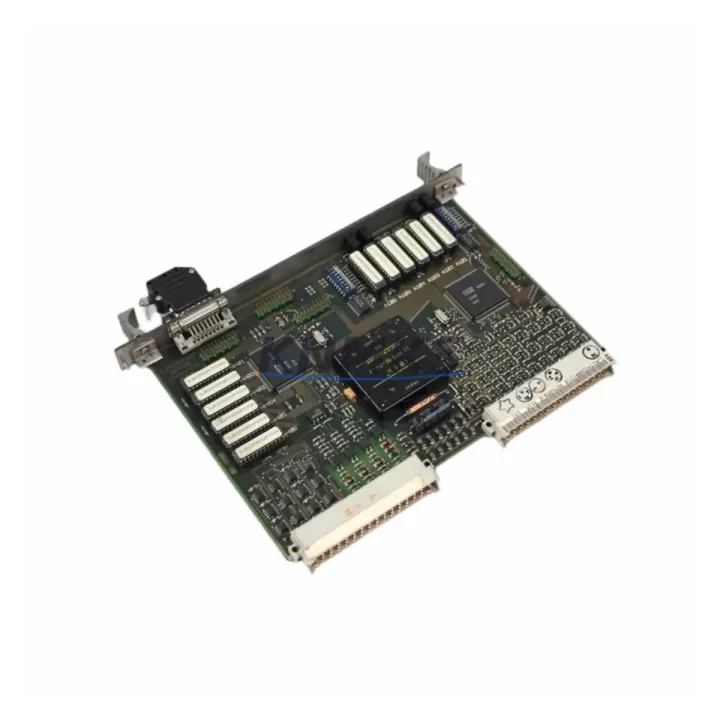
Overview
ABB GJR2389800R1210 81ET03M-E Spare Part for Factory Uptime
The ABB GJR2389800R1210 (model designation 81ET03M-E) is an original RTD and thermocouple analog input module designed for the ABB AC500 PLC platform. In process industries, discrete manufacturing, and utility automation, this module serves as the primary interface between field temperature sensors and the control logic layer. When this module fails or degrades, the consequences extend beyond a single I/O channel — temperature loops go blind, PID controllers lose feedback, and production lines face unplanned shutdowns. Maintaining a verified spare on the shelf is the single most effective measure a maintenance team can take to protect factory uptime.
This listing provides an original ABB GJR2389800R1210 81ET03M-E sourced through established industrial supply channels, pre-shipment tested for electrical integrity and channel accuracy, and backed by a support terms confirmed by quotation. Every unit is inspected before dispatch to confirm firmware compatibility, connector condition, and analog channel calibration within ABB factory tolerances.
Spare Maintenance Table
| Parameter | Specification |
|---|---|
| Part Number | GJR2389800R1210 |
| Model | 81ET03M-E |
| Brand | ABB |
| Series | AC500 |
| Module Type | RTD & Thermocouple Analog Input |
| Input Channels | 8 channels (RTD / TC configurable per channel) |
| Supported Sensor Types | Pt100, Pt1000, Ni100, Ni1000, Cu10; Type J, K, T, E, B, R, S thermocouples |
| Resolution | 16-bit |
| Communication Interface | AC500 internal I/O bus (S500 backplane) |
| Supply Voltage | 24 V DC (via backplane) |
| Operating Temperature | -25 °C to +60 °C |
| Protection Rating | IP20 |
| Mounting | S500 I/O terminal unit (TB523 or compatible) |
| Country of Origin | Germany |
| Compatibility | AC500 PM5xx / PM5xx-ETH / PM5xx-2ETH CPU families |
| Firmware | Compatible with Automation Builder / PS501 Control Builder Plus |
| Pre-Shipment Test | Yes — channel accuracy, bus communication, connector integrity |
| Support terms | 12 Months |
| Condition | Original / New-equivalent verified spare |
Maintenance Planning for Continuous Operation
A GJR2389800R1210 replacement rarely occurs in isolation. When a maintenance engineer identifies a failed or drifting 81ET03M-E module during a fault investigation or scheduled inspection, the surrounding system components deserve equal scrutiny before the cabinet is closed and the line is restarted.
Begin with the terminal unit: the TB523 or equivalent S500 terminal base that the 81ET03M-E plugs into. Corroded or loose screw terminals are a common source of intermittent channel faults that are misdiagnosed as module failure. Inspect each terminal for oxidation, verify torque, and confirm that sensor cable shielding is properly grounded at one end only to prevent ground loops that corrupt RTD readings.
Next, evaluate the AC500 CPU module — typically a PM554, PM564, or PM583 — for firmware version alignment. A mismatch between the CPU firmware and the I/O module’s internal firmware can cause channel configuration errors or prevent the module from being recognized on the S500 bus after replacement. Use ABB Automation Builder to verify the hardware configuration file matches the physical slot assignment before going live.
The 24 V DC power supply feeding the S500 backplane is another critical checkpoint. Voltage sag below 22 V DC or excessive ripple can cause analog input modules to report erratic values or fail self-diagnostics. A CP-E 24/10.0 or equivalent ABB industrial power supply should be load-tested and its output capacitors assessed if the unit has been in service for more than five years.
For installations where the 81ET03M-E feeds temperature data into a safety-relevant loop, verify the signal isolator or barrier in the sensor circuit. Zener barriers and galvanic isolators degrade over time, particularly in environments with high ambient temperature or humidity. A degraded isolator can introduce offset errors that appear as sensor drift rather than module failure.
If the cabinet also houses communication modules such as the CM572-DP (PROFIBUS DP) or CM589-PNIO (PROFINET IO), confirm that the network diagnostic LEDs show normal status after the module swap. A bus fault triggered by a brief power interruption during maintenance can mask itself as a persistent I/O error if the network is not re-initialized cleanly.
Finally, review the fuse and circuit protection for the sensor supply circuits. Blown or weakened fuses in the 24 V sensor excitation lines are a frequent secondary finding when an RTD input module is replaced. Stocking a set of appropriate fuse ratings alongside the GJR2389800R1210 spare ensures the maintenance team can complete the repair in a single intervention without a second parts run.
Site Replacement Workflow
Step 1 — Isolate and document. Before removing the 81ET03M-E, capture the current channel configuration from the CPU project file in Automation Builder. Note the sensor type, range, and engineering unit assigned to each of the eight channels. This prevents reconfiguration errors after the new module is seated.
Step 2 — Power down the I/O segment. The S500 bus supports hot-swap on select CPU variants, but for RTD/TC input modules it is best practice to de-energize the affected I/O segment to avoid transient signals being interpreted as valid process values during the swap. Confirm with the control room before isolating.
Step 3 — Seat and secure the replacement module. Insert the GJR2389800R1210 into the terminal unit until the locking tab clicks. Do not force the module — misalignment of the bus connector is a common cause of immediate post-replacement faults. Verify the module LED sequence on power-up: a steady green RUN LED confirms successful bus enumeration.
Step 4 — Restore and verify. Re-energize the segment, download the configuration if required, and verify each channel against a known reference — either a calibrated RTD simulator or a live sensor with a known process temperature. Document the as-found and as-left readings for the maintenance record.
Step 5 — Update the spare parts register. Log the replaced module’s serial number, installation date, and the new spare’s location in the storeroom. For facilities running AC500-based systems across multiple lines, maintaining a minimum stock of one GJR2389800R1210 per control cabinet cluster is a practical inventory policy that eliminates single-point-of-failure risk in the spare parts supply chain.
Spare Parts Support FAQ
Q1: Is the GJR2389800R1210 compatible with all AC500 CPU generations?
The 81ET03M-E is compatible with the AC500 S500 I/O family used alongside PM5xx series CPUs. It requires a compatible S500 terminal unit (such as the TB523) and is supported by ABB Automation Builder and the legacy PS501 Control Builder Plus environment. Compatibility with older PM5xx-ETH and newer PM5xx-2ETH variants should be confirmed against the project’s hardware configuration file before installation.
Q2: What pre-shipment testing is performed on this spare?
Each GJR2389800R1210 unit is tested for bus communication integrity, per-channel analog accuracy across the RTD and thermocouple input ranges, and physical connector condition before dispatch. A test report summary is available on request. The support terms confirmed by quotation cover functional failure under normal operating conditions from the date of receipt.
Q3: Can this module replace an older revision of the same part number?
ABB typically maintains backward compatibility across hardware revisions of the same part number within the AC500 S500 family. However, if the installed base uses a significantly older firmware baseline, a firmware update via Automation Builder may be required after installation. We recommend confirming the target CPU firmware version before ordering if your system has not been updated in several years.
Q4: What is the recommended inventory strategy for long-term AC500 system support?
For facilities with AC500 systems in critical process or production roles, a 12–36 month forward stock of key I/O modules — including the GJR2389800R1210 — is advisable, particularly as ABB transitions product lines and legacy module availability tightens. We support long-term supply agreements with fixed pricing and reserved stock allocation. Contact our team to discuss a multi-unit procurement plan tailored to your maintenance cycle and cabinet count.
© 2026 KNMKS. All rights reserved.
Original Source: https://knmks.com
Contact: admin@knmks.com | +86 18359268345
Product Identification
- Brand / Ecosystem
-
ABB
ABB - Model / Series
-
GJR2389800R1210 81ET03M-E
AC500 Series - Product Family
- PLCs & Controllers
- Availability Status
- Available on request after model and quantity confirmation
- Inquiry Type
- B2B RFQ, replacement inquiry and project spare-part request
- Pre-Quote Check
- Exact SKU, brand, series, quantity, nameplate photos and destination country are checked before quotation
System Path
Where this product fits in the KNMKS automation structure.
Specification & Inquiry Focus
- Control platform
- PLC, PAC and modular controllers
- Common needs
- CPU, rack, power and I/O expansion
- Project support
- Replacement, cabinet build and maintenance
Buyer Confirmation
Information KNMKS checks before replying.
- Exact model
- GJR2389800R1210 81ET03M-E
- Brand / ecosystem
- ABB
- Product family
- PLCs & Controllers
- Application note
- Replacement, maintenance, project build or spare-part list
- Useful photos
- Nameplate, installed unit, cabinet layout or connector side
- Delivery details
- Quantity, destination country and target schedule
Document Support
Files and notes can be confirmed during quotation.
- Product photos or nameplate confirmation when available
- Packing and delivery notes before quotation confirmation
- Support scope and delivery terms confirmed per inquiry
- Export document coordination for qualified B2B requests
Inquiry Support
- Model cross-checking before quotation
- CPU, power, rack and expansion module matching
- Support for replacement and project inquiry
What to Send Us
- Brand and exact model number: ABB GJR2389800R1210 81ET03M-E
- Quantity and required delivery time
- Application, replacement requirement or nameplate photo
- Destination country and shipping preference
RFQ Preparation
This is a product inquiry page built for RFQ communication.
Fast Model Check
Send this model to KNMKS for confirmation.
Include quantity, destination country and photos if this is a maintenance replacement. The inquiry will be saved with a reference number after submission.
Brand & Compatibility Note
KNMKS displays automation product information for well-known industrial brand ecosystems and compatible replacement references. Brand names are used for product identification and compatibility reference only; final availability and commercial terms are confirmed per quotation.
 Manufacturing
 Machine Tools
 Packaging
 Energy & Power



 HMI & Displays
 Servo Systems
 Variable Frequency Drives
 Sensors