
Overview
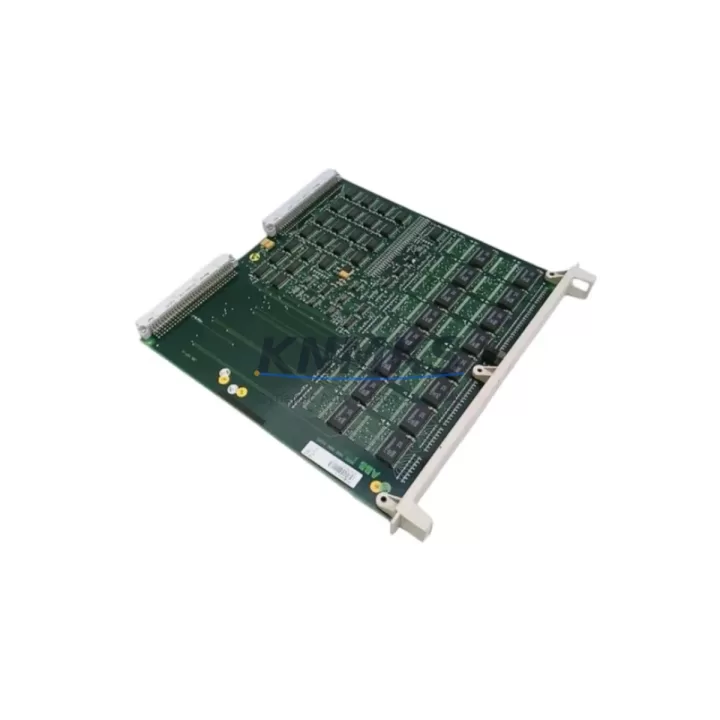
ABB GJR23657R1010 Maintenance-Proven Spare Part for Factory Uptime
The ABB GJR23657R1010 is an original speed and frequency input module designed for the ABB AC500 PLC platform — one of the most widely deployed programmable logic controller families in industrial automation across process, manufacturing, and energy sectors. Maintaining an in-stock unit of the GJR23657R1010 is a proven strategy for maintenance engineers who cannot afford unplanned downtime caused by a failed or degraded speed input channel.
In daily inspection routines, the GJR23657R1010 is typically checked alongside the AC500 CPU module and the associated I/O bus coupler for signal integrity, channel response time, and encoder feedback accuracy. When a speed or frequency signal anomaly is detected — whether through PLC diagnostics, SCADA alarms, or physical vibration analysis — the GJR23657R1010 is one of the first modules to be isolated and bench-tested. Its role in closed-loop motor control, conveyor speed regulation, and turbine monitoring makes it a critical node in the control architecture.
For procurement engineers, sourcing the GJR23657R1010 from a verified supplier with documented stock and pre-shipment testing eliminates the risk of receiving counterfeit or refurbished units without traceability. Each unit shipped from our warehouse undergoes functional verification before dispatch, and is covered by a support terms confirmed by quotation from the date of delivery. Long-term supply agreements are available for customers requiring buffer stock programs or scheduled annual maintenance kits.
Spare Maintenance Table
| Parameter | Specification |
|---|---|
| Part Number | GJR23657R1010 |
| Brand | ABB |
| Series | AC500 |
| Module Type | Speed & Frequency Input Module |
| Compatible Platform | ABB AC500 PLC (PM5xx, PM5xx-ETH CPU families) |
| Input Channels | Up to 4 speed/frequency input channels (encoder or pulse) |
| Input Signal Type | HTL/TTL encoder, pulse train, proximity sensor output |
| Frequency Range | 0 – 100 kHz (typical, channel-dependent) |
| Supply Voltage | 24 V DC (via AC500 I/O bus or external terminal) |
| Mounting | AC500 I/O bus rail, DIN rail compatible |
| Operating Temperature | -25 °C to +60 °C |
| Protection Class | IP20 |
| Country of Origin | Germany (DE) |
| Weight | Approx. 400 g |
| Support terms | 12 Months from date of delivery |
| Pre-Shipment Test | Yes — functional verification before dispatch |
| Condition | Original, unused or fully refurbished to OEM spec |
Maintenance Planning for Continuous Operation
When replacing or inspecting the GJR23657R1010 in the field, a disciplined maintenance engineer will not stop at the module itself. The AC500 control cabinet typically houses several interdependent components that should be checked concurrently to prevent repeat failures and ensure the restored system operates within specification.
Begin with the AC500 CPU module (e.g., PM564-ETH or PM583-ETH) — verify firmware version compatibility with the GJR23657R1010 and confirm that the I/O configuration table in the project matches the physical slot assignment. Next, inspect the AC500 I/O bus coupler (TB521 or TB541) for bus communication errors; a degraded bus coupler can cause intermittent channel faults that mimic a failed speed input module.
Check the 24 V DC power supply module feeding the I/O rack — voltage sag or ripple above 5% can cause encoder signal misreads on the GJR23657R1010. Inspect the terminal blocks and shielded encoder cables connected to the speed input channels; damaged cable shielding is a leading cause of noise-induced frequency counting errors in high-EMI environments such as VFD-heavy panels.
If the application involves motor speed feedback, verify the condition of the incremental encoder or proximity sensor connected to the input channel — a worn encoder disk or misaligned sensor will produce erratic pulse trains regardless of module condition. Also review the AC500 analog output module (e.g., AO523) if the speed setpoint is issued via analog reference, as a drifting output can create apparent speed control instability that is incorrectly attributed to the input module.
For cabinets with communication-intensive architectures, inspect the AC500 communication module (e.g., CM572-DP for PROFIBUS or CM589-PNIO for PROFINET) — network timeouts during module replacement can trigger watchdog faults that complicate commissioning. Finally, check all fuse holders and miniature circuit breakers in the 24 V DC distribution circuit; a partially blown fuse can cause intermittent power loss to the encoder supply without triggering a full system fault.
Site Replacement Workflow
The GJR23657R1010 is a direct slot-replacement module within the AC500 I/O bus architecture. No hardware modification is required when replacing a like-for-like unit. Follow this sequence to minimize downtime and ensure system integrity:
Step 1 — Isolate and document: Place the AC500 CPU in STOP mode via the programming tool (Automation Builder or PS501 Control Builder Plus). Record the current I/O configuration, channel assignments, and any active diagnostics before powering down the rack section.
Step 2 — Power down the I/O segment: Switch off the 24 V DC supply to the affected I/O bus segment. Do not hot-swap the GJR23657R1010 unless the system design explicitly supports it — consult the AC500 hardware manual for bus segment isolation procedures.
Step 3 — Remove and inspect: Extract the failed module and inspect the bus connector pins for corrosion, mechanical damage, or contamination. Clean the slot with dry compressed air if necessary.
Step 4 — Install the replacement GJR23657R1010: Seat the new module firmly into the correct slot. Verify the slot address matches the original configuration. Restore 24 V DC power to the I/O segment.
Step 5 — Recommission and verify: Return the CPU to RUN mode. Monitor the speed input channels in the diagnostic display for correct signal acquisition. Verify encoder pulse counts against a known reference speed before releasing the system to production.
This workflow supports legacy AC500 installations where the GJR23657R1010 may be replacing an older revision of the same module. Backward compatibility within the AC500 I/O bus family is generally maintained across hardware revisions, but always confirm the firmware baseline in Automation Builder before finalizing the replacement.
Spare Parts Support FAQ
Q1: Is the GJR23657R1010 compatible with all AC500 CPU variants?
The GJR23657R1010 is designed for the ABB AC500 I/O bus platform and is compatible with the PM5xx and PM5xx-ETH CPU families. Compatibility with specific firmware versions should be verified in ABB’s Automation Builder software prior to installation. Our technical team can assist with compatibility confirmation before shipment.
Q2: What does the support terms confirmed by quotation cover?
The support terms confirmed by quotation cover manufacturing defects, functional failures under normal operating conditions, and any defects identified during the confirmed support period from the date of delivery. It does not cover damage caused by incorrect installation, overvoltage, or environmental conditions outside the specified operating range. Support requests are processed with full traceability documentation.
Q3: How is the module tested before shipment?
Each GJR23657R1010 unit undergoes a functional verification test prior to dispatch. This includes power-on self-test, channel signal acquisition verification, and bus communication check where test equipment permits. A test record is available upon request for quality-critical procurement processes.
Q4: Can you support long-term or scheduled supply for annual maintenance programs?
Yes. We offer long-term supply agreements and buffer stock programs for customers with scheduled annual maintenance, multi-site operations, or OEM service contracts. Contact our sales team to discuss volume commitments, lead-time guarantees, and consignment stock arrangements tailored to your maintenance calendar.
© 2026 KNMKS. All rights reserved.
Original Source: https://knmks.com
Contact: admin@knmks.com | +86 18359268345
Product Identification
- Brand / Ecosystem
-
ABB
ABB - Model / Series
-
GJR23657R1010
AC500 Series - Product Family
- PLCs & Controllers
- Availability Status
- Available on request after model and quantity confirmation
- Inquiry Type
- B2B RFQ, replacement inquiry and project spare-part request
- Pre-Quote Check
- Exact SKU, brand, series, quantity, nameplate photos and destination country are checked before quotation
System Path
Where this product fits in the KNMKS automation structure.
Specification & Inquiry Focus
- Control platform
- PLC, PAC and modular controllers
- Common needs
- CPU, rack, power and I/O expansion
- Project support
- Replacement, cabinet build and maintenance
Buyer Confirmation
Information KNMKS checks before replying.
- Exact model
- GJR23657R1010
- Brand / ecosystem
- ABB
- Product family
- PLCs & Controllers
- Application note
- Replacement, maintenance, project build or spare-part list
- Useful photos
- Nameplate, installed unit, cabinet layout or connector side
- Delivery details
- Quantity, destination country and target schedule
Document Support
Files and notes can be confirmed during quotation.
- Product photos or nameplate confirmation when available
- Packing and delivery notes before quotation confirmation
- Support scope and delivery terms confirmed per inquiry
- Export document coordination for qualified B2B requests
Inquiry Support
- Model cross-checking before quotation
- CPU, power, rack and expansion module matching
- Support for replacement and project inquiry
What to Send Us
- Brand and exact model number: ABB GJR23657R1010
- Quantity and required delivery time
- Application, replacement requirement or nameplate photo
- Destination country and shipping preference
RFQ Preparation
This is a product inquiry page built for RFQ communication.
Fast Model Check
Send this model to KNMKS for confirmation.
Include quantity, destination country and photos if this is a maintenance replacement. The inquiry will be saved with a reference number after submission.
Brand & Compatibility Note
KNMKS displays automation product information for well-known industrial brand ecosystems and compatible replacement references. Brand names are used for product identification and compatibility reference only; final availability and commercial terms are confirmed per quotation.
 Manufacturing
 Machine Tools
 Packaging
 Energy & Power



 HMI & Displays
 Servo Systems
 Variable Frequency Drives
 Sensors