
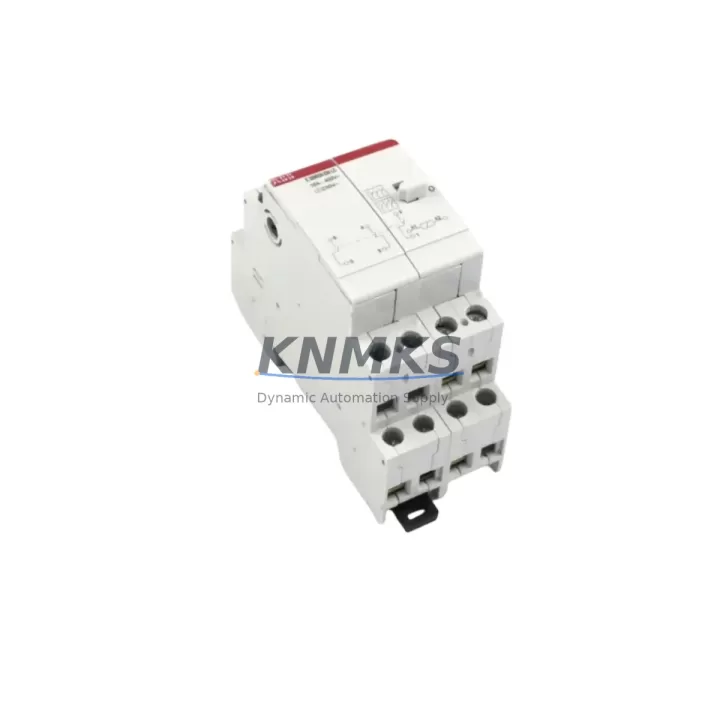
Overview
ABB GJR2365700R1010 Migration-Ready Analog Output Module: Legacy System Migration and Compatible Upgrade
The ABB GJR2365700R1010 (also identified as 88VA02B-E) is a migration-ready analog output module engineered for the ABB AC500 PLC platform. As industrial facilities accelerate the retirement of aging control architectures, this module serves as a verified drop-in replacement for discontinued or end-of-life analog output cards across the AC500 family. Whether you are upgrading a legacy PM571 or PM581 CPU-based cabinet, expanding I/O capacity in a distributed rack, or restoring a system after an unplanned failure, the GJR2365700R1010 delivers the signal fidelity, terminal compatibility, and firmware alignment required for a controlled, low-risk cutover.
Before initiating any replacement, engineers should confirm the following parameters against the existing installation: power supply rail capacity on the backplane (the module draws from the AC500 system bus), terminal block wiring assignments (current loop vs. voltage output channel mapping), backplane slot address configuration, and the analog output scaling defined in the active PLC program. Mismatched channel scaling or incorrect module addressing will cause process deviations immediately upon restart. Pre-migration verification against the original hardware configuration report is strongly recommended.
Migration Compatibility Table
| Parameter | GJR2365700R1010 (88VA02B-E) | Migration Notes |
|---|---|---|
| Platform | ABB AC500 PLC Series | Compatible with PM571, PM581, PM591, PM595 CPUs |
| Module Type | Analog Output | Replaces discontinued AC500 AO modules; verify channel count |
| Output Signal | 4–20 mA / 0–10 V (configurable per channel) | Match existing field wiring loop type before swap |
| Terminal Interface | Screw-terminal, front-wired | Wiring-compatible with standard AC500 I/O terminal blocks |
| Backplane Interface | AC500 S500 I/O bus | Slot address must match original module position in rack |
| Power Consumption | Supplied via AC500 backplane bus | Verify total rack power budget before adding modules |
| Firmware Compatibility | AC500 firmware V2.x and V3.x | Confirm CPU firmware version; update if below minimum |
| Communication Protocol | Internal S500 I/O bus (local rack); supports PROFIBUS, Modbus via CM modules | No protocol change required for local rack replacement |
| Installation Footprint | Standard AC500 S500 module width | No cabinet modification required for like-for-like swap |
| Commissioning | Automatic hardware recognition via AC500 CPU | Reload program; verify AO channel scaling in Automation Builder |
| Support terms | 12 Months | Covers manufacturing defects; pre-shipment functional test included |
Retrofit Planning for Existing Automation Systems
A successful retrofit of the GJR2365700R1010 into an existing AC500 control cabinet requires a structured approach that accounts for the full scope of the control architecture. In most legacy installations, the analog output module operates alongside a mix of digital I/O modules such as the DC532 or DC522, power supply modules like the PS501-PROG or PS560, and communication modules including the CM572-DP for PROFIBUS-DP or the CM589-PNIO for PROFINET. Each of these components must be assessed for compatibility with the replacement module and the current CPU firmware revision before the cutover window is opened.
Terminal block wiring is a critical checkpoint. The GJR2365700R1010 uses the same front-wired screw terminal format as other S500 I/O modules, which simplifies the physical swap. However, engineers must document the existing channel-to-field-device mapping — particularly for 4–20 mA current loop outputs driving control valves, variable frequency drives, or positioners — and verify that the new module’s channel configuration in Automation Builder matches the original hardware configuration exactly. Any discrepancy in the analog output data type (INT vs. REAL) or scaling range will produce incorrect process setpoints upon restart.
For systems that include an HMI panel — such as an ABB CP600 series operator panel or a third-party panel connected via Modbus TCP — the HMI tag database should be reviewed to confirm that analog output addresses remain unchanged after the module swap. If the original module occupied a different slot position or used a non-standard address offset, the HMI configuration may require a minor update before the system is returned to automatic mode.
Where the control cabinet includes a TB511-ETH or TB521-ETH terminal base for remote I/O expansion, the GJR2365700R1010 can be integrated into the expanded rack without additional wiring infrastructure changes, provided the rack power budget accommodates the additional load. This makes the module well-suited for phased upgrade projects where the CPU and communication infrastructure are retained while the I/O layer is modernized incrementally.
Downtime Control During System Migration
Minimizing unplanned downtime during an analog output module replacement requires preparation that begins well before the maintenance window. The first step is to export and archive the complete PLC program from the AC500 CPU using ABB Automation Builder, including all hardware configuration files, symbol tables, and analog output scaling parameters. This backup ensures that the original program logic can be restored immediately if the replacement module does not initialize correctly.
During the physical swap, the field wiring connected to the outgoing module should be labeled and photographed before disconnection. The GJR2365700R1010 should be inserted into the same backplane slot as the original module to preserve the hardware address assignment recognized by the CPU. Upon power-up, the AC500 CPU will automatically detect the new module and compare it against the stored hardware configuration. If the module type and slot position match, the CPU will resume normal operation without requiring a full program download.
For processes where analog output continuity is critical — such as temperature control loops, flow regulation, or pressure setpoint transmission — it is advisable to place the affected control loops in manual mode at the field device level before removing the original module. This prevents process upsets caused by the brief loss of analog output signal during the swap. Once the GJR2365700R1010 is installed and the CPU has confirmed module recognition, the analog outputs should be verified against expected setpoints using a calibrated loop tester before the loops are returned to automatic control.
Pre-shipment functional testing of the GJR2365700R1010 is performed prior to dispatch, covering analog output accuracy, channel isolation, and bus communication integrity. This reduces the risk of receiving a non-functional module and supports the goal of completing the replacement within a single planned maintenance window. All units are supplied with a support terms confirmed by quotation covering manufacturing defects from the date of shipment.
Retrofit Support FAQ
Q1: Is the GJR2365700R1010 a direct replacement for my existing AC500 analog output module?
The GJR2365700R1010 (88VA02B-E) is designed for the ABB AC500 S500 I/O platform and is compatible with the PM571, PM581, PM591, and PM595 CPU families. It is a verified replacement for discontinued AC500 analog output modules of equivalent channel count and signal type. Confirm the original module’s part number and channel configuration before ordering to ensure a like-for-like substitution.
Q2: What commissioning steps are required after installing the replacement module?
After physical installation, power up the AC500 rack and allow the CPU to perform automatic hardware recognition. Open ABB Automation Builder and verify that the hardware configuration reflects the GJR2365700R1010 in the correct slot. Download the program if prompted, then navigate to the analog output configuration and confirm that channel scaling, output type (current or voltage), and data format match the original settings. Perform a loop check on each active channel before returning the system to automatic operation.
Q3: Can I use this module in a system that also uses PROFIBUS-DP or Modbus communication?
Yes. The GJR2365700R1010 communicates with the AC500 CPU via the internal S500 I/O bus and does not directly participate in PROFIBUS-DP or Modbus network traffic. Communication modules such as the CM572-DP (PROFIBUS-DP) or CM589-PNIO (PROFINET) handle external protocol interfaces independently. Replacing the analog output module does not require changes to the communication module configuration or the network topology.
Q4: What does the support terms confirmed by quotation cover, and is pre-shipment testing included?
All GJR2365700R1010 units supplied by KNMKS are pre-shipment tested for analog output accuracy, channel isolation, and S500 bus communication before dispatch. The support terms confirmed by quotation cover manufacturing defects and functional failures under normal operating conditions from the date of shipment. Stock is maintained for rapid dispatch to support urgent replacement requirements and minimize production downtime.
© 2026 KNMKS. All rights reserved.
Original Source: https://knmks.com
Contact: admin@knmks.com | +86 18359268345
Product Identification
- Brand / Ecosystem
-
ABB
ABB - Model / Series
-
GJR2365700R1010 88VA02B-E
AC500 Series - Product Family
- PLCs & Controllers
- Availability Status
- Available on request after model and quantity confirmation
- Inquiry Type
- B2B RFQ, replacement inquiry and project spare-part request
- Pre-Quote Check
- Exact SKU, brand, series, quantity, nameplate photos and destination country are checked before quotation
System Path
Where this product fits in the KNMKS automation structure.
Specification & Inquiry Focus
- Control platform
- PLC, PAC and modular controllers
- Common needs
- CPU, rack, power and I/O expansion
- Project support
- Replacement, cabinet build and maintenance
Buyer Confirmation
Information KNMKS checks before replying.
- Exact model
- GJR2365700R1010 88VA02B-E
- Brand / ecosystem
- ABB
- Product family
- PLCs & Controllers
- Application note
- Replacement, maintenance, project build or spare-part list
- Useful photos
- Nameplate, installed unit, cabinet layout or connector side
- Delivery details
- Quantity, destination country and target schedule
Document Support
Files and notes can be confirmed during quotation.
- Product photos or nameplate confirmation when available
- Packing and delivery notes before quotation confirmation
- Support scope and delivery terms confirmed per inquiry
- Export document coordination for qualified B2B requests
Inquiry Support
- Model cross-checking before quotation
- CPU, power, rack and expansion module matching
- Support for replacement and project inquiry
What to Send Us
- Brand and exact model number: ABB GJR2365700R1010 88VA02B-E
- Quantity and required delivery time
- Application, replacement requirement or nameplate photo
- Destination country and shipping preference
RFQ Preparation
This is a product inquiry page built for RFQ communication.
Fast Model Check
Send this model to KNMKS for confirmation.
Include quantity, destination country and photos if this is a maintenance replacement. The inquiry will be saved with a reference number after submission.
Brand & Compatibility Note
KNMKS displays automation product information for well-known industrial brand ecosystems and compatible replacement references. Brand names are used for product identification and compatibility reference only; final availability and commercial terms are confirmed per quotation.
 Manufacturing
 Machine Tools
 Packaging
 Energy & Power



 HMI & Displays
 Servo Systems
 Variable Frequency Drives
 Sensors