
Overview
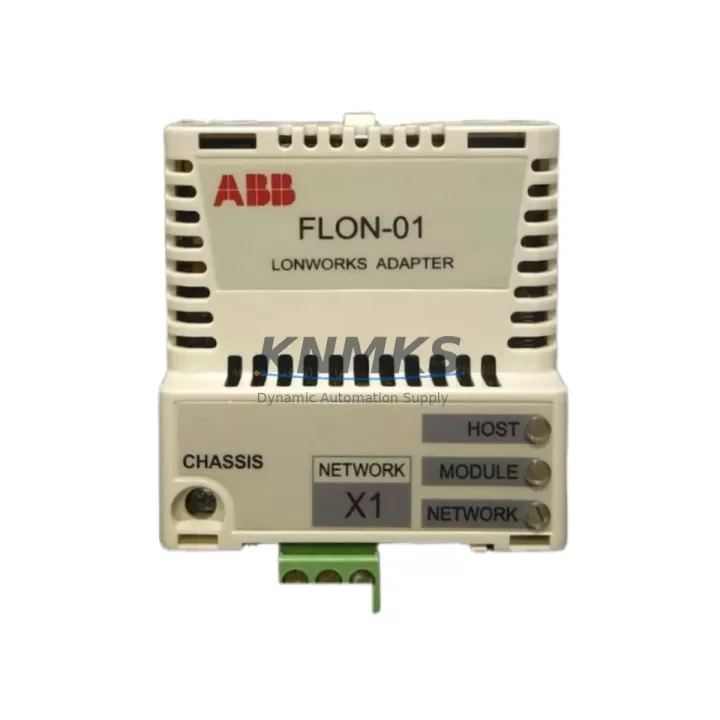
ABB FLON-01 Migration-Ready LonWorks Adapter for Legacy Control Systems
The ABB FLON-01 is a LonWorks field-bus communication adapter designed for integration with the ABB AC500 PLC platform. As legacy automation networks built on LonWorks (ISO/IEC 14908) continue to operate across building automation, energy management, and industrial process control installations, the FLON-01 serves as the critical bridge between modern AC500 CPU modules and existing LonWorks field devices. With many original FLON-01 units reaching end-of-service life, sourcing a verified replacement with confirmed firmware compatibility is essential to maintaining network continuity and avoiding unplanned downtime.
KNMKS maintains ready stock of the ABB FLON-01, fully tested prior to shipment and backed by a support terms confirmed by quotation. Each unit undergoes functional verification covering LonWorks channel initialization, baud rate negotiation, and AC500 backplane communication before dispatch.
Migration Compatibility Table
| Parameter | Specification / Retrofit Note |
|---|---|
| SKU / Part Number | FLON-01 |
| Brand / Series | ABB / AC500 |
| Communication Protocol | LonWorks (ISO/IEC 14908-1), TP/FT-10 Free Topology |
| Host Interface | AC500 internal communication bus (CS31 backplane slot) |
| Compatible CPU Modules | PM571, PM581, PM591, PM595 (AC500 V2 / V3 series) |
| Mounting | Direct slot insertion into AC500 communication module bay; no additional hardware required |
| Power Supply | Powered via AC500 backplane; no external 24 VDC supply required |
| Terminal / Wiring | 2-wire TP/FT-10 network terminals; polarity-insensitive; verify existing cable shielding and termination resistors |
| Firmware Compatibility | Compatible with AC500 firmware V2.x and V3.x; confirm CPU firmware version before hot-swap |
| Node Addressing | LonWorks Neuron ID-based; re-commission node address in LonMaker or NL220 tool after replacement |
| Installation Space | Standard AC500 communication slot; verify slot availability if CPU module bay is fully populated |
| Replacement Recommendation | Direct drop-in for failed or end-of-life FLON-01 units; no hardware modification required |
| Commissioning Focus | Node re-binding, network variable mapping, and LonWorks channel scan after installation |
| Support terms | support terms confirmed by quotation — functional defects covered from date of shipment |
Retrofit Planning for Existing Automation Systems
Replacing the FLON-01 in an operational LonWorks network requires careful pre-migration planning to protect existing program logic and field device bindings. Before removing the failed adapter, engineers should export the full LonWorks network database from the network management tool — whether LonMaker for Windows, NL220, or a third-party LNS-based tool — to preserve all node bindings, network variable connections, and device templates. This database backup is the foundation for restoring the network after the new FLON-01 is installed.
On the AC500 side, the CPU module — typically a PM581 or PM591 in mid-range installations — continues to execute the control program during the adapter swap if the CPU is not powered down. However, any LonWorks-dependent function blocks will enter a fault state during the interval when the adapter is absent. Engineers should review the AC500 program for LonWorks function blocks (LONFB series) and confirm that fail-safe output states are correctly configured to hold last values or drive safe defaults during the communication gap.
The AC500 communication module bay also accommodates other field-bus adapters such as the FPBA-01 PROFIBUS-DP adapter and the FENA-21 Ethernet/IP adapter, which may already occupy adjacent slots. Confirm that the target slot is physically free and that the CPU firmware version supports the FLON-01 in that slot position — some older AC500 V2 firmware builds have slot-specific communication module restrictions documented in the AC500 system manual.
For installations where the LonWorks network connects to a building management system (BMS) via a LonWorks-to-BACnet gateway or a LonWorks-to-Modbus bridge, the gateway configuration should be reviewed to ensure that the Neuron ID change (if the replacement FLON-01 carries a different Neuron ID) does not break the gateway’s device binding table. In many cases, the gateway must be updated with the new Neuron ID before normal BMS communication resumes.
Where the control cabinet also houses an AC500 TB521 terminal base or a TA521 expansion unit, verify that the backplane ribbon cable and slot connectors are clean and undamaged before inserting the replacement FLON-01. Contamination or bent connector pins are a common cause of intermittent communication faults that are misdiagnosed as adapter failures.
Downtime Control During System Migration
Minimizing downtime during an FLON-01 replacement begins with preparation completed before the maintenance window opens. The recommended sequence is: (1) back up the LonWorks network database and the AC500 CPU program; (2) document all current LonWorks node addresses, network variable bindings, and alarm setpoints; (3) notify downstream systems — SCADA, DCS, or BMS — of the planned communication interruption and set appropriate alarm suppression windows; (4) power down only the AC500 communication module bay if a hot-swap is not supported by the installed firmware version; (5) insert the replacement FLON-01 and restore power; (6) use the LonWorks network management tool to re-commission the adapter, restore node bindings, and verify network variable communication; (7) confirm that all LonWorks-dependent control loops have returned to automatic mode before closing the maintenance window.
For sites where continuous process control is mandatory, a parallel commissioning approach can be used: install a temporary Modbus RTU or PROFIBUS-DP fallback path using an available AC500 communication slot, maintain basic process control via the fallback protocol during the LonWorks adapter replacement, and restore LonWorks communication before removing the temporary fallback. This approach is particularly effective in energy management and HVAC control applications where LonWorks carries non-critical monitoring data alongside primary control signals.
KNMKS ships the FLON-01 with a pre-shipment functional test report. Each unit is verified for LonWorks channel initialization and AC500 backplane communication before dispatch, reducing the risk of receiving a non-functional replacement and extending the maintenance window unnecessarily.
Retrofit Support FAQ
Q1: Is the FLON-01 a direct replacement for the original ABB FLON-01 without any hardware modification?
Yes. The FLON-01 is a direct slot-in replacement for the original ABB FLON-01 in any AC500 communication module bay. No hardware modification, adapter bracket, or wiring change is required. The 2-wire TP/FT-10 LonWorks network cable connects directly to the same terminal positions as the original unit.
Q2: Does the replacement FLON-01 require firmware updates before installation?
The FLON-01 adapter firmware is managed by the AC500 CPU module. No separate firmware upload to the FLON-01 is required. However, confirm that the AC500 CPU firmware version (PM571/PM581/PM591/PM595) is at a revision that supports the FLON-01 — refer to the ABB AC500 firmware release notes for the minimum supported firmware version for your CPU model.
Q3: Will the LonWorks node bindings and network variable mappings be preserved after replacing the FLON-01?
Node bindings and network variable mappings are stored in the LonWorks network management database (LNS database), not in the FLON-01 adapter itself. Provided the LNS database is intact and the replacement FLON-01 is re-commissioned using the same network management tool, all bindings can be restored. If the replacement unit carries a different Neuron ID, the network management tool will treat it as a new device and re-commissioning will be required.
Q4: What does the support terms confirmed by quotation cover, and what is the shipping lead time?
The support terms confirmed by quotation cover functional defects in the FLON-01 unit from the date of shipment. Units that fail to initialize on the AC500 backplane or fail to establish LonWorks channel communication under normal operating conditions are covered. KNMKS maintains ready stock of the FLON-01; standard orders ship within 1–3 business days. Expedited shipping is available for urgent maintenance requirements. Contact admin@knmks.com or +86 18359268345 for stock confirmation and lead time.
© 2026 KNMKS. All rights reserved.
Original Source: https://knmks.com
Contact: admin@knmks.com | +86 18359268345
Product Identification
- Brand / Ecosystem
-
ABB
ABB - Model / Series
-
FLON-01
AC500 Series - Product Family
- PLCs & Controllers
- Availability Status
- Available on request after model and quantity confirmation
- Inquiry Type
- B2B RFQ, replacement inquiry and project spare-part request
- Pre-Quote Check
- Exact SKU, brand, series, quantity, nameplate photos and destination country are checked before quotation
System Path
Where this product fits in the KNMKS automation structure.
Specification & Inquiry Focus
- Control platform
- PLC, PAC and modular controllers
- Common needs
- CPU, rack, power and I/O expansion
- Project support
- Replacement, cabinet build and maintenance
Buyer Confirmation
Information KNMKS checks before replying.
- Exact model
- FLON-01
- Brand / ecosystem
- ABB
- Product family
- PLCs & Controllers
- Application note
- Replacement, maintenance, project build or spare-part list
- Useful photos
- Nameplate, installed unit, cabinet layout or connector side
- Delivery details
- Quantity, destination country and target schedule
Document Support
Files and notes can be confirmed during quotation.
- Product photos or nameplate confirmation when available
- Packing and delivery notes before quotation confirmation
- Support scope and delivery terms confirmed per inquiry
- Export document coordination for qualified B2B requests
Inquiry Support
- Model cross-checking before quotation
- CPU, power, rack and expansion module matching
- Support for replacement and project inquiry
What to Send Us
- Brand and exact model number: ABB FLON-01
- Quantity and required delivery time
- Application, replacement requirement or nameplate photo
- Destination country and shipping preference
RFQ Preparation
This is a product inquiry page built for RFQ communication.
Fast Model Check
Send this model to KNMKS for confirmation.
Include quantity, destination country and photos if this is a maintenance replacement. The inquiry will be saved with a reference number after submission.
Brand & Compatibility Note
KNMKS displays automation product information for well-known industrial brand ecosystems and compatible replacement references. Brand names are used for product identification and compatibility reference only; final availability and commercial terms are confirmed per quotation.
 Manufacturing
 Machine Tools
 Packaging
 Energy & Power



 HMI & Displays
 Servo Systems
 Variable Frequency Drives
 Sensors