
Overview
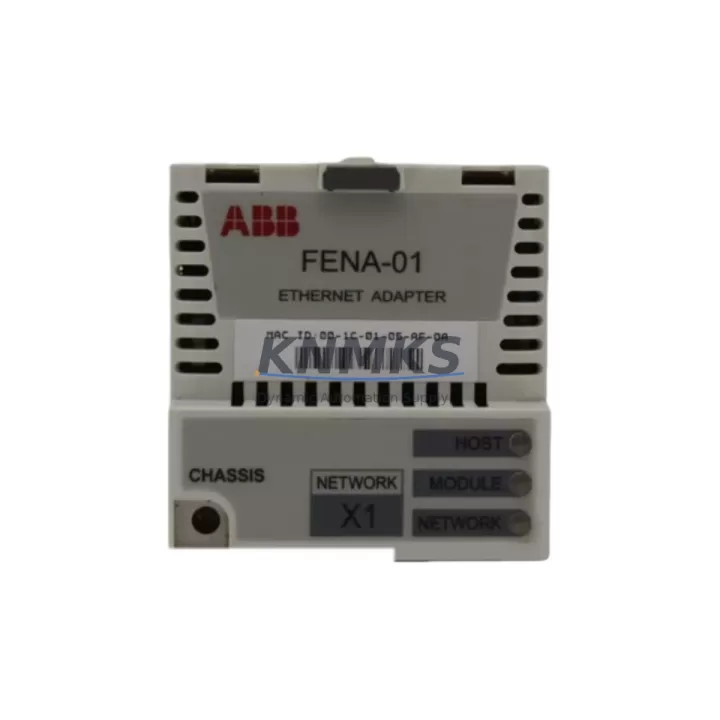
ABB FENA-01 Maintenance-Proven Spare Part for Factory Uptime
The ABB FENA-01 is an original Ethernet fieldbus adapter module from ABB’s FENA series, engineered for seamless integration with ABB ACS800 and ACS550 variable frequency drives. As a maintenance-proven spare part, the FENA-01 enables industrial facilities to restore drive communication networks rapidly, minimizing unplanned downtime and protecting production continuity. Whether you are managing a scheduled annual overhaul, responding to an emergency fault, or building a strategic spare parts inventory, the FENA-01 delivers the compatibility, reliability, and long-term supply assurance that maintenance and procurement engineers demand.
The FENA-01 supports PROFINET IO, EtherNet/IP, and Modbus TCP communication protocols, making it a versatile replacement component across diverse control architectures. Its plug-in design allows field technicians to swap the module without specialized tooling, reducing mean time to repair (MTTR) and enabling faster return to production. Each unit shipped by KNMKS undergoes pre-shipment functional testing and is backed by a support terms confirmed by quotation, giving procurement teams confidence in both quality and post-sale support.
For facilities operating legacy ABB drive systems, the FENA-01 represents a cost-effective alternative to full drive replacement. Its compatibility with the ACS800 and ACS550 platforms — both widely deployed in pump, fan, compressor, and conveyor applications — means that a single stocked unit can serve multiple production lines. Procurement engineers managing multi-site operations will find the FENA-01 an efficient addition to centralized spare parts programs, reducing per-site inventory costs while maintaining system readiness.
Spare Maintenance Table
| Parameter | Specification |
|---|---|
| SKU / Part Number | FENA-01 |
| Brand | ABB |
| Series | FENA (Fieldbus Adapter, Ethernet) |
| Product Type | Fieldbus Adapter Module |
| Supported Protocols | PROFINET IO, EtherNet/IP, Modbus TCP |
| Compatible Drives | ABB ACS800, ACS550 series VFDs |
| Interface | RJ-45 Ethernet (dual port) |
| Supply Voltage | Powered via drive control board (no external supply required) |
| Operating Temperature | -10°C to +55°C |
| Installation Method | Plug-in slot on drive control board (tool-free) |
| Origin | Germany (ABB manufacturing) |
| Application Environment | Industrial automation, process control, HVAC, pump/fan/compressor systems |
| Maintenance Recommendation | Inspect connector pins and firmware version during annual drive overhaul; replace if communication faults persist after cable and switch checks |
| Support terms | 12 months from shipment date |
| Pre-Shipment Testing | Yes — functional communication test performed before dispatch |
Maintenance Planning for Continuous Operation
When replacing or inspecting the FENA-01 in the field, a thorough maintenance workflow extends beyond the adapter module itself. Maintenance engineers should treat the FENA-01 replacement as an opportunity to audit the entire drive communication circuit and surrounding electrical environment.
Begin by verifying the integrity of the Ethernet cabling between the FENA-01 and the plant network switch. Industrial-grade shielded Cat5e or Cat6 cables are recommended; unshielded cables in high-EMI environments are a common source of intermittent communication faults that are incorrectly attributed to the adapter module. If the facility uses an ABB RDNA-01 or RETA-01 adapter in parallel drive configurations, inspect those units simultaneously to rule out network-level issues.
Check the drive’s control board — typically the RMIO board on ACS800 drives — for signs of capacitor aging, corrosion on the adapter slot connector, or firmware incompatibility. An outdated drive firmware version can cause the FENA-01 to fail initialization even when the module itself is fully functional. Coordinate with your control system team to verify that the drive firmware supports the installed FENA-01 hardware revision.
On the network side, inspect the managed Ethernet switch port to which the FENA-01 connects. Port configuration errors — such as mismatched duplex settings or VLAN misconfiguration — are a frequent cause of communication loss in PROFINET and EtherNet/IP environments. If the drive is integrated into a PROFINET network, also review the GSD file version loaded in the PLC engineering station to ensure it matches the FENA-01 firmware.
For drives controlling critical loads such as boiler feed pumps or compressors, consider stocking the ABB ACS800 standard I/O module (RDIO) alongside the FENA-01. A failed I/O module can produce symptoms similar to a fieldbus fault, and having both spares on hand eliminates diagnostic ambiguity during emergency callouts. Similarly, inspect the 24 VDC auxiliary power supply feeding the drive control circuit — an undersized or aging power supply unit is a common root cause of intermittent drive faults in older control cabinets.
If the facility uses ABB’s Panel Bus or CDP308 control panel, verify that the panel communication cable and connector are in good condition. Panel communication faults can mask underlying fieldbus issues and complicate fault isolation. For sites with ABB ACS550 drives, the FENA-01 is equally applicable; however, confirm the drive’s option slot configuration and any installed OREL-01 relay output modules, as slot conflicts can prevent the adapter from being recognized.
Site Replacement Workflow
Replacing the FENA-01 on-site is a straightforward procedure when the correct spare is available and the replacement workflow is followed systematically. Begin by documenting the existing network configuration — IP address, subnet mask, gateway, and protocol settings — either from the drive’s parameter list or from the engineering station. This data is stored in the drive’s memory and will need to be re-entered or verified after the new module is installed, as some firmware versions reset adapter parameters upon module swap.
Power down the drive following the site’s lockout/tagout (LOTO) procedure and allow the DC bus to discharge fully before accessing the control board. Remove the faulty FENA-01 by releasing the module latch and pulling it clear of the slot. Inspect the slot connector for bent pins or contamination before inserting the replacement unit. Seat the new FENA-01 firmly until the latch engages, then restore power and verify that the module initializes correctly — indicated by the green LINK LED illuminating on the adapter’s Ethernet port.
Re-enter the network parameters as documented, then perform a communication test from the PLC or SCADA system to confirm that the drive is visible on the network and responding to control commands. For PROFINET installations, trigger a device scan from the engineering station to verify that the FENA-01 is assigned the correct device name and IP address. Log the replacement in the site’s maintenance management system (CMMS) with the new module’s serial number and the date of installation to support support terms tracking and future fault analysis.
This workflow applies equally to ACS800 and ACS550 platforms and can be completed by a qualified maintenance technician in under 30 minutes when the spare is pre-staged and network parameters are documented in advance — a strong argument for maintaining at least one FENA-01 in the site’s critical spare parts inventory.
Spare Parts Support FAQ
Q1: Is the FENA-01 compatible with both ACS800 and ACS550 drives?
Yes. The FENA-01 is designed for use with ABB ACS800 and ACS550 series variable frequency drives. Before installation, confirm the drive’s option slot designation and firmware version to ensure compatibility with the specific hardware revision of the FENA-01 being installed. KNMKS can provide compatibility verification support prior to order confirmation.
Q2: What does the support terms confirmed by quotation cover, and how is it claimed?
The support terms confirmed by quotation cover manufacturing defects and functional failures under normal operating conditions from the date of shipment. Each unit is tested before dispatch. To initiate a support terms claim, contact KNMKS at admin@knmks.com with the order reference, serial number, and a description of the fault. Replacement or repair will be arranged promptly to minimize site downtime.
Q3: How should the FENA-01 be stored as a long-term spare?
Store the FENA-01 in its original anti-static packaging in a dry, temperature-controlled environment (0°C to +40°C, relative humidity below 85% non-condensing). Avoid storing near strong magnetic fields or in environments with high particulate contamination. Inspect the module annually for connector oxidation and verify firmware compatibility with the target drive before deployment. KNMKS maintains ongoing stock to support long-term supply continuity.
Q4: Can KNMKS supply the FENA-01 for urgent or emergency orders?
Yes. KNMKS maintains ready stock of the FENA-01 and can process urgent orders with expedited dispatch. Contact our sales team at admin@knmks.com or +86 18359268345 to confirm availability and arrange priority shipping. We support global delivery and can provide documentation packages including test reports and certificates of conformity upon request.
© 2026 KNMKS. All rights reserved.
Original Source: https://knmks.com
Contact: admin@knmks.com | +86 18359268345
Product Identification
- Brand / Ecosystem
-
ABB
ABB - Model / Series
-
FENA-01
S800 Series - Product Family
- Other Components
- Availability Status
- Available on request after model and quantity confirmation
- Inquiry Type
- B2B RFQ, replacement inquiry and project spare-part request
- Pre-Quote Check
- Exact SKU, brand, series, quantity, nameplate photos and destination country are checked before quotation
System Path
Where this product fits in the KNMKS automation structure.
Specification & Inquiry Focus
- Component range
- Breakers, terminals and cabinet accessories
- Common needs
- Model, photo and installation requirement
- Project support
- Maintenance and mixed spare-part inquiry
Buyer Confirmation
Information KNMKS checks before replying.
- Exact model
- FENA-01
- Brand / ecosystem
- ABB
- Product family
- Other Components
- Application note
- Replacement, maintenance, project build or spare-part list
- Useful photos
- Nameplate, installed unit, cabinet layout or connector side
- Delivery details
- Quantity, destination country and target schedule
Document Support
Files and notes can be confirmed during quotation.
- Product photos or nameplate confirmation when available
- Packing and delivery notes before quotation confirmation
- Support scope and delivery terms confirmed per inquiry
- Export document coordination for qualified B2B requests
Inquiry Support
- Mixed automation spare parts inquiry
- Cabinet component and accessory support
- Model identification from photos or labels
What to Send Us
- Brand and exact model number: ABB FENA-01
- Quantity and required delivery time
- Application, replacement requirement or nameplate photo
- Destination country and shipping preference
RFQ Preparation
This is a product inquiry page built for RFQ communication.
Fast Model Check
Send this model to KNMKS for confirmation.
Include quantity, destination country and photos if this is a maintenance replacement. The inquiry will be saved with a reference number after submission.
Brand & Compatibility Note
KNMKS displays automation product information for well-known industrial brand ecosystems and compatible replacement references. Brand names are used for product identification and compatibility reference only; final availability and commercial terms are confirmed per quotation.
 Manufacturing
 Machine Tools
 Packaging
 Energy & Power
 PLCs & Controllers
 HMI & Displays
 Servo Systems
 Variable Frequency Drives