
Overview
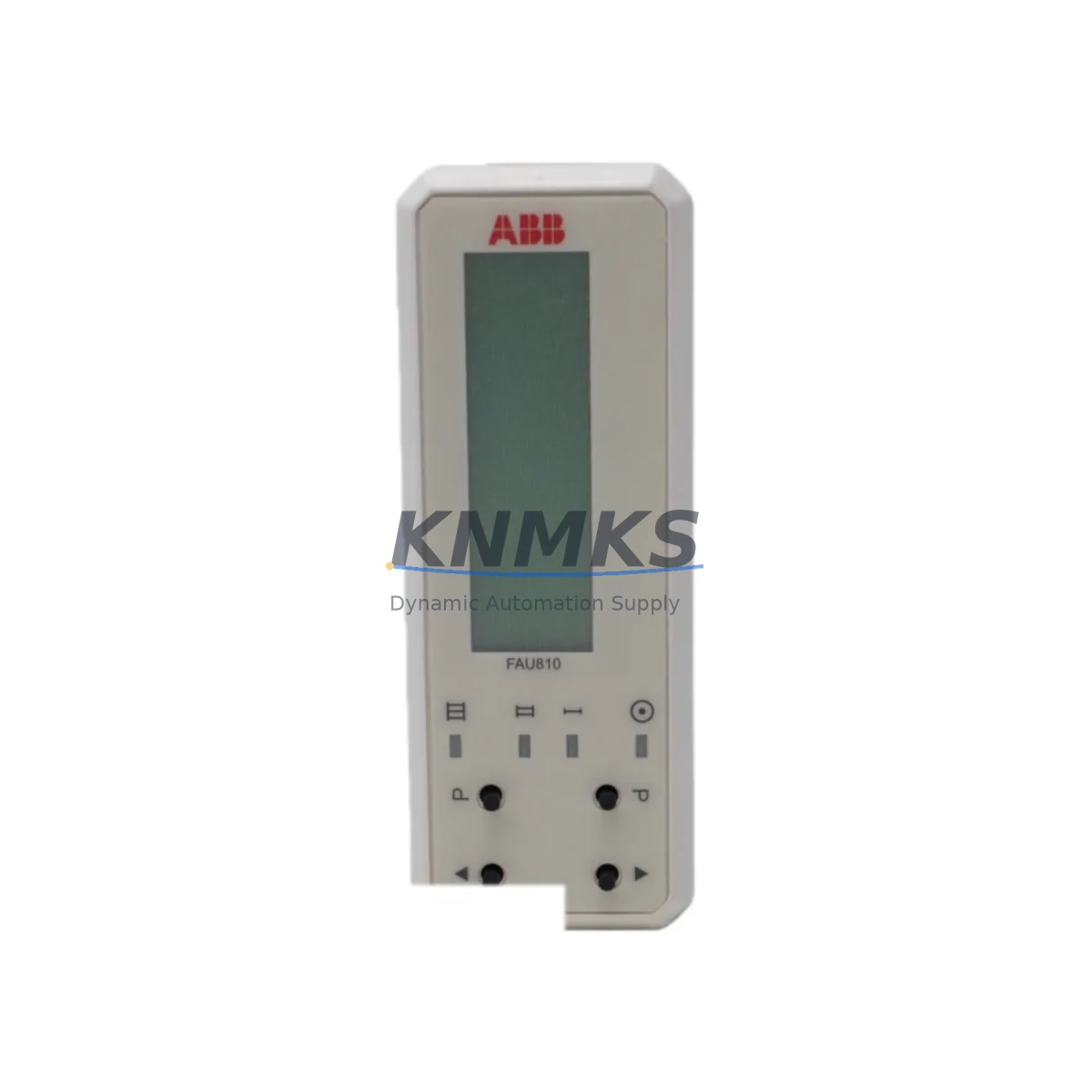
ABB FAU810-C10-12010 Migration-Ready Flame Analysis Unit: Legacy System Retrofit & Compatibility Upgrade
The ABB FAU810-C10-12010 is a migration-ready Flame Analysis Unit engineered for direct replacement of discontinued FAU810-series modules in legacy burner management and combustion control systems. Designed for industrial facilities operating aging ABB Advant, Bailey INFI 90, or Symphony Plus control platforms, this unit delivers a verified drop-in upgrade path that minimizes engineering rework, preserves existing wiring infrastructure, and maintains flame supervision continuity during planned or emergency retrofits.
For maintenance engineers and automation integrators managing end-of-life control cabinets, the FAU810-C10-12010 addresses the most critical pain points in legacy system migration: terminal block compatibility, rack backplane interface alignment, module address configuration, and firmware version matching. Whether you are replacing a failed unit under emergency shutdown conditions or executing a scheduled control system modernization, this module is pre-tested and ready for immediate field installation.
Migration Compatibility Table
| Parameter | FAU810-C10-12010 (This Unit) | Legacy FAU810 Reference | Retrofit Notes |
|---|---|---|---|
| Backplane Interface | ABB S800 / CI810 compatible rack slot | Original FAU810 rack slot | Direct slot-in replacement; no rack modification required |
| Terminal Wiring | Standard screw-terminal block, 24VDC signal | Identical terminal layout | Existing field wiring reusable; verify UV/IR sensor cable polarity |
| Communication Protocol | PROFIBUS DP / Modbus RTU selectable | PROFIBUS DP | Confirm DIP switch protocol selection before power-on |
| Module Address | Configurable via rotary switch (0–99) | Fixed address per original config | Match original module address; document before removal |
| Power Supply | 24VDC ±15%, max 4.5W | 24VDC | Verify cabinet PSU capacity; check load budget with CI810B or PM866 |
| Firmware Version | Factory-loaded, field-upgradeable via USB | Varies by production batch | Confirm firmware compatibility with AC800M or Freelance controller version |
| Installation Dimensions | Standard S800 I/O module form factor | Identical | No panel cutout or DIN rail modification needed |
| HMI Screen Mapping | Identical I/O tag structure | Original tag layout | Existing 800xA or Freelance HMI faceplates remain valid |
| Commissioning Tool | Compatible with Control Builder M / Freelance Engineering | Same toolchain | No re-engineering of function block library required |
| Support terms | support terms confirmed by quotation — covers manufacturing defects; includes pre-shipment functional test report | ||
Retrofit Planning for Existing Automation Systems
A successful FAU810-C10-12010 retrofit begins well before the module arrives on site. Experienced integrators working within ABB Symphony Plus or Freelance 2013/2019 environments will recognize that the flame analysis function block is tightly coupled to the burner sequencing logic in the AC800M or AC900F controller. Before initiating any hardware swap, the engineering team should export and archive the current controller program, including all FAU810-related function block instances, parameter sets, and interlock configurations.
On the cabinet side, the existing CI810B communication interface module and TB820 termination unit should be inspected for contact wear and connector integrity. In many legacy installations, the TB820 termination board carries the UV and IR sensor field wiring directly — these connections must be documented with photographs and terminal labels before the old FAU810 is extracted. If the control cabinet also houses an SD821 or SD822 power supply module, verify that the available 24VDC rail capacity accommodates the FAU810-C10-12010’s 4.5W draw alongside other active I/O modules in the same rack.
For facilities running parallel burner trains, it is common to find the FAU810 operating alongside AI810 analog input modules and DI810 digital input modules within the same S800 I/O rack. The module address of the FAU810-C10-12010 must be set to match the original unit’s rotary switch position before insertion — a mismatch will cause the controller to report a hardware fault and prevent the burner sequence from advancing past the ignition permissive check. In PROFIBUS DP topologies, the GSD file for the FAU810 series should already be loaded in the engineering station; no re-import is required for the C10-12010 variant.
Where the existing plant HMI runs on ABB 800xA with Aspect Object graphics, the flame status display, UV intensity trend, and burner state faceplate will continue to function without modification, as the FAU810-C10-12010 presents an identical I/O tag structure to the original module. For sites using third-party SCADA systems connected via Modbus RTU, confirm the register map and baud rate settings match the original configuration before enabling communication.
Downtime Control During System Migration
Minimizing unplanned downtime is the primary operational concern when replacing a flame analysis unit in an active combustion control system. The FAU810-C10-12010 is supplied with a pre-shipment functional test report, confirming that UV and IR detection channels, relay outputs, and communication interfaces have been verified against factory specifications before dispatch. This eliminates the most common cause of extended outages during module replacement: receiving a unit that requires bench testing or firmware loading before installation.
For planned maintenance windows, the recommended procedure is to place the burner management system in manual hold, isolate the affected burner train, and extract the legacy FAU810 with the rack powered down. The FAU810-C10-12010 can be inserted cold, with the module address pre-set and the PROFIBUS or Modbus protocol selected via DIP switch before rack power is restored. Controller re-download is not required if the original program and hardware configuration remain unchanged — the AC800M or Freelance controller will recognize the replacement module at the same slot address and resume normal operation within one scan cycle.
For emergency replacements where the original module has failed in service, the FAU810-C10-12010’s compatibility with the existing TB820 termination board means that field wiring need not be disturbed. The entire swap — from rack extraction to burner restart — can typically be completed within a two-hour maintenance window by a qualified instrumentation technician familiar with the ABB S800 I/O platform. Spare module inventory held on-site or sourced from KNMKS with confirmed lead times further reduces exposure to extended production loss.
Retrofit Support FAQ
Q1: Is the FAU810-C10-12010 a direct replacement for all FAU810 variants, including the FAU810-C10-12000?
The FAU810-C10-12010 is the current production successor to the FAU810-C10-12000 and earlier C10-series variants. The hardware form factor, terminal layout, and backplane interface are identical. The primary difference is an updated firmware baseline that improves UV sensor sensitivity calibration. No wiring or rack changes are required for the substitution.
Q2: Can I reuse the existing TB820 termination unit and field wiring?
Yes. The FAU810-C10-12010 is designed to mate directly with the TB820 termination board. Existing UV and IR sensor cables, interlock relay wiring, and 24VDC supply connections are fully reusable. Inspect terminal screws for torque and contact condition before re-energizing the rack.
Q3: What commissioning steps are required after installation?
After inserting the module and restoring rack power, verify that the controller hardware configuration scan recognizes the FAU810-C10-12010 at the correct slot address. Perform a UV/IR sensor channel check using the burner management system’s diagnostic display or the 800xA hardware monitor. Confirm relay output states match the expected burner permissive logic before releasing the burner train to automatic sequence. No function block re-download or HMI reconfiguration is required.
Q4: What does the support terms confirmed by quotation cover, and is a test report included?
Every FAU810-C10-12010 shipped by KNMKS includes a pre-shipment functional test report documenting UV channel response, IR channel response, relay output verification, and communication interface check. The support terms confirmed by quotation cover manufacturing defects and component failures under normal operating conditions. Support requests are supported directly by KNMKS with advance replacement options available for critical applications.
© 2026 KNMKS. All rights reserved.
Original Source: https://knmks.com
Contact: admin@knmks.com | +86 18359268345
Product Identification
- Brand / Ecosystem
-
ABB
ABB - Model / Series
- FAU810-C10-12010
- Product Family
- Other Components
- Availability Status
- Available on request after model and quantity confirmation
- Inquiry Type
- B2B RFQ, replacement inquiry and project spare-part request
- Pre-Quote Check
- Exact SKU, brand, series, quantity, nameplate photos and destination country are checked before quotation
System Path
Where this product fits in the KNMKS automation structure.
Specification & Inquiry Focus
- Component range
- Breakers, terminals and cabinet accessories
- Common needs
- Model, photo and installation requirement
- Project support
- Maintenance and mixed spare-part inquiry
Buyer Confirmation
Information KNMKS checks before replying.
- Exact model
- FAU810-C10-12010
- Brand / ecosystem
- ABB
- Product family
- Other Components
- Application note
- Replacement, maintenance, project build or spare-part list
- Useful photos
- Nameplate, installed unit, cabinet layout or connector side
- Delivery details
- Quantity, destination country and target schedule
Document Support
Files and notes can be confirmed during quotation.
- Product photos or nameplate confirmation when available
- Packing and delivery notes before quotation confirmation
- Support scope and delivery terms confirmed per inquiry
- Export document coordination for qualified B2B requests
Inquiry Support
- Mixed automation spare parts inquiry
- Cabinet component and accessory support
- Model identification from photos or labels
What to Send Us
- Brand and exact model number: ABB FAU810-C10-12010
- Quantity and required delivery time
- Application, replacement requirement or nameplate photo
- Destination country and shipping preference
RFQ Preparation
This is a product inquiry page built for RFQ communication.
Fast Model Check
Send this model to KNMKS for confirmation.
Include quantity, destination country and photos if this is a maintenance replacement. The inquiry will be saved with a reference number after submission.
Brand & Compatibility Note
KNMKS displays automation product information for well-known industrial brand ecosystems and compatible replacement references. Brand names are used for product identification and compatibility reference only; final availability and commercial terms are confirmed per quotation.
 Manufacturing
 Machine Tools
 Packaging
 Energy & Power

 PLCs & Controllers
 HMI & Displays
 Servo Systems
 Variable Frequency Drives