
Overview
ABB FAU800 Maintenance-Proven Spare Part for Factory Uptime
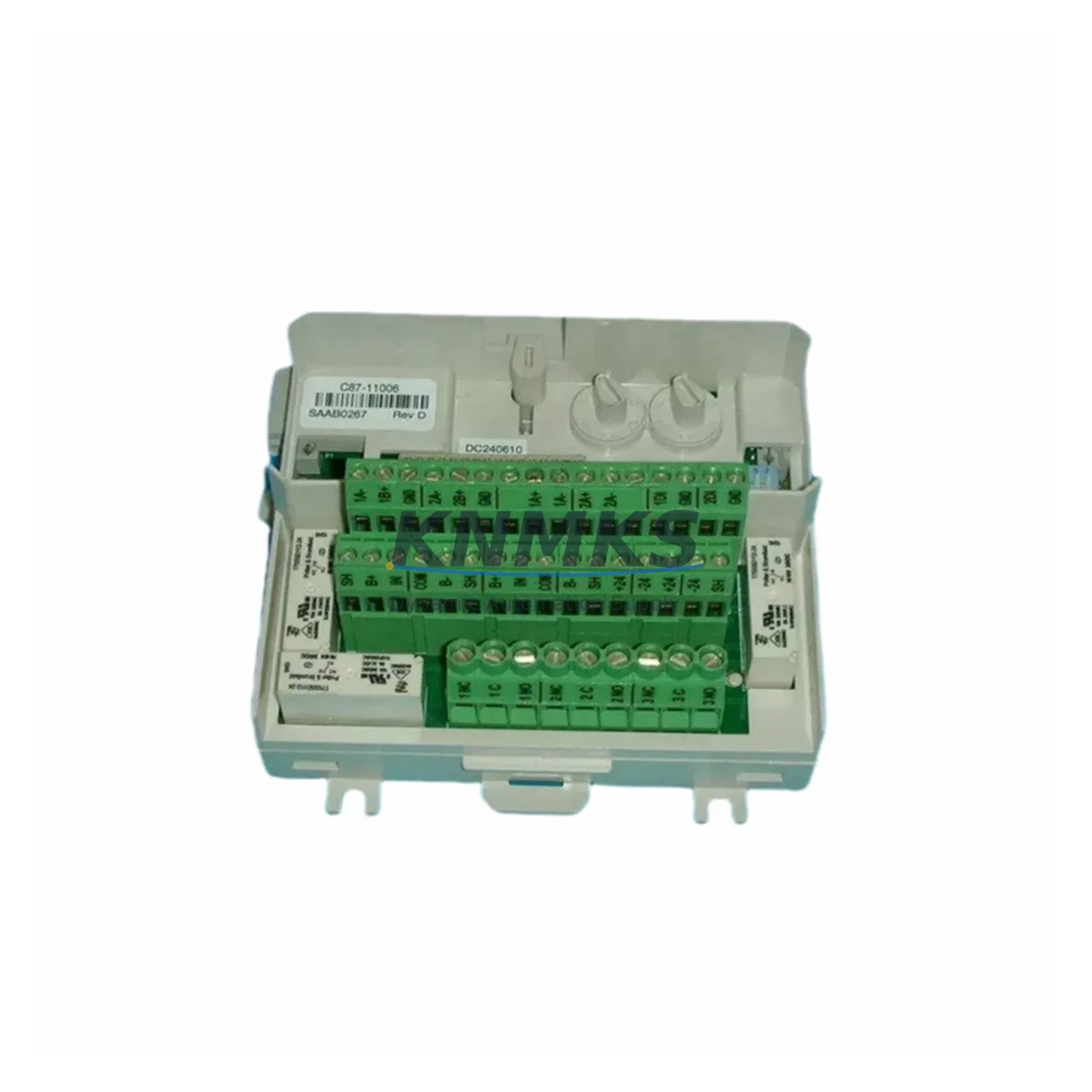
The ABB FAU800 Flame Analysis Unit is a critical spare part for industrial burner management and combustion control systems operating within the ABB FAU Series platform. Designed for continuous-duty environments in energy generation, petrochemical processing, manufacturing, and infrastructure facilities, the FAU800 delivers reliable flame detection and signal output essential for safe burner operation and process continuity. Sourced as an original ABB component, every FAU800 unit supplied by KNMKS is inspected, function-tested, and shipped with a support terms confirmed by quotation to support your maintenance planning and procurement confidence.
For maintenance engineers managing aging DCS or burner management system (BMS) infrastructure, the FAU800 represents a high-priority spare. Its role in flame supervision means that a failed or degraded unit can trigger unplanned shutdowns, safety interlocks, or combustion faults that halt production lines. Keeping a verified FAU800 in your spare parts inventory eliminates the lead-time risk associated with emergency procurement and ensures your team can execute a rapid, like-for-like replacement during scheduled or corrective maintenance windows.
Procurement engineers sourcing FAU800 units should verify compatibility with the installed FAU Series controller revision and confirm the signal interface type (UV, IR, or combined) matches the existing sensor configuration. KNMKS provides pre-shipment documentation including part number verification, functional test records, and packaging inspection reports to reduce incoming inspection burden at your facility.
Spare Maintenance Table
| Part Number | FAU800 |
| Brand | ABB |
| Series | FAU Series (Flame Analysis Unit) |
| Product Type | Flame Analysis Unit / Burner Management Spare |
| Origin | Germany (DE) |
| Application | Industrial burner management, combustion supervision, BMS integration |
| Compatible Systems | ABB FAU Series BMS, DCS-integrated burner control panels |
| Signal Interface | UV / IR flame detection signal output (verify with installed revision) |
| Operating Environment | Industrial — suitable for energy, petrochemical, manufacturing, and infrastructure sectors |
| Installation | Panel-mount; direct replacement for existing FAU800 installations |
| Condition | Original ABB — new or factory-refurbished, function-tested before shipment |
| Support terms | 12 Months |
| Pre-Shipment Testing | Functional test, part number verification, packaging inspection |
| Lead Time | Subject to stock availability — contact admin@knmks.com for confirmation |
Maintenance Planning for Continuous Operation
When replacing an ABB FAU800 in the field, a thorough inspection of the surrounding electrical circuit is essential to prevent repeat failures and ensure the replacement unit operates within specification. Maintenance engineers should begin by verifying the 24 VDC or 115/230 VAC supply rail feeding the FAU800 — a degraded ABB NPBA-12 or equivalent power supply module can introduce voltage ripple that shortens flame detector service life. Check the terminal block connections at the BMS panel for signs of oxidation, loose crimps, or thermal discoloration before installing the new unit.
The flame signal cable between the FAU800 and the burner scanner should be inspected for insulation damage, particularly in high-temperature zones near the combustion chamber. If the installation includes an ABB CI840A or similar PROFIBUS communication module linking the BMS to the plant DCS, confirm that the FAU800 replacement does not require a firmware or parameter update in the controller to re-establish the flame status signal on the process network.
For facilities running ABB AC500 or AC800M PLC platforms alongside the FAU Series BMS, it is good practice to verify that the digital input card receiving the FAU800 flame-on/flame-off signal — such as an ABB DI581-S or equivalent safety-rated I/O module — is functioning correctly and that its diagnostic LEDs show no latched fault conditions. Similarly, any interposing relay or ABB CR-M series relay module in the flame signal circuit should be tested for contact integrity before commissioning the replacement FAU800.
If the BMS panel includes an ABB CP600 or CP400 HMI displaying burner status, confirm that the flame status tag updates correctly after replacement and that no alarm suppression is active that could mask a genuine flame failure. Annual maintenance schedules should also include inspection of the panel’s DIN rail-mounted fuse holders and ABB S200 series miniature circuit breakers protecting the FAU800 supply circuit, as nuisance tripping or slow-blow fuse degradation can cause intermittent flame analysis faults that are difficult to diagnose without a systematic approach.
Stocking one FAU800 unit per burner management panel — or per combustion train in multi-burner installations — is a widely adopted strategy among maintenance planners in energy and petrochemical facilities. This approach eliminates the risk of extended downtime caused by international shipping lead times and ensures that corrective maintenance can be completed within a single shift.
Site Replacement Workflow
1. Isolate and de-energize. Follow your site LOTO procedure to isolate the BMS panel supply. Confirm zero energy state at the FAU800 terminals before proceeding.
2. Document existing wiring. Photograph or sketch the terminal connections on the outgoing FAU800, noting wire labels, cable routing, and any ferrite cores or shielding terminations.
3. Remove the failed unit. Disconnect signal and power terminals. Release the DIN rail or panel-mount fasteners and extract the FAU800 carefully to avoid disturbing adjacent modules.
4. Inspect the installation environment. Check the terminal block, cable insulation, supply fuse, and any interposing relay contacts before installing the replacement. Address any identified issues before proceeding.
5. Install the replacement FAU800. Mount the new unit, reconnect terminals per your documented wiring, and verify that all connections are torqued to the manufacturer’s specification.
6. Re-energize and commission. Restore power and observe the FAU800 startup sequence. Confirm flame status signal output at the BMS controller and verify correct indication on the plant HMI or DCS faceplate.
7. Record and close out. Update your maintenance management system (CMMS) with the replacement date, new unit serial number, and any observations from the inspection. Reset the planned maintenance interval for the FAU800 circuit.
This workflow supports a like-for-like replacement that maintains system compatibility, minimizes downtime, and provides a clear audit trail for safety and compliance purposes.
Spare Parts Support FAQ
Q1: Is the FAU800 supplied by KNMKS an original ABB part?
Yes. KNMKS supplies original ABB FAU800 units sourced through verified industrial channels. Each unit undergoes functional testing and part number verification before shipment. A support terms confirmed by quotation is included with every order.
Q2: How do I confirm compatibility with my installed FAU Series BMS revision?
Provide your existing FAU800 part number, BMS controller model, and firmware revision to admin@knmks.com. Our technical team will confirm compatibility and advise on any configuration requirements before shipment.
Q3: What is the recommended inventory strategy for FAU800 units?
For facilities with continuous combustion processes, we recommend maintaining at least one FAU800 per burner management panel as a critical on-site spare. For multi-burner or multi-train installations, a ratio of one spare per two to three active units is a common industry practice that balances inventory cost against downtime risk.
Q4: Can KNMKS support long-term supply of FAU800 units for multi-year maintenance contracts?
Yes. KNMKS offers long-term supply agreements for critical spare parts including the FAU800. Contact admin@knmks.com or call +86 18359268345 to discuss volume commitments, lead time guarantees, and pricing arrangements for your maintenance program.
© 2026 KNMKS. All rights reserved.
Original Source: https://knmks.com
Contact: admin@knmks.com | +86 18359268345
Product Identification
- Brand / Ecosystem
-
ABB
ABB - Model / Series
- FAU800
- Product Family
- Other Components
- Availability Status
- Available on request after model and quantity confirmation
- Inquiry Type
- B2B RFQ, replacement inquiry and project spare-part request
- Pre-Quote Check
- Exact SKU, brand, series, quantity, nameplate photos and destination country are checked before quotation
System Path
Where this product fits in the KNMKS automation structure.
Specification & Inquiry Focus
- Component range
- Breakers, terminals and cabinet accessories
- Common needs
- Model, photo and installation requirement
- Project support
- Maintenance and mixed spare-part inquiry
Buyer Confirmation
Information KNMKS checks before replying.
- Exact model
- FAU800
- Brand / ecosystem
- ABB
- Product family
- Other Components
- Application note
- Replacement, maintenance, project build or spare-part list
- Useful photos
- Nameplate, installed unit, cabinet layout or connector side
- Delivery details
- Quantity, destination country and target schedule
Document Support
Files and notes can be confirmed during quotation.
- Product photos or nameplate confirmation when available
- Packing and delivery notes before quotation confirmation
- Support scope and delivery terms confirmed per inquiry
- Export document coordination for qualified B2B requests
Inquiry Support
- Mixed automation spare parts inquiry
- Cabinet component and accessory support
- Model identification from photos or labels
What to Send Us
- Brand and exact model number: ABB FAU800
- Quantity and required delivery time
- Application, replacement requirement or nameplate photo
- Destination country and shipping preference
RFQ Preparation
This is a product inquiry page built for RFQ communication.
Fast Model Check
Send this model to KNMKS for confirmation.
Include quantity, destination country and photos if this is a maintenance replacement. The inquiry will be saved with a reference number after submission.
Brand & Compatibility Note
KNMKS displays automation product information for well-known industrial brand ecosystems and compatible replacement references. Brand names are used for product identification and compatibility reference only; final availability and commercial terms are confirmed per quotation.
 Manufacturing
 Machine Tools
 Packaging
 Energy & Power

 PLCs & Controllers
 HMI & Displays
 Servo Systems
 Variable Frequency Drives