
Overview
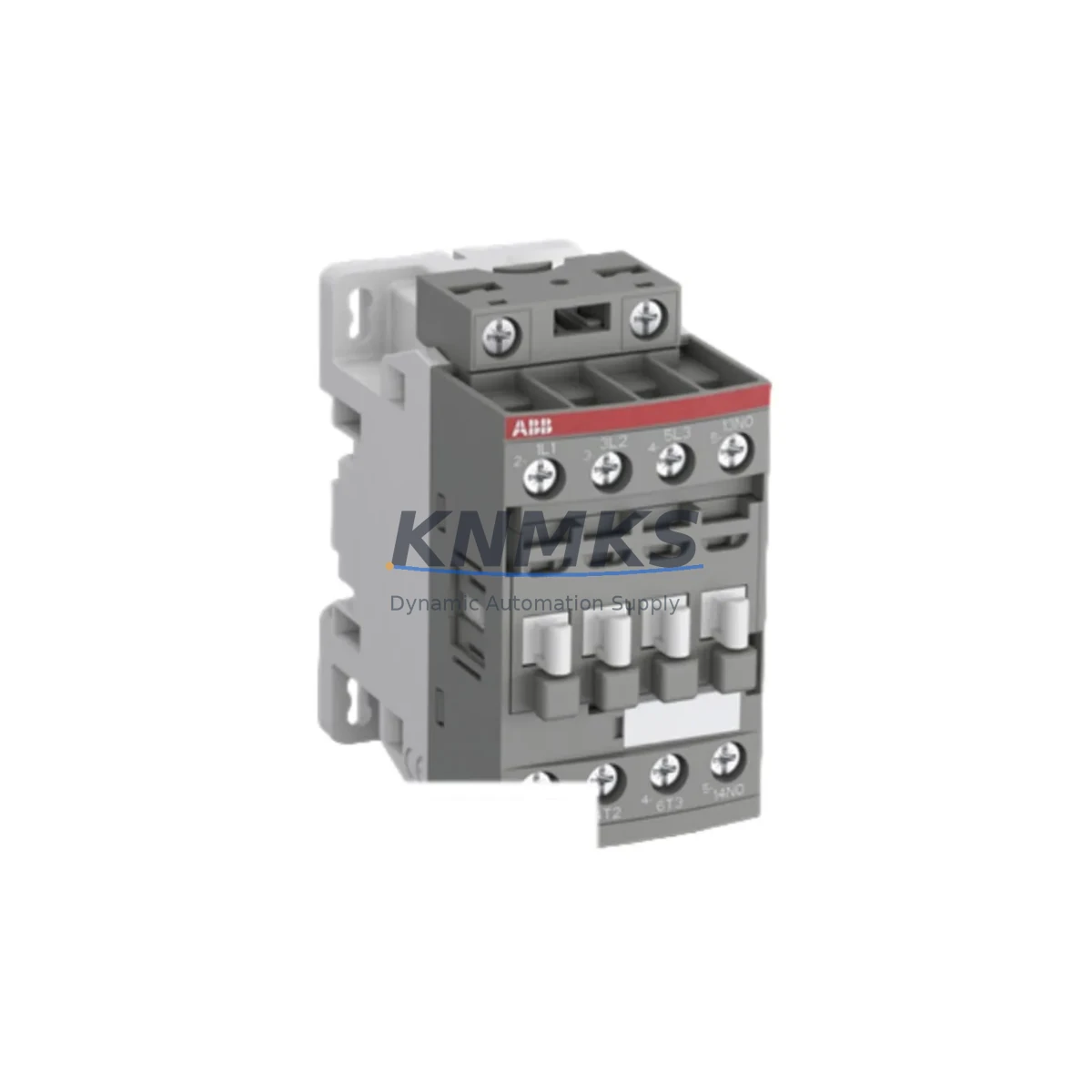
ABB F10-11 Migration-Ready Auxiliary Contact Block: Legacy SOFTSTARTER System Upgrade & Retrofit
The ABB F10-11 is a 1NO+1NC snap-on auxiliary contact block engineered for direct compatibility with ABB’s SOFTSTARTER product family, including the PSR, PSE, and PSTB series. As legacy motor control centers and MCC panels age out of manufacturer support cycles, the F10-11 remains one of the most critical spare components for engineers managing retrofit projects, planned maintenance shutdowns, and emergency replacements in existing automation infrastructure.
Whether you are upgrading a 1990s-era control cabinet, replacing a discontinued snap-on contact block from an obsolete SOFTSTARTER generation, or migrating a production line to a newer control architecture while preserving existing wiring topology, the F10-11 provides a drop-in mechanical and electrical interface that eliminates the need for panel rewiring or PLC program modification during the transition phase.
In retrofit scenarios, the F10-11 is typically installed alongside the main SOFTSTARTER body — such as the ABB PSR9-600-70 or PSR16-600-70 — and interfaces directly with the auxiliary terminal block on the front face of the device. The contact block snaps into position without tools, and its 1NO+1NC output configuration maps directly to standard run-feedback and fault-feedback signal circuits used in legacy SCADA and DCS systems. This means existing signal wiring to the PLC digital input card — whether a SIMATIC S7-300 SM321 or an Allen-Bradley 1756-IB16 — can remain unchanged during the SOFTSTARTER swap.
For projects involving communication protocol migration — for example, transitioning from hardwired relay logic to PROFIBUS DP or Modbus RTU-based motor management — the F10-11 provides the local hardware interlock signal that bridges the gap between the legacy hardwired control layer and the new fieldbus-connected SOFTSTARTER. This is particularly relevant when the replacement SOFTSTARTER, such as the ABB PSTB105-600-70, is being commissioned with a FBUS-01 fieldbus adapter for integration into a distributed control system, while the existing hardwired emergency stop and run-permissive circuits must remain active throughout the commissioning period.
During retrofit planning, engineers should verify the following before ordering: the number of auxiliary contact positions available on the existing SOFTSTARTER body, the terminal pitch and snap-on rail compatibility, the current signal voltage (typically 24 VDC or 110/230 VAC), and whether the existing HMI screen — such as a ABB CP600 panel or third-party WEINVIEW HMI — references the auxiliary contact status in any active alarm or status display page. In most cases, no HMI screen modification is required when replacing a like-for-like F10-11 block, as the signal address and I/O mapping remain identical.
Installation space is a common constraint in legacy control cabinets. The F10-11’s compact snap-on form factor adds minimal depth to the SOFTSTARTER assembly, making it suitable for retrofit in cabinets where DIN rail space is limited and adjacent components — such as circuit breakers, ABB MS116 manual motor starters, or terminal blocks — are closely spaced. No additional mounting hardware or bracket modification is required.
All F10-11 units supplied by KNMKS are sourced from authorized distribution channels, undergo pre-shipment continuity and contact resistance testing, and are covered by a support terms confirmed by quotation from the date of invoice. Stock is maintained across multiple regional warehouses to support urgent replacement orders with short lead times.
Migration Compatibility Table
| Parameter | Specification / Recommendation |
|---|---|
| Contact Configuration | 1NO + 1NC (Form C) |
| Compatible SOFTSTARTER Series | ABB PSR, PSE, PSTB (snap-on auxiliary port required) |
| Mounting Interface | Snap-on, tool-free, front-face auxiliary port |
| Signal Voltage Range | Up to 690 VAC / 250 VDC |
| Rated Current | 6 A (AC-15), 2 A (DC-13) |
| Communication Compatibility | Hardwired relay logic; compatible with PLC DI cards (24 VDC / 110 VAC) |
| Replacement Recommendation | Direct drop-in for legacy F10-11 on PSR/PSE/PSTB; no rewiring required |
| Commissioning Notes | Verify snap-on port availability; test NO/NC continuity before energizing |
| Installation Space | Compact snap-on; no additional DIN rail space required |
| Firmware Dependency | None — purely electromechanical; no firmware update required |
| Support terms | 12 months from invoice date, all units pre-tested before shipment |
Retrofit Planning for Existing Automation Systems
A successful SOFTSTARTER retrofit begins well before the maintenance window opens. When the F10-11 is part of a broader control cabinet upgrade, the bill of materials typically includes the replacement SOFTSTARTER body (e.g., ABB PSR9-600-70 or PSR25-600-70 depending on motor FLA), the F10-11 auxiliary contact block, and — where the existing cabinet uses a dedicated power supply rail — a replacement ABB CP-E 24/5.0 24 VDC power supply to ensure stable auxiliary circuit voltage during the transition.
For systems where the SOFTSTARTER communicates upstream via a fieldbus adapter, the ABB FBUS-01 or FBUS-02 PROFIBUS adapter must be verified for firmware compatibility with the replacement SOFTSTARTER body before the shutdown begins. In parallel, the I/O mapping between the SOFTSTARTER’s auxiliary outputs and the PLC’s digital input module should be documented and cross-checked against the existing program logic — particularly any interlocks that reference the run-feedback or fault-feedback signals provided by the F10-11.
Where the legacy system uses a SIMATIC S7-300 or S7-400 controller with hardwired I/O, the F10-11’s NO contact is typically wired to a digital input channel for run-status confirmation, while the NC contact feeds the fault circuit. This wiring convention is consistent across most ABB SOFTSTARTER installations and does not change when replacing the F10-11 on a like-for-like basis. Engineers should also confirm that the HMI — whether an ABB CP600, a Siemens TP700 Comfort, or a standalone WEINVIEW panel — does not display a persistent auxiliary contact fault alarm after replacement, which can occur if the contact block is not fully seated in the snap-on port.
In cabinets where space is constrained by adjacent ABB MS116 manual motor starters, terminal blocks, or cable ducts, the F10-11’s tool-free snap-on installation allows replacement to be completed within a standard 30-minute planned maintenance window without disturbing neighboring components or rerouting cables.
Downtime Control During System Migration
Minimizing unplanned downtime during a SOFTSTARTER auxiliary contact replacement requires a structured pre-shutdown checklist. Before de-energizing the panel, the technician should capture a screenshot or photograph of the HMI status page showing the current run and fault signal states, export the PLC program backup (particularly the FB or FC blocks referencing the SOFTSTARTER I/O), and confirm that the replacement F10-11 has passed pre-shipment continuity testing — a standard step in KNMKS’s outgoing quality inspection process.
During the replacement, the snap-on contact block can be removed and reinstalled without disconnecting any field wiring, as the F10-11 interfaces exclusively through the SOFTSTARTER’s internal auxiliary terminal. This design eliminates the risk of miswiring during the swap and preserves the original program logic without modification. After reinstallation, a functional test — applying 24 VDC to the control circuit and verifying NO/NC state transitions on the PLC input status display — confirms correct installation before the motor is re-energized.
For sites operating continuous processes where even a 30-minute shutdown carries significant production cost, KNMKS recommends maintaining at least one F10-11 as a dedicated on-site spare. Given the component’s compact size and long shelf life, stocking a spare alongside the SOFTSTARTER body itself is a low-cost insurance policy against unplanned motor control failures. All units supplied by KNMKS carry a support terms confirmed by quotation and are tested prior to dispatch to ensure zero-defect delivery to site.
Retrofit Support FAQ
Q1: Is the ABB F10-11 a direct replacement for the auxiliary contact block on my existing PSR or PSE SOFTSTARTER?
Yes. The F10-11 is the standard snap-on auxiliary contact block for the ABB PSR, PSE, and PSTB SOFTSTARTER series. It is a direct mechanical and electrical replacement for any existing F10-11 installed on these devices. No wiring changes or program modifications are required for a like-for-like swap.
Q2: Do I need to update the SOFTSTARTER firmware after installing a new F10-11?
No. The F10-11 is a purely electromechanical component with no firmware dependency. It interfaces with the SOFTSTARTER body through a physical snap-on port and does not interact with the device’s internal firmware or parameter settings. Firmware updates are only required when replacing the SOFTSTARTER body itself or upgrading a fieldbus adapter module.
Q3: Can the F10-11 be used in a system that is being migrated from hardwired relay logic to PROFIBUS DP or Modbus RTU?
Yes. During a protocol migration, the F10-11 continues to provide hardwired auxiliary contact signals that can serve as a local interlock layer while the new fieldbus communication is being commissioned and validated. This allows the existing hardwired safety and permissive circuits to remain active throughout the migration, reducing risk and enabling a phased cutover.
Q4: What is KNMKS’s stock availability and support terms policy for the F10-11?
KNMKS maintains ready stock of the ABB F10-11 across multiple regional warehouses to support urgent replacement and retrofit orders. All units undergo pre-shipment continuity and contact resistance testing before dispatch. A support terms confirmed by quotation is provided from the invoice date, covering manufacturing defects and contact failure under normal operating conditions. For bulk orders or blanket purchase agreements, please contact our sales team directly.
© 2026 KNMKS. All rights reserved.
Original Source: https://knmks.com
Contact: admin@knmks.com | +86 18359268345
Product Identification
- Brand / Ecosystem
-
ABB
ABB - Model / Series
- F10-11
- Product Family
- Other Components
- Availability Status
- Available on request after model and quantity confirmation
- Inquiry Type
- B2B RFQ, replacement inquiry and project spare-part request
- Pre-Quote Check
- Exact SKU, brand, series, quantity, nameplate photos and destination country are checked before quotation
System Path
Where this product fits in the KNMKS automation structure.
Specification & Inquiry Focus
- Component range
- Breakers, terminals and cabinet accessories
- Common needs
- Model, photo and installation requirement
- Project support
- Maintenance and mixed spare-part inquiry
Buyer Confirmation
Information KNMKS checks before replying.
- Exact model
- F10-11
- Brand / ecosystem
- ABB
- Product family
- Other Components
- Application note
- Replacement, maintenance, project build or spare-part list
- Useful photos
- Nameplate, installed unit, cabinet layout or connector side
- Delivery details
- Quantity, destination country and target schedule
Document Support
Files and notes can be confirmed during quotation.
- Product photos or nameplate confirmation when available
- Packing and delivery notes before quotation confirmation
- Support scope and delivery terms confirmed per inquiry
- Export document coordination for qualified B2B requests
Inquiry Support
- Mixed automation spare parts inquiry
- Cabinet component and accessory support
- Model identification from photos or labels
What to Send Us
- Brand and exact model number: ABB F10-11
- Quantity and required delivery time
- Application, replacement requirement or nameplate photo
- Destination country and shipping preference
RFQ Preparation
This is a product inquiry page built for RFQ communication.
Fast Model Check
Send this model to KNMKS for confirmation.
Include quantity, destination country and photos if this is a maintenance replacement. The inquiry will be saved with a reference number after submission.
Brand & Compatibility Note
KNMKS displays automation product information for well-known industrial brand ecosystems and compatible replacement references. Brand names are used for product identification and compatibility reference only; final availability and commercial terms are confirmed per quotation.
 Manufacturing
 Machine Tools
 Packaging
 Energy & Power

 PLCs & Controllers
 HMI & Displays
 Servo Systems
 Variable Frequency Drives