
Overview
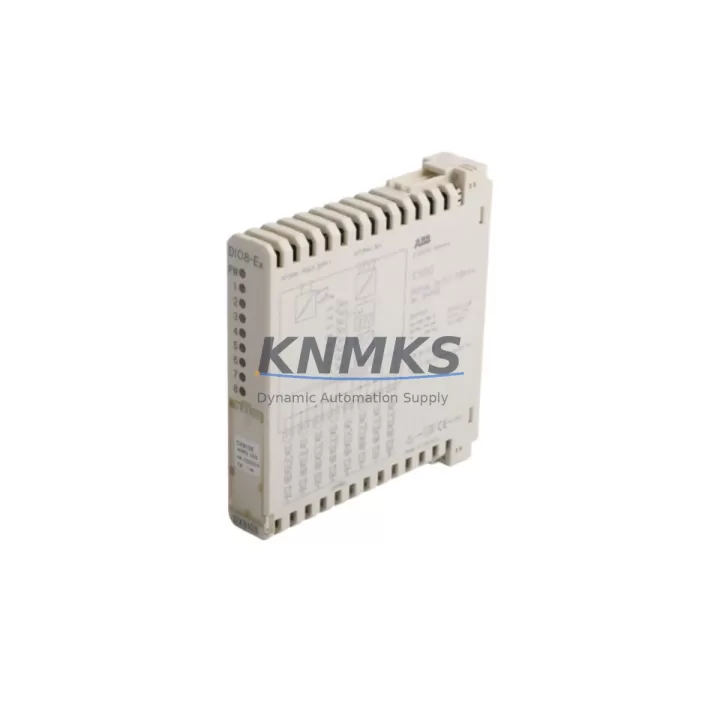
ABB DX910S 3KDE175311L9100 Maintenance-Proven Spare Part for Factory Uptime
The ABB DX910S (part number 3KDE175311L9100) is a digital I/O expansion module engineered for the ABB AC500 PLC platform — one of the most widely deployed programmable logic controller families in industrial automation, process control, and critical infrastructure applications. Designed to extend the I/O capacity of AC500 CPUs such as the PM573, PM583, and PM595, the DX910S delivers reliable digital signal acquisition and output switching across demanding factory environments. For maintenance engineers managing aging control cabinets, the DX910S represents a high-priority spare: its failure directly impacts production line availability, and sourcing delays from OEM channels can extend unplanned downtime by days or weeks.
At KNMKS, every DX910S 3KDE175311L9100 unit is pre-shipment tested, verified for firmware and hardware revision compatibility, and dispatched with a support terms confirmed by quotation. Our global stock program ensures rapid fulfillment for emergency replacement orders, scheduled annual overhauls, and forward buffer procurement strategies.
Spare Maintenance Table
| Parameter | Specification |
|---|---|
| Part Number | DX910S / 3KDE175311L9100 |
| Brand | ABB |
| Series | AC500 |
| Module Type | Digital I/O Expansion Module |
| Compatible CPUs | AC500 PM573, PM583, PM595 and compatible variants |
| Digital Inputs | 16 x 24 VDC digital inputs |
| Digital Outputs | 16 x 24 VDC transistor outputs |
| Supply Voltage | 24 VDC (nominal), 20.4–28.8 VDC operating range |
| Communication Interface | AC500 internal bus (S500 I/O bus) |
| Mounting | DIN rail, AC500 I/O bus terminal unit |
| Operating Temperature | -25°C to +60°C |
| Protection Rating | IP20 |
| Origin | Germany (DE) |
| Support terms | 12 Months — KNMKS Pre-Shipment Tested |
| Availability | availability confirmed by RFQ — Fast Dispatch |
Maintenance Planning for Continuous Operation
When replacing the DX910S 3KDE175311L9100 in an AC500 control cabinet, a disciplined maintenance workflow extends beyond the module swap itself. Maintenance engineers should treat the replacement as an opportunity for a full cabinet health audit to prevent secondary failures and reduce the risk of repeat downtime events.
Begin by inspecting the AC500 terminal unit (TB511, TB521, or equivalent) to which the DX910S mounts — worn bus connectors or cracked terminal blocks are a common source of intermittent I/O faults that are misdiagnosed as module failures. Verify the 24 VDC power supply rail feeding the I/O bus; ABB PS501 or equivalent industrial DIN-rail power supplies should be load-tested and output voltage confirmed within ±1% tolerance before the new module is energized.
Check all field wiring terminations at the I/O terminal blocks — loose or corroded connections on digital input circuits are a leading cause of premature module stress. If the cabinet includes an AC500 communication module such as the CM572-DP (PROFIBUS) or CM589-PNIO (PROFINET), verify that the fieldbus configuration still maps correctly after the I/O module replacement, as slot addressing may shift depending on firmware version.
For cabinets running mixed I/O configurations, also inspect adjacent analog I/O modules (DA501, DA502 series) and any installed signal isolators or signal conditioners on shared 24 VDC loops — a failing isolator can inject noise that triggers false digital input readings on the new DX910S. Review the miniature circuit breakers and fuse holders protecting the 24 VDC I/O supply; replace any that show signs of thermal discoloration or contact wear.
If the system includes an AC500 HMI panel (CP600 series or third-party), confirm that the HMI tag database and alarm mappings remain consistent after the module swap. Finally, document the replacement in the cabinet maintenance log and update the spare parts inventory to maintain a minimum one-unit buffer of the DX910S for future emergency response.
Site Replacement Workflow
Step 1 — Isolation: De-energize the AC500 I/O bus segment containing the DX910S. Follow site LOTO (Lockout/Tagout) procedures. Confirm 0 VDC on the I/O bus supply rail before proceeding.
Step 2 — Module Removal: Disconnect field wiring from the terminal unit. Release the DX910S from the bus terminal unit by pressing the release lever and sliding the module free. Note the slot position for reinstallation reference.
Step 3 — Inspection: Inspect the terminal unit bus connector for bent pins, corrosion, or debris. Clean with dry compressed air if required. Do not reinstall into a damaged terminal unit.
Step 4 — New Module Installation: Align the DX910S 3KDE175311L9100 with the terminal unit slot and press firmly until the bus connector seats and the locking lever clicks. Reconnect field wiring per the original wiring diagram.
Step 5 — Power-Up and Verification: Re-energize the I/O bus. From the AC500 CPU (or connected programming tool — PS501 Control Builder Plus), verify that the DX910S is recognized on the I/O bus and that all 16 digital inputs and 16 digital outputs report correct status. Run a forced I/O test on critical channels before returning the line to production.
Step 6 — Documentation: Record the replacement date, new module serial number, and post-replacement test results in the site maintenance management system (CMMS). Schedule the next inspection interval per the site preventive maintenance plan.
Spare Parts Support FAQ
Q1: Is the DX910S 3KDE175311L9100 compatible with all AC500 CPU generations?
The DX910S is designed for the AC500 S500 I/O bus architecture and is compatible with AC500 V2 and V3 CPU modules including the PM573, PM583, and PM595 families. Compatibility with specific firmware revisions should be confirmed against the ABB AC500 system compatibility matrix. KNMKS technical support can assist with revision verification prior to order.
Q2: What pre-shipment testing is performed on each unit?
Every DX910S unit dispatched by KNMKS undergoes functional power-on testing, I/O channel verification, and bus communication confirmation before shipment. Units are packed in anti-static ESD-safe packaging with individual test records. The support terms confirmed by quotation cover manufacturing defects and functional failures under normal operating conditions.
Q3: Can the DX910S replace older or discontinued AC500 I/O modules?
In many retrofit and life-extension scenarios, the DX910S can serve as a direct or near-direct replacement for earlier AC500 digital I/O modules where the terminal unit footprint and bus interface are compatible. Hardware revision differences may require minor configuration updates in the AC500 programming environment. KNMKS recommends providing the existing module part number for cross-reference confirmation before ordering.
Q4: What are the recommended inventory stocking levels for the DX910S?
For production facilities operating AC500-based control systems with more than three DX910S modules installed, a minimum buffer of one spare unit per control cabinet is recommended. High-criticality lines (continuous process, cleanroom, or safety-instrumented systems) should maintain a two-unit buffer. KNMKS supports long-term supply agreements and scheduled replenishment programs to reduce procurement lead-time risk and ensure consistent spare parts availability.
© 2026 KNMKS. All rights reserved.
Original Source: https://knmks.com
Contact: admin@knmks.com | +86 18359268345
Product Identification
- Brand / Ecosystem
-
ABB
ABB - Model / Series
-
DX910S 3KDE175311L9100
AC500 Series - Product Family
- PLCs & Controllers
- Availability Status
- Available on request after model and quantity confirmation
- Inquiry Type
- B2B RFQ, replacement inquiry and project spare-part request
- Pre-Quote Check
- Exact SKU, brand, series, quantity, nameplate photos and destination country are checked before quotation
System Path
Where this product fits in the KNMKS automation structure.
Specification & Inquiry Focus
- Control platform
- PLC, PAC and modular controllers
- Common needs
- CPU, rack, power and I/O expansion
- Project support
- Replacement, cabinet build and maintenance
Buyer Confirmation
Information KNMKS checks before replying.
- Exact model
- DX910S 3KDE175311L9100
- Brand / ecosystem
- ABB
- Product family
- PLCs & Controllers
- Application note
- Replacement, maintenance, project build or spare-part list
- Useful photos
- Nameplate, installed unit, cabinet layout or connector side
- Delivery details
- Quantity, destination country and target schedule
Document Support
Files and notes can be confirmed during quotation.
- Product photos or nameplate confirmation when available
- Packing and delivery notes before quotation confirmation
- Support scope and delivery terms confirmed per inquiry
- Export document coordination for qualified B2B requests
Inquiry Support
- Model cross-checking before quotation
- CPU, power, rack and expansion module matching
- Support for replacement and project inquiry
What to Send Us
- Brand and exact model number: ABB DX910S 3KDE175311L9100
- Quantity and required delivery time
- Application, replacement requirement or nameplate photo
- Destination country and shipping preference
RFQ Preparation
This is a product inquiry page built for RFQ communication.
Fast Model Check
Send this model to KNMKS for confirmation.
Include quantity, destination country and photos if this is a maintenance replacement. The inquiry will be saved with a reference number after submission.
Brand & Compatibility Note
KNMKS displays automation product information for well-known industrial brand ecosystems and compatible replacement references. Brand names are used for product identification and compatibility reference only; final availability and commercial terms are confirmed per quotation.
 Manufacturing
 Machine Tools
 Packaging
 Energy & Power



 HMI & Displays
 Servo Systems
 Variable Frequency Drives
 Sensors