
Overview
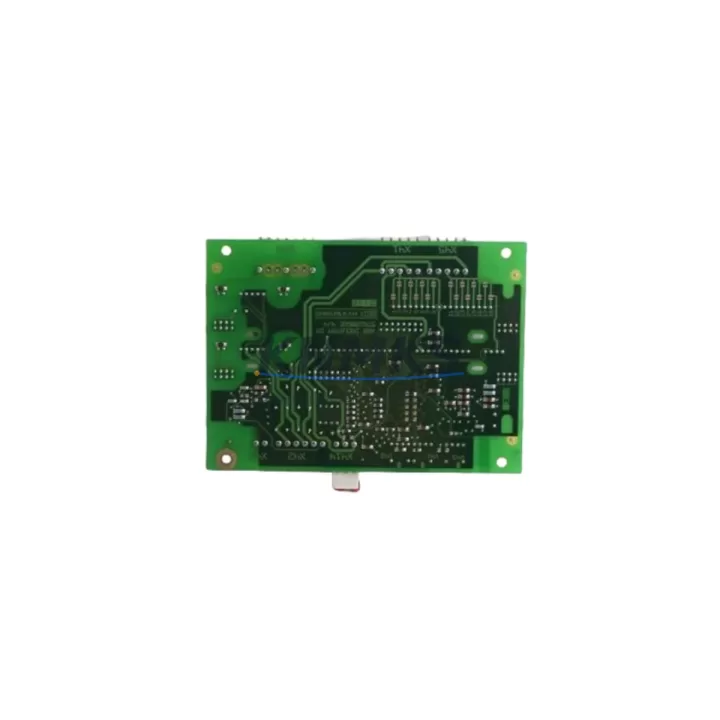
ABB DX571 Maintenance-Proven Spare Part for Factory Uptime
The ABB DX571 is a digital I/O expansion module designed for the AC500 PLC platform — one of ABB’s most widely deployed automation architectures in process, manufacturing, and infrastructure applications. As a maintenance-proven spare part, the DX571 is a critical component for any facility running AC500-based control systems that demands continuous uptime, rapid fault recovery, and long-term parts availability.
Whether you are managing a scheduled annual overhaul, responding to an unplanned I/O fault, or building a strategic spare parts inventory for a multi-line production facility, the DX571 delivers the electrical performance and form-factor compatibility required for direct drop-in replacement. Each unit supplied by KNMKS is sourced from verified channels, pre-shipment tested, and backed by a support terms confirmed by quotation — giving procurement and maintenance engineers the confidence to stock and deploy without qualification risk.
For maintenance engineers, the DX571 addresses one of the most common failure modes in aging AC500 installations: degraded or failed digital I/O channels caused by electrical transients, wiring faults, or end-of-life component wear. Replacing the DX571 restores full I/O channel capacity without requiring PLC CPU replacement or system reconfiguration, minimising downtime to the duration of the physical swap and firmware re-verification.
Spare Maintenance Table
| Parameter | Specification |
|---|---|
| Part Number / SKU | DX571 |
| Brand | ABB |
| Series | AC500 |
| Module Type | Digital I/O Expansion Module |
| Product Type | PLC I/O Module |
| Origin | Germany (DE) |
| Compatible Platform | ABB AC500 PLC Series (PM5xx, PM5xxV2, PM5xxV3) |
| I/O Configuration | Digital Inputs / Digital Outputs (expansion) |
| Backplane Interface | AC500 I/O bus (direct module-to-CPU or via expansion bus) |
| Operating Voltage | 24 V DC (nominal, via system bus or external supply) |
| Operating Temperature | -25 °C to +60 °C |
| Protection Rating | IP20 (panel-mount, control cabinet installation) |
| Installation | DIN rail, AC500 mounting rail |
| Certifications | CE, UL (per AC500 platform standards) |
| Pre-Shipment Test | Yes — functional and electrical verification |
| Support terms | 12 Months from date of dispatch |
| Lead Time | In-stock: same/next business day dispatch |
Maintenance Planning for Continuous Operation
A DX571 replacement should never be treated in isolation. When a digital I/O expansion module fails or shows intermittent channel faults, the root cause often involves adjacent components in the same electrical circuit or control cabinet. A thorough maintenance workflow should include inspection and, where appropriate, proactive replacement of the following:
The AC500 CPU module (e.g., PM554, PM564, PM583) should be checked for firmware version compatibility with the replacement DX571, particularly if the installed base has not been updated in several years. Mismatched firmware can cause I/O mapping errors even after a physically successful module swap. Similarly, the AC500 terminal units (TU515, TU516, TU531) that the DX571 mounts onto should be inspected for contact wear, corrosion, or mechanical damage — a faulty terminal unit will cause recurring faults regardless of module condition.
The 24 V DC power supply feeding the I/O bus is a frequent contributor to digital I/O failures. Voltage ripple, under-voltage during motor starts, or a failing power supply capacitor can stress I/O modules over time. Replacing the DX571 without verifying power supply health risks premature failure of the new module. Brands such as ABB CP-E series, Phoenix Contact QUINT, or PULS DIMENSION power supplies are commonly paired with AC500 systems and should be load-tested during the same maintenance window.
Wiring integrity at the I/O terminal blocks and field wiring connectors should be verified with a torque check and insulation resistance test. Loose terminations are a leading cause of intermittent digital input faults that are misdiagnosed as module failures. If the cabinet uses signal isolators or relay output modules (such as ABB CR-M or Phoenix Contact PLC-RSC series) between the DX571 outputs and field devices, these should be tested for contact resistance and coil integrity.
For systems with PROFIBUS DP or Modbus RTU communication running through the AC500 rack, the communication module (e.g., CM572-DP) should be checked for bus termination and address conflicts after any I/O module replacement, as physical disturbance of the rack can affect bus continuity. Finally, fuse protection on the 24 V DC output circuits should be inspected — blown or degraded fuses are often the first indicator of an output short that has already damaged the I/O module being replaced.
Site Replacement Workflow
Replacing the ABB DX571 in an operational AC500 system follows a structured sequence to minimise downtime and avoid configuration errors:
1. Pre-replacement preparation: Export the current PLC project from Automation Builder or PS501 Control Builder. Document the I/O mapping, module slot position, and any module-specific parameters configured in the hardware tree. Confirm the replacement DX571 hardware revision is compatible with the installed CPU firmware.
2. Safe isolation: Place the PLC in STOP mode. Isolate the 24 V DC supply to the I/O bus. Follow local LOTO (Lockout/Tagout) procedures. Do not remove the module under power — the AC500 I/O bus does not support hot-swap on standard DX-series modules.
3. Physical replacement: Release the DX571 from the terminal unit by pressing the module release lever. Seat the replacement module firmly until the locking tab engages. Reconnect field wiring connectors, verifying correct terminal assignment against the as-built wiring diagram.
4. Configuration verification: Power up the system. In Automation Builder, perform a hardware scan or manually confirm the module is recognised in the correct slot. Verify I/O channel assignments match the original configuration. Run a forced I/O test on all channels before returning the system to AUTO mode.
5. Post-replacement documentation: Record the replacement date, new module serial number, and test results in the maintenance log. Update the spare parts inventory to trigger reorder of a replacement DX571 for the next maintenance cycle.
This workflow applies equally to planned annual maintenance replacements and emergency fault recovery scenarios, and is designed to keep total downtime under two hours for a single-module swap in a standard AC500 cabinet.
Spare Parts Support FAQ
Q1: Is the DX571 supplied by KNMKS a new or refurbished unit?
All DX571 units are sourced from verified supply channels and undergo pre-shipment functional and electrical testing. Condition (new or tested-serviceable) is confirmed at the time of order. Each unit is dispatched with a support terms confirmed by quotation covering manufacturing defects and functional failure under normal operating conditions.
Q2: How do I confirm compatibility between the DX571 and my existing AC500 CPU?
The DX571 is compatible with the AC500 platform across PM5xx CPU generations. Compatibility is determined by the terminal unit type (TU515/TU516/TU531) and the Automation Builder hardware library version. KNMKS technical support can assist with compatibility verification if you provide your CPU part number and firmware version prior to ordering.
Q3: Can KNMKS support long-term or blanket purchase orders for the DX571?
Yes. KNMKS supports 12–36 month supply agreements for critical spare parts including the DX571. Long-term agreements provide price stability, reserved stock allocation, and priority dispatch — reducing procurement risk for facilities with multiple AC500 installations or extended maintenance cycles.
Q4: What is the dispatch lead time and how is the unit packaged for shipment?
In-stock units are dispatched same or next business day. Each DX571 is packaged in anti-static protective packaging with a test report and support terms documentation. Express international shipping is available for emergency maintenance requirements.
© 2026 KNMKS. All rights reserved.
Original Source: https://knmks.com
Contact: admin@knmks.com | +86 18359268345
Product Identification
- Brand / Ecosystem
-
ABB
ABB - Model / Series
-
DX571
AC500 Series - Product Family
- PLCs & Controllers
- Availability Status
- Available on request after model and quantity confirmation
- Inquiry Type
- B2B RFQ, replacement inquiry and project spare-part request
- Pre-Quote Check
- Exact SKU, brand, series, quantity, nameplate photos and destination country are checked before quotation
System Path
Where this product fits in the KNMKS automation structure.
Specification & Inquiry Focus
- Control platform
- PLC, PAC and modular controllers
- Common needs
- CPU, rack, power and I/O expansion
- Project support
- Replacement, cabinet build and maintenance
Buyer Confirmation
Information KNMKS checks before replying.
- Exact model
- DX571
- Brand / ecosystem
- ABB
- Product family
- PLCs & Controllers
- Application note
- Replacement, maintenance, project build or spare-part list
- Useful photos
- Nameplate, installed unit, cabinet layout or connector side
- Delivery details
- Quantity, destination country and target schedule
Document Support
Files and notes can be confirmed during quotation.
- Product photos or nameplate confirmation when available
- Packing and delivery notes before quotation confirmation
- Support scope and delivery terms confirmed per inquiry
- Export document coordination for qualified B2B requests
Inquiry Support
- Model cross-checking before quotation
- CPU, power, rack and expansion module matching
- Support for replacement and project inquiry
What to Send Us
- Brand and exact model number: ABB DX571
- Quantity and required delivery time
- Application, replacement requirement or nameplate photo
- Destination country and shipping preference
RFQ Preparation
This is a product inquiry page built for RFQ communication.
Fast Model Check
Send this model to KNMKS for confirmation.
Include quantity, destination country and photos if this is a maintenance replacement. The inquiry will be saved with a reference number after submission.
Brand & Compatibility Note
KNMKS displays automation product information for well-known industrial brand ecosystems and compatible replacement references. Brand names are used for product identification and compatibility reference only; final availability and commercial terms are confirmed per quotation.
 Manufacturing
 Machine Tools
 Packaging
 Energy & Power



 HMI & Displays
 Servo Systems
 Variable Frequency Drives
 Sensors