
Overview
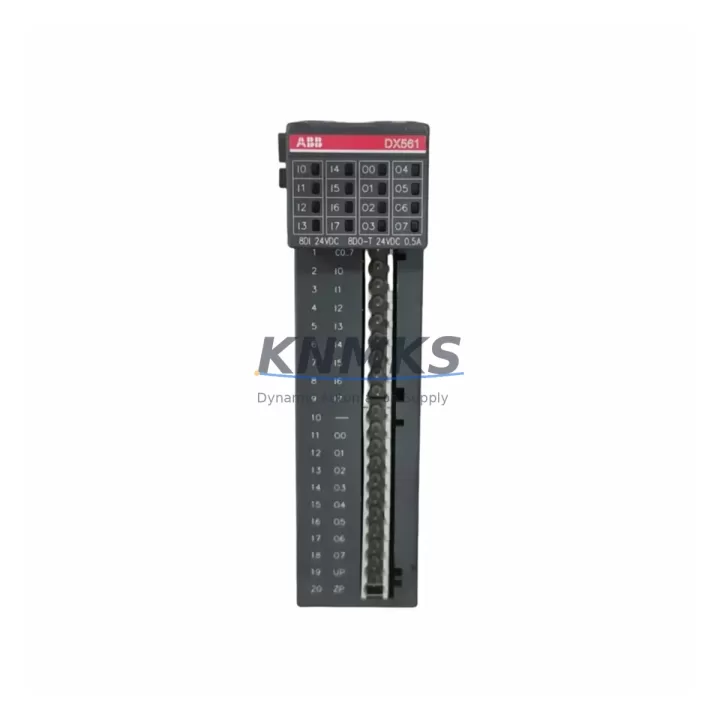
ABB DX561-A1 1TNE968902R2301 Maintenance-Proven Spare Part for Factory Uptime
The ABB DX561-A1 (order reference 1TNE968902R2301) is a digital combination I/O module engineered for the ABB AC500 programmable automation controller platform. Designed for demanding industrial environments, this module delivers reliable digital input and output performance across process automation, machine control, and infrastructure applications. Maintaining an available stock of the DX561-A1 is a proven strategy for reducing unplanned downtime, accelerating fault recovery, and sustaining continuous production across facilities that depend on ABB AC500 control architectures.
For maintenance engineers and procurement teams managing aging or active AC500 installations, the DX561-A1 represents a critical node in the I/O layer. Its failure — whether from electrical surge, connector wear, firmware incompatibility, or environmental stress — can halt an entire control loop. Stocking a verified original spare eliminates the lead-time risk associated with emergency procurement and ensures that site replacement can be completed within a single maintenance window.
Every unit supplied is sourced as an original ABB component, subjected to pre-shipment functional testing, and covered by a support terms confirmed by quotation. Global dispatch capability supports both planned annual overhauls and emergency breakdown scenarios.
Spare Maintenance Table
| SKU / Order Reference | DX561-A1 / 1TNE968902R2301 |
| Brand | ABB |
| Series | AC500 |
| Module Type | Digital Combination I/O Module (DI + DO) |
| Compatible Platform | ABB AC500 PLC System (PM5xx / PM5xx-ETH CPU families) |
| Digital Inputs | 16 x 24 VDC digital inputs (IEC 61131-2 Type 1/3) |
| Digital Outputs | 8 x 24 VDC transistor outputs, 0.5 A per channel |
| Supply Voltage | 24 VDC (–15% / +20%) |
| Backplane Interface | AC500 S500 I/O bus (local expansion) |
| Protection Class | IP20 |
| Operating Temperature | –25 °C to +60 °C |
| Country of Origin | Germany |
| Mounting | DIN rail via AC500 terminal base (TB5xx series) |
| Certifications | CE, UL, cUL, ATEX (zone 2), IECEx |
| Compatibility Confirmation | Verified for AC500 S500 I/O expansion bus; confirm CPU firmware version before installation |
| Pre-Shipment Testing | Functional I/O channel verification, bus communication check |
| Support terms | 12 Months |
| Dispatch | Global express; same-day or next-business-day for in-stock units |
Maintenance Planning for Continuous Operation
When a DX561-A1 module is flagged during routine control cabinet inspection or fails during a production shift, the replacement scope should extend beyond the module itself. A disciplined maintenance approach requires simultaneous verification of all components sharing the same electrical circuit and backplane segment.
Begin with the TB561 terminal base — the DX561-A1 mounts directly onto this base, and worn or corroded terminal contacts are a frequent secondary cause of I/O signal errors that are misattributed to the module. Inspect and replace the terminal base if contact resistance is elevated or if physical damage is visible.
Next, audit the 24 VDC field power supply feeding the output channels. ABB CP series power supplies (e.g., CP-E 24/5.0) are commonly deployed in AC500 panels; verify output voltage stability and ripple under load before commissioning the replacement module. An unstable supply will cause intermittent output faults on the new DX561-A1 and may void support terms coverage.
Review the AC500 CPU module (PM564-T, PM566-T, or equivalent) for firmware currency. ABB periodically releases firmware updates that address I/O bus timing and module recognition. A firmware mismatch between the CPU and a replacement I/O module can prevent correct initialization. Download the latest firmware from the ABB Library and apply it during the planned maintenance window.
Inspect field wiring and terminal blocks connected to the DX561-A1’s input and output channels. Loose ferrules, oxidized conductors, or undersized cable cross-sections are common root causes of nuisance trips and channel failures. Re-terminate any suspect connections using appropriate wire end sleeves.
For installations where the DX561-A1 handles safety-adjacent signals, verify the status of any signal isolators or relay output modules (such as ABB ORIO or third-party DIN-rail isolators) in the same loop. These components age independently and may introduce signal degradation that is only revealed after the I/O module is replaced.
Finally, confirm the integrity of the AC500 backplane bus connector and any expansion bus cables (TB5xx to TB5xx links) if the DX561-A1 is part of a remote I/O segment. Bus connector damage is a silent failure mode that causes sporadic communication errors across multiple I/O modules simultaneously.
Site Replacement Workflow
Step 1 — Isolation: Place the affected AC500 CPU in STOP mode via the programming tool (Automation Builder) or the local RUN/STOP switch. De-energize the 24 VDC field supply to the I/O segment containing the DX561-A1. Apply lockout/tagout per site safety procedures.
Step 2 — Documentation: Photograph the existing wiring layout on the TB561 terminal base before disconnection. Record the module slot position within the I/O rack. Note the CPU firmware version and project file revision for post-replacement verification.
Step 3 — Module Removal: Release the DX561-A1 from the terminal base by pressing the module release lever and sliding the module upward. Do not apply lateral force to the bus connector pins.
Step 4 — Terminal Base Inspection: With the module removed, inspect the TB561 bus connector for bent pins, debris, or corrosion. Clean with dry compressed air if required. Replace the terminal base if physical damage is confirmed.
Step 5 — Replacement Installation: Align the replacement DX561-A1 with the TB561 guide rails and press firmly until the locking lever engages. Restore field wiring connections per the documented layout. Re-energize the 24 VDC field supply.
Step 6 — Commissioning: Set the CPU to RUN mode. In Automation Builder, perform an online comparison between the project configuration and the detected hardware. Confirm that the DX561-A1 appears correctly in the I/O tree with no fault indicators. Execute a channel-by-channel I/O test using force functions before returning the system to automatic operation.
Step 7 — Documentation Closure: Update the maintenance log with the replacement date, new module serial number, and test results. Initiate a replenishment order for the consumed spare to restore buffer stock.
Spare Parts Support FAQ
Q1: Is the DX561-A1 (1TNE968902R2301) compatible with all AC500 CPU generations?
The DX561-A1 is designed for the AC500 S500 I/O bus and is compatible with PM5xx and PM5xx-ETH CPU families. Compatibility with older PM5xx-DP or first-generation AC500 CPUs should be confirmed against the ABB AC500 system catalog and the installed CPU firmware version. We recommend providing your CPU model and firmware revision when placing an order so compatibility can be verified before shipment.
Q2: What pre-shipment testing is performed on each unit?
Each DX561-A1 unit undergoes functional verification of all digital input and output channels, bus communication handshake testing, and visual inspection for physical integrity. Test records are retained and can be provided upon request. Units that do not pass all test criteria are not dispatched.
Q3: What is the recommended spare holding quantity for an AC500 installation?
For facilities operating a single AC500 rack with one or two DX561-A1 modules, a minimum of one spare unit is recommended. For multi-rack or multi-line installations, a ratio of one spare per four installed modules is a common industry practice. Annual consumption history and criticality of the controlled process should guide final stocking decisions. Long lead times for original ABB I/O modules make buffer stock essential for emergency recovery scenarios.
Q4: What does the support terms confirmed by quotation cover, and what is the long-term supply commitment?
The support terms confirmed by quotation cover defects in materials and workmanship under normal operating conditions. It does not cover damage resulting from incorrect installation, overvoltage events, or unauthorized modification. For long-term supply, we maintain rolling stock of AC500 I/O modules and can support scheduled annual procurement programs. Customers with multi-year maintenance contracts are encouraged to contact us to discuss volume pricing and reserved stock arrangements.
© 2026 KNMKS. All rights reserved.
Original Source: https://knmks.com
Contact: admin@knmks.com | +86 18359268345
Product Identification
- Brand / Ecosystem
-
ABB
ABB - Model / Series
-
DX561-A1-1TNE968902R2301
AC500 Series - Product Family
- PLCs & Controllers
- Availability Status
- Available on request after model and quantity confirmation
- Inquiry Type
- B2B RFQ, replacement inquiry and project spare-part request
- Pre-Quote Check
- Exact SKU, brand, series, quantity, nameplate photos and destination country are checked before quotation
System Path
Where this product fits in the KNMKS automation structure.
Specification & Inquiry Focus
- Control platform
- PLC, PAC and modular controllers
- Common needs
- CPU, rack, power and I/O expansion
- Project support
- Replacement, cabinet build and maintenance
Buyer Confirmation
Information KNMKS checks before replying.
- Exact model
- DX561-A1-1TNE968902R2301
- Brand / ecosystem
- ABB
- Product family
- PLCs & Controllers
- Application note
- Replacement, maintenance, project build or spare-part list
- Useful photos
- Nameplate, installed unit, cabinet layout or connector side
- Delivery details
- Quantity, destination country and target schedule
Document Support
Files and notes can be confirmed during quotation.
- Product photos or nameplate confirmation when available
- Packing and delivery notes before quotation confirmation
- Support scope and delivery terms confirmed per inquiry
- Export document coordination for qualified B2B requests
Inquiry Support
- Model cross-checking before quotation
- CPU, power, rack and expansion module matching
- Support for replacement and project inquiry
What to Send Us
- Brand and exact model number: ABB DX561-A1-1TNE968902R2301
- Quantity and required delivery time
- Application, replacement requirement or nameplate photo
- Destination country and shipping preference
RFQ Preparation
This is a product inquiry page built for RFQ communication.
Fast Model Check
Send this model to KNMKS for confirmation.
Include quantity, destination country and photos if this is a maintenance replacement. The inquiry will be saved with a reference number after submission.
Brand & Compatibility Note
KNMKS displays automation product information for well-known industrial brand ecosystems and compatible replacement references. Brand names are used for product identification and compatibility reference only; final availability and commercial terms are confirmed per quotation.
 Manufacturing
 Machine Tools
 Packaging
 Energy & Power



 HMI & Displays
 Servo Systems
 Variable Frequency Drives
 Sensors