
Overview
ABB DX522-XC 1SAP445200R0001 Spare Part for AC500-XC: Maintenance-Proven Digital I/O for Factory Uptime
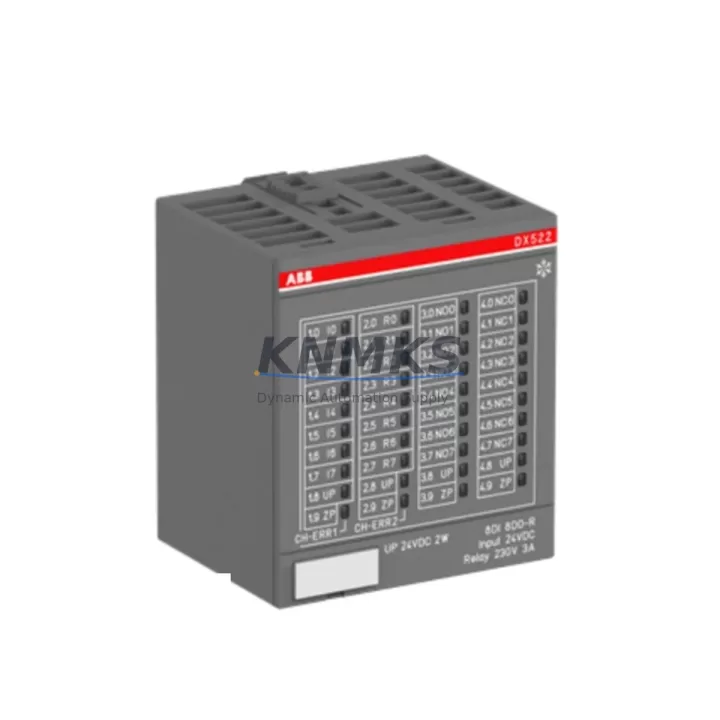
The ABB DX522-XC (Part No. 1SAP445200R0001) is a 16-channel digital input / 16-channel digital output module engineered for the ABB AC500-XC extreme-condition PLC platform. Designed to operate reliably in harsh industrial environments — including wide temperature ranges, high humidity, vibration, and corrosive atmospheres — this module is a critical spare part for maintenance engineers managing continuous production lines, process automation systems, and outdoor control cabinets.
At KNMKS, every DX522-XC unit is sourced as an original ABB component, individually inspected, and shipped with full traceability documentation. Our support terms confirmed by quotation and pre-shipment functional testing ensure that your replacement module performs to factory specification from the moment it is installed.
Spare Maintenance Table
| Parameter | Specification |
|---|---|
| Part Number | 1SAP445200R0001 |
| Model | DX522-XC |
| Brand | ABB |
| Series | AC500-XC (Extreme Condition) |
| Product Type | Digital I/O Module (16DI / 16DO) |
| Input Channels | 16 × Digital Input (24 VDC) |
| Output Channels | 16 × Digital Output (transistor, 24 VDC / 0.5 A per channel) |
| Operating Temperature | −40 °C to +70 °C (XC-rated extreme condition) |
| Protection Rating | IP20 (module); conformal coating for XC environments |
| Communication Interface | AC500 internal I/O bus (backplane-mounted) |
| Power Supply | Supplied via AC500 CPU/backplane bus |
| Weight | 177 g |
| Country of Origin | Germany |
| Compatibility | ABB AC500-XC CPU modules (PM5xx-XC series), AC500-XC expansion backplanes |
| Installation | DIN-rail mounted via AC500-XC backplane; tool-free module insertion |
| Maintenance Recommendation | Inspect output transistor health annually; verify 24 VDC bus voltage; check conformal coating integrity in corrosive environments |
| Support terms | 12 Months — KNMKS Spare Parts Guarantee |
Maintenance Planning for Continuous Operation
When a DX522-XC module is flagged during routine point inspection or fault isolation, experienced maintenance engineers know that replacing the I/O module alone is rarely sufficient to restore full system confidence. A disciplined spare-parts review of the surrounding electrical circuit is essential to prevent repeat failures and unplanned downtime.
Power supply integrity is the first checkpoint. The AC500-XC backplane draws regulated 24 VDC from the system power supply unit — typically an ABB CP-E or equivalent industrial DIN-rail PSU. Voltage ripple or transient spikes are a leading cause of premature I/O module failure. Verify output voltage under load and replace aging PSUs proactively as part of any I/O module swap.
Backplane and CPU module health must be confirmed before commissioning a replacement DX522-XC. The AC500-XC backplane (TB5xx-XC series) provides the internal bus connection between the CPU — such as the PM591-XC or PM592-XC — and all expansion I/O modules. A damaged backplane connector or a CPU with corrupted I/O configuration will prevent the new module from being recognized. Always read the CPU diagnostic log and confirm the I/O bus status before declaring the module as the root cause.
Field wiring and terminal blocks deserve careful inspection. The 16 digital inputs and 16 digital outputs of the DX522-XC connect to field devices — sensors, solenoid valves, motor contactors, and pilot lights — through terminal blocks or marshalling panels. Loose terminations, corroded contacts, or undersized conductors can cause intermittent I/O faults that mimic module failure. Inspect all field-side terminals and replace any degraded terminal blocks during the maintenance window.
Relay output modules and signal isolation are common companions to the DX522-XC in mixed-signal control cabinets. Where the transistor outputs of the DX522-XC drive inductive loads or interface with higher-voltage circuits, interposing relay modules or signal isolators are used to protect the PLC output stage. During a DX522-XC replacement, inspect these relay modules for contact wear and verify that signal isolators are functioning within specification — a failed isolator can damage a new I/O module within hours of commissioning.
Communication modules and HMI connectivity should be verified after any I/O module replacement. In AC500-XC systems, fieldbus communication modules such as the CM572-DP (PROFIBUS-DP) or CM589-PNIO (PROFINET) handle upstream communication to SCADA or DCS systems. Confirm that the communication module status LEDs indicate normal operation and that the HMI — often an ABB CP600 or CP400 panel — is displaying live process values correctly after the DX522-XC is brought online.
Fuse protection and circuit breakers in the 24 VDC distribution circuit should be tested and replaced if there is any evidence of overcurrent events. A blown fuse protecting the DX522-XC output group is a symptom, not the root cause — always trace the fault to the field device before restoring power to the new module.
Maintaining a minimum stock of one DX522-XC per AC500-XC control system is recommended for facilities with critical uptime requirements. For multi-cabinet installations or redundant control architectures, a stock of two to three units per site ensures that emergency replacement can be completed within a single shift, without waiting for international freight.
Site Replacement Workflow
Step 1 — Isolate and document. Before removing the faulty DX522-XC, record the current I/O mapping, channel assignments, and any force values active in the CPU. Export the AC500 project from Automation Builder if a backup is not already current. Isolate the 24 VDC supply to the affected I/O group and lock out the field circuits connected to the module’s output channels.
Step 2 — Physical replacement. The DX522-XC is a backplane-mounted module with a tool-free locking mechanism. Release the module latch, slide the faulty unit out of the backplane slot, and insert the replacement module until the latch clicks. Confirm that the module is fully seated — a partially inserted module will not establish a reliable bus connection and may generate intermittent faults.
Step 3 — Configuration verification. Power up the system and observe the CPU diagnostic display. In most AC500-XC configurations, the CPU will automatically recognize the replacement DX522-XC and restore the I/O mapping from the stored project. If the module is not recognized, use ABB Automation Builder to perform a hardware scan and re-download the I/O configuration.
Step 4 — Functional test. Before returning the system to production, perform a channel-by-channel functional test. Activate each digital input from the field device and confirm the corresponding status bit in the CPU. Energize each digital output channel and verify the field device response. Document the test results and update the maintenance log.
Step 5 — Return to service. Remove all lockouts, restore the 24 VDC supply, and confirm that the HMI and SCADA system are displaying correct process values. Notify the operations team that the control system has been restored and monitor the first production cycle for any residual faults.
The DX522-XC is a direct replacement for older AC500-XC I/O modules in the same form factor. Where legacy modules have been discontinued, the DX522-XC provides a compatible upgrade path that preserves the existing backplane, wiring, and CPU configuration — minimizing engineering effort and reducing the risk of introducing new compatibility issues during an emergency repair.
Spare Parts Support FAQ
Q1: Is the DX522-XC (1SAP445200R0001) compatible with all AC500-XC CPU modules?
The DX522-XC is designed for the ABB AC500-XC platform and is compatible with PM5xx-XC series CPU modules, including the PM591-XC and PM592-XC, when used with AC500-XC expansion backplanes. Compatibility with specific firmware versions should be confirmed against the ABB AC500-XC hardware compatibility matrix. KNMKS technical support can assist with compatibility verification prior to purchase.
Q2: What pre-shipment testing does KNMKS perform on the DX522-XC?
Every DX522-XC unit shipped by KNMKS undergoes visual inspection for physical damage, verification of part number and revision markings, and functional power-on testing where applicable. Units are packed in anti-static packaging with original or equivalent protective materials. A support terms confirmed by quotation cover defects in materials and workmanship from the date of shipment.
Q3: How many DX522-XC units should we stock for a multi-cabinet AC500-XC installation?
For facilities with continuous production requirements, we recommend maintaining a minimum of one DX522-XC per control cabinet as an on-site cold spare. For critical processes where downtime cost exceeds the cost of additional inventory, stocking two units per site provides a safety margin that covers simultaneous failures or damage during replacement. KNMKS offers volume pricing for spare parts inventory programs.
Q4: Can KNMKS guarantee long-term supply of the DX522-XC for aging AC500-XC systems?
KNMKS maintains sourcing relationships with verified supply channels and certified secondary-market suppliers to support long-lifecycle industrial automation systems. We actively monitor ABB product lifecycle announcements and can advise customers on end-of-life timelines and recommended replacement strategies. For customers managing aging AC500-XC installations, we recommend establishing a blanket order or annual supply agreement to secure stock before availability becomes constrained.
© 2026 KNMKS. All rights reserved.
Original Source: https://knmks.com
Contact: admin@knmks.com | +86 18359268345
Product Identification
- Brand / Ecosystem
-
ABB
ABB - Model / Series
-
DX522-XC 1SAP445200R0001
AC500 Series - Product Family
- PLCs & Controllers
- Availability Status
- Available on request after model and quantity confirmation
- Inquiry Type
- B2B RFQ, replacement inquiry and project spare-part request
- Pre-Quote Check
- Exact SKU, brand, series, quantity, nameplate photos and destination country are checked before quotation
System Path
Where this product fits in the KNMKS automation structure.
Specification & Inquiry Focus
- Control platform
- PLC, PAC and modular controllers
- Common needs
- CPU, rack, power and I/O expansion
- Project support
- Replacement, cabinet build and maintenance
Buyer Confirmation
Information KNMKS checks before replying.
- Exact model
- DX522-XC 1SAP445200R0001
- Brand / ecosystem
- ABB
- Product family
- PLCs & Controllers
- Application note
- Replacement, maintenance, project build or spare-part list
- Useful photos
- Nameplate, installed unit, cabinet layout or connector side
- Delivery details
- Quantity, destination country and target schedule
Document Support
Files and notes can be confirmed during quotation.
- Product photos or nameplate confirmation when available
- Packing and delivery notes before quotation confirmation
- Support scope and delivery terms confirmed per inquiry
- Export document coordination for qualified B2B requests
Inquiry Support
- Model cross-checking before quotation
- CPU, power, rack and expansion module matching
- Support for replacement and project inquiry
What to Send Us
- Brand and exact model number: ABB DX522-XC 1SAP445200R0001
- Quantity and required delivery time
- Application, replacement requirement or nameplate photo
- Destination country and shipping preference
RFQ Preparation
This is a product inquiry page built for RFQ communication.
Fast Model Check
Send this model to KNMKS for confirmation.
Include quantity, destination country and photos if this is a maintenance replacement. The inquiry will be saved with a reference number after submission.
Brand & Compatibility Note
KNMKS displays automation product information for well-known industrial brand ecosystems and compatible replacement references. Brand names are used for product identification and compatibility reference only; final availability and commercial terms are confirmed per quotation.
 Manufacturing
 Machine Tools
 Packaging
 Energy & Power



 HMI & Displays
 Servo Systems
 Variable Frequency Drives
 Sensors