
Overview
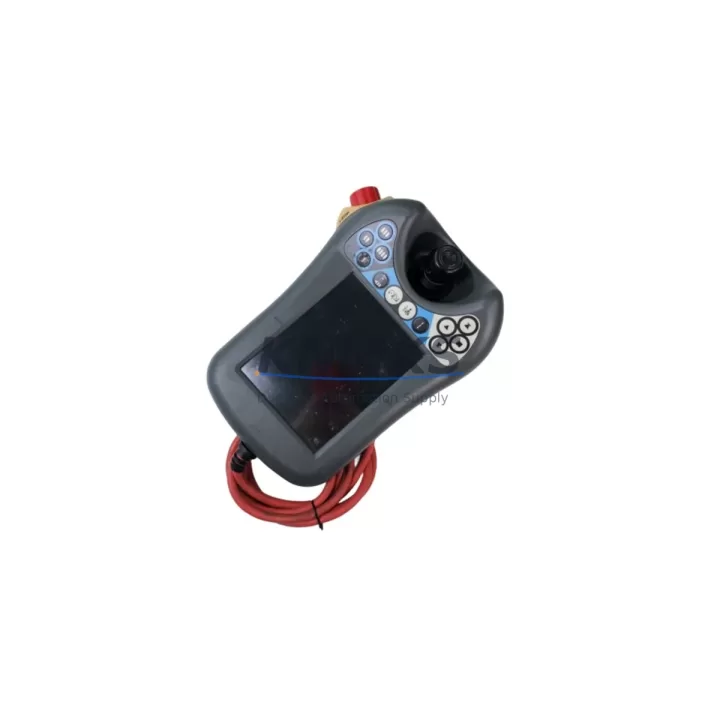
ABB DSQC679 Maintenance-Proven Spare Part for Factory Uptime
The ABB DSQC679 FlexPendant is the primary human-machine interface for ABB IRC5 robot controllers, serving as the critical operator terminal for jogging, programming, and fault diagnostics across a wide range of industrial robot installations. In high-throughput manufacturing environments — automotive body shops, arc welding cells, material handling lines, and palletizing stations — the DSQC679 is a single point of failure that demands immediate spare availability. A failed teach pendant can halt an entire production cell within minutes, making proactive stock of the DSQC679 one of the most cost-effective decisions a maintenance or reliability engineer can make.
This listing supplies an original ABB DSQC679 FlexPendant sourced from authorized channels, pre-shipment tested for full touchscreen response, emergency stop circuit integrity, enable device function, and IRC5 communication handshake. Each unit ships with a support terms confirmed by quotation covering manufacturing defects and functional failure under normal industrial operating conditions. Units are available from stock and dispatched with full documentation to support incoming inspection and maintenance records.
Spare Maintenance Table
| Parameter | Specification |
|---|---|
| Part Number / SKU | DSQC679 |
| Brand | ABB |
| Series | IRC5 Robot Controller |
| Product Type | FlexPendant / Robot Teach Pendant |
| Display | 6.4-inch color touchscreen, 640×480 resolution |
| Communication Interface | Ethernet (RJ45) to IRC5 controller |
| Emergency Stop | Dual-channel, safety-rated E-stop button |
| Enable Device | 3-position enabling device (deadman switch) |
| Operating Temperature | 0°C to +45°C |
| IP Rating | IP54 |
| Weight | Approx. 420 g |
| Compatibility | ABB IRC5 Single / Dual Cabinet, IRC5 Compact, IRC5 Panel Mounted Controller |
| Origin | Sweden |
| Support terms | 12 Months — covers manufacturing defects and functional failure |
| Pre-Shipment Test | Touchscreen, E-stop circuit, enable device, IRC5 communication handshake |
| Condition | Original spare — new or fully refurbished to OEM specification |
Maintenance Planning for Continuous Operation
When a DSQC679 FlexPendant is flagged for replacement during a scheduled maintenance window or after an unplanned fault, the replacement scope should extend beyond the pendant itself. The IRC5 controller cabinet houses several interdependent components that are subject to the same operational age and environmental stress. Maintenance engineers should simultaneously inspect the DSQC652 Main Computer Unit, which manages all robot motion and I/O coordination — a degraded main computer can cause erratic pendant behavior that is often misdiagnosed as a pendant fault. The DSQC611 Drive Unit and associated axis computer boards should be checked for thermal damage or capacitor aging, particularly in high-cycle welding or press-tending applications.
The IRC5 controller’s internal 24 VDC power supply module (DSQC661 or DSQC662) is a common failure point that can cause intermittent pendant disconnections and touchscreen freezes. Verifying stable DC bus voltage before commissioning a replacement DSQC679 prevents repeat failures. The DSQC643 I/O module and any DSQC377 safety boards in the safety chain should also be inspected, as E-stop circuit faults are sometimes rooted in the safety relay logic rather than the pendant hardware itself.
For robot cells integrated with external PLCs or SCADA systems via DeviceNet, PROFIBUS, or EtherNet/IP communication adapters (such as the DSQC688 or DSQC378), confirm that the fieldbus communication is stable after pendant replacement, as a controller reboot during swap can reset network node addresses. Additionally, inspect the teach pendant cable and connector (3HAC031683-001) — cable jacket abrasion near the cabinet entry point is a leading cause of intermittent pendant faults and should be replaced proactively when the pendant itself is changed.
For sites running multiple IRC5 cells, maintaining a minimum of one DSQC679 per three robots as a rotating spare is a widely adopted benchmark in automotive and electronics manufacturing. Pairing this with a documented annual inspection checklist covering pendant cable condition, touchscreen calibration, E-stop response time, and enable device spring tension ensures that spare units are rotated into service before degradation causes unplanned downtime.
Site Replacement Workflow
Step 1 — Isolate and document: Place the IRC5 controller in manual mode at reduced speed. Record the current robot program, tool data, and work object data from the FlexPendant before disconnecting. Back up the system configuration via RobotStudio or the pendant’s backup function if the unit is still partially functional.
Step 2 — Safe disconnection: Power down the IRC5 controller via the main switch. Wait for the DC bus to discharge (minimum 5 minutes). Disconnect the DSQC679 cable from the controller cabinet connector — do not pull by the cable jacket. Inspect the connector pins for corrosion or mechanical damage.
Step 3 — Install replacement unit: Connect the replacement DSQC679 to the controller. Power on the IRC5 and verify that the FlexPendant boots to the ABB startup screen within 60 seconds. Confirm the robot type, controller serial number, and RobotWare version displayed on the pendant match the system records.
Step 4 — Functional verification: Test the E-stop button (both channels), the 3-position enable device, and jogging in all axes at reduced speed. Verify touchscreen calibration and confirm that all I/O signals, safety outputs, and fieldbus status indicators are normal before returning the cell to automatic production mode.
Step 5 — Update maintenance records: Log the replacement date, unit serial number, and test results in the site CMMS. Tag the replaced unit for fault analysis or return to supplier under support terms if applicable.
This workflow minimizes IRC5 cell downtime to under 30 minutes for a prepared maintenance team and eliminates the risk of configuration loss or safety circuit errors during the swap.
Spare Parts Support FAQ
Q1: Is this DSQC679 compatible with all IRC5 controller variants?
The DSQC679 FlexPendant is compatible with the full IRC5 family, including IRC5 Single Cabinet, IRC5 Dual Cabinet, IRC5 Compact, and IRC5 Panel Mounted Controller configurations. It is not compatible with the older S4C+ or IRC5P (paint) variants that use different pendant interfaces. If you are unsure of your controller variant, provide the controller serial number and we will confirm compatibility before shipment.
Q2: What does the support terms confirmed by quotation cover and how is it claimed?
The support terms confirmed by quotation cover manufacturing defects and functional failure under normal industrial operating conditions from the date of shipment. It does not cover physical damage from drops, liquid ingress beyond IP54 rating, or unauthorized repair attempts. To claim support terms, contact admin@knmks.com with the order number, fault description, and photos of the unit. Replacement or repair is arranged within 5 business days of claim approval.
Q3: How do you verify the unit before shipment?
Every DSQC679 unit undergoes a pre-shipment functional test covering touchscreen response across the full display area, dual-channel E-stop circuit continuity, 3-position enable device operation, and IRC5 Ethernet communication handshake. Test records are available upon request and can be included with the shipment documentation for incoming inspection purposes.
Q4: Can you support long-term or blanket purchase orders for ongoing spare parts programs?
Yes. KNMKS supports annual spare parts programs, blanket purchase orders, and consignment stock arrangements for maintenance teams managing multiple IRC5 robot cells. Long-term supply agreements include guaranteed stock reservation, fixed pricing for the contract period, and priority dispatch. Contact admin@knmks.com or +86 18359268345 to discuss your site’s spare parts requirements.
© 2026 KNMKS. All rights reserved.
Original Source: https://knmks.com
Contact: admin@knmks.com | +86 18359268345
Product Identification
- Brand / Ecosystem
-
ABB
ABB - Model / Series
-
LQ064V3DG05-A-1Z000700-P60B13120DBPD2-W-L01494F-DSQC679
IRC5 Series - Product Family
- Other Components
- Availability Status
- Available on request after model and quantity confirmation
- Inquiry Type
- B2B RFQ, replacement inquiry and project spare-part request
- Pre-Quote Check
- Exact SKU, brand, series, quantity, nameplate photos and destination country are checked before quotation
System Path
Where this product fits in the KNMKS automation structure.
Specification & Inquiry Focus
- Component range
- Breakers, terminals and cabinet accessories
- Common needs
- Model, photo and installation requirement
- Project support
- Maintenance and mixed spare-part inquiry
Buyer Confirmation
Information KNMKS checks before replying.
- Exact model
- LQ064V3DG05-A-1Z000700-P60B13120DBPD2-W-L01494F-DSQC679
- Brand / ecosystem
- ABB
- Product family
- Other Components
- Application note
- Replacement, maintenance, project build or spare-part list
- Useful photos
- Nameplate, installed unit, cabinet layout or connector side
- Delivery details
- Quantity, destination country and target schedule
Document Support
Files and notes can be confirmed during quotation.
- Product photos or nameplate confirmation when available
- Packing and delivery notes before quotation confirmation
- Support scope and delivery terms confirmed per inquiry
- Export document coordination for qualified B2B requests
Inquiry Support
- Mixed automation spare parts inquiry
- Cabinet component and accessory support
- Model identification from photos or labels
What to Send Us
- Brand and exact model number: ABB LQ064V3DG05-A-1Z000700-P60B13120DBPD2-W-L01494F-DSQC679
- Quantity and required delivery time
- Application, replacement requirement or nameplate photo
- Destination country and shipping preference
RFQ Preparation
This is a product inquiry page built for RFQ communication.
Fast Model Check
Send this model to KNMKS for confirmation.
Include quantity, destination country and photos if this is a maintenance replacement. The inquiry will be saved with a reference number after submission.
Brand & Compatibility Note
KNMKS displays automation product information for well-known industrial brand ecosystems and compatible replacement references. Brand names are used for product identification and compatibility reference only; final availability and commercial terms are confirmed per quotation.
 Manufacturing
 Machine Tools
 Packaging
 Energy & Power

 PLCs & Controllers
 HMI & Displays
 Servo Systems
 Variable Frequency Drives