
Overview
ABB DSQC679 3HAC028357-024 IRC5 FlexPendant Upgrade: Migration-Ready Replacement for Legacy Robot Control Systems
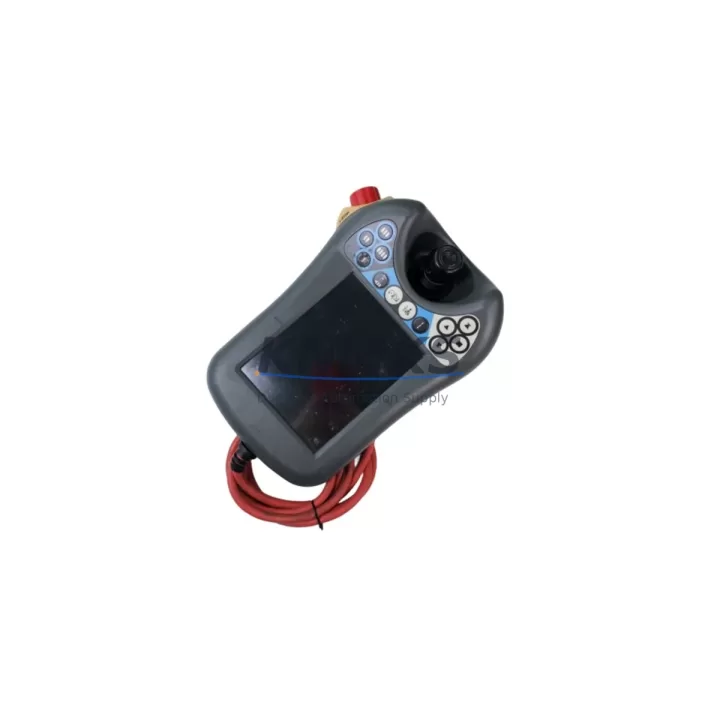
The ABB DSQC679 (part number 3HAC028357-024) is the standard FlexPendant teach pendant for ABB IRC5 robot controller cabinets. As production lines age and original OEM units reach end-of-service life, the DSQC679 has become one of the most frequently requested replacement components in robotic cell retrofits, line modernization projects, and emergency spare part programs across automotive, electronics, and general manufacturing sectors.
This unit ships from verified stock, has passed pre-shipment functional testing, and is backed by a support terms confirmed by quotation covering hardware defects and interface failures. Whether you are replacing a failed pendant on an active production line or building a spare parts inventory for a multi-robot IRC5 installation, the DSQC679 provides a direct, wiring-compatible drop-in solution without requiring controller firmware changes or HMI screen reconfiguration in most standard IRC5 deployments.
The DSQC679 connects to the IRC5 controller via the standard FlexPendant interface cable (typically 3HAC031683-001 or equivalent), and communicates over the internal IRC5 device network. Before installation, engineers should confirm the RobotWare version running on the IRC5 main computer — the DSQC679 is compatible with RobotWare 5.x and 6.x releases. Units running RobotWare 4.x or earlier S4C+ platforms require a different pendant model and are not compatible with this SKU.
Terminal wiring on the IRC5 cabinet side does not require modification. The pendant connector is keyed and polarized, eliminating mis-insertion risk during field replacement. However, technicians should inspect the cable strain relief and connector housing on the existing cable before reuse, as cable fatigue is a common failure mode in high-cycle pendant applications.
Migration Compatibility Table
| Parameter | Detail |
|---|---|
| SKU | DSQC679 / 3HAC028357-024 |
| Compatible Controller | ABB IRC5 Single / Dual Cabinet |
| RobotWare Compatibility | RobotWare 5.x, 6.x (not compatible with S4C+ / RW4.x) |
| Interface Connection | FlexPendant port on IRC5 controller front panel |
| Cable Compatibility | 3HAC031683-001 or equivalent IRC5 pendant cable |
| Display | 6.4-inch color touchscreen, 640×480 resolution |
| Communication Protocol | IRC5 internal device network (proprietary ABB) |
| Mounting / Installation Space | Standard IRC5 pendant hook; no cabinet modification required |
| Replacement for Discontinued | DSQC679 replaces earlier DSQC615 / DSQC616 in IRC5 upgrades |
| Pre-Shipment Testing | Yes — functional power-on and interface verification |
| Support terms | 12 Months — hardware defects and interface failures covered |
| Commissioning Note | Confirm RobotWare version; re-pair pendant to controller after swap |
Retrofit Planning for Existing Automation Systems
A successful IRC5 pendant replacement requires more than a physical swap. In most retrofit scenarios, the DSQC679 is one component in a broader system recovery or upgrade workflow. Engineers planning a robotic cell modernization should audit the full IRC5 cabinet configuration before ordering replacement parts.
The IRC5 main computer (DSQC1000 or DSQC645, depending on generation) hosts the RobotWare runtime and manages all I/O communication. If the main computer firmware is outdated, a new DSQC679 pendant may display version mismatch warnings on first boot. In these cases, a RobotWare update via the ABB Update Manager is required before the pendant can be fully commissioned. This step is often overlooked in emergency replacement scenarios and can extend downtime if not planned in advance.
I/O expansion in IRC5 cabinets is typically handled through DeviceNet or EtherNet/IP I/O modules such as the DSQC651 (DeviceNet) or DSQC688 (EtherNet/IP). When retrofitting a pendant on a system that also has degraded I/O modules, it is advisable to address both simultaneously to avoid a second unplanned shutdown. Signal isolation between the robot controller and field devices should also be verified — particularly in older installations where DSQC355 or similar signal conditioning boards are present.
For installations where the IRC5 cabinet communicates with a SCADA system or upstream PLC via Profibus or EtherNet/IP, the communication link should be tested after pendant replacement to confirm that the controller’s network identity and IP configuration were not reset during the swap. The IRC5 system parameters, including tool data, work object definitions, and safety zone configurations, are stored on the main computer and are not affected by a pendant replacement — but a backup via the DSQC679’s FlexPendant backup function is strongly recommended before any intervention.
HMI screens connected to the IRC5 via the Panel Board (DSQC1030 or equivalent) do not require reconfiguration after a pendant swap. However, if the retrofit is part of a broader upgrade that includes replacing the Panel Board or upgrading the safety controller (DSQC400 series), the HMI I/O mapping should be re-verified against the original electrical drawings.
Downtime Control During System Migration
Minimizing production downtime during a pendant replacement or broader IRC5 retrofit is the primary concern for maintenance engineers. The DSQC679 replacement procedure, when properly prepared, can be completed in under 30 minutes on a standard IRC5 single-cabinet installation. The following approach is recommended for controlled downtime management:
Before shutdown, use the existing pendant to perform a full system backup — saving all RAPID programs, system parameters, I/O configurations, and safety settings to a USB drive via the FlexPendant backup menu. This backup is critical: it protects the original program logic and allows rapid restoration if the new pendant or any associated component does not initialize correctly.
After the physical pendant swap, power the IRC5 cabinet back on and allow the controller to complete its boot sequence before connecting the new DSQC679. The pendant will prompt for pairing confirmation on first connection. Once paired, verify that all RAPID tasks load correctly, that I/O signals are active, and that the robot can be jogged in manual mode before returning the cell to automatic operation.
For multi-robot cells where several IRC5 controllers share a common network, it is advisable to perform pendant replacements one controller at a time, keeping the remaining robots in a safe hold state rather than a full E-stop, to preserve production continuity on unaffected stations. This approach reduces total line downtime and allows the maintenance team to validate each replacement before proceeding to the next unit.
All DSQC679 units supplied by KNMKS are tested prior to shipment. In-stock availability means same-day or next-day dispatch is possible for urgent replacement orders, directly supporting downtime reduction targets in critical production environments.
Retrofit Support FAQ
Q: Is the DSQC679 (3HAC028357-024) a direct replacement for a failed IRC5 FlexPendant?
A: Yes. The DSQC679 is the standard FlexPendant for IRC5 controllers running RobotWare 5.x and 6.x. It connects via the existing pendant cable and does not require cabinet wiring changes. Confirm your RobotWare version before installation to ensure compatibility.
Q: What commissioning steps are required after installing the DSQC679?
A: After physical installation, power on the IRC5 and allow the controller to boot fully before connecting the pendant. The system will prompt for pendant pairing. Once paired, verify RAPID program loading, I/O signal status, and manual jog function before returning to automatic mode. A pre-swap system backup is strongly recommended.
Q: Does KNMKS provide pre-shipment testing for the DSQC679?
A: Yes. Every DSQC679 unit undergoes functional power-on and interface verification before dispatch. Units are shipped with a support terms confirmed by quotation covering hardware defects and interface failures. In-stock units are available for same-day or next-day dispatch.
Q: Can the DSQC679 be used to replace older ABB teach pendants from S4C+ systems?
A: No. The DSQC679 is designed exclusively for IRC5 architecture and is not compatible with S4C+ or earlier ABB controller platforms. If you are migrating from an S4C+ system to IRC5, the full controller cabinet upgrade is required, after which the DSQC679 becomes the correct pendant for the new platform.
© 2026 KNMKS. All rights reserved.
Original Source: https://knmks.com
Contact: admin@knmks.com | +86 18359268345
Product Identification
- Brand / Ecosystem
-
ABB
ABB - Model / Series
-
DSQC679 USB3HAC028357-024
IRC5 Series - Product Family
- PLCs & Controllers
- Availability Status
- Available on request after model and quantity confirmation
- Inquiry Type
- B2B RFQ, replacement inquiry and project spare-part request
- Pre-Quote Check
- Exact SKU, brand, series, quantity, nameplate photos and destination country are checked before quotation
System Path
Where this product fits in the KNMKS automation structure.
Specification & Inquiry Focus
- Control platform
- PLC, PAC and modular controllers
- Common needs
- CPU, rack, power and I/O expansion
- Project support
- Replacement, cabinet build and maintenance
Buyer Confirmation
Information KNMKS checks before replying.
- Exact model
- DSQC679 USB3HAC028357-024
- Brand / ecosystem
- ABB
- Product family
- PLCs & Controllers
- Application note
- Replacement, maintenance, project build or spare-part list
- Useful photos
- Nameplate, installed unit, cabinet layout or connector side
- Delivery details
- Quantity, destination country and target schedule
Document Support
Files and notes can be confirmed during quotation.
- Product photos or nameplate confirmation when available
- Packing and delivery notes before quotation confirmation
- Support scope and delivery terms confirmed per inquiry
- Export document coordination for qualified B2B requests
Inquiry Support
- Model cross-checking before quotation
- CPU, power, rack and expansion module matching
- Support for replacement and project inquiry
What to Send Us
- Brand and exact model number: ABB DSQC679 USB3HAC028357-024
- Quantity and required delivery time
- Application, replacement requirement or nameplate photo
- Destination country and shipping preference
RFQ Preparation
This is a product inquiry page built for RFQ communication.
Fast Model Check
Send this model to KNMKS for confirmation.
Include quantity, destination country and photos if this is a maintenance replacement. The inquiry will be saved with a reference number after submission.
Brand & Compatibility Note
KNMKS displays automation product information for well-known industrial brand ecosystems and compatible replacement references. Brand names are used for product identification and compatibility reference only; final availability and commercial terms are confirmed per quotation.
 Manufacturing
 Machine Tools
 Packaging
 Energy & Power



 HMI & Displays
 Servo Systems
 Variable Frequency Drives
 Sensors