
Overview
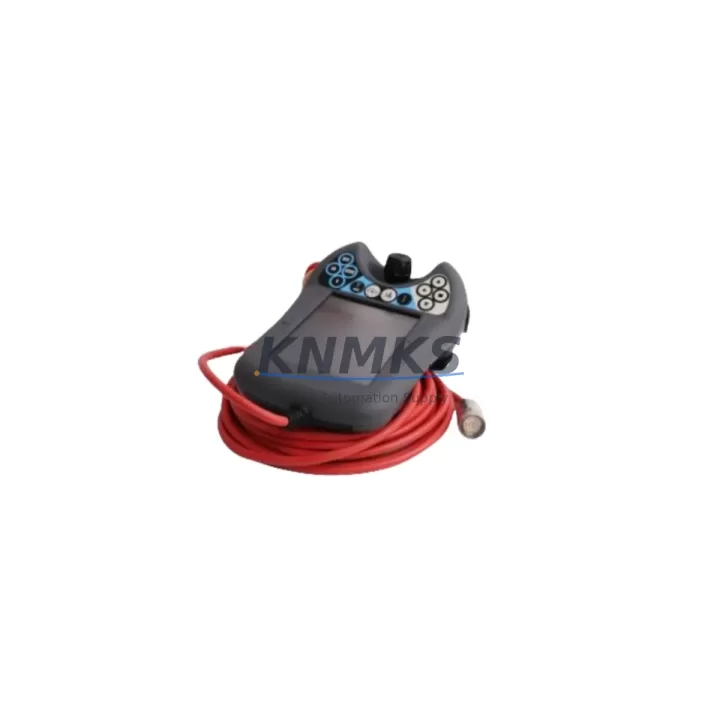
ABB DSQC679 3HAC028357-001 Migration-Ready FlexPendant for Legacy IRC5 Control Systems
The ABB DSQC679 (part number 3HAC028357-001) is a migration-ready FlexPendant teach pendant engineered for direct integration into ABB IRC5 robot controller cabinets. As legacy IRC5 installations approach end-of-support milestones and original DSQC679 units become increasingly difficult to source through standard distribution channels, this unit provides a verified drop-in replacement path that preserves existing program logic, HMI screen layouts, and communication link integrity without requiring controller firmware upgrades or panel rewiring.
For maintenance engineers and automation integrators managing aging robot cells, the DSQC679 addresses one of the most operationally sensitive replacement scenarios in industrial robotics: swapping a teach pendant on a live production line with minimal downtime exposure. The unit connects via the standard IRC5 FlexPendant interface port, maintaining full compatibility with the IRC5 single cabinet, IRC5 dual cabinet, and IRC5 panel-mounted controller variants. Before installation, engineers should confirm the controller firmware version (RobotWare 5.x or 6.x), verify that the enabling device circuit is correctly wired to the safety chain, and check that the emergency stop loop is intact across the pendant and the controller’s safety board.
Migration Compatibility Table
| Parameter | DSQC679 / 3HAC028357-001 | Notes for Retrofit |
|---|---|---|
| Compatible Controller | ABB IRC5 (Single / Dual / Panel) | Verify cabinet variant before ordering |
| Interface Connection | IRC5 FlexPendant Port (proprietary ABB connector) | No adapter required for standard IRC5 port |
| RobotWare Compatibility | RobotWare 5.x / 6.x | Confirm firmware version on DSQC652 or DSQC1000 main computer |
| Communication Protocol | ABB proprietary FlexPendant protocol over USB/Ethernet hybrid link | No protocol migration required |
| Safety Circuit | Dual-channel enabling device + E-stop | Verify safety chain continuity before commissioning |
| HMI Screen Compatibility | Full compatibility with existing FlexPendant UI screens | No screen reconfiguration required |
| Installation Space | Standard IRC5 pendant hook / bracket mount | Confirm bracket condition; replace if corroded |
| Program Logic Retention | RAPID programs unaffected by pendant swap | Back up RAPID modules before replacement |
| Pre-Shipment Testing | Yes — functional and safety circuit verified | Test report available on request |
| Support terms | support terms confirmed by quotation | Covers hardware defects under normal operating conditions |
Retrofit Planning for Existing Automation Systems
A successful DSQC679 retrofit begins well before the physical swap. Integrators working on IRC5-based robot cells should start by auditing the full controller cabinet configuration. The IRC5 main computer — typically a DSQC652 or the newer DSQC1000 — determines which RobotWare version is active and whether the FlexPendant firmware on the replacement unit is aligned. In most cases, the DSQC679 ships with firmware that is compatible across the RobotWare 5.x and 6.x branches, but confirming this against the controller’s system parameters file (SYS.CFG) eliminates commissioning surprises.
Beyond the pendant itself, the retrofit scope often extends to adjacent components. The IRC5 axis computer (DSQC668 or DSQC673) manages drive communication and should be inspected for fault logs that may indicate pre-existing issues unrelated to the pendant. If the robot cell uses an ABB DSQC378B or DSQC377B I/O module for digital signal routing, verify that the I/O configuration in the RobotWare system matches the physical wiring before restarting the controller after the pendant swap. Mismatched I/O addresses are a common source of post-replacement faults that are incorrectly attributed to the new pendant.
For cells that include an ABB CP600 or CP400 operator panel alongside the FlexPendant, confirm that the panel’s communication link to the IRC5 controller remains active during the pendant replacement window. Some older IRC5 configurations route operator panel signals through the FlexPendant bus, which can cause a temporary loss of panel functionality if the pendant is disconnected without first placing the controller in manual mode. Placing the system in manual reduced speed (250 mm/s) before disconnecting the old DSQC679 is the recommended procedure.
If the robot cell is integrated into a broader PLC-controlled production line — for example, using a Siemens S7-300 or Allen-Bradley ControlLogix as the line controller — the IRC5’s DeviceNet or PROFIBUS communication module (such as the DSQC667 DeviceNet adapter) should remain unaffected by the pendant swap. However, it is good practice to notify the line PLC operator before initiating the replacement so that the robot’s ready signal is not misinterpreted as a fault condition by the upstream controller.
Downtime Control During System Migration
Minimizing downtime during a DSQC679 replacement requires a structured pre-swap checklist. Before disconnecting the existing pendant, back up all RAPID modules, system parameters, and EIO configuration files to a USB drive or network share using the FlexPendant’s backup function. This ensures that if the replacement unit triggers an unexpected system restart or configuration mismatch, the original program state can be restored within minutes rather than hours.
The physical swap itself takes under five minutes on a standard IRC5 cabinet: power down the controller to the motors-off state (not a full cabinet power-off, which is unnecessary for a pendant swap), disconnect the old DSQC679 from the FlexPendant port, connect the replacement unit, and restore motors-on state. The IRC5 will automatically detect the new pendant and load the existing HMI configuration. No re-teaching of program points is required, and existing RAPID routines remain fully intact on the DSQC652 or DSQC1000 main computer’s CompactFlash or SSD storage.
For production environments where even a five-minute interruption is unacceptable, a hot-standby pendant strategy can be implemented: keep a pre-tested DSQC679 unit on the shelf, powered and verified, so that the swap can be executed during a scheduled micro-stop rather than an unplanned breakdown. This approach is particularly effective for high-throughput welding or assembly cells where robot uptime directly impacts line OEE. All units supplied by KNMKS are pre-shipment tested and verified against the IRC5 safety circuit specification, reducing the risk of a failed swap on the first attempt.
Retrofit Support FAQ
Q1: Is the DSQC679 (3HAC028357-001) a direct drop-in replacement for the original ABB FlexPendant on IRC5 systems?
Yes. The DSQC679 connects directly to the standard IRC5 FlexPendant interface port without adapters or wiring modifications. Existing RAPID programs, HMI screens, and safety circuit configurations are preserved after the swap. Confirm your RobotWare version (5.x or 6.x) before installation.
Q2: What commissioning steps are required after installing the replacement DSQC679?
After connecting the unit, power the IRC5 to motors-off state and verify that the FlexPendant displays the correct system identity and RobotWare version. Test the enabling device and emergency stop functions before returning the robot to automatic mode. Run a slow-speed (T1) cycle of the existing RAPID program to confirm motion path integrity before resuming production speed.
Q3: How do I verify wiring and terminal compatibility before the swap?
The DSQC679 uses the ABB proprietary FlexPendant connector — no terminal block wiring is involved on the pendant side. However, inspect the FlexPendant cable and connector on the IRC5 cabinet for wear or corrosion, particularly on older installations. If the cable shows damage, replace the cable assembly (ABB part 3HAC031683-001) at the same time to avoid intermittent connection faults after the pendant is replaced.
Q4: What does the support terms confirmed by quotation cover, and what is the stock availability?
All DSQC679 units supplied by KNMKS carry a support terms confirmed by quotation covering hardware defects under normal operating conditions. Units are pre-shipment tested for functional and safety circuit performance. Stock is maintained across multiple regional warehouses to support urgent replacement requirements. Contact admin@knmks.com or +86 18359268345 for current availability and lead time confirmation.
© 2026 KNMKS. All rights reserved.
Original Source: https://knmks.com
Contact: admin@knmks.com | +86 18359268345
Product Identification
- Brand / Ecosystem
-
ABB
ABB - Model / Series
-
DSQC679?3HAC028357-001
IRC5 Series - Product Family
- Other Components
- Availability Status
- Available on request after model and quantity confirmation
- Inquiry Type
- B2B RFQ, replacement inquiry and project spare-part request
- Pre-Quote Check
- Exact SKU, brand, series, quantity, nameplate photos and destination country are checked before quotation
System Path
Where this product fits in the KNMKS automation structure.
Specification & Inquiry Focus
- Component range
- Breakers, terminals and cabinet accessories
- Common needs
- Model, photo and installation requirement
- Project support
- Maintenance and mixed spare-part inquiry
Buyer Confirmation
Information KNMKS checks before replying.
- Exact model
- DSQC679?3HAC028357-001
- Brand / ecosystem
- ABB
- Product family
- Other Components
- Application note
- Replacement, maintenance, project build or spare-part list
- Useful photos
- Nameplate, installed unit, cabinet layout or connector side
- Delivery details
- Quantity, destination country and target schedule
Document Support
Files and notes can be confirmed during quotation.
- Product photos or nameplate confirmation when available
- Packing and delivery notes before quotation confirmation
- Support scope and delivery terms confirmed per inquiry
- Export document coordination for qualified B2B requests
Inquiry Support
- Mixed automation spare parts inquiry
- Cabinet component and accessory support
- Model identification from photos or labels
What to Send Us
- Brand and exact model number: ABB DSQC679?3HAC028357-001
- Quantity and required delivery time
- Application, replacement requirement or nameplate photo
- Destination country and shipping preference
RFQ Preparation
This is a product inquiry page built for RFQ communication.
Fast Model Check
Send this model to KNMKS for confirmation.
Include quantity, destination country and photos if this is a maintenance replacement. The inquiry will be saved with a reference number after submission.
Brand & Compatibility Note
KNMKS displays automation product information for well-known industrial brand ecosystems and compatible replacement references. Brand names are used for product identification and compatibility reference only; final availability and commercial terms are confirmed per quotation.
 Manufacturing
 Machine Tools
 Packaging
 Energy & Power

 PLCs & Controllers
 HMI & Displays
 Servo Systems
 Variable Frequency Drives