
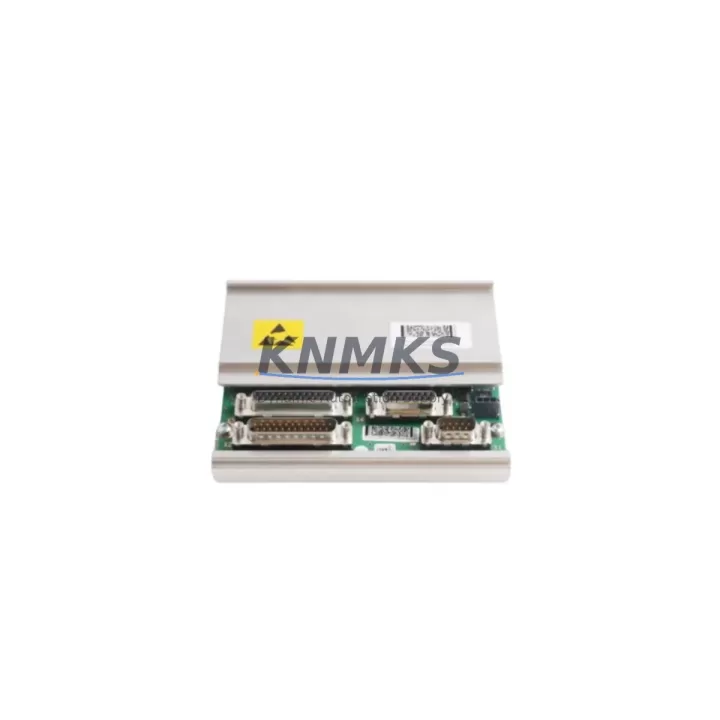
Overview
ABB DSQC668 3HAC029157-001 Maintenance-Proven Spare Part for Factory Uptime
The ABB DSQC668 (part number 3HAC029157-001) is the Axis Computer Module at the core of the IRC5 robot controller cabinet. It manages real-time motion interpolation, axis synchronization, and servo drive communication for ABB industrial robots including the IRB 1600, IRB 2400, IRB 4600, IRB 6640, and IRB 7600 series. When this module fails or degrades, the entire robot cell is taken offline — making a verified, pre-tested replacement unit an essential item in any maintenance spare parts inventory.
This listing provides an original ABB DSQC668 sourced from authorized supply channels, pre-shipment tested for functional integrity, and backed by a support terms confirmed by quotation. It is intended for maintenance engineers, automation technicians, and spare parts procurement teams managing IRC5-based robot installations in automotive, metal fabrication, food processing, electronics assembly, and general manufacturing environments.
Spare Maintenance Table
| Parameter | Specification |
|---|---|
| Part Number | 3HAC029157-001 |
| Model / SKU | DSQC668 |
| Brand | ABB Robotics |
| Series | IRC5 Robot Controller |
| Function | Axis Computer Module — motion control, axis interpolation, servo communication |
| Compatible Controllers | IRC5 Single Cabinet, IRC5 Dual Cabinet, IRC5 Compact |
| Compatible Robot Models | IRB 1600, IRB 2400, IRB 4600, IRB 6640, IRB 7600 (and variants) |
| Communication Interface | Internal IRC5 backplane bus, Ethernet service port |
| Operating Voltage | 24 VDC (supplied via IRC5 power distribution) |
| Operating Temperature | 0°C to +55°C |
| Country of Origin | Sweden |
| Condition | Original / Genuine ABB |
| Pre-Shipment Testing | Yes — functional verification before dispatch |
| Support terms | 12 Months |
| Lead Time | In-stock units ship within 3–5 business days |
| Application Environment | Industrial robot cells, automated welding lines, assembly systems, palletizing stations |
Maintenance Planning for Continuous Operation
The DSQC668 Axis Computer does not operate in isolation. It sits within a tightly integrated IRC5 controller architecture, and a fault in this module often signals stress or wear in adjacent components. Experienced maintenance engineers know that replacing the axis computer alone — without inspecting the surrounding electrical environment — risks repeat failures and extended downtime.
When replacing the DSQC668, the following components should be inspected or tested as part of the same maintenance window:
Power Supply Unit (DSQC661 / 3HAC026253-001): The IRC5 power supply provides regulated 24 VDC to the axis computer and all logic boards. A degraded power supply delivering voltage ripple or transient spikes is a common root cause of axis computer failure. Verify output voltage stability under load before installing the replacement DSQC668.
Drive System and Servo Boards (DSQC673 / DSQC374): The axis computer communicates directly with the drive modules over the internal backplane. If the robot was exhibiting axis-specific errors or overcurrent faults prior to the DSQC668 failure, inspect the corresponding drive board for damage or thermal stress.
Main Computer / FlexPendant Interface (DSQC639 / 3HAC025097-001): The main computer module handles the RobotWare operating system and communicates with the axis computer via the IRC5 backplane. After replacing the DSQC668, confirm that the main computer recognizes the new module and that RobotWare loads without axis configuration errors.
IRC5 Backplane and Internal Cabling: Inspect the backplane connector for bent pins, corrosion, or heat discoloration. Loose or damaged backplane connections are a frequent cause of intermittent axis computer faults that are misdiagnosed as module failure. Also check the internal ribbon cables and power harnesses routed to the DSQC668 slot.
I/O Modules (DSQC651 / DSQC652): If the robot cell uses digital or analog I/O for tooling, safety interlocks, or conveyor synchronization, verify that the I/O modules are communicating correctly after the axis computer replacement. A corrupted I/O configuration can prevent the robot from entering automatic mode even after a successful hardware swap.
Safety Controller and Emergency Stop Circuit: IRC5 controllers integrate safety-rated emergency stop and safeguard monitoring. After any controller board replacement, validate the safety circuit continuity, confirm the safety controller (DSQC400 or equivalent) is logging no faults, and perform a full safety function test before returning the robot to production.
Procurement teams managing multi-robot facilities should consider holding at least one DSQC668 unit per robot family in local spare parts inventory. For facilities running more than five IRC5 controllers, a minimum stock of two units is recommended to cover simultaneous failures during peak production periods.
Site Replacement Workflow
Replacing the DSQC668 in an IRC5 controller is a structured procedure that, when followed correctly, minimizes downtime and eliminates configuration errors.
Step 1 — Preparation: Before opening the controller cabinet, ensure the robot is in manual mode and the main power isolator is locked out. Obtain the current RobotWare version and system backup from the FlexPendant or RobotStudio. Confirm the replacement DSQC668 (3HAC029157-001) matches the hardware revision of the installed unit where applicable.
Step 2 — Cabinet Access and Module Removal: Open the IRC5 cabinet door and locate the axis computer in the upper section of the controller. Disconnect the backplane connector, Ethernet service cable, and any auxiliary connectors. Remove the module using the standard DIN rail or rack mounting release. Note the orientation and cable routing for reinstallation reference.
Step 3 — Installation: Seat the replacement DSQC668 firmly into the backplane connector. Reconnect all cables in the correct sequence. Verify that the module is fully engaged and that no connector pins are misaligned.
Step 4 — System Restore and Verification: Power on the controller and allow RobotWare to initialize. Restore the system backup via the FlexPendant. Confirm that all six axes are recognized, that no axis computer faults appear in the event log, and that the robot can be jogged in manual mode across its full range of motion.
Step 5 — Production Validation: Run the robot through a dry cycle of the production program at reduced speed. Verify path accuracy, I/O response, and safety function operation before returning to full automatic production.
This workflow applies equally to emergency replacements following unplanned failures and to planned replacements during scheduled annual maintenance shutdowns. Having a pre-tested DSQC668 on hand reduces the replacement cycle from days to hours.
Spare Parts Support FAQ
Q1: Is this DSQC668 compatible with all IRC5 controller variants?
The DSQC668 (3HAC029157-001) is designed for the IRC5 Single Cabinet and IRC5 Dual Cabinet controllers. It is also compatible with IRC5 Compact configurations in most installations. Compatibility depends on the RobotWare version and hardware revision of your specific controller. If you are unsure, provide your controller serial number and RobotWare version when placing your order and our technical team will confirm compatibility before shipment.
Q2: What testing is performed before shipment?
Every DSQC668 unit is functionally tested prior to dispatch. Testing includes power-on verification, backplane communication check, and axis interface validation. Units that do not pass functional testing are not dispatched. A test report is available upon request for quality-critical procurement processes.
Q3: What does the support terms confirmed by quotation cover?
The support terms confirmed by quotation cover manufacturing defects and functional failures under normal operating conditions. It does not cover damage resulting from incorrect installation, overvoltage events, physical impact, or use outside the specified operating environment. Support requests are processed with a replacement unit dispatched after fault confirmation — minimizing the time your robot cell is offline.
Q4: Can you support long-term or repeat supply of DSQC668 units?
Yes. For facilities managing fleets of IRC5 robots or running long-term maintenance contracts, we support scheduled spare parts supply agreements. This includes reserved stock allocation, priority dispatch, and consistent pricing over contract periods. Contact our sales team to discuss a supply arrangement aligned with your annual maintenance calendar.
© 2026 KNMKS. All rights reserved.
Original Source: https://knmks.com
Contact: admin@knmks.com | +86 18359268345
Product Identification
- Brand / Ecosystem
-
ABB
ABB - Model / Series
-
DSQC668-3HAC029157-001
IRC5 Series - Product Family
- PLCs & Controllers
- Availability Status
- Available on request after model and quantity confirmation
- Inquiry Type
- B2B RFQ, replacement inquiry and project spare-part request
- Pre-Quote Check
- Exact SKU, brand, series, quantity, nameplate photos and destination country are checked before quotation
System Path
Where this product fits in the KNMKS automation structure.
Specification & Inquiry Focus
- Control platform
- PLC, PAC and modular controllers
- Common needs
- CPU, rack, power and I/O expansion
- Project support
- Replacement, cabinet build and maintenance
Buyer Confirmation
Information KNMKS checks before replying.
- Exact model
- DSQC668-3HAC029157-001
- Brand / ecosystem
- ABB
- Product family
- PLCs & Controllers
- Application note
- Replacement, maintenance, project build or spare-part list
- Useful photos
- Nameplate, installed unit, cabinet layout or connector side
- Delivery details
- Quantity, destination country and target schedule
Document Support
Files and notes can be confirmed during quotation.
- Product photos or nameplate confirmation when available
- Packing and delivery notes before quotation confirmation
- Support scope and delivery terms confirmed per inquiry
- Export document coordination for qualified B2B requests
Inquiry Support
- Model cross-checking before quotation
- CPU, power, rack and expansion module matching
- Support for replacement and project inquiry
What to Send Us
- Brand and exact model number: ABB DSQC668-3HAC029157-001
- Quantity and required delivery time
- Application, replacement requirement or nameplate photo
- Destination country and shipping preference
RFQ Preparation
This is a product inquiry page built for RFQ communication.
Fast Model Check
Send this model to KNMKS for confirmation.
Include quantity, destination country and photos if this is a maintenance replacement. The inquiry will be saved with a reference number after submission.
Brand & Compatibility Note
KNMKS displays automation product information for well-known industrial brand ecosystems and compatible replacement references. Brand names are used for product identification and compatibility reference only; final availability and commercial terms are confirmed per quotation.
 Manufacturing
 Machine Tools
 Packaging
 Energy & Power



 HMI & Displays
 Servo Systems
 Variable Frequency Drives
 Sensors