
Overview
ABB DSQC652 3HAC025917-001 Spare Part for Factory Uptime
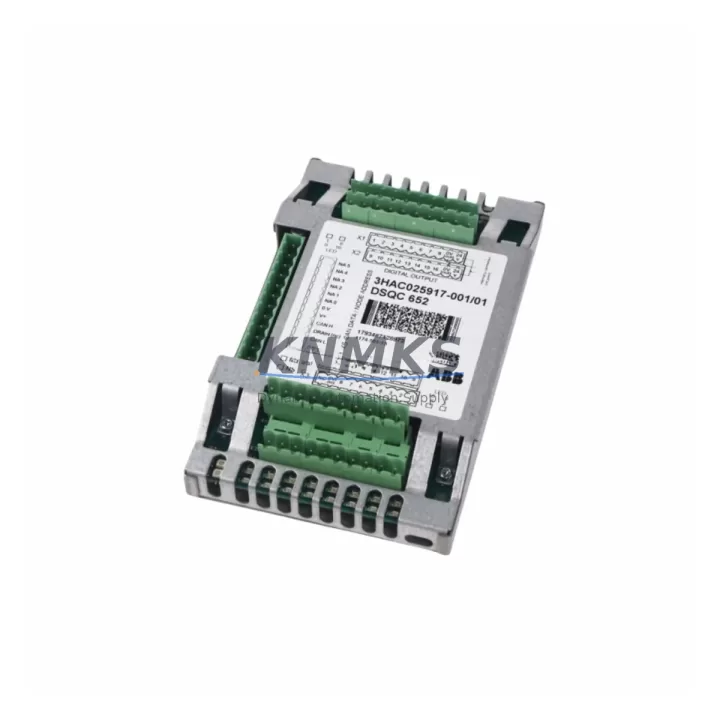
The ABB DSQC652 (part number 3HAC025917-001) is a digital I/O module designed for the ABB IRC5 robot controller family. As a maintenance-proven spare part, it supports 24 VDC digital inputs and outputs essential for signal exchange between the robot controller and peripheral equipment on the production line. Sourced as an original ABB component, each unit is pre-shipment tested and backed by a support terms confirmed by quotation, making it a reliable choice for maintenance engineers managing robot uptime and spare parts inventory in automotive, electronics, food processing, and general manufacturing environments.
When a digital I/O fault is logged in the IRC5 event log — error codes such as 37001 or 37002 indicating I/O communication loss — the DSQC652 is typically the first module to inspect and replace. Its role in routing discrete signals between the controller backplane and field devices means that a failed unit can halt an entire robot cell. Keeping a verified spare on the shelf eliminates the lead time risk associated with sourcing this module during an unplanned outage.
Spare Maintenance Table
| Parameter | Specification |
|---|---|
| Part Number | 3HAC025917-001 |
| Model | DSQC652 |
| Brand | ABB |
| Series | IRC5 Robot Controller |
| Module Type | Digital I/O Module |
| Digital Inputs | 16 x 24 VDC |
| Digital Outputs | 16 x 24 VDC |
| Communication Bus | DeviceNet (internal IRC5 backplane) |
| Supply Voltage | 24 VDC (from IRC5 power supply) |
| Compatible Controllers | IRC5 Single Cabinet, IRC5 Dual Cabinet, IRC5 Panel Mounted |
| Origin | Sweden |
| Weight | 323 g |
| Application Environment | Industrial automation, robot cell integration, PLC/DCS interfacing |
| Condition | Original spare, pre-shipment tested |
| Support terms | 12 months |
| Availability | availability confirmed by RFQ — ready to ship |
Maintenance Planning for Continuous Operation
Replacing the DSQC652 in an IRC5 controller is rarely an isolated task. A thorough site inspection should accompany any I/O module swap to prevent repeat faults and ensure the robot cell returns to full production capacity without secondary failures.
Begin by verifying the IRC5 power supply module (DSQC661 or DSQC662) output voltage. A degraded power supply delivering less than 23.5 VDC to the backplane can cause intermittent I/O faults that mimic a failed DSQC652. Confirm stable voltage before installing the replacement module.
Inspect the DeviceNet communication cable and connectors between the DSQC652 and any external I/O expansion units. Corroded or loose connectors are a common root cause of I/O signal loss in high-vibration environments. Replace the cable assembly if continuity testing reveals resistance above specification.
Check the DSQC643 or DSQC658 I/O gateway module if the IRC5 system uses distributed I/O over Profibus or Profinet. A fault in the gateway can cascade into apparent DSQC652 errors. Confirm the gateway firmware version is compatible with the current RobotWare release.
Review the 24 VDC fuse block and terminal strip supplying field devices connected to the DSQC652 outputs. Blown fuses or loose terminal connections on the field side will prevent output signals from reaching actuators and solenoids even after the module is replaced. A fuse audit at the control cabinet terminal rail is standard practice during any I/O module replacement.
If the IRC5 system interfaces with a Siemens S7 or Allen-Bradley ControlLogix PLC via hardwired I/O, verify the PLC input card channel assignments and signal levels match the DSQC652 output specifications. Mismatched signal levels can damage the new module within hours of installation.
Finally, inspect the IRC5 main computer module (DSQC639) for any active system faults logged prior to the I/O failure. A corrupted system parameter file or a RobotWare configuration error can prevent the DSQC652 from initializing correctly after replacement. A system parameter backup and restore procedure should be part of the commissioning checklist for any IRC5 I/O module replacement.
Site Replacement Workflow
The DSQC652 is a hot-swap-capable module within the IRC5 backplane architecture, but ABB recommends powering down the controller before removal to avoid transient voltage spikes on the backplane bus. Follow this sequence to minimize downtime and ensure a clean handover:
1. Fault Confirmation: Review the IRC5 event log for I/O-related error codes. Confirm the fault is isolated to the DSQC652 and not caused by a field wiring short or upstream power fault. Use the FlexPendant I/O diagnostic screen to verify which channels are non-responsive.
2. System Backup: Perform a full system backup via RobotStudio or the FlexPendant before any hardware change. This preserves the I/O configuration, signal mapping, and RAPID program in the event of a configuration loss during module replacement.
3. Power Down and Module Removal: Switch the IRC5 main switch to OFF. Wait 30 seconds for capacitors to discharge. Remove the DSQC652 by releasing the backplane locking tab and sliding the module out. Note the slot position — the replacement must be installed in the same slot to preserve the DeviceNet node address.
4. Module Installation: Insert the replacement DSQC652 into the same backplane slot. Ensure the module is fully seated and the locking tab engages. Reconnect all field wiring connectors, verifying pin assignments against the original wiring diagram.
5. Power-Up and Verification: Restore power and observe the module status LED. A steady green LED indicates successful initialization. Use the FlexPendant I/O diagnostic screen to confirm all 16 input and 16 output channels are active. Run a dry-cycle test of the robot program before returning the cell to production.
6. Documentation: Record the replacement date, module serial number, and test results in the maintenance log. Update the spare parts inventory to trigger a reorder for the consumed DSQC652 unit.
Spare Parts Support FAQ
Q1: Is this DSQC652 an original ABB part or a third-party compatible?
This is an original ABB DSQC652 (3HAC025917-001) sourced through authorized industrial supply channels. Each unit is inspected and function-tested before shipment. A support terms confirmed by quotation is included from the date of delivery.
Q2: Which IRC5 controller variants is the DSQC652 compatible with?
The DSQC652 is compatible with all IRC5 variants including the IRC5 Single Cabinet, IRC5 Dual Cabinet, and IRC5 Panel Mounted Controller. It is not compatible with the older S4C+ or IRC5 Compact controllers, which use different backplane architectures. Confirm your controller generation before ordering.
Q3: How should we manage DSQC652 inventory for a multi-robot facility?
For facilities operating 5 or more IRC5 robots, maintaining a minimum of 2 DSQC652 units in the on-site spare parts cabinet is recommended. I/O module failures are among the most common unplanned maintenance events in robot cells. A buffer stock of 2 units covers simultaneous failures in adjacent cells and eliminates the risk of extended downtime while waiting for emergency shipment.
Q4: What is the long-term supply outlook for the DSQC652?
The DSQC652 remains an active spare part in the ABB IRC5 ecosystem. We maintain ongoing stock and can support long-term supply agreements for maintenance contracts and annual inspection programs. Contact our team to discuss scheduled delivery arrangements or multi-unit pricing for annual spare parts budgets.
© 2026 KNMKS. All rights reserved.
Original Source: https://knmks.com
Contact: admin@knmks.com | +86 18359268345
Product Identification
- Brand / Ecosystem
-
ABB
ABB - Model / Series
-
DSQC652-3HAC025917-001
IRC5 Series - Product Family
- PLCs & Controllers
- Availability Status
- Available on request after model and quantity confirmation
- Inquiry Type
- B2B RFQ, replacement inquiry and project spare-part request
- Pre-Quote Check
- Exact SKU, brand, series, quantity, nameplate photos and destination country are checked before quotation
System Path
Where this product fits in the KNMKS automation structure.
Specification & Inquiry Focus
- Control platform
- PLC, PAC and modular controllers
- Common needs
- CPU, rack, power and I/O expansion
- Project support
- Replacement, cabinet build and maintenance
Buyer Confirmation
Information KNMKS checks before replying.
- Exact model
- DSQC652-3HAC025917-001
- Brand / ecosystem
- ABB
- Product family
- PLCs & Controllers
- Application note
- Replacement, maintenance, project build or spare-part list
- Useful photos
- Nameplate, installed unit, cabinet layout or connector side
- Delivery details
- Quantity, destination country and target schedule
Document Support
Files and notes can be confirmed during quotation.
- Product photos or nameplate confirmation when available
- Packing and delivery notes before quotation confirmation
- Support scope and delivery terms confirmed per inquiry
- Export document coordination for qualified B2B requests
Inquiry Support
- Model cross-checking before quotation
- CPU, power, rack and expansion module matching
- Support for replacement and project inquiry
What to Send Us
- Brand and exact model number: ABB DSQC652-3HAC025917-001
- Quantity and required delivery time
- Application, replacement requirement or nameplate photo
- Destination country and shipping preference
RFQ Preparation
This is a product inquiry page built for RFQ communication.
Fast Model Check
Send this model to KNMKS for confirmation.
Include quantity, destination country and photos if this is a maintenance replacement. The inquiry will be saved with a reference number after submission.
Brand & Compatibility Note
KNMKS displays automation product information for well-known industrial brand ecosystems and compatible replacement references. Brand names are used for product identification and compatibility reference only; final availability and commercial terms are confirmed per quotation.
 Manufacturing
 Machine Tools
 Packaging
 Energy & Power



 HMI & Displays
 Servo Systems
 Variable Frequency Drives
 Sensors