
Overview
ABB DSQC651 Migration-Ready Digital I/O for Legacy Control Systems
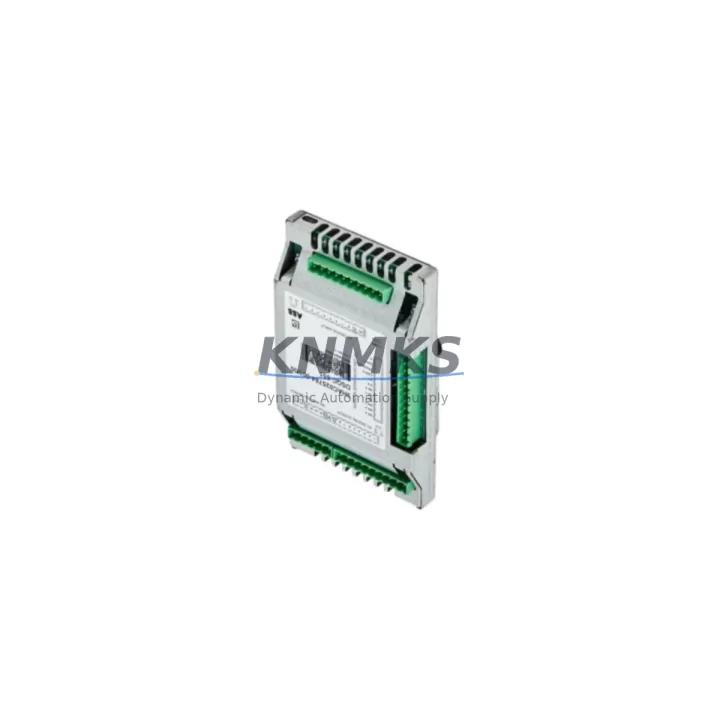
The ABB DSQC651 (also referenced as DSQC651A) is a migration-ready Digital I/O Module engineered for IRC5 robot controller platforms. As legacy automation lines face increasing pressure from discontinued spare parts and aging control architectures, the DSQC651 serves as a verified drop-in replacement that preserves existing wiring infrastructure, program logic, and HMI configurations without requiring a full system overhaul. Whether you are managing a planned retrofit or responding to an unplanned failure on a production line, this module is stocked, tested, and ready to ship with a support terms confirmed by quotation.
The DSQC651 provides 16 digital inputs and 16 digital outputs, interfacing directly with the IRC5 controller backplane via the standard ABB internal bus. Its compact form factor fits the original mounting slot without mechanical modification, and the terminal block pinout is fully compatible with existing field wiring harnesses. Engineers migrating from earlier IRC5 configurations or replacing a failed DSQC651A unit can complete the swap without rewiring the control cabinet, significantly reducing planned downtime windows.
Before installation, technicians should verify the power supply capacity of the IRC5 cabinet — particularly when the DSQC651 is being added alongside other expansion modules such as the DSQC652 analog I/O module or the DSQC377B conveyor tracking board. The IRC5 internal 24 VDC bus must support the combined load of all installed I/O modules. Confirm available current headroom in the DSQC609 power distribution unit before commissioning the replacement module.
Module address configuration is handled through the ABB FlexPendant or RobotStudio software. When replacing a failed DSQC651, the module address must match the original unit’s DeviceNet node address to ensure the robot program recognizes the new hardware without requiring signal remapping. If the original address is unknown, it can be recovered from the system backup stored on the IRC5 controller’s compact flash card or from the RAPID program’s I/O configuration file.
Program compatibility is a critical checkpoint during any IRC5 I/O module migration. The RAPID language signal declarations referencing the DSQC651’s logical I/O names must remain unchanged. If the replacement module is installed as part of a broader system upgrade — for example, transitioning from an older IRC5 M2004 cabinet to a current IRC5 C cabinet — the system integrator should audit all signal cross-references in the RAPID modules and verify that the HMI screen signal bindings on the FlexPendant remain intact after the hardware swap.
For installations involving communication protocol migration — such as moving from DeviceNet to EtherNet/IP — the DSQC651 can coexist with the DSQC688 EtherNet/IP adapter module during a phased transition. This allows the control system to maintain legacy DeviceNet I/O connectivity while new EtherNet/IP segments are commissioned in parallel, minimizing production interruption during the migration window.
Field commissioning of the DSQC651 should include a full I/O verification sequence: verify each digital input channel with a known signal source, confirm each digital output channel drives its corresponding field device, and validate that the IRC5 event log shows no I/O bus fault codes after module initialization. The DSQC651 is shipped pre-tested against ABB factory acceptance criteria and includes an outgoing inspection report confirming channel-level functionality.
Migration Compatibility Table
| Parameter | DSQC651 / DSQC651A | Notes |
|---|---|---|
| Controller Compatibility | ABB IRC5 (all variants) | M2004, C, Compact, Panel-Mounted |
| Digital Inputs | 16 x 24 VDC | Sourcing type, IEC 61131-2 compliant |
| Digital Outputs | 16 x 24 VDC / 0.5 A | Short-circuit protected |
| Bus Interface | ABB Internal DeviceNet Bus | Backplane connector, no external cabling |
| Mounting | IRC5 I/O Tray (standard slot) | No mechanical modification required |
| Terminal Block | Screw-type, 2.5 mm² | Compatible with original field wiring |
| Power Supply | 24 VDC via DSQC609 | Verify cabinet power budget before install |
| Firmware | RobotWare 5.x / 6.x compatible | No firmware update required for standard swap |
| Replacement for | DSQC651, DSQC651A | Direct drop-in, same part number family |
| Commissioning | FlexPendant / RobotStudio | Address must match original DeviceNet node |
| Support terms | 12 Months | Covers manufacturing defects, channel failure |
Retrofit Planning for Existing Automation Systems
A successful DSQC651 retrofit begins with a thorough audit of the existing IRC5 cabinet configuration. Start by documenting all installed I/O modules — including the DSQC652 analog I/O module, DSQC377B conveyor tracking board, and any DSQC688 EtherNet/IP adapter — to establish the current backplane slot map and power consumption baseline. This inventory prevents slot conflicts and ensures the DSQC609 power distribution unit can support the replacement module without derating.
Terminal block wiring should be photographed and labeled before removal. The DSQC651’s 40-pin terminal block uses a standard ABB pinout that is consistent across the IRC5 I/O module family, so existing field cables can be reconnected directly to the replacement unit. If the original terminal block shows signs of corrosion or mechanical wear, this is an appropriate time to replace it with a new ABB-compatible terminal block assembly to prevent intermittent signal faults after commissioning.
For systems where the DSQC651 interfaces with a PROFIBUS DP network via a DSQC667 PROFIBUS adapter, verify that the PROFIBUS GSD file loaded in the PLC master station correctly describes the DSQC651’s I/O map. After module replacement, trigger a PROFIBUS network scan from the master PLC to confirm the IRC5 slave address is recognized and all configured I/O bytes are mapped correctly. This step is frequently overlooked and is a common source of post-retrofit communication faults.
Signal isolation requirements should also be reviewed during retrofit planning. If the DSQC651 interfaces with high-voltage field devices or long cable runs susceptible to ground loops, installing DIN-rail signal isolators between the module outputs and field devices will protect the new module from transient damage and extend its service life in harsh industrial environments.
Downtime Control During System Migration
Minimizing unplanned downtime during a DSQC651 replacement requires preparation before the maintenance window opens. The IRC5 system backup — including the RAPID program, I/O configuration, and system parameters — should be exported to an external storage device before the module is removed. This backup serves as the recovery baseline if the replacement module requires reconfiguration or if the system fails to initialize correctly after the swap.
The physical replacement procedure for the DSQC651 takes approximately 15 to 30 minutes under normal conditions: power down the IRC5 cabinet, remove the terminal block, extract the module from the I/O tray, insert the replacement unit, reconnect the terminal block, restore power, and verify module recognition via the FlexPendant system status screen. Having a pre-configured spare module with the correct DeviceNet address set in advance reduces this window to under 20 minutes.
For production lines where continuous operation is critical, a cold-standby strategy is recommended: maintain one pre-addressed DSQC651 spare in the control cabinet’s spare parts drawer, clearly labeled with the target node address and cabinet ID. This eliminates the address configuration step during an emergency replacement and allows the line to resume production within a single shift. KNMKS maintains in-stock inventory of the DSQC651 to support same-day dispatch for emergency replacement orders, reducing the risk of extended production stoppages caused by spare parts lead time.
After the replacement module is installed and the system has restarted, perform a full production cycle dry run before releasing the line to normal operation. Verify all I/O signals, confirm the RAPID program executes without fault codes, and check that the HMI FlexPendant displays correct signal states for all monitored I/O channels. Document the replacement in the cabinet maintenance log with the module serial number, installation date, and technician name to support future support requests and audit trails.
Retrofit Support FAQ
Q: Is the DSQC651A a direct replacement for the DSQC651?
Yes. The DSQC651A is a revision of the DSQC651 within the same part number family. Both variants share identical backplane connectors, terminal block pinouts, I/O channel counts, and DeviceNet addressing. Either unit can replace the other without wiring changes or program modifications.
Q: What commissioning steps are required after installing a replacement DSQC651?
After physical installation, power on the IRC5 controller and navigate to the I/O configuration panel on the FlexPendant. Confirm the module appears on the DeviceNet bus with the correct node address. Run a full I/O test sequence to verify all 16 input and 16 output channels respond correctly. If the system was backed up before the swap, restore the backup to ensure all signal names and program references are intact.
Q: Does KNMKS test the DSQC651 before shipment?
Yes. Every DSQC651 unit shipped by KNMKS undergoes a pre-shipment functional test covering all digital I/O channels, bus communication, and power supply integrity. An outgoing inspection report is included with each shipment. All units are covered by a support terms confirmed by quotation against manufacturing defects and channel-level failures from the date of delivery.
Q: What is the typical lead time and stock availability for the DSQC651?
KNMKS maintains in-stock inventory of the DSQC651 to support urgent replacement requirements. Standard orders ship within 1–3 business days. For large-quantity orders or long-term supply agreements, contact admin@knmks.com to discuss dedicated stock allocation and scheduled delivery programs.
© 2026 KNMKS. All rights reserved.
Original Source: https://knmks.com
Contact: admin@knmks.com | +86 18359268345
Product Identification
- Brand / Ecosystem
-
ABB
ABB - Model / Series
-
DSQC651 DSQC 651A
IRC5 Series - Product Family
- PLCs & Controllers
- Availability Status
- Available on request after model and quantity confirmation
- Inquiry Type
- B2B RFQ, replacement inquiry and project spare-part request
- Pre-Quote Check
- Exact SKU, brand, series, quantity, nameplate photos and destination country are checked before quotation
System Path
Where this product fits in the KNMKS automation structure.
Specification & Inquiry Focus
- Control platform
- PLC, PAC and modular controllers
- Common needs
- CPU, rack, power and I/O expansion
- Project support
- Replacement, cabinet build and maintenance
Buyer Confirmation
Information KNMKS checks before replying.
- Exact model
- DSQC651 DSQC 651A
- Brand / ecosystem
- ABB
- Product family
- PLCs & Controllers
- Application note
- Replacement, maintenance, project build or spare-part list
- Useful photos
- Nameplate, installed unit, cabinet layout or connector side
- Delivery details
- Quantity, destination country and target schedule
Document Support
Files and notes can be confirmed during quotation.
- Product photos or nameplate confirmation when available
- Packing and delivery notes before quotation confirmation
- Support scope and delivery terms confirmed per inquiry
- Export document coordination for qualified B2B requests
Inquiry Support
- Model cross-checking before quotation
- CPU, power, rack and expansion module matching
- Support for replacement and project inquiry
What to Send Us
- Brand and exact model number: ABB DSQC651 DSQC 651A
- Quantity and required delivery time
- Application, replacement requirement or nameplate photo
- Destination country and shipping preference
RFQ Preparation
This is a product inquiry page built for RFQ communication.
Fast Model Check
Send this model to KNMKS for confirmation.
Include quantity, destination country and photos if this is a maintenance replacement. The inquiry will be saved with a reference number after submission.
Brand & Compatibility Note
KNMKS displays automation product information for well-known industrial brand ecosystems and compatible replacement references. Brand names are used for product identification and compatibility reference only; final availability and commercial terms are confirmed per quotation.
 Manufacturing
 Machine Tools
 Packaging
 Energy & Power



 HMI & Displays
 Servo Systems
 Variable Frequency Drives
 Sensors