
Overview
ABB DSQC651 3HAC025784-001 Migration-Ready I/O for IRC5: Legacy System Retrofit & Compatibility Upgrade
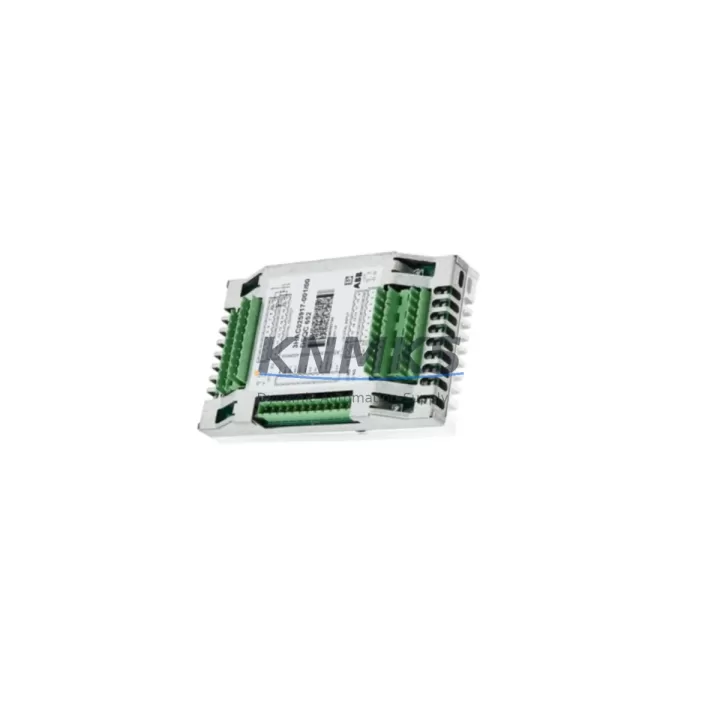
The ABB DSQC651 (part number 3HAC025784-001) is a 24 VDC I/O distribution board designed for the ABB IRC5 robot controller platform. As ABB progressively phases out legacy IRC5 hardware, the DSQC651 remains one of the most frequently requested replacement modules for maintenance teams managing aging robotic cells in automotive, metal fabrication, and general manufacturing environments. This unit provides 16 digital inputs and 16 digital outputs distributed across two 32-pin connectors, interfacing directly with the IRC5 main computer via the internal backplane bus. Whether you are replacing a failed board in a running production line or pre-staging spares for a planned shutdown, the DSQC651 is a direct drop-in replacement that requires no firmware modification and no changes to the robot program logic.
For facilities operating multiple IRC5 cabinets, the DSQC651 is typically paired with the DSQC652 relay output board and the DSQC662 fieldbus adapter when expanding I/O capacity or migrating from a DeviceNet-based I/O architecture to EtherNet/IP. Engineers planning a broader control cabinet upgrade should also account for the DSQC609 power supply unit, which provides the regulated 24 VDC rail that feeds the I/O distribution boards. Verifying the power budget across all installed DSQC-series modules before replacement is a critical pre-commissioning step that is often overlooked during emergency swap-outs.
When the DSQC651 is used as a replacement in an existing IRC5 system, the module address assignment is handled through the FlexPendant or RobotStudio configuration interface. The board slot position on the IRC5 backplane determines the default unit number, and any mismatch between the physical slot and the configured I/O unit address will result in a system fault at startup. Technicians should document the existing unit number, signal mapping, and cross-reference assignments from the original RAPID program before removing the failed board. This documentation step alone can reduce commissioning time from several hours to under thirty minutes.
Terminal wiring on the DSQC651 uses standard 32-pin Harting-style connectors. Field wiring harnesses from the original installation are fully reusable provided the connector pinout is preserved. In retrofit scenarios where the original wiring documentation is unavailable, the ABB IRC5 Product Manual (document 3HAC021313-001) provides the complete signal assignment table for both X1 and X2 connectors. For systems where the original harness has been modified or extended, a continuity check against the documented pinout before power-up is strongly recommended to avoid input/output short-circuit faults that can damage the new board.
Facilities that are migrating from an older S4C+ or S4Cplus controller to the IRC5 platform will find that the DSQC651 is not backward-compatible with the S4-series backplane. The S4C+ equivalent, the DSQC328A, uses a different connector format and a different internal bus protocol. If your retrofit plan involves reusing existing field wiring from an S4C+ installation, a wiring adapter harness will be required, and the I/O configuration in the RAPID program will need to be rebuilt from scratch rather than migrated directly. In these cross-generation migrations, it is also common to replace the IRC5 teach pendant cable and the SMB (Serial Measurement Board) simultaneously, as the SMB firmware version must be compatible with the IRC5 main computer firmware to avoid axis calibration errors on first startup.
All DSQC651 units supplied by KNMKS are sourced from verified industrial channels, individually inspected, and subjected to pre-shipment functional testing under simulated I/O load conditions. Each unit ships with a support terms confirmed by quotation covering manufacturing defects and functional failures under normal operating conditions. In-stock units are available for same-day dispatch, supporting urgent maintenance requirements and minimizing unplanned downtime in safety-critical production environments.
Migration Compatibility Table
| Parameter | DSQC651 (3HAC025784-001) | Notes / Retrofit Guidance |
|---|---|---|
| Compatible Controller | ABB IRC5 (all variants) | Not compatible with S4C+ or S4Cplus backplane |
| Digital Inputs | 16 x 24 VDC | Verify field signal voltage before wiring |
| Digital Outputs | 16 x 24 VDC, 0.5 A per channel | Check load current per channel; do not exceed rating |
| Connector Type | 2 x 32-pin Harting (X1, X2) | Original harness reusable if pinout is preserved |
| Backplane Interface | IRC5 internal bus | Slot position determines default unit address |
| Power Supply Requirement | 24 VDC via DSQC609 or equivalent | Verify power budget before adding I/O boards |
| Firmware Compatibility | RobotWare 5.x and 6.x | No firmware update required for direct replacement |
| Installation Space | Standard IRC5 backplane slot | Confirm available slot before ordering additional boards |
| Communication Protocol | Internal IRC5 bus (not fieldbus) | For fieldbus I/O, use DSQC662 (EtherNet/IP) or DSQC667 (DeviceNet) |
| Replacement for | DSQC651 (all revisions) | Cross-revision compatible; no RAPID program changes required |
| Pre-Shipment Testing | Yes — functional I/O load test | Test report available on request |
| Support terms | 12 Months | Covers manufacturing defects and functional failures |
Retrofit Planning for Existing Automation Systems
A successful DSQC651 retrofit begins well before the replacement unit arrives on site. The first step is a full audit of the existing IRC5 cabinet configuration: document every installed DSQC-series board, its slot position, its configured unit number, and its signal assignments. For cabinets running multiple I/O boards — a common configuration in welding cells or press-tending applications — the interaction between the DSQC651 and adjacent modules such as the DSQC652 relay output board must be understood before any board is removed. Relay outputs driving safety interlocks or pneumatic valve solenoids must be de-energized in a controlled sequence to avoid unintended machine motion during the swap.
Power supply capacity is the second critical variable. The DSQC609 24 VDC power supply unit has a defined output current rating, and adding or replacing I/O boards without recalculating the total load can result in intermittent faults or premature power supply failure. If the existing DSQC609 is already operating near its rated capacity, the retrofit plan should include a power supply upgrade or load redistribution across multiple supply rails before the new DSQC651 is commissioned.
For systems that also require communication protocol migration — for example, moving from a legacy DeviceNet I/O network to EtherNet/IP — the DSQC651 replacement is typically performed in parallel with the installation of a DSQC662 EtherNet/IP adapter. This combined retrofit allows the facility to consolidate I/O wiring, reduce the number of fieldbus segments, and simplify the network topology for future maintenance. The RAPID program signal definitions will need to be updated to reflect the new I/O unit addresses and communication paths, and the HMI screens connected to the IRC5 system should be validated against the updated signal list to ensure that all operator displays and alarm conditions remain correctly mapped after the migration.
Installation space within the IRC5 cabinet should be confirmed before ordering additional DSQC651 boards for I/O expansion. The IRC5 backplane supports a defined number of slots, and in fully populated cabinets, expansion may require a second IRC5 drive module or an external I/O panel. A signal isolation module may also be required when integrating the IRC5 I/O with third-party PLCs or safety relay circuits that operate at different voltage levels or require galvanic isolation between control and field circuits.
Downtime Control During System Migration
Minimizing unplanned downtime during a DSQC651 replacement requires a structured approach to pre-staging, execution, and verification. Before the maintenance window begins, the replacement board should be on-site and pre-verified: confirm the part number revision, inspect the connector pins for damage, and if possible, perform a bench test using a spare IRC5 controller or a test rig. Having the replacement unit ready before the production line stops eliminates the most common source of extended downtime — waiting for parts to arrive after a failure has already occurred.
During the replacement, the original RAPID program should be backed up to a USB memory stick or a network share before any hardware is touched. The IRC5 system backup includes the program modules, system parameters, I/O configuration, and safety configuration, and it takes less than two minutes to complete. This backup is the single most important step in protecting the existing program logic and ensuring that the system can be restored to its pre-failure state if any unexpected issue arises during commissioning of the new board.
After the new DSQC651 is installed and the cabinet is powered up, the startup sequence should be monitored on the FlexPendant for any I/O unit fault messages. A unit fault at this stage almost always indicates a unit address mismatch or a wiring error on the X1 or X2 connector. Resolving these faults before attempting to run the robot program prevents secondary faults from propagating through the RAPID logic and causing additional diagnostic complexity. Once the I/O unit is confirmed online, a systematic check of all input and output signals — using the I/O monitor on the FlexPendant — should be completed before the robot is returned to automatic mode. This verification step typically takes 15 to 30 minutes and is the most reliable way to confirm that the retrofit has been completed correctly and that production can resume safely.
Retrofit Support FAQ
Q: Is the DSQC651 (3HAC025784-001) a direct replacement for all revisions of the DSQC651?
A: Yes. All hardware revisions of the DSQC651 are cross-compatible and use the same part number base. The replacement unit will install in the same backplane slot, use the same connectors, and operate with the same I/O configuration without any changes to the RAPID program or system parameters.
Q: What pre-shipment testing is performed on each unit?
A: Every DSQC651 unit supplied by KNMKS is functionally tested under simulated I/O load conditions prior to dispatch. All 16 digital inputs and 16 digital outputs are verified for correct switching behavior and signal integrity. A test report is available on request for quality assurance documentation purposes.
Q: Can the DSQC651 be used in an IRC5 Compact or IRC5 Panel Mounted Controller?
A: The DSQC651 is compatible with the standard IRC5 controller cabinet. Compatibility with the IRC5 Compact and IRC5 Panel Mounted Controller variants depends on the specific backplane configuration and available slot count. Please provide your controller variant and cabinet configuration when placing your order so that our technical team can confirm compatibility before dispatch.
Q: What is the support terms coverage and what does it include?
A: All units carry a support terms confirmed by quotation from the date of shipment. The support terms covers manufacturing defects and functional failures under normal operating conditions, including I/O channel failures, connector integrity issues, and backplane interface faults. Support requests are processed within 5 business days, and replacement units are dispatched from in-stock inventory to minimize your system downtime.
© 2026 KNMKS. All rights reserved.
Original Source: https://knmks.com
Contact: admin@knmks.com | +86 18359268345
Product Identification
- Brand / Ecosystem
-
ABB
ABB - Model / Series
-
DSQC651-3HAC025784-001
IRC5 Series - Product Family
- PLCs & Controllers
- Availability Status
- Available on request after model and quantity confirmation
- Inquiry Type
- B2B RFQ, replacement inquiry and project spare-part request
- Pre-Quote Check
- Exact SKU, brand, series, quantity, nameplate photos and destination country are checked before quotation
System Path
Where this product fits in the KNMKS automation structure.
Specification & Inquiry Focus
- Control platform
- PLC, PAC and modular controllers
- Common needs
- CPU, rack, power and I/O expansion
- Project support
- Replacement, cabinet build and maintenance
Buyer Confirmation
Information KNMKS checks before replying.
- Exact model
- DSQC651-3HAC025784-001
- Brand / ecosystem
- ABB
- Product family
- PLCs & Controllers
- Application note
- Replacement, maintenance, project build or spare-part list
- Useful photos
- Nameplate, installed unit, cabinet layout or connector side
- Delivery details
- Quantity, destination country and target schedule
Document Support
Files and notes can be confirmed during quotation.
- Product photos or nameplate confirmation when available
- Packing and delivery notes before quotation confirmation
- Support scope and delivery terms confirmed per inquiry
- Export document coordination for qualified B2B requests
Inquiry Support
- Model cross-checking before quotation
- CPU, power, rack and expansion module matching
- Support for replacement and project inquiry
What to Send Us
- Brand and exact model number: ABB DSQC651-3HAC025784-001
- Quantity and required delivery time
- Application, replacement requirement or nameplate photo
- Destination country and shipping preference
RFQ Preparation
This is a product inquiry page built for RFQ communication.
Fast Model Check
Send this model to KNMKS for confirmation.
Include quantity, destination country and photos if this is a maintenance replacement. The inquiry will be saved with a reference number after submission.
Brand & Compatibility Note
KNMKS displays automation product information for well-known industrial brand ecosystems and compatible replacement references. Brand names are used for product identification and compatibility reference only; final availability and commercial terms are confirmed per quotation.
 Manufacturing
 Machine Tools
 Packaging
 Energy & Power



 HMI & Displays
 Servo Systems
 Variable Frequency Drives
 Sensors