
Overview
ABB DSQC643 Migration-Ready Operator Panel Interface for IRC5
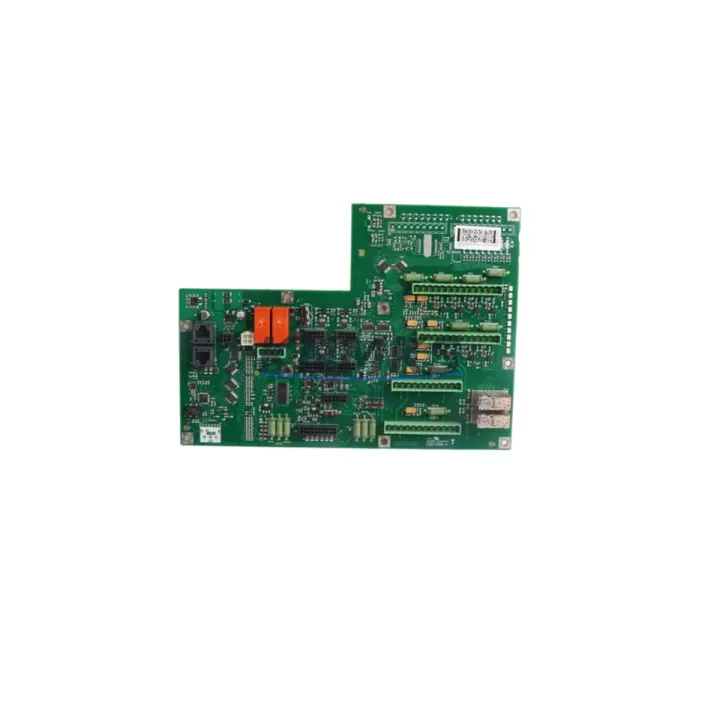
The ABB DSQC643 is the operator panel interface module designed for ABB IRC5 robot controller cabinets. As legacy IRC5 installations age and original spare parts reach end-of-life, the DSQC643 has become a critical component in retrofit projects, production line upgrades, and system recovery operations across automotive, metal fabrication, electronics assembly, and general industrial automation environments.
Whether you are replacing a failed unit in an active production cell, upgrading a legacy IRC5 single-cabinet or dual-cabinet system, or migrating from an older S4C+ platform to IRC5 architecture, the DSQC643 serves as the communication bridge between the FlexPendant (teach pendant), the main computer board, and the operator safety panel. Ensuring correct module identification, firmware compatibility, and connector pinout verification before installation is essential to minimizing unplanned downtime.
Each unit supplied by KNMKS is sourced from verified industrial channels, function-tested prior to dispatch, and covered by a support terms confirmed by quotation. Stock is maintained to support urgent replacement and scheduled maintenance windows.
Migration Compatibility Table
| Parameter | Specification / Requirement |
|---|---|
| Compatible Controller | ABB IRC5 Single Cabinet, Dual Cabinet, Panel Mounted Controller (PMC) |
| Replaces / Supersedes | DSQC643 (direct replacement); cross-reference DSQC639 for earlier operator panel variants |
| Interface Connections | FlexPendant port (X1), safety panel connector, main computer bus connector |
| Power Input | 24 VDC from IRC5 internal power supply (verify DSQC661 or DSQC662 PSU output capacity before swap) |
| Communication Protocol | Internal IRC5 backplane bus; DeviceNet and Ethernet/IP via separate communication modules |
| Firmware Compatibility | RobotWare 5.x and 6.x — confirm RobotWare version on existing system before replacement |
| Installation Space | Standard IRC5 cabinet DIN rail / module slot; verify physical clearance in compact PMC variants |
| Commissioning Requirement | System restart required; re-validate safety I/O signals and FlexPendant communication after installation |
| Retrofit Recommendation | Replace as complete unit; do not attempt board-level repair in safety-critical operator panel circuits |
| Support terms | 12 months from date of shipment; covers manufacturing defects and functional failure under normal operating conditions |
Retrofit Planning for Existing Automation Systems
Successful integration of the DSQC643 into an existing IRC5 system requires a structured pre-installation review. Begin by documenting the current RobotWare version and system configuration using RobotStudio or the FlexPendant service menu. This step is critical when the replacement unit originates from a different production batch, as minor firmware revisions can affect operator panel initialization sequences.
Before powering down the robot cell, verify the output capacity of the installed DSQC661 or DSQC662 power supply module. The operator panel interface draws regulated 24 VDC, and any degradation in PSU performance — common in systems operating beyond 8–10 years — can cause intermittent faults after module replacement. If the PSU shows signs of aging, plan a concurrent replacement to avoid repeat failures.
Inspect the IRC5 backplane and module rack for corrosion, loose connectors, or damaged guide rails before installing the DSQC643. In humid or high-vibration environments, connector oxidation is a frequent root cause of operator panel communication errors that are misdiagnosed as module failure. Clean all backplane contacts and reseat adjacent modules including the DSQC668 main computer board and any installed DSQC688 or DSQC690 I/O modules to eliminate contact resistance as a variable.
For systems using DeviceNet or Profibus communication via a DSQC651 or DSQC667 fieldbus adapter, confirm that the network node address and baud rate settings are preserved in the system parameters backup before the swap. Operator panel replacement does not affect fieldbus configuration directly, but a full system restart provides an opportunity to validate all network nodes and catch any pre-existing communication faults.
If the IRC5 cabinet includes a DSQC679 FlexPendant (teach pendant), test the pendant connection on the replacement DSQC643 before closing the cabinet. FlexPendant port failures are a common secondary fault in operator panel modules that have experienced power surge events. Confirm that the pendant enable device, emergency stop chain, and mode selector switch all respond correctly through the new module before returning the cell to production.
For facilities managing multiple IRC5 cells, maintain a documented spare parts register that includes DSQC643 alongside the DSQC661 PSU, DSQC668 main computer, and at least one DSQC679 FlexPendant. This inventory posture supports rapid swap-out during unplanned failures and reduces mean time to repair (MTTR) in high-throughput production environments.
Downtime Control During System Migration
Operator panel interface failures in IRC5 systems typically manifest as loss of FlexPendant communication, inability to switch operating modes, or safety chain faults that prevent robot motion. In each case, the production cell is immediately halted. Reducing the duration of this unplanned downtime depends on three factors: spare part availability, pre-documented system configuration, and technician readiness.
Before initiating the physical swap, export a full system backup from the IRC5 controller using the FlexPendant or RobotStudio. This backup preserves the RAPID program, system parameters, I/O configuration, and safety settings. Even if the DSQC643 is the only component being replaced, a current backup eliminates the risk of configuration loss if the controller requires a cold start during the process.
Prepare the replacement DSQC643 at the workbench before entering the cell. Inspect connectors, verify part number markings, and confirm the unit powers on correctly if a bench test fixture is available. Arriving at the cabinet with a pre-verified replacement unit reduces in-cell exposure time and minimizes the risk of introducing a second fault during the repair.
After installation, follow the IRC5 restart sequence: power on the controller, allow the main computer to complete its boot cycle, then connect the FlexPendant and confirm operator panel status on the pendant display. Validate the emergency stop chain, safety I/O signals, and mode selector before releasing the cell to operators. Document the replacement in the maintenance log with the date, replaced part number, and post-installation test results.
For planned retrofit projects — such as upgrading an entire production line of IRC5 cells — schedule replacements during planned maintenance windows and prepare a cell-by-cell migration checklist. Staggered replacement across shifts maintains partial production capacity and allows each cell to be fully validated before the next is taken offline.
Retrofit Support FAQ
Q1: Is the DSQC643 a direct drop-in replacement for the original ABB part?
Yes. The DSQC643 supplied by KNMKS matches the original ABB part number and is compatible with IRC5 single-cabinet, dual-cabinet, and panel-mounted controller variants. No hardware modification is required. Confirm your RobotWare version is within the supported range (5.x or 6.x) before installation.
Q2: What pre-installation checks are required before swapping the DSQC643?
Export a full system backup, verify PSU output voltage at the DSQC661/DSQC662, inspect backplane connectors for oxidation, and document the current RobotWare version and system configuration. These steps ensure a clean swap and protect existing program logic and safety parameters.
Q3: Does KNMKS test units before shipment?
Yes. Each DSQC643 unit undergoes functional testing prior to dispatch. Units are verified for power-on operation, connector integrity, and communication interface function. A support terms confirmed by quotation cover manufacturing defects and functional failure under normal operating conditions from the date of shipment.
Q4: What is the typical lead time and do you maintain stock?
KNMKS maintains inventory of the DSQC643 to support both urgent replacement and scheduled maintenance procurement. Standard orders ship within 1–3 business days. For large-quantity or project-based procurement, contact our sales team to confirm availability and arrange priority allocation.
© 2026 KNMKS. All rights reserved.
Original Source: https://knmks.com
Contact: admin@knmks.com | +86 18359268345
Product Identification
- Brand / Ecosystem
-
ABB
ABB - Model / Series
-
DSQC643
IRC5 Series - Product Family
- HMI & Displays
- Availability Status
- Available on request after model and quantity confirmation
- Inquiry Type
- B2B RFQ, replacement inquiry and project spare-part request
- Pre-Quote Check
- Exact SKU, brand, series, quantity, nameplate photos and destination country are checked before quotation
System Path
Where this product fits in the KNMKS automation structure.
Specification & Inquiry Focus
- Display range
- Operator panels and touch screens
- Common needs
- Screen size, interface and version matching
- Project support
- Retrofit, spare unit and panel replacement
Buyer Confirmation
Information KNMKS checks before replying.
- Exact model
- DSQC643
- Brand / ecosystem
- ABB
- Product family
- HMI & Displays
- Application note
- Replacement, maintenance, project build or spare-part list
- Useful photos
- Nameplate, installed unit, cabinet layout or connector side
- Delivery details
- Quantity, destination country and target schedule
Document Support
Files and notes can be confirmed during quotation.
- Product photos or nameplate confirmation when available
- Packing and delivery notes before quotation confirmation
- Support scope and delivery terms confirmed per inquiry
- Export document coordination for qualified B2B requests
Inquiry Support
- Panel size and interface confirmation
- Replacement unit inquiry for discontinued HMIs
- Protective packaging for display shipment
What to Send Us
- Brand and exact model number: ABB DSQC643
- Quantity and required delivery time
- Application, replacement requirement or nameplate photo
- Destination country and shipping preference
RFQ Preparation
This is a product inquiry page built for RFQ communication.
Fast Model Check
Send this model to KNMKS for confirmation.
Include quantity, destination country and photos if this is a maintenance replacement. The inquiry will be saved with a reference number after submission.
Brand & Compatibility Note
KNMKS displays automation product information for well-known industrial brand ecosystems and compatible replacement references. Brand names are used for product identification and compatibility reference only; final availability and commercial terms are confirmed per quotation.
 Manufacturing
 Machine Tools
 Packaging
 Energy & Power
 PLCs & Controllers
 Servo Systems
 Variable Frequency Drives
 Sensors