
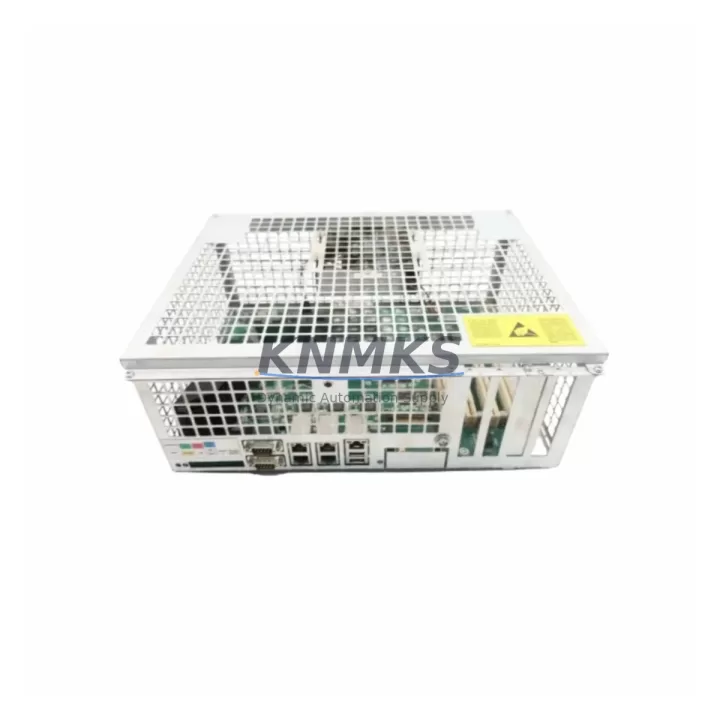
Overview
ABB DSQC639 Migration-Ready IRC5 Main Computer: Legacy System Retrofit & Upgrade
The ABB DSQC639 (3HAC025097-001/16) is the central processing unit of the ABB IRC5 robot controller family, responsible for coordinating motion control, I/O management, communication protocols, and real-time program execution across the entire robotic cell. As ABB progressively phases out legacy IRC5 hardware configurations, facilities running S4C+, IRC5 single-cabinet, and IRC5 panel-mounted controllers face increasing pressure to source verified replacement main computers before critical production downtime occurs.
This unit is a direct migration-ready replacement for degraded, failed, or end-of-life DSQC639 boards. Each unit undergoes pre-shipment functional testing, firmware compatibility verification, and hardware inspection before dispatch. A support terms confirmed by quotation is included as standard, covering manufacturing defects and functional failures under normal operating conditions. Global stock is maintained across multiple distribution points to support emergency replacement timelines.
When planning a DSQC639 replacement, engineers must confirm the installed firmware revision on the existing IRC5 controller. The DSQC639 operates under RobotWare versions ranging from 5.x through later 6.x branches, and the replacement unit must be loaded with a compatible RobotWare image prior to commissioning. Mismatched firmware between the main computer and the axis computer — typically the DSQC668 or DSQC667 — will prevent the controller from completing its boot sequence and may trigger SafeMove or EPS configuration errors that require full recommissioning.
Backplane interface compatibility is a critical checkpoint. The DSQC639 connects to the IRC5 internal backplane via a proprietary high-speed bus. Before installation, verify that the backplane revision in the cabinet matches the supported interface specification for the /16 hardware variant. Cabinets that have undergone partial upgrades — for example, those with a mixed population of DSQC612 I/O modules and newer DSQC652 digital I/O units — may require a configuration file update in RobotStudio to correctly map I/O addresses after the main computer swap.
Power supply capacity is another pre-replacement checkpoint. The IRC5 internal power supply, often a DSQC661 or DSQC662 unit, must deliver stable 24 VDC within tolerance to the main computer board. A degraded power supply is frequently the root cause of intermittent DSQC639 failures, and replacing the main computer without verifying supply rail integrity risks repeat failure. Measure output voltage under load before committing to the board swap.
Terminal wiring on the DSQC639 is fixed and does not require re-termination during a like-for-like replacement, provided the cabinet wiring harness is undamaged. However, if the replacement is part of a broader retrofit — for example, migrating from a legacy FlexPendant with a 10-inch display to a newer IRC5 teach pendant — the DSQC679 teach pendant interface board may also require attention to ensure correct signal routing between the new pendant and the main computer.
For facilities integrating the IRC5 controller into a broader SCADA or MES environment via DeviceNet, PROFIBUS, or Ethernet/IP, the communication module stack must be reviewed. The DSQC658 DeviceNet adapter or DSQC688 PROFIBUS adapter, if installed, will retain their configuration after a main computer swap only if the system parameters file (SYS.CFG) is correctly backed up and restored. Failure to restore communication parameters will result in loss of fieldbus connectivity and may halt production line coordination.
Installation space within the IRC5 cabinet is standardized for the DSQC639 form factor. No mechanical modification is required for a direct replacement. However, if the retrofit involves adding a DSQC643 additional axis computer to expand robot motion axes, confirm that the cabinet has sufficient rail space and that the backplane slot allocation does not conflict with the main computer’s address range.
Migration Compatibility Table
| Parameter | Details |
|---|---|
| SKU | DSQC639 / 3HAC025097-001/16 |
| Compatible Controller | ABB IRC5 Single Cabinet, IRC5 Panel Mounted, IRC5 Compact |
| RobotWare Compatibility | RobotWare 5.x – 6.x (firmware match required) |
| Backplane Interface | IRC5 proprietary high-speed internal bus |
| Power Input | 24 VDC (supplied via IRC5 internal PSU: DSQC661 / DSQC662) |
| Communication Protocols | DeviceNet, PROFIBUS DP, Ethernet/IP (via add-on modules) |
| Replacement Type | Direct drop-in, like-for-like hardware variant /16 |
| Commissioning Requirement | RobotWare image load, SYS.CFG restore, I/O address verification |
| Installation Space | Standard IRC5 DIN rail slot — no mechanical modification required |
| Pre-Shipment Testing | Functional test, firmware verification, hardware inspection |
| Support terms | 12 months from date of dispatch |
| Origin | Germany |
Retrofit Planning for Existing Automation Systems
A structured retrofit plan reduces risk when replacing the DSQC639 in a live production environment. Begin by creating a full system backup using RobotStudio or the FlexPendant backup utility. This captures the RAPID program, system parameters, I/O configuration, and SafeMove safety configuration. Store the backup on an external medium independent of the controller.
Next, document the current axis computer configuration. If the cabinet uses a DSQC668 as the primary axis computer alongside the DSQC639, confirm that the axis computer firmware revision is compatible with the replacement main computer’s RobotWare version. Incompatible axis computer firmware is a common source of post-replacement boot failures.
Review the I/O module population. Cabinets with a mix of DSQC652 digital I/O modules and DSQC651 analog I/O modules must have their I/O unit addresses verified in the system parameters after the main computer swap. Address conflicts between I/O units and the main computer’s internal memory map can cause unpredictable behavior during the first power-on cycle.
If the retrofit includes upgrading the communication infrastructure — for example, replacing a legacy DSQC658 DeviceNet adapter with an Ethernet/IP solution — plan the protocol migration as a separate phase after the main computer replacement is stable. Attempting simultaneous hardware and protocol changes increases diagnostic complexity if issues arise during commissioning.
For cabinets where the teach pendant cable or the DSQC679 interface board shows wear, replace these components during the same maintenance window to avoid a second planned outage. Confirm that the replacement pendant cable length and connector type match the cabinet layout before the maintenance window begins.
Downtime Control During System Migration
Minimizing unplanned downtime during a DSQC639 replacement requires preparation before the maintenance window opens. The most effective approach is to pre-configure the replacement main computer off-line using RobotStudio, loading the correct RobotWare version and restoring the system backup before the unit is installed in the cabinet. This reduces on-site commissioning time to verification and functional testing rather than full configuration.
Protect the original RAPID program logic by maintaining at least two independent backup copies — one on the engineering workstation and one on removable media stored separately. If the replacement main computer requires a clean RobotWare installation, the program restore process is straightforward provided the backup was created with a compatible RobotWare version.
During the physical swap, follow ABB’s ESD handling procedures for the DSQC639 board. Ground the cabinet before removing the failed unit, and avoid touching the board’s connector pins. Seat the replacement unit firmly into the backplane slot and verify that all locking mechanisms are engaged before applying power.
After power-on, monitor the controller boot sequence via the FlexPendant or RobotStudio event log. Confirm that all I/O units, axis computers, and communication modules are recognized before releasing the robot for production. A controlled test cycle — running the RAPID program through one complete production sequence under supervision — should be completed before returning the cell to autonomous operation.
Maintaining a spare DSQC639 unit in local inventory eliminates the lead time variable entirely for future failures. Given the criticality of the main computer to IRC5 controller operation, a single spare unit per robot cell or per production line is a standard recommendation for facilities with high uptime requirements.
Retrofit Support FAQ
Q: Is the DSQC639 3HAC025097-001/16 a direct replacement for all IRC5 main computer variants?
A: The /16 hardware variant is compatible with the majority of IRC5 single-cabinet and panel-mounted controllers. However, confirm the hardware variant suffix on the installed unit before ordering. Different /xx suffixes may indicate hardware revisions with different backplane interface specifications. Contact our technical team with your cabinet serial number for confirmation.
Q: Does the replacement unit ship with RobotWare pre-installed?
A: Units are dispatched with firmware verified for hardware functionality. RobotWare must be licensed and loaded by the end user using ABB’s RobotWare installation tools and a valid license key. Your existing RobotWare license is tied to the robot serial number, not the main computer hardware, so the license remains valid after a main computer replacement.
Q: What pre-shipment testing is performed on each DSQC639 unit?
A: Each unit undergoes functional power-on testing, backplane interface verification, and hardware inspection covering connector integrity, capacitor condition, and board-level component inspection. Units that do not pass all test criteria are not dispatched. A support terms confirmed by quotation cover functional failures under normal operating conditions from the date of dispatch.
Q: What is the typical lead time and do you maintain stock for emergency orders?
A: Stock is maintained across multiple regional distribution points to support emergency replacement requirements. Standard dispatch is within 1–3 business days for in-stock units. Contact admin@knmks.com or +86 18359268345 to confirm current stock availability and expedited shipping options for urgent requirements.
© 2026 KNMKS. All rights reserved.
Original Source: https://knmks.com
Contact: admin@knmks.com | +86 18359268345
Product Identification
- Brand / Ecosystem
-
ABB
ABB - Model / Series
-
DSQC639 3HAC025097-001/16
IRC5 Series - Product Family
- PLCs & Controllers
- Availability Status
- Available on request after model and quantity confirmation
- Inquiry Type
- B2B RFQ, replacement inquiry and project spare-part request
- Pre-Quote Check
- Exact SKU, brand, series, quantity, nameplate photos and destination country are checked before quotation
System Path
Where this product fits in the KNMKS automation structure.
Specification & Inquiry Focus
- Control platform
- PLC, PAC and modular controllers
- Common needs
- CPU, rack, power and I/O expansion
- Project support
- Replacement, cabinet build and maintenance
Buyer Confirmation
Information KNMKS checks before replying.
- Exact model
- DSQC639 3HAC025097-001/16
- Brand / ecosystem
- ABB
- Product family
- PLCs & Controllers
- Application note
- Replacement, maintenance, project build or spare-part list
- Useful photos
- Nameplate, installed unit, cabinet layout or connector side
- Delivery details
- Quantity, destination country and target schedule
Document Support
Files and notes can be confirmed during quotation.
- Product photos or nameplate confirmation when available
- Packing and delivery notes before quotation confirmation
- Support scope and delivery terms confirmed per inquiry
- Export document coordination for qualified B2B requests
Inquiry Support
- Model cross-checking before quotation
- CPU, power, rack and expansion module matching
- Support for replacement and project inquiry
What to Send Us
- Brand and exact model number: ABB DSQC639 3HAC025097-001/16
- Quantity and required delivery time
- Application, replacement requirement or nameplate photo
- Destination country and shipping preference
RFQ Preparation
This is a product inquiry page built for RFQ communication.
Fast Model Check
Send this model to KNMKS for confirmation.
Include quantity, destination country and photos if this is a maintenance replacement. The inquiry will be saved with a reference number after submission.
Brand & Compatibility Note
KNMKS displays automation product information for well-known industrial brand ecosystems and compatible replacement references. Brand names are used for product identification and compatibility reference only; final availability and commercial terms are confirmed per quotation.
 Manufacturing
 Machine Tools
 Packaging
 Energy & Power



 HMI & Displays
 Servo Systems
 Variable Frequency Drives
 Sensors