
Overview
ABB DSQC639 3HNA011195-001 Migration-Ready Main Computer for Legacy IRC5 Systems
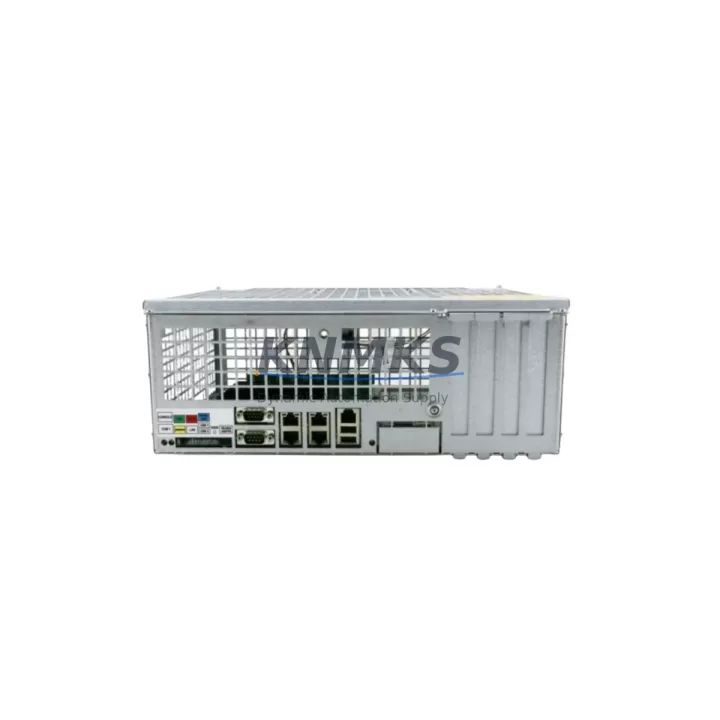
The ABB DSQC639 (part number 3HNA011195-001, also cross-referenced as 3HAC022978-001) is the primary main computer module for the ABB IRC5 robot controller family. As ABB progressively phases out older IRC5 cabinet configurations and transitions customers toward the IRC5 Compact and OmniCore platforms, the DSQC639 remains the most critical single-board replacement component for maintaining uptime on installed IRC5 M2004 and M2006 systems. Whether you are managing a planned retrofit, responding to an unplanned controller failure, or executing a spare parts lifecycle extension program, the DSQC639 is the authoritative drop-in replacement for your existing main computer board.
Each unit supplied by KNMKS is sourced from verified industrial channels, subjected to pre-shipment functional testing under simulated IRC5 operating conditions, and backed by a support terms confirmed by quotation covering hardware defects and module-level failures. Stock is maintained across multiple regional warehouses to support urgent dispatch requirements for production-critical environments.
Migration Compatibility Table
| Parameter | DSQC639 (3HNA011195-001) | Notes / Retrofit Guidance |
|---|---|---|
| Replaces / Cross-Reference | 3HAC022978-001, DSQC639A | Confirm hardware revision suffix before ordering; A/B revisions are functionally compatible in most IRC5 M2004 cabinets |
| Compatible Controller | ABB IRC5 M2004, M2006 | Not compatible with IRC5 Compact without backplane adapter; verify cabinet generation |
| Backplane Interface | IRC5 standard backplane slot 1 | Confirm backplane connector condition before installation; inspect for bent pins or corrosion |
| Communication Protocols | EtherNet/IP, DeviceNet, PROFIBUS (option) | PROFIBUS requires DSQC688 fieldbus adapter; verify existing fieldbus topology before swap |
| Power Supply Requirement | 24 VDC via DSQC661 or DSQC662 PSU | Measure PSU output voltage under load before replacement; degraded PSU can cause repeated main computer faults |
| RobotWare Compatibility | RobotWare 5.x, 6.x | Backup system parameters and RAPID programs before module swap; restore via FlexPendant or RobotStudio |
| Module Address / IP Config | Configured via RobotStudio or FlexPendant | Document existing IP address, subnet mask, and gateway before removal |
| Physical Dimensions | Standard IRC5 main computer form factor | No mechanical modification required for direct slot replacement |
| Pre-Shipment Testing | Yes — functional test under IRC5 load simulation | Test report available on request |
| Support terms | 12 Months | Covers hardware defects and module-level failures from date of shipment |
Retrofit Planning for Existing Automation Systems
A successful DSQC639 replacement in a live production environment requires systematic pre-work across multiple subsystems. Before removing the failed or degraded main computer, engineers should use RobotStudio to perform a full system backup, capturing RAPID task programs, system parameters, I/O configuration, and safety controller settings. This backup is essential because the DSQC639 does not retain user programs internally — all logic resides in the system flash and must be restored after the new module is seated and powered.
The IRC5 cabinet power architecture depends on the DSQC661 or DSQC662 power supply module to deliver stable 24 VDC to the main computer backplane. Before attributing a main computer fault to the DSQC639 itself, verify that the PSU output is within specification under load. A marginal power supply will cause repeated boot failures even with a new main computer installed. Similarly, inspect the DSQC609 I/O module and DSQC643 axis computer connections on the backplane — loose or corroded connectors are a common source of intermittent communication faults that are misdiagnosed as main computer failures.
For systems using DeviceNet or EtherNet/IP for PLC integration, document the existing network topology, node addresses, and scanner configuration before the swap. The DSQC639 communicates with upstream PLCs and SCADA systems through the IRC5 service port and the optional DSQC688 fieldbus adapter. After replacement, the fieldbus node address and EDS file registration must be verified in the PLC scanner configuration to restore full I/O communication. If the existing system uses a PROFIBUS link to a Siemens or Allen-Bradley PLC, confirm that the GSD file and DP slave address are correctly re-applied post-swap.
HMI screens connected via the FlexPendant (DSQC679) will automatically re-establish communication once the new DSQC639 is booted and the system backup is restored. However, if the FlexPendant firmware version is mismatched with the RobotWare version on the replacement module, a firmware update may be required before the teach pendant becomes fully operational. Confirm firmware compatibility in the ABB RobotWare release notes for your specific software version before proceeding.
For installations where physical space in the control cabinet is constrained, note that the DSQC639 occupies the primary backplane slot and does not require additional DIN rail space. However, if the retrofit is part of a broader cabinet upgrade that includes adding a DSQC378 I/O expansion module or a DSQC652 digital I/O board, verify that the backplane has available slots and that the total power budget of the DSQC661/662 PSU is not exceeded.
Downtime Control During System Migration
Minimizing unplanned downtime during a main computer replacement on an IRC5 system requires a structured approach that protects program integrity, maintains safety system continuity, and reduces the risk of configuration errors during commissioning. The following practices are recommended for production environments where robot downtime directly impacts line throughput.
First, perform the system backup via RobotStudio before any physical intervention. Verify that the backup file is complete and readable on a separate workstation. If the existing DSQC639 is still partially functional, use this window to export all RAPID modules, system parameters, and I/O signal definitions. A corrupted or incomplete backup is the single largest source of extended downtime during IRC5 main computer replacements.
Second, prepare the replacement DSQC639 unit alongside the cabinet before shutdown. Confirm that the hardware revision matches the existing installation and that the RobotWare license key (stored on the main computer) is documented. ABB licenses are tied to the controller serial number, and a replacement main computer may require a license transfer through ABB’s license management portal — initiate this process before the planned maintenance window to avoid delays.
Third, after physical installation and system restore, perform a controlled cold start and verify all safety outputs, emergency stop circuits, and axis enable signals before releasing the robot to automatic mode. The IRC5 safety controller (integrated within the main computer on DSQC639-based systems) must confirm all safety inputs are within normal parameters before motion is permitted. Document the commissioning checklist and retain it as part of the maintenance record for the cell.
KNMKS maintains buffer stock of the DSQC639 specifically to support emergency dispatch scenarios. Orders placed before 14:00 local time are typically processed for same-day shipment, with express freight options available to most industrial regions. Contact admin@knmks.com or +86 18359268345 to confirm current stock availability and lead time for your location.
Retrofit Support FAQ
Q1: Is the DSQC639 (3HNA011195-001) a direct drop-in replacement for the 3HAC022978-001?
Yes. The 3HNA011195-001 and 3HAC022978-001 are cross-referenced part numbers for the same DSQC639 main computer module. Both designations refer to the same hardware used in IRC5 M2004 and M2006 cabinets. Confirm the hardware revision suffix (A or B) matches your existing installation for full compatibility, though in most cases both revisions are interchangeable within the same cabinet generation.
Q2: Do I need to re-license RobotWare after replacing the DSQC639?
Potentially yes. ABB RobotWare licenses are associated with the controller serial number embedded in the main computer. When replacing the DSQC639, you may need to transfer the existing license to the new module through ABB’s license management system. KNMKS recommends initiating the license transfer request with ABB before the planned replacement window to avoid production delays. Our technical team can advise on the process based on your RobotWare version.
Q3: What pre-shipment testing does KNMKS perform on the DSQC639?
Each DSQC639 unit undergoes functional testing under simulated IRC5 operating conditions prior to shipment. This includes power-on verification, backplane communication checks, and basic I/O signal validation. A test report is available on request. All units are shipped with a support terms confirmed by quotation covering hardware defects and module-level failures from the date of shipment.
Q4: Can the DSQC639 be used in an IRC5 Compact controller?
The standard DSQC639 is designed for the full-size IRC5 cabinet backplane and is not directly compatible with the IRC5 Compact without a backplane adapter. If you are migrating from a full-size IRC5 to an IRC5 Compact as part of a broader system upgrade, contact our technical team to discuss the appropriate migration path and compatible replacement modules for the Compact platform.
© 2026 KNMKS. All rights reserved.
Original Source: https://knmks.com
Contact: admin@knmks.com | +86 18359268345
Product Identification
- Brand / Ecosystem
-
ABB
ABB - Model / Series
-
3hna011195-001 3hac022978-001 DSQC639
IRC5 Series - Product Family
- PLCs & Controllers
- Availability Status
- Available on request after model and quantity confirmation
- Inquiry Type
- B2B RFQ, replacement inquiry and project spare-part request
- Pre-Quote Check
- Exact SKU, brand, series, quantity, nameplate photos and destination country are checked before quotation
System Path
Where this product fits in the KNMKS automation structure.
Specification & Inquiry Focus
- Control platform
- PLC, PAC and modular controllers
- Common needs
- CPU, rack, power and I/O expansion
- Project support
- Replacement, cabinet build and maintenance
Buyer Confirmation
Information KNMKS checks before replying.
- Exact model
- 3hna011195-001 3hac022978-001 DSQC639
- Brand / ecosystem
- ABB
- Product family
- PLCs & Controllers
- Application note
- Replacement, maintenance, project build or spare-part list
- Useful photos
- Nameplate, installed unit, cabinet layout or connector side
- Delivery details
- Quantity, destination country and target schedule
Document Support
Files and notes can be confirmed during quotation.
- Product photos or nameplate confirmation when available
- Packing and delivery notes before quotation confirmation
- Support scope and delivery terms confirmed per inquiry
- Export document coordination for qualified B2B requests
Inquiry Support
- Model cross-checking before quotation
- CPU, power, rack and expansion module matching
- Support for replacement and project inquiry
What to Send Us
- Brand and exact model number: ABB 3hna011195-001 3hac022978-001 DSQC639
- Quantity and required delivery time
- Application, replacement requirement or nameplate photo
- Destination country and shipping preference
RFQ Preparation
This is a product inquiry page built for RFQ communication.
Fast Model Check
Send this model to KNMKS for confirmation.
Include quantity, destination country and photos if this is a maintenance replacement. The inquiry will be saved with a reference number after submission.
Brand & Compatibility Note
KNMKS displays automation product information for well-known industrial brand ecosystems and compatible replacement references. Brand names are used for product identification and compatibility reference only; final availability and commercial terms are confirmed per quotation.
 Manufacturing
 Machine Tools
 Packaging
 Energy & Power



 HMI & Displays
 Servo Systems
 Variable Frequency Drives
 Sensors