
Overview
ABB DSQC639 3HAC041443-003 Maintenance-Proven Spare Part for Factory Uptime
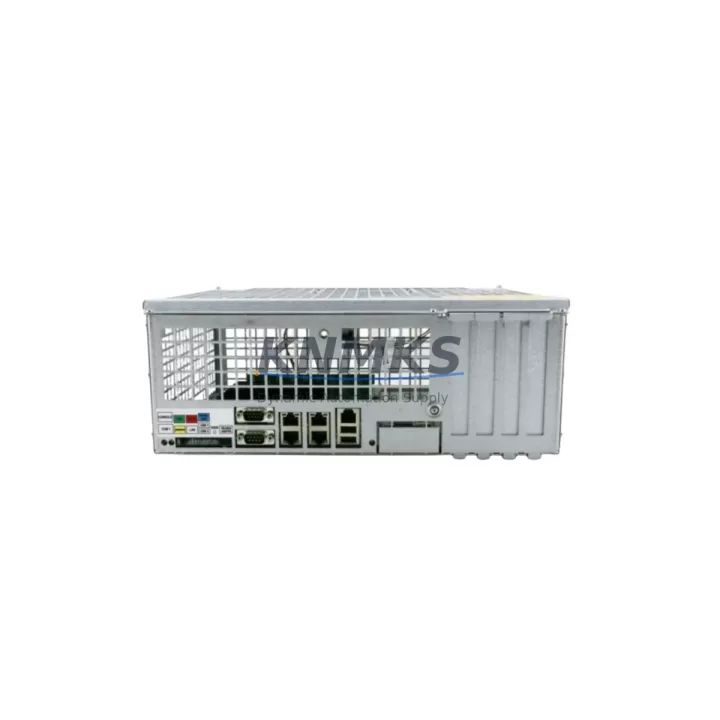
The ABB DSQC639 (OEM part number 3HAC041443-003) is the Main Computer Unit of the IRC5 robot controller — the central processing core responsible for motion planning, I/O coordination, program execution, and real-time communication across the entire robot cell. When this module fails, the robot stops. Sourcing a verified, pre-tested replacement is the fastest path back to production.
At KNMKS, every DSQC639 unit is inspected and functionally tested before shipment. Each unit ships with a support terms confirmed by quotation and full traceability documentation, giving maintenance engineers and procurement teams the confidence to stock this module as a critical spare.
Spare Maintenance Table
| Part Number | DSQC639 / 3HAC041443-003 |
| Brand | ABB Robotics |
| Series / Platform | IRC5 Robot Controller |
| Module Function | Main Computer Unit — motion control, I/O management, program execution |
| Compatible Controllers | IRC5 Single Cabinet, IRC5 Dual Cabinet, IRC5 Panel Mounted Controller |
| Compatible Robot Series | IRB 120, IRB 1600, IRB 2600, IRB 4600, IRB 6640, IRB 6700 and other IRC5-based models |
| Operating Voltage | 24 VDC (supplied internally by IRC5 power unit) |
| Communication Interfaces | Ethernet (LAN/WAN), USB, serial; integrates with DSQC643 I/O bus |
| Origin | Germany (ABB Robotics manufacturing) |
| Condition | Original — new or refurbished, pre-shipment tested |
| Installation Environment | IRC5 controller cabinet, DIN-rail mounted backplane slot |
| Operating Temperature | 0 °C to +52 °C (controller cabinet ambient) |
| Support terms | 12 Months — covers functional failure under normal operating conditions |
| Shipping | Global express; ESD-safe packaging; multi-region stock |
Maintenance Planning for Continuous Operation
The DSQC639 sits at the heart of the IRC5 controller, and a failure here typically manifests as a complete robot halt, error codes on the FlexPendant teach pendant, or loss of communication with the robot management network. Before declaring the main computer faulty, a disciplined maintenance engineer will first verify the DSQC609 power supply unit — an unstable 24 VDC rail is the most common root cause of apparent CPU failures. Confirm input voltage and ripple at the power unit output terminals before swapping the DSQC639.
Once the DSQC639 is confirmed as the fault source, the replacement workflow should also include inspection of the DSQC643 DeviceNet I/O unit and the DSQC652 digital I/O board, both of which communicate directly with the main computer over the internal I/O bus. A corrupted bus caused by a failing DSQC639 can leave residual configuration errors on these modules even after the CPU is replaced — a full I/O bus reset and re-parameterization is recommended.
For plants running IRC5 controllers in multi-robot cells, the DSQC668 fieldbus adapter (PROFIBUS or DeviceNet variant, depending on site configuration) should be checked for firmware compatibility with the replacement DSQC639. Firmware mismatches between the main computer and the fieldbus adapter are a known cause of post-replacement communication faults that can delay restart by hours.
Maintenance teams should also inspect the DSQC662 Ethernet switch module if the IRC5 is networked into a plant-wide SCADA or MES system. A failing main computer can corrupt ARP tables on the switch module, causing intermittent network dropouts that persist after the CPU swap. Cycling the switch module and verifying IP configuration post-replacement is standard practice.
Finally, the FlexPendant (DSQC679 or equivalent) cable and connector should be inspected during any DSQC639 replacement. The teach pendant connects directly to the main computer, and a damaged cable or worn connector can introduce communication errors that are misdiagnosed as CPU faults — or that cause new faults immediately after a CPU replacement.
For annual maintenance schedules, procurement engineers are advised to hold at least one DSQC639 unit in local stock per robot cell cluster. Given the IRC5 platform’s widespread global install base and ABB’s ongoing transition to IRC7, lead times for new DSQC639 units from the OEM channel are extending. Securing verified spares through a reliable distributor with multi-region stock — and confirmed support terms confirmed by quotation coverage — is the lowest-risk procurement strategy for plants committed to IRC5 longevity.
Site Replacement Workflow
Step 1 — Safety Isolation: Follow site LOTO (Lockout/Tagout) procedure. De-energize the IRC5 controller cabinet and confirm zero-energy state before opening the cabinet door.
Step 2 — Configuration Backup: If the existing DSQC639 is still partially functional, use RobotStudio or the FlexPendant to perform a full system backup (including RAPID programs, I/O configuration, and system parameters) to a USB drive or network share. If the module is non-functional, restore from the most recent scheduled backup.
Step 3 — Module Removal: Disconnect all cables from the DSQC639 — Ethernet, USB, power, and the internal bus connector. Note cable routing and labeling before disconnection. Remove the module from the backplane mounting.
Step 4 — Replacement Installation: Install the replacement DSQC639 into the backplane slot. Reconnect all cables in reverse order. Verify connector seating and locking.
Step 5 — Firmware and Configuration Restore: Power up the controller. The replacement unit may require a firmware update to match the site’s RobotWare version — use RobotStudio Boot Application to flash if needed. Restore the system backup. Verify I/O configuration, robot parameters, and RAPID program integrity.
Step 6 — Functional Test: Run the robot through a low-speed test cycle in manual mode. Verify all I/O signals, fieldbus communication, and teach pendant response before returning to automatic production mode.
This workflow applies equally to planned annual maintenance replacements and emergency fault-response scenarios. Keeping a pre-tested DSQC639 spare on-site reduces the replacement cycle from days (waiting for shipment) to hours (immediate swap and restore).
Spare Parts Support FAQ
Q1: Is the DSQC639 compatible with all IRC5 controller variants?
The DSQC639 (3HAC041443-003) is the standard main computer for IRC5 Single Cabinet and Dual Cabinet controllers across a wide range of ABB robot models. Compatibility depends on the RobotWare version installed at your site. KNMKS recommends confirming your controller’s RobotWare version before ordering to ensure firmware alignment. Our technical team can assist with compatibility verification prior to shipment.
Q2: What does the support terms confirmed by quotation cover?
The support terms confirmed by quotation cover functional failure of the DSQC639 unit under normal operating conditions — including CPU processing faults, communication interface failures, and power rail issues originating within the module. It does not cover damage caused by incorrect installation, overvoltage events, or physical impact. Each unit is pre-shipment tested and ships with a test report on request.
Q3: How do you manage long-term supply for a module that ABB may discontinue?
KNMKS maintains multi-region stock of the DSQC639 and monitors OEM lifecycle announcements. For customers with large IRC5 fleets, we offer forward-stocking agreements — reserving a defined quantity of verified units for scheduled delivery over 12–36 months. This protects against supply disruption as ABB transitions its controller platform and OEM channel availability tightens.
Q4: Can I send my faulty DSQC639 for evaluation before purchasing a replacement?
Yes. KNMKS accepts faulty units for technical evaluation. Send the module with a description of the fault symptoms and your controller’s RobotWare version. Our engineers will assess repairability and provide a written evaluation report. This service supports procurement decisions and helps maintenance teams build accurate fault history records for their IRC5 assets.
© 2026 KNMKS. All rights reserved.
Original Source: https://knmks.com
Contact: admin@knmks.com | +86 18359268345
Product Identification
- Brand / Ecosystem
-
ABB
ABB - Model / Series
-
DSQC639?3HAC041443-003
IRC5 Series - Product Family
- PLCs & Controllers
- Availability Status
- Available on request after model and quantity confirmation
- Inquiry Type
- B2B RFQ, replacement inquiry and project spare-part request
- Pre-Quote Check
- Exact SKU, brand, series, quantity, nameplate photos and destination country are checked before quotation
System Path
Where this product fits in the KNMKS automation structure.
Specification & Inquiry Focus
- Control platform
- PLC, PAC and modular controllers
- Common needs
- CPU, rack, power and I/O expansion
- Project support
- Replacement, cabinet build and maintenance
Buyer Confirmation
Information KNMKS checks before replying.
- Exact model
- DSQC639?3HAC041443-003
- Brand / ecosystem
- ABB
- Product family
- PLCs & Controllers
- Application note
- Replacement, maintenance, project build or spare-part list
- Useful photos
- Nameplate, installed unit, cabinet layout or connector side
- Delivery details
- Quantity, destination country and target schedule
Document Support
Files and notes can be confirmed during quotation.
- Product photos or nameplate confirmation when available
- Packing and delivery notes before quotation confirmation
- Support scope and delivery terms confirmed per inquiry
- Export document coordination for qualified B2B requests
Inquiry Support
- Model cross-checking before quotation
- CPU, power, rack and expansion module matching
- Support for replacement and project inquiry
What to Send Us
- Brand and exact model number: ABB DSQC639?3HAC041443-003
- Quantity and required delivery time
- Application, replacement requirement or nameplate photo
- Destination country and shipping preference
RFQ Preparation
This is a product inquiry page built for RFQ communication.
Fast Model Check
Send this model to KNMKS for confirmation.
Include quantity, destination country and photos if this is a maintenance replacement. The inquiry will be saved with a reference number after submission.
Brand & Compatibility Note
KNMKS displays automation product information for well-known industrial brand ecosystems and compatible replacement references. Brand names are used for product identification and compatibility reference only; final availability and commercial terms are confirmed per quotation.
 Manufacturing
 Machine Tools
 Packaging
 Energy & Power



 HMI & Displays
 Servo Systems
 Variable Frequency Drives
 Sensors