
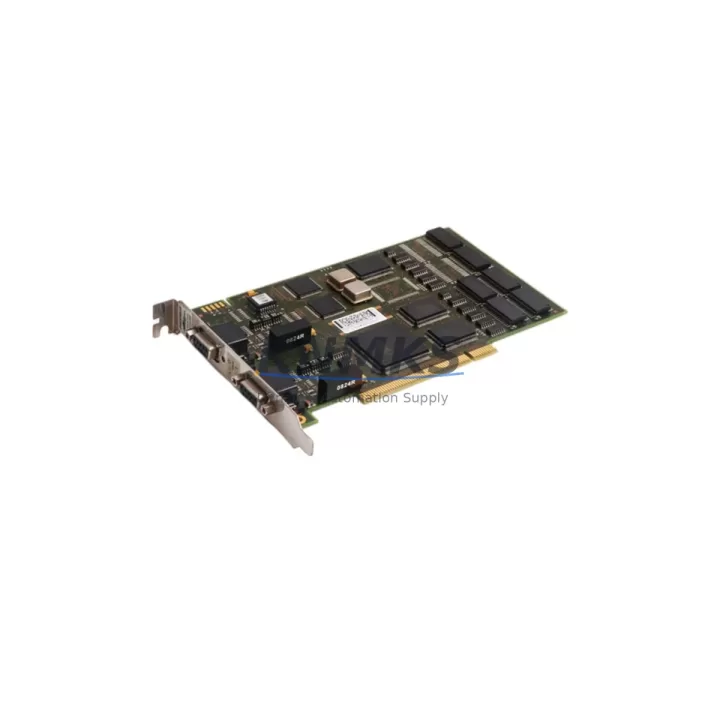
Overview
ABB DSQC637 3HAC023047-001 Migration-Ready Profibus Adapter: Legacy Control System Retrofit & Upgrade
The ABB DSQC637 (catalog reference 3HAC023047-001) is a Profibus-DP fieldbus adapter module designed for integration into the ABB IRC5 robot controller platform. As industrial facilities accelerate the retirement of aging DeviceNet and serial-based communication architectures, the DSQC637 has become a critical component in migration projects that demand deterministic fieldbus performance, minimal rewiring, and verified backward compatibility with existing IRC5 cabinet infrastructure.
Whether you are replacing a failed DSQC612 DeviceNet adapter, upgrading from an older DSQC652 I/O module configuration, or migrating an entire robot cell from a legacy S4C+ controller to the IRC5 platform, the DSQC637 provides a structured, low-risk path to Profibus-DP connectivity without requiring controller replacement or PLC reprogramming at the master level.
Migration Compatibility Table
| Parameter | Detail |
|---|---|
| SKU / Part Number | DSQC637 / 3HAC023047-001 |
| Compatible Controller | ABB IRC5 (single & dual cabinet) |
| Fieldbus Protocol | Profibus-DP (DP-V0 / DP-V1) |
| Replaces / Upgrades From | DSQC612 (DeviceNet), DSQC652 (I/O), legacy S4C+ fieldbus boards |
| Backplane Interface | IRC5 internal axis computer bus slot |
| Installation Slot | Dedicated fieldbus adapter slot in IRC5 drive module |
| Power Supply Requirement | Supplied via IRC5 backplane (no external 24 VDC required) |
| Communication Speed | 9.6 kbps – 12 Mbps (auto-negotiated) |
| GSD File Required | Yes — ABB-provided GSD for Profibus master configuration |
| Firmware Compatibility | RobotWare 5.x and 6.x (verify build version before installation) |
| Physical Dimensions | Standard IRC5 adapter card form factor |
| Weight | 140 g |
| Origin | Germany |
| Retrofit Recommendation | Direct drop-in for IRC5 Profibus-DP slot; no cabinet modification required |
| Commissioning Focus | Node address DIP switch, GSD import to Profibus master, I/O mapping verification in RobotStudio |
| Support terms | support terms confirmed by quotation — functional test performed prior to shipment |
Retrofit Planning for Existing Automation Systems
Successful integration of the DSQC637 into a running production environment requires systematic pre-migration planning. Before removing the legacy fieldbus board, engineers should document the existing Profibus node address (set via DIP switches on the adapter), confirm the IRC5 drive module has a free fieldbus adapter slot, and verify that the Profibus master — typically a Siemens S7-300/S7-400 PLC or equivalent — has an available GSD slot for the ABB robot station.
In retrofit scenarios where the IRC5 cabinet also houses a DSQC652 digital I/O module or a DSQC661 axis computer, engineers must audit the backplane slot assignments before insertion to avoid address conflicts. The DSQC637 occupies a dedicated fieldbus slot and does not share addressing with standard I/O modules, but the overall slot map must be reviewed in the IRC5 system parameters under Motion > Fieldbus Command Interface.
For facilities migrating from older S4C+ robot controllers, the transition typically involves replacing the S4C+ Profibus board with the DSQC637 in the new IRC5 cabinet, re-importing the GSD file into the Profibus master, and remapping I/O signals in the robot program. If the existing HMI (such as a Siemens TP700 or TP1200 panel) uses symbolic addressing tied to the robot’s Profibus I/O, the HMI project may require a partial update to reflect the new I/O byte offsets introduced by the DSQC637’s default configuration.
Power budget verification is essential: the IRC5 backplane supplies 5 VDC to adapter cards, and adding the DSQC637 alongside a DSQC643 fieldbus adapter or a DSQC688 Ethernet/IP adapter in a dual-protocol configuration requires confirming the drive module’s internal power rail does not exceed its rated capacity. ABB’s IRC5 hardware manual provides per-slot current draw specifications that should be reviewed during the planning phase.
For installations requiring extended I/O capacity beyond the DSQC637’s Profibus-mapped signals, engineers commonly pair the adapter with additional DSQC651 analog I/O modules or external Profibus remote I/O stations. This approach preserves the robot controller’s native I/O architecture while extending field device connectivity through the Profibus network managed by the DSQC637.
All replacement units supplied by KNMKS are functionally tested prior to shipment. Each DSQC637 is verified for Profibus communication handshake, backplane connector integrity, and DIP switch functionality. Units are shipped with anti-static packaging and include a support terms confirmed by quotation covering manufacturing defects and functional failures under normal operating conditions.
Downtime Control During System Migration
Minimizing unplanned downtime during a DSQC637 retrofit requires a structured hot-swap preparation protocol. Before the maintenance window opens, the existing robot program — including RAPID modules, system parameters, and I/O configuration files — should be backed up to a USB drive or network share using RobotStudio’s backup function. This ensures that if the migration encounters an unexpected firmware incompatibility or Profibus addressing conflict, the system can be restored to its pre-migration state within minutes rather than hours.
During the physical swap, the IRC5 controller must be powered down completely before removing the legacy fieldbus adapter. The DSQC637 should be inserted into the correct slot with the backplane connector fully seated — partial seating is a common cause of intermittent communication faults that are difficult to diagnose under production pressure. After power-up, the IRC5 event log should be checked for fieldbus initialization errors before the Profibus master is brought online.
On the PLC side, the Profibus master should be placed in STOP mode during the robot controller restart to prevent spurious I/O commands from reaching the robot during the initialization sequence. Once the DSQC637 has established a stable Profibus connection — confirmed by the adapter’s green RUN LED and the absence of BF (Bus Fault) indicators — the PLC can be returned to RUN mode and I/O signal integrity verified against the pre-migration baseline.
For production lines where continuous operation is critical, a parallel commissioning approach is recommended: configure and test the DSQC637 in a spare IRC5 cabinet or test rig before the scheduled maintenance window, then perform the physical swap and final parameter transfer during the planned downtime. This approach has consistently reduced live migration time to under 90 minutes for experienced automation engineers familiar with the IRC5 platform.
Retrofit Support FAQ
Q1: Can the DSQC637 directly replace a DSQC612 DeviceNet adapter in an existing IRC5 cabinet?
The DSQC637 (Profibus-DP) and DSQC612 (DeviceNet) occupy the same physical fieldbus adapter slot in the IRC5 drive module, so the mechanical replacement is straightforward. However, the protocol change from DeviceNet to Profibus-DP requires reconfiguration of the Profibus master (PLC), import of the ABB GSD file, and remapping of all robot I/O signals in the system parameters. The robot RAPID program logic itself typically does not require modification if I/O signal names are preserved during remapping.
Q2: What firmware version is required on the IRC5 controller for the DSQC637 to function correctly?
The DSQC637 is supported under RobotWare 5.12 and later, including all RobotWare 6.x releases. Before installation, confirm the installed RobotWare build version via the FlexPendant under Control Panel > About. If the controller is running an earlier RobotWare 5.x build, a firmware update may be required. KNMKS recommends verifying compatibility with ABB’s official hardware/software compatibility matrix prior to ordering.
Q3: How is the Profibus node address configured on the DSQC637, and does it need to match the legacy adapter’s address?
The Profibus node address is set via an 8-position DIP switch bank on the DSQC637 module face. The address must match the station address configured in the Profibus master’s hardware configuration (e.g., in Siemens STEP 7 or TIA Portal). If the legacy adapter was configured at address 2, the DSQC637 DIP switches should be set to the same address to minimize changes to the PLC program. Address changes require corresponding updates in both the PLC hardware configuration and the IRC5 system parameters.
Q4: What does the support terms confirmed by quotation cover, and what is the lead time for replacement units?
All DSQC637 units supplied by KNMKS carry a support terms confirmed by quotation covering functional failures and manufacturing defects under normal industrial operating conditions. Each unit undergoes a pre-shipment functional test including Profibus communication verification and backplane connector inspection. In-stock units typically ship within 1–3 business days. For urgent replacement requirements, expedited shipping options are available — contact our sales team for current inventory status and lead time confirmation.
© 2026 KNMKS. All rights reserved.
Original Source: https://knmks.com
Contact: admin@knmks.com | +86 18359268345
Product Identification
- Brand / Ecosystem
-
ABB
ABB - Model / Series
-
DSQC637 3HAC023047-001
IRC5 Series - Product Family
- PLCs & Controllers
- Availability Status
- Available on request after model and quantity confirmation
- Inquiry Type
- B2B RFQ, replacement inquiry and project spare-part request
- Pre-Quote Check
- Exact SKU, brand, series, quantity, nameplate photos and destination country are checked before quotation
System Path
Where this product fits in the KNMKS automation structure.
Specification & Inquiry Focus
- Control platform
- PLC, PAC and modular controllers
- Common needs
- CPU, rack, power and I/O expansion
- Project support
- Replacement, cabinet build and maintenance
Buyer Confirmation
Information KNMKS checks before replying.
- Exact model
- DSQC637 3HAC023047-001
- Brand / ecosystem
- ABB
- Product family
- PLCs & Controllers
- Application note
- Replacement, maintenance, project build or spare-part list
- Useful photos
- Nameplate, installed unit, cabinet layout or connector side
- Delivery details
- Quantity, destination country and target schedule
Document Support
Files and notes can be confirmed during quotation.
- Product photos or nameplate confirmation when available
- Packing and delivery notes before quotation confirmation
- Support scope and delivery terms confirmed per inquiry
- Export document coordination for qualified B2B requests
Inquiry Support
- Model cross-checking before quotation
- CPU, power, rack and expansion module matching
- Support for replacement and project inquiry
What to Send Us
- Brand and exact model number: ABB DSQC637 3HAC023047-001
- Quantity and required delivery time
- Application, replacement requirement or nameplate photo
- Destination country and shipping preference
RFQ Preparation
This is a product inquiry page built for RFQ communication.
Fast Model Check
Send this model to KNMKS for confirmation.
Include quantity, destination country and photos if this is a maintenance replacement. The inquiry will be saved with a reference number after submission.
Brand & Compatibility Note
KNMKS displays automation product information for well-known industrial brand ecosystems and compatible replacement references. Brand names are used for product identification and compatibility reference only; final availability and commercial terms are confirmed per quotation.
 Manufacturing
 Machine Tools
 Packaging
 Energy & Power



 HMI & Displays
 Servo Systems
 Variable Frequency Drives
 Sensors