
Overview
ABB DSQC633A 3HAC031851-001 Maintenance-Proven Spare Part for IRC5 Factory Uptime
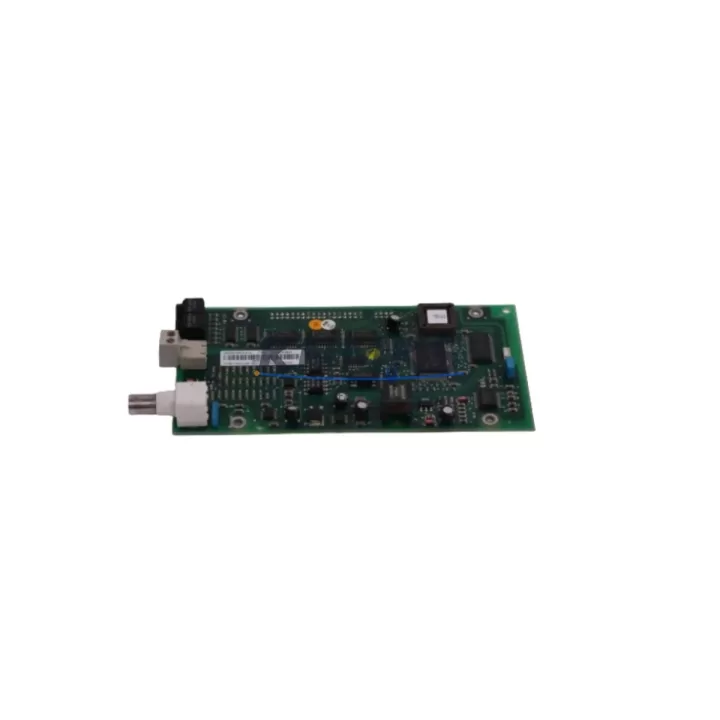
The ABB DSQC633A (3HAC031851-001 / 3HAC031977-001) is the Serial Measurement Board (SMB) at the heart of ABB IRC5 robot controller axis feedback. It acquires resolver and encoder signals from all robot axes, relays position data to the main computer module, and enables the IRC5 drive system to maintain precise motion control. When this board degrades or fails, the robot halts — making a verified, ready-to-install spare unit the single most effective insurance against unplanned downtime on any IRC5-based production line.
KNMKS stocks the DSQC633A as an original spare, fully tested before shipment and backed by a support terms confirmed by quotation. Each unit is inspected for connector integrity, PCB condition, and firmware compatibility before dispatch, ensuring that your maintenance team can swap the board and resume production with confidence.
Spare Maintenance Table
| Parameter | Specification / Value |
|---|---|
| Part Number | DSQC633A / 3HAC031851-001 |
| Alternate P/N | 3HAC031977-001 |
| Bearing Reference | 6901ZZ |
| Description | Serial Measurement Board (SMB) |
| Compatible Controller | ABB IRC5 (Single / Dual Cabinet, Panel Mounted) |
| Compatible Robot Series | IRB 140, IRB 1600, IRB 2400, IRB 4400, IRB 6600, IRB 6640, IRB 7600 |
| Function | Axis resolver/encoder signal acquisition & serial data transmission to main computer |
| Origin | Germany (DE) |
| Weight | 420 g |
| Application Environment | Industrial robot controller cabinet, IP54 enclosure |
| Installation | DIN-rail / cabinet backplane mount; standard ABB IRC5 connector harness |
| Maintenance Interval | Inspect annually or at 20,000 operating hours; replace on resolver fault or SMB error code |
| Pre-Shipment Test | Yes — functional and communication verification |
| Support terms | 12 Months |
Maintenance Planning for Continuous Operation
A field-proven maintenance strategy for IRC5 robots treats the DSQC633A not as a reactive replacement but as a scheduled spare. During annual cabinet inspections, maintenance engineers should evaluate the SMB alongside the DSQC662 Main Computer Module, which processes the serial position data the SMB delivers. A degraded main computer can produce axis errors that mimic SMB faults, so both boards should be assessed together before condemning either unit.
Power quality directly affects SMB longevity. The DSQC609 Power Supply Unit provides the regulated 24 VDC rail that feeds the SMB and other IRC5 logic boards. Voltage ripple or transient spikes on this rail accelerate component wear on the measurement board. Including the DSQC609 in your annual power audit — checking output voltage under load and inspecting capacitor condition — reduces the risk of cascade failures that take down the entire axis feedback chain.
Signal integrity between the SMB and the robot arm depends on the resolver cable harness and the SMB battery backup unit (BBU). The BBU preserves axis position data during power-off cycles; a weak battery causes the robot to lose its calibration reference and triggers SMB-related alarms on restart. Maintenance teams should test BBU voltage annually and keep a replacement unit on the shelf alongside the DSQC633A spare.
For multi-robot cells, the DSQC378B I/O Board and DSQC652 Digital I/O Module are frequently co-located in the same IRC5 cabinet. During a planned SMB replacement, it is efficient practice to inspect these I/O boards for loose terminal connections, blown fuses on the 24 VDC I/O supply, and any signs of heat stress on the connector blocks. Addressing minor I/O issues during the same maintenance window avoids a second unplanned outage weeks later.
Communication continuity is equally important. The DSQC688 Fieldbus Adapter or PROFIBUS/DeviceNet communication boards installed in the IRC5 option slot should be checked for firmware version compatibility whenever the SMB is replaced, particularly if the replacement unit carries a different hardware revision. Mismatched firmware between the SMB and the main computer is a known source of post-replacement axis calibration errors.
Finally, the physical connector harness — the multi-pin resolver cables routed from each robot joint to the SMB — should be inspected for chafing, connector pin corrosion, and cable tie fatigue during every SMB service event. Damaged resolver cables produce intermittent axis errors that are difficult to distinguish from a failing SMB, and replacing the board without addressing cable condition leads to repeat failures. A complete spare parts kit for the IRC5 SMB circuit therefore includes the DSQC633A board, the BBU, and a set of resolver cable connectors.
Site Replacement Workflow
Step 1 — Preparation & Safety Isolation. Place the IRC5 controller in manual mode and execute a controlled power-down sequence. Lock out / tag out (LOTO) the main cabinet breaker. Allow the drive capacitors to discharge for a minimum of 5 minutes before opening the cabinet door.
Step 2 — Position Data Backup. Before disconnecting the SMB, verify that the robot’s calibration data and axis positions have been saved to the FlexPendant or a connected PC using RobotStudio. The DSQC633A battery backup preserves this data during normal power cycling, but a board swap requires a manual save to prevent recalibration after installation.
Step 3 — Board Removal. Photograph the existing cable routing and connector positions on the DSQC633A. Disconnect the resolver harness connectors in sequence, label each cable, and remove the board from its mounting position. Note the hardware revision printed on the board label for compatibility verification against the replacement unit.
Step 4 — Replacement Installation. Confirm that the replacement DSQC633A (3HAC031851-001) hardware revision matches or is a qualified successor to the removed unit. Seat the board, reconnect all resolver harness connectors in the documented sequence, and verify that the BBU connector is fully engaged.
Step 5 — Power-Up & Verification. Restore power and observe the IRC5 startup sequence on the FlexPendant. Clear any SMB-related error codes, restore the saved axis position data, and run a slow-speed jog test on all axes to confirm resolver feedback is correct on each joint. Log the replacement date, board serial number, and test results in the maintenance record.
This workflow is compatible with all IRC5 variants including Single Cabinet, Dual Cabinet, and Panel Mounted controllers, and applies equally when upgrading from the earlier DSQC633 to the DSQC633A revision.
Spare Parts Support FAQ
Q1: Is the DSQC633A directly interchangeable with the earlier DSQC633?
The DSQC633A is the qualified successor to the DSQC633 and is backward compatible with all IRC5 controllers that previously used the DSQC633. No firmware update is required in most installations, but it is recommended to verify the IRC5 system software version against ABB’s compatibility matrix before installation, particularly on controllers running RobotWare versions earlier than 5.14.
Q2: What is included in the support terms confirmed by quotation and how does it apply to spare parts?
Every DSQC633A unit supplied by KNMKS is covered by a support terms confirmed by quotation from the date of shipment. The support terms covers manufacturing defects and functional failures under normal operating conditions. It does not cover damage resulting from incorrect installation, overvoltage events, or physical impact. In the event of a support terms claim, KNMKS provides a replacement unit or documented resolution support after fault verification.
Q3: How should maintenance teams manage long-term spare parts inventory for IRC5 SMB boards?
For facilities operating three or more IRC5 robots, industry best practice recommends holding a minimum of one DSQC633A spare per five robots, stored in an ESD-safe bag in a climate-controlled environment. Boards should be rotated into service on a first-in, first-out basis and inspected annually for storage-related degradation. KNMKS supports long-term supply agreements to ensure consistent availability of the DSQC633A even as the IRC5 platform matures.
Q4: Can KNMKS supply the DSQC633A for urgent breakdown recovery, and what are the lead times?
Yes. KNMKS maintains stock of the DSQC633A for immediate dispatch. Standard international shipping typically delivers within 3–7 business days depending on destination. For urgent breakdown situations, expedited freight options are available. Contact the KNMKS sales team directly to confirm current stock status and arrange priority shipment.
© 2026 KNMKS. All rights reserved.
Original Source: https://knmks.com
Contact: admin@knmks.com | +86 18359268345
Product Identification
- Brand / Ecosystem
-
ABB
ABB - Model / Series
-
DSQC633A 3HAC031851-001 3HAC031977-001 6901ZZ
IRC5 Series - Product Family
- Other Components
- Availability Status
- Available on request after model and quantity confirmation
- Inquiry Type
- B2B RFQ, replacement inquiry and project spare-part request
- Pre-Quote Check
- Exact SKU, brand, series, quantity, nameplate photos and destination country are checked before quotation
System Path
Where this product fits in the KNMKS automation structure.
Specification & Inquiry Focus
- Component range
- Breakers, terminals and cabinet accessories
- Common needs
- Model, photo and installation requirement
- Project support
- Maintenance and mixed spare-part inquiry
Buyer Confirmation
Information KNMKS checks before replying.
- Exact model
- DSQC633A 3HAC031851-001 3HAC031977-001 6901ZZ
- Brand / ecosystem
- ABB
- Product family
- Other Components
- Application note
- Replacement, maintenance, project build or spare-part list
- Useful photos
- Nameplate, installed unit, cabinet layout or connector side
- Delivery details
- Quantity, destination country and target schedule
Document Support
Files and notes can be confirmed during quotation.
- Product photos or nameplate confirmation when available
- Packing and delivery notes before quotation confirmation
- Support scope and delivery terms confirmed per inquiry
- Export document coordination for qualified B2B requests
Inquiry Support
- Mixed automation spare parts inquiry
- Cabinet component and accessory support
- Model identification from photos or labels
What to Send Us
- Brand and exact model number: ABB DSQC633A 3HAC031851-001 3HAC031977-001 6901ZZ
- Quantity and required delivery time
- Application, replacement requirement or nameplate photo
- Destination country and shipping preference
RFQ Preparation
This is a product inquiry page built for RFQ communication.
Fast Model Check
Send this model to KNMKS for confirmation.
Include quantity, destination country and photos if this is a maintenance replacement. The inquiry will be saved with a reference number after submission.
Brand & Compatibility Note
KNMKS displays automation product information for well-known industrial brand ecosystems and compatible replacement references. Brand names are used for product identification and compatibility reference only; final availability and commercial terms are confirmed per quotation.
 Manufacturing
 Machine Tools
 Packaging
 Energy & Power

 PLCs & Controllers
 HMI & Displays
 Servo Systems
 Variable Frequency Drives