
Overview
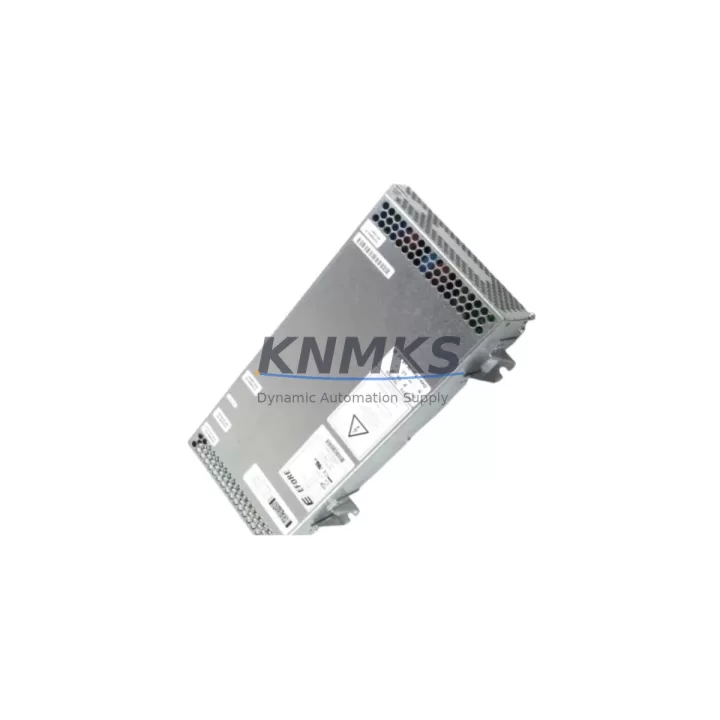
ABB DSQC627 3HAC020466-001 Maintenance-Proven Spare Part for Factory Uptime
The ABB DSQC627 (part number 3HAC020466-001) is the original power supply module for the ABB IRC5 robot controller family — one of the most widely deployed industrial robot platforms in automotive, electronics, and general manufacturing environments worldwide. When this module fails or degrades, the entire robot cell goes offline. Sourcing a verified, pre-tested replacement quickly is the single most effective action a maintenance team can take to restore production and protect factory uptime.
This listing covers a genuine ABB DSQC627 3HAC020466-001 unit, sourced through established industrial supply channels, inspected before dispatch, and backed by a support terms confirmed by quotation. Whether you are responding to an unplanned shutdown, building a critical spare inventory, or executing a scheduled annual overhaul, this module ships ready to install.
Spare Maintenance Table
| Part Number | 3HAC020466-001 |
| Model / SKU | DSQC627 |
| Brand | ABB |
| Series / Platform | IRC5 Robot Controller |
| Module Type | Power Supply Unit (PSU) |
| Input Voltage | 200–600 V AC, 3-phase (auto-ranging) |
| Output Voltages | +24 V DC (logic/I/O), ±15 V DC (signal), +5 V DC (board logic) |
| Compatible Controllers | IRC5 Single Cabinet, IRC5 Dual Cabinet, IRC5 Panel Mounted Controller |
| Compatible Robot Models | IRB 1600, IRB 2400, IRB 4600, IRB 6640, IRB 6650S and other IRC5-based models |
| Installation Position | Internal cabinet module, DIN-rail or chassis mount |
| Operating Temperature | 0 °C to +52 °C (controller ambient) |
| Protection Class | IP54 (within IRC5 cabinet enclosure) |
| Origin | Sweden (ABB Robotics) |
| Pre-Shipment Test | Yes — power-on functional verification |
| Support terms | 12 Months |
| Condition | Original / Surplus / Refurbished (as labeled on order confirmation) |
Maintenance Planning for Continuous Operation
The DSQC627 power supply sits at the heart of the IRC5 controller’s electrical architecture. It converts incoming three-phase mains power into the regulated DC rails that feed every downstream board and device in the cabinet. When planning a replacement or conducting a preventive inspection, maintenance engineers should treat this module as part of a broader cabinet health review rather than an isolated swap.
Start with the DSQC609 drive unit and DSQC611 axis computer — both draw directly from the 24 V DC rail supplied by the DSQC627. A degraded power supply often manifests first as intermittent axis faults or communication dropouts on these boards before the PSU itself triggers an alarm. Inspect the DSQC652 I/O module and any DSQC651 digital I/O boards for signs of voltage instability: flickering status LEDs, unexpected input state changes, or erratic output switching are classic indicators of upstream power quality issues.
Check the DSQC679 teach pendant (FlexPendant) connection and its 24 V supply branch. A failing DSQC627 can cause the FlexPendant to disconnect or display communication errors that are easily misdiagnosed as a pendant cable or connector fault. Similarly, review the DSQC688 safety board — safety circuit integrity depends on stable power, and nuisance E-stop trips or safety relay faults may trace back to the PSU.
On the incoming power side, verify the main circuit breaker rating and condition, inspect input fuses (typically located on the DSQC627 itself or on the cabinet’s main power entry board), and check EMC filter capacitors for signs of bulging or leakage. Loose terminal connections on the three-phase input block are a common root cause of premature PSU failure and should be re-torqued during any scheduled maintenance window.
For sites running multiple IRC5 controllers, maintaining at least one DSQC627 3HAC020466-001 unit in the local spare parts cabinet is standard practice. Mean time to repair drops significantly when the replacement module is on-site rather than on order. Pair this with a spare DSQC609 and a set of DSQC652 I/O modules to cover the most common IRC5 failure modes without overstocking.
Site Replacement Workflow
Step 1 — Isolate and lock out. De-energize the IRC5 cabinet at the main disconnect. Apply LOTO (lockout/tagout) per site safety procedure. Confirm zero energy state with a calibrated voltage tester on the three-phase input terminals.
Step 2 — Document existing wiring. Photograph or sketch all cable connections to the DSQC627 before removal. Note the positions of the three-phase input leads, the 24 V DC output harness connectors, and any signal cables. The IRC5 wiring harness is keyed, but documentation prevents errors during reassembly.
Step 3 — Remove the faulty module. Disconnect all connectors in sequence. Remove the mounting screws or release the DIN-rail clip. Slide the module out carefully — the unit weighs approximately 500 g and is secured by a combination of connectors and mechanical fasteners.
Step 4 — Inspect the cabinet interior. Before installing the replacement DSQC627 3HAC020466-001, inspect the cabinet for signs of overheating (discoloration, burnt smell), moisture ingress, or loose wiring. Clean any dust accumulation from the cooling vents and fan assembly.
Step 5 — Install the replacement module. Seat the new DSQC627 in the mounting position. Reconnect all harness connectors firmly. Verify that the three-phase input terminals are torqued to specification (refer to ABB IRC5 Product Manual, document 3HAC021313-001).
Step 6 — Power-on and verify. Re-energize the cabinet. Observe the DSQC627 status LEDs: steady green on the 24 V output indicator confirms normal operation. Boot the IRC5 controller and verify that the FlexPendant connects, all I/O modules report correctly, and no power-related fault codes appear in the event log.
Step 7 — Log the replacement. Record the replacement in the equipment maintenance log with the date, replaced part number, and new module serial number. Update the spare parts inventory accordingly.
This workflow applies equally to planned annual overhauls and emergency breakdown recovery. The DSQC627’s plug-and-play compatibility within the IRC5 platform means no firmware flashing or parameter reconfiguration is required — the controller recognizes the module automatically on power-up.
Spare Parts Support FAQ
Q1: Is the DSQC627 3HAC020466-001 compatible with all IRC5 controller variants?
Yes. The DSQC627 is the standard power supply module across the IRC5 Single Cabinet, Dual Cabinet, and Panel Mounted Controller variants. It is compatible with all IRC5-based ABB robot models including the IRB 1600, IRB 2400, IRB 4600, IRB 6640, and IRB 6650S series. Always confirm your controller’s main computer board revision against ABB’s compatibility matrix if you are working with early-production IRC5 units manufactured before 2006.
Q2: What pre-shipment testing is performed on each unit?
Every DSQC627 unit is powered on and subjected to a functional output voltage verification test before dispatch. Output rails (+24 V DC, ±15 V DC, +5 V DC) are measured under load and confirmed within ABB specification tolerances. Units that fail any output parameter are quarantined and not shipped. A test record is available on request.
Q3: What does the support terms confirmed by quotation cover, and how is a claim handled?
The support terms confirmed by quotation cover manufacturing defects and functional failures under normal operating conditions. It does not cover damage caused by incorrect installation, overvoltage events, physical impact, or moisture ingress. To initiate a support terms claim, contact admin@knmks.com with your order number, a description of the fault, and photos of the installed unit. Replacement or refund is processed within 5 business days of fault confirmation.
Q4: Can you support long-term or blanket purchase orders for IRC5 spare parts programs?
Yes. KNMKS supports annual spare parts programs and blanket purchase agreements for maintenance teams managing multiple IRC5 robot cells. We maintain buffer stock of high-demand IRC5 modules including the DSQC627, DSQC609, DSQC652, and DSQC679 to support scheduled maintenance cycles and emergency call-off orders. Contact admin@knmks.com or +86 18359268345 to discuss volume pricing and lead time commitments.
© 2026 KNMKS. All rights reserved.
Original Source: https://knmks.com
Contact: admin@knmks.com | +86 18359268345
Product Identification
- Brand / Ecosystem
-
ABB
ABB - Model / Series
-
DSQC627-3HAC020466-001
IRC5 Series - Product Family
- PLCs & Controllers
- Availability Status
- Available on request after model and quantity confirmation
- Inquiry Type
- B2B RFQ, replacement inquiry and project spare-part request
- Pre-Quote Check
- Exact SKU, brand, series, quantity, nameplate photos and destination country are checked before quotation
System Path
Where this product fits in the KNMKS automation structure.
Specification & Inquiry Focus
- Control platform
- PLC, PAC and modular controllers
- Common needs
- CPU, rack, power and I/O expansion
- Project support
- Replacement, cabinet build and maintenance
Buyer Confirmation
Information KNMKS checks before replying.
- Exact model
- DSQC627-3HAC020466-001
- Brand / ecosystem
- ABB
- Product family
- PLCs & Controllers
- Application note
- Replacement, maintenance, project build or spare-part list
- Useful photos
- Nameplate, installed unit, cabinet layout or connector side
- Delivery details
- Quantity, destination country and target schedule
Document Support
Files and notes can be confirmed during quotation.
- Product photos or nameplate confirmation when available
- Packing and delivery notes before quotation confirmation
- Support scope and delivery terms confirmed per inquiry
- Export document coordination for qualified B2B requests
Inquiry Support
- Model cross-checking before quotation
- CPU, power, rack and expansion module matching
- Support for replacement and project inquiry
What to Send Us
- Brand and exact model number: ABB DSQC627-3HAC020466-001
- Quantity and required delivery time
- Application, replacement requirement or nameplate photo
- Destination country and shipping preference
RFQ Preparation
This is a product inquiry page built for RFQ communication.
Fast Model Check
Send this model to KNMKS for confirmation.
Include quantity, destination country and photos if this is a maintenance replacement. The inquiry will be saved with a reference number after submission.
Brand & Compatibility Note
KNMKS displays automation product information for well-known industrial brand ecosystems and compatible replacement references. Brand names are used for product identification and compatibility reference only; final availability and commercial terms are confirmed per quotation.
 Manufacturing
 Machine Tools
 Packaging
 Energy & Power



 HMI & Displays
 Servo Systems
 Variable Frequency Drives
 Sensors