
Overview
ABB DSQC561 3HAC048550-001 Migration-Ready SMB for Legacy Control Systems
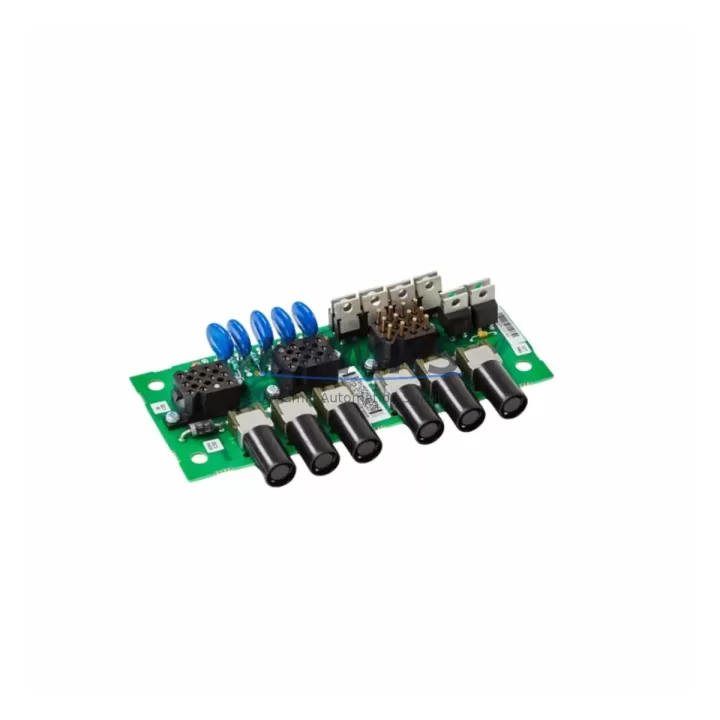
The ABB DSQC561 (part number 3HAC048550-001) is a Serial Measurement Board (SMB) designed for use in ABB IRC5 robot controller cabinets. As a direct migration-ready replacement for the discontinued 3HAC060919-001 and the earlier 3HAC16036-1, this module addresses one of the most common failure points in aging IRC5 installations — loss of axis position data due to SMB battery depletion or board-level failure. For maintenance engineers managing legacy robot lines, sourcing a verified DSQC561 with confirmed firmware compatibility is critical to minimizing unplanned downtime and protecting existing program logic.
The DSQC561 stores resolver offset values and axis calibration data for all six robot axes. When this board fails or its onboard battery is exhausted, the IRC5 controller loses positional reference, triggering calibration alarms and halting production. Replacing the SMB requires careful attention to battery backup procedures, calibration data transfer, and axis fine-calibration sequences — all of which are supported by this migration-ready unit.
In retrofit and upgrade projects, the DSQC561 is typically replaced alongside related IRC5 components. Engineers frequently address the DSQC652 computer unit, the DSQC662 or DSQC663 I/O modules, and the DSQC679 teach pendant interface during the same cabinet overhaul. When the SMB is replaced as part of a broader IRC5 modernization, it is also common to inspect the DSQC609 power distribution board and the DSQC508 axis computer for signs of capacitor aging or firmware obsolescence. Addressing these components together reduces the number of planned maintenance windows and lowers total lifecycle cost.
Migration Compatibility Table
| Parameter | Details |
|---|---|
| Part Number | 3HAC048550-001 |
| Module Designation | DSQC561 |
| Replaces (Discontinued) | 3HAC060919-001, 3HAC16036-1 |
| Compatible Controller | ABB IRC5 Single Cabinet, Dual Cabinet, Panel Mounted Controller (PMC) |
| Backplane Interface | IRC5 internal bus connector — direct drop-in fit |
| Communication Protocol | Internal IRC5 serial bus (SMB link) |
| Installation Requirement | Controller power-off; battery backup recommended before removal |
| Calibration Requirement | Axis fine-calibration required after replacement if calibration data is lost |
| Firmware Compatibility | Compatible with RobotWare 5.x and 6.x |
| Retrofit Recommendation | Replace SMB battery simultaneously; verify resolver offsets post-installation |
| Commissioning Note | Update revolution counter after installation; verify via FlexPendant |
| Support terms | support terms confirmed by quotation — tested and verified before shipment |
Retrofit Planning for Existing Automation Systems
Replacing the DSQC561 in an active production environment requires a structured approach to avoid data loss and extended downtime. Before removing the existing SMB, engineers should use the FlexPendant or RobotStudio to export the current revolution counter values and calibration offsets for all axes. If the onboard SMB battery has already failed, these values may need to be re-established through a full fine-calibration procedure using calibration pins or a calibration pendulum.
During cabinet access, it is advisable to inspect the DSQC652 main computer unit for firmware version compatibility with the replacement SMB. RobotWare versions below 5.14 may require a patch before the new DSQC561 is recognized correctly. In dual-cabinet IRC5 configurations, the SMB link runs through the DSQC609 power distribution board — verify that the SMB cable harness and connector pins are undamaged before reinstalling.
For facilities running multiple IRC5 robots on a common DeviceNet or PROFIBUS network, the SMB replacement does not affect fieldbus addressing, but the axis computer (DSQC508) must confirm axis data integrity after the SMB is swapped. If the robot is integrated with an external PLC via the DSQC662 digital I/O module, ensure that the PLC program holds the robot in a safe state during the replacement window. HMI screens linked to axis position feedback should be verified after recommissioning to confirm that displayed values match actual robot position.
Where installation space is constrained — particularly in Panel Mounted Controller (PMC) configurations — confirm that the DSQC561 board dimensions and connector orientation match the existing mounting bracket before ordering. The 3HAC048550-001 is a direct mechanical replacement for 3HAC060919-001 and 3HAC16036-1, but always cross-reference the cabinet layout drawing against the part number revision history to confirm fit.
Downtime Control During System Migration
Unplanned downtime during an SMB replacement is most commonly caused by three factors: loss of calibration data, firmware incompatibility, and incorrect revolution counter restoration. Each of these risks can be mitigated with pre-replacement preparation.
Before the maintenance window opens, back up the robot system using RobotStudio’s backup function. This captures the RAPID program, I/O configuration, system parameters, and — critically — the calibration data stored in the SMB. Even if the SMB battery has failed and live data cannot be read, the backup file preserves the last known calibration state, which can be used as a reference during recommissioning.
During the replacement, keep the controller powered down for the minimum time necessary. Once the new DSQC561 is seated and the cabinet is closed, power up the controller and immediately update the revolution counters via the FlexPendant before releasing the robot to automatic mode. Failure to update revolution counters is the single most common cause of post-replacement axis errors and collision risk.
For production lines where stopping the robot is not possible during a full shift, consider pre-staging the replacement DSQC561 with a charged battery and verified firmware, so that the physical swap can be completed within a single planned break window. Our units are shipped tested and ready for installation, reducing bench preparation time and supporting tight maintenance schedules. All units carry a support terms confirmed by quotation covering both the board and the onboard battery assembly.
Retrofit Support FAQ
Q: Is the DSQC561 3HAC048550-001 a direct replacement for 3HAC060919-001 and 3HAC16036-1?
A: Yes. The 3HAC048550-001 is ABB’s current active part number for the DSQC561 SMB and is the designated replacement for both the discontinued 3HAC060919-001 and the earlier 3HAC16036-1. It is a direct mechanical and electrical drop-in for IRC5 single and dual cabinet controllers.
Q: Do I need to recalibrate the robot after replacing the SMB?
A: If the SMB battery was still functional and calibration data was preserved, you only need to update the revolution counters after installation. If calibration data was lost due to battery failure, a full fine-calibration procedure is required. We recommend backing up the robot system before any SMB replacement.
Q: What firmware version is required for the DSQC561 3HAC048550-001?
A: The DSQC561 is compatible with RobotWare 5.x and 6.x. For controllers running RobotWare versions below 5.14, verify that the system software is up to date before installing the replacement board. Contact your ABB service representative or check the RobotWare release notes for patch requirements.
Q: What are the stock availability and support terms terms?
A: Units are availability confirmed by RFQ and available for immediate shipment. Each DSQC561 3HAC048550-001 is tested and verified before dispatch. A support terms confirmed by quotation is provided covering manufacturing defects and board-level failures. For volume orders or urgent spare part requirements, contact our sales team directly.
© 2026 KNMKS. All rights reserved.
Original Source: https://knmks.com
Contact: admin@knmks.com | +86 18359268345
Product Identification
- Brand / Ecosystem
-
ABB
ABB - Model / Series
-
SMB3HAC048550-001 3HAC060919-001 3HAC16036-1
IRC5 Series - Product Family
- PLCs & Controllers
- Availability Status
- Available on request after model and quantity confirmation
- Inquiry Type
- B2B RFQ, replacement inquiry and project spare-part request
- Pre-Quote Check
- Exact SKU, brand, series, quantity, nameplate photos and destination country are checked before quotation
System Path
Where this product fits in the KNMKS automation structure.
Specification & Inquiry Focus
- Control platform
- PLC, PAC and modular controllers
- Common needs
- CPU, rack, power and I/O expansion
- Project support
- Replacement, cabinet build and maintenance
Buyer Confirmation
Information KNMKS checks before replying.
- Exact model
- SMB3HAC048550-001 3HAC060919-001 3HAC16036-1
- Brand / ecosystem
- ABB
- Product family
- PLCs & Controllers
- Application note
- Replacement, maintenance, project build or spare-part list
- Useful photos
- Nameplate, installed unit, cabinet layout or connector side
- Delivery details
- Quantity, destination country and target schedule
Document Support
Files and notes can be confirmed during quotation.
- Product photos or nameplate confirmation when available
- Packing and delivery notes before quotation confirmation
- Support scope and delivery terms confirmed per inquiry
- Export document coordination for qualified B2B requests
Inquiry Support
- Model cross-checking before quotation
- CPU, power, rack and expansion module matching
- Support for replacement and project inquiry
What to Send Us
- Brand and exact model number: ABB SMB3HAC048550-001 3HAC060919-001 3HAC16036-1
- Quantity and required delivery time
- Application, replacement requirement or nameplate photo
- Destination country and shipping preference
RFQ Preparation
This is a product inquiry page built for RFQ communication.
Fast Model Check
Send this model to KNMKS for confirmation.
Include quantity, destination country and photos if this is a maintenance replacement. The inquiry will be saved with a reference number after submission.
Brand & Compatibility Note
KNMKS displays automation product information for well-known industrial brand ecosystems and compatible replacement references. Brand names are used for product identification and compatibility reference only; final availability and commercial terms are confirmed per quotation.
 Manufacturing
 Machine Tools
 Packaging
 Energy & Power



 HMI & Displays
 Servo Systems
 Variable Frequency Drives
 Sensors