
Overview
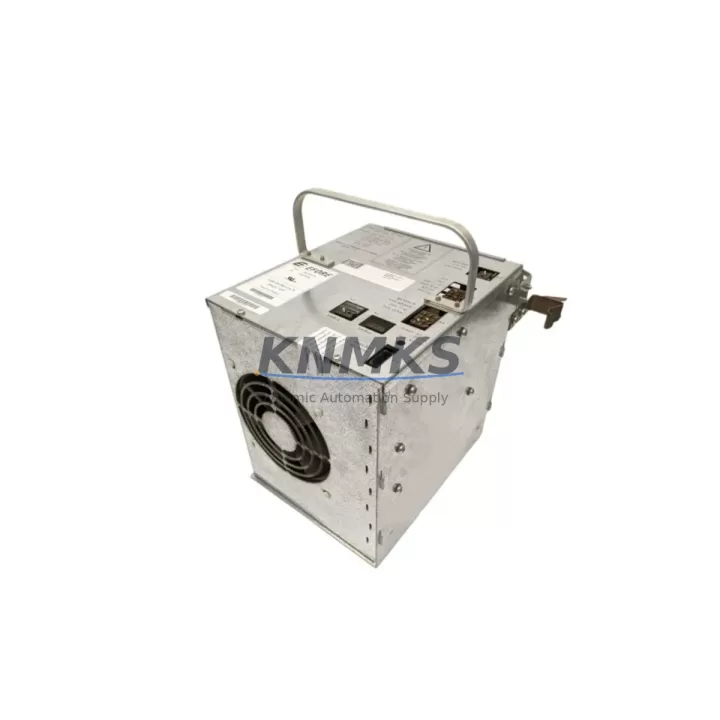
ABB DSQC539 Maintenance-Proven Spare Part for Factory Uptime
The ABB DSQC539 is an original axis computer board designed for ABB S4C+ robot controllers, widely deployed across IRB 1400, IRB 2400, IRB 4400, and IRB 6400 series industrial robots. As a core motion-control component within the robot controller cabinet, the DSQC539 manages axis interpolation, servo drive communication, and real-time trajectory execution. When this board fails, the entire robot cell is immediately halted — making rapid spare part availability a direct factor in production uptime and line recovery speed.
For maintenance engineers managing multi-robot facilities or aging S4C+ installations, stocking a verified DSQC539 replacement is a standard risk-mitigation practice. This unit is sourced as an original ABB spare, inspected and function-tested prior to shipment, and backed by a support terms confirmed by quotation covering manufacturing defects and operational failure under normal industrial use conditions.
Spare Maintenance Table
| Parameter | Specification / Detail |
|---|---|
| Part Number | DSQC539 |
| Brand | ABB |
| Series | S4C+ Robot Controller |
| Product Type | Axis Computer Board |
| Compatible Controllers | ABB S4C+ (IRC5 not applicable) |
| Compatible Robot Models | IRB 1400, IRB 2400, IRB 4400, IRB 6400 |
| Function | Axis motion control, servo communication, trajectory interpolation |
| Origin | Germany |
| Condition | Original, tested before shipment |
| Installation | Backplane slot mount within S4C+ controller cabinet |
| Operating Environment | Industrial cabinet, 0–55°C, protected from moisture and vibration |
| Maintenance Recommendation | Replace on axis fault alarms, servo communication errors, or motion deviation faults |
| Support terms | 12 months from shipment date |
| Lead Time | Ships within 1–3 business days upon order confirmation |
Maintenance Planning for Continuous Operation
Replacing the DSQC539 axis computer board is rarely an isolated task. In a properly structured S4C+ controller cabinet, the axis computer board interfaces directly with the drive unit (such as the DSQC508 or DSQC374 drive modules), the main computer board (DSQC532 or DSQC533), and the I/O system boards. When a DSQC539 fault is diagnosed, experienced maintenance engineers will simultaneously inspect the following components to prevent repeat failures and ensure full system restoration:
Drive Units and Power Supply: The DSQC540 rectifier unit and associated drive modules should be checked for overvoltage or undervoltage conditions that may have stressed the axis board. A failing power supply is a common upstream cause of axis computer board damage.
Main Computer Board: The DSQC532 or DSQC533 main computer communicates directly with the DSQC539 over the internal backplane bus. If the main computer has logged communication errors prior to the axis board failure, it should be inspected and its firmware version verified for compatibility with the replacement unit.
Backplane and Connector Integrity: The S4C+ controller backplane carries all inter-board communication. Inspect backplane connectors for oxidation, bent pins, or thermal damage before installing the replacement DSQC539. A compromised backplane can damage a new board within hours of installation.
Teach Pendant and FlexPendant Cabling: Axis faults sometimes originate from corrupted motion programs or teach pendant communication errors rather than hardware failure. Verify the teach pendant cable (DSQC679 or equivalent) and its connection to the controller before concluding the axis board is the root cause.
I/O Boards and Signal Isolation: If the robot cell uses digital I/O boards such as the DSQC328 or DSQC652, inspect these for signal integrity issues. Noise on I/O lines can cause spurious axis faults that are misdiagnosed as axis computer board failures.
Fuses and Protective Components: Check all cabinet fuses, particularly those protecting the 24VDC logic supply rail. A blown fuse on the logic supply is a frequent cause of axis board lockup and should be replaced as part of any DSQC539 swap procedure.
Procurement engineers sourcing DSQC539 replacements should also consider maintaining a minimum stock of one DSQC532 main computer board and one DSQC540 rectifier unit alongside the axis board, as these three components represent the highest-failure-rate assemblies in long-running S4C+ installations. Coordinated spare parts inventory reduces mean time to repair (MTTR) and supports annual maintenance planning for facilities operating multiple ABB robot cells.
Site Replacement Workflow
Step 1 — Fault Confirmation: Before ordering or installing a replacement DSQC539, retrieve the controller error log via the teach pendant. Confirm axis computer board fault codes (e.g., 38xxx series axis errors) are present and not caused by upstream drive or power supply faults.
Step 2 — Safe Shutdown: Power down the S4C+ controller following ABB lockout/tagout procedures. Allow capacitors in the drive section to discharge fully (minimum 5 minutes after power-off) before opening the cabinet.
Step 3 — Board Removal: Document the existing board’s slot position and all cable connections with photographs before disconnection. The DSQC539 is secured by backplane connectors and retaining screws. Handle with ESD precautions throughout.
Step 4 — Compatibility Verification: Confirm the replacement DSQC539 part number and hardware revision match the original. S4C+ systems are revision-sensitive; mismatched hardware revisions can cause boot failures or axis calibration errors.
Step 5 — Installation and Power-Up: Seat the replacement board firmly into the backplane slot, reconnect all cables, and restore power. Monitor the controller boot sequence for axis initialization errors. If the system boots cleanly and axis homing completes without fault, the replacement is successful.
Step 6 — Functional Test: Run a slow-speed axis jog test across all axes before returning the robot to automatic production mode. Verify encoder feedback and servo response on each axis. Log the replacement in the maintenance record with date, part number, and technician ID.
This workflow applies equally to emergency breakdown replacements and planned annual overhaul scenarios. For facilities with extended maintenance windows, the same procedure supports proactive replacement of boards showing intermittent axis faults before a full production stoppage occurs.
Spare Parts Support FAQ
Q1: Is the DSQC539 compatible with both S4C and S4C+ controllers?
The DSQC539 is specifically designed for the ABB S4C+ controller platform. While the S4C and S4C+ share a similar cabinet form factor, their axis computer boards are not interchangeable. Always verify the controller generation (S4C vs. S4C+) from the controller nameplate before ordering. The DSQC539 is not compatible with the IRC5 controller platform.
Q2: How is the DSQC539 tested before shipment?
Each unit undergoes functional inspection covering board-level power integrity, connector condition, and component visual inspection. Units showing signs of physical damage, corrosion, or prior repair are excluded from stock. The support terms confirmed by quotation cover failure under normal operating conditions and begins from the shipment date confirmed on the sales order.
Q3: What is the recommended spare parts inventory strategy for S4C+ robot cells?
For facilities operating three or more S4C+ robots, industry practice recommends stocking at minimum: one DSQC539 axis computer board, one DSQC532 or DSQC533 main computer board, one DSQC540 rectifier unit, and a set of cabinet fuses. This inventory profile covers the majority of unplanned downtime scenarios and supports a target MTTR of under four hours for most axis and controller faults.
Q4: Can long-term supply of DSQC539 be guaranteed for aging S4C+ installations?
The S4C+ platform has been in service for over two decades, and original spare parts availability is increasingly constrained through standard distribution channels. We maintain dedicated stock of DSQC539 and related S4C+ components to support long-term maintenance programs. For facilities planning multi-year maintenance contracts or system life extension beyond OEM support windows, we recommend contacting our sales team to discuss volume reservation and long-term supply agreements.
© 2026 KNMKS. All rights reserved.
Original Source: https://knmks.com
Contact: admin@knmks.com | +86 18359268345
Product Identification
- Brand / Ecosystem
-
ABB
ABB - Model / Series
-
DSQC539
IRC5 Series - Product Family
- PLCs & Controllers
- Availability Status
- Available on request after model and quantity confirmation
- Inquiry Type
- B2B RFQ, replacement inquiry and project spare-part request
- Pre-Quote Check
- Exact SKU, brand, series, quantity, nameplate photos and destination country are checked before quotation
System Path
Where this product fits in the KNMKS automation structure.
Specification & Inquiry Focus
- Control platform
- PLC, PAC and modular controllers
- Common needs
- CPU, rack, power and I/O expansion
- Project support
- Replacement, cabinet build and maintenance
Buyer Confirmation
Information KNMKS checks before replying.
- Exact model
- DSQC539
- Brand / ecosystem
- ABB
- Product family
- PLCs & Controllers
- Application note
- Replacement, maintenance, project build or spare-part list
- Useful photos
- Nameplate, installed unit, cabinet layout or connector side
- Delivery details
- Quantity, destination country and target schedule
Document Support
Files and notes can be confirmed during quotation.
- Product photos or nameplate confirmation when available
- Packing and delivery notes before quotation confirmation
- Support scope and delivery terms confirmed per inquiry
- Export document coordination for qualified B2B requests
Inquiry Support
- Model cross-checking before quotation
- CPU, power, rack and expansion module matching
- Support for replacement and project inquiry
What to Send Us
- Brand and exact model number: ABB DSQC539
- Quantity and required delivery time
- Application, replacement requirement or nameplate photo
- Destination country and shipping preference
RFQ Preparation
This is a product inquiry page built for RFQ communication.
Fast Model Check
Send this model to KNMKS for confirmation.
Include quantity, destination country and photos if this is a maintenance replacement. The inquiry will be saved with a reference number after submission.
Brand & Compatibility Note
KNMKS displays automation product information for well-known industrial brand ecosystems and compatible replacement references. Brand names are used for product identification and compatibility reference only; final availability and commercial terms are confirmed per quotation.
 Manufacturing
 Machine Tools
 Packaging
 Energy & Power



 HMI & Displays
 Servo Systems
 Variable Frequency Drives
 Sensors