
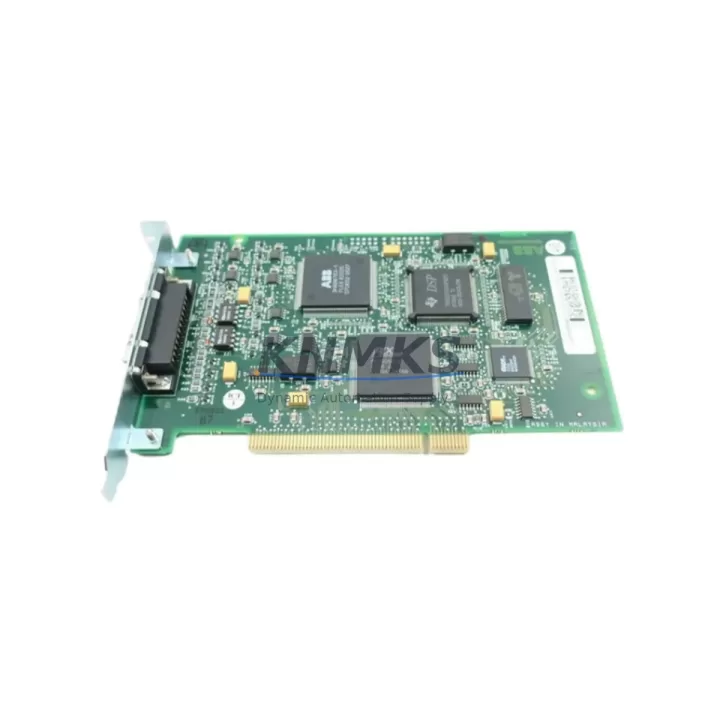
Overview
ABB DSQC503 Migration-Ready Axis Computer for IRC5 Control Systems
The ABB DSQC503 is a critical axis computer module designed for IRC5 robot controller cabinets, serving as the primary motion control processor that coordinates multi-axis servo drives in industrial robotic applications. As legacy S4C and S4C+ systems approach end-of-life and original spare parts become increasingly scarce, the DSQC503 has become one of the most sought-after replacement modules for facilities undertaking control system modernization, production line retrofits, and unplanned downtime recovery.
Whether you are migrating from an older S4C+ platform, restoring a failed IRC5 cabinet, or extending the operational life of an existing robotic cell, the DSQC503 provides a verified drop-in replacement path that minimizes engineering rework and reduces total migration risk. Each unit supplied by KNMKS is sourced from controlled inventory channels, subjected to pre-shipment functional testing, and backed by a support terms confirmed by quotation covering hardware defects and operational failures under normal industrial use conditions.
Before proceeding with installation, engineers should confirm the following compatibility parameters against the existing system: backplane slot assignment and connector pinout on the IRC5 drive module rack, DC bus voltage supply from the DSQC609 or equivalent power distribution unit, axis configuration parameters stored in the robot controller’s system parameters, RobotWare version compatibility (typically RobotWare 5.x series), and the physical installation envelope within the controller cabinet to ensure adequate clearance for cable routing and ventilation.
Migration Compatibility Table
| Parameter | DSQC503 Specification | Migration Notes |
|---|---|---|
| Compatible Controller | ABB IRC5 (single & multi-cabinet) | Verify cabinet generation before ordering |
| Replaces / Upgrades From | S4C+ Axis Computer variants | Confirm backplane connector revision |
| Backplane Interface | IRC5 drive module rack slot | Check slot index in system parameters |
| Power Input | 24 VDC from DSQC609 PSU | Measure supply voltage under load before swap |
| Communication Protocol | Internal IRC5 drive bus | No external fieldbus reconfiguration required |
| Firmware Compatibility | RobotWare 5.x series | Confirm RW version via FlexPendant before replacement |
| Axis Support | Up to 6 axes (standard IRC5) | Additional axis boards required for 7-axis configurations |
| Installation Format | DIN-rail / rack-mount in IRC5 cabinet | Verify physical clearance and cable length |
| Wiring Compatibility | Direct connector swap | Label all connectors before disconnection |
| Support terms | 12 Months | Covers hardware defects under normal operating conditions |
Retrofit Planning for Existing Automation Systems
A successful DSQC503 retrofit begins well before the module arrives on-site. Maintenance engineers should start by exporting a full system backup from the IRC5 controller using the FlexPendant or RobotStudio, capturing all RAPID programs, system parameters, I/O configurations, and safety settings. This backup is the single most important asset in any IRC5 migration — it allows the replacement axis computer to be initialized with the exact operational profile of the failed unit, dramatically reducing commissioning time.
Power supply integrity is the next critical checkpoint. The DSQC609 power distribution unit within the IRC5 cabinet supplies regulated 24 VDC to the axis computer and associated drive modules. Before installing the DSQC503, verify that the DSQC609 output rails are within specification under load. A degraded power supply is a common root cause of repeated axis computer failures and must be addressed before the replacement module is energized.
For facilities running multi-robot cells or coordinated motion systems, the DSQC503 replacement must be coordinated with the broader drive module stack. The DSQC508 rectifier unit and DSQC374 capacitor bank both interact with the axis computer during the drive bus initialization sequence. If either of these components shows signs of degradation — evidenced by slow bus charge times or intermittent drive fault codes — they should be inspected and replaced as part of the same maintenance window to avoid a repeat failure shortly after the axis computer swap.
Communication continuity is equally important in facilities where the IRC5 controller interfaces with upstream SCADA systems, PLCs, or HMI panels via DeviceNet, PROFIBUS, or Ethernet/IP. The DSQC688 DeviceNet gateway or DSQC679 teach pendant connection board may need to be reconfigured if the axis computer replacement triggers a controller re-initialization. Confirm that all fieldbus node addresses, I/O mapping tables, and HMI screen tag bindings remain intact after the system restart. In some installations, the DSQC352A I/O board configuration also requires re-verification following an axis computer swap, particularly where analog signal scaling or digital output assignments have been customized for the specific production process.
Physical installation should follow ABB’s documented torque specifications for backplane connector seating. Inadequate connector engagement is a leading cause of intermittent axis faults post-retrofit and is easily avoided with proper tooling and a final visual inspection before cabinet closure.
Downtime Control During System Migration
Unplanned downtime in robotic production cells carries significant cost, and the DSQC503 replacement procedure can be executed within a controlled maintenance window when properly prepared. The target for a well-prepared team with a pre-tested replacement module and a verified system backup is a total outage window of two to four hours, including functional verification and a supervised production restart.
The key to achieving this target is pre-staging. Before the maintenance window opens, the replacement DSQC503 should be bench-tested where possible, the system backup should be verified as complete and restorable, all required tools and torque drivers should be staged at the cabinet, and the commissioning engineer should have reviewed the axis configuration parameters and motor calibration data for the specific robot model.
During the swap, the original RAPID programs and system parameters are preserved in the backup and are not affected by the hardware replacement. After the new DSQC503 is seated and the cabinet is powered up, the controller will perform a drive bus initialization sequence. If the system backup is loaded correctly, the robot should reach a ready state without requiring manual re-entry of axis parameters. A supervised jog test across all axes at reduced speed, followed by a dry-run of the production program without tooling engaged, is the recommended final verification step before returning the cell to full production.
For facilities where even a two-hour window is operationally difficult, KNMKS can support advance shipment of a tested replacement unit to allow pre-staging and minimize the gap between fault occurrence and production resumption. Stock availability is confirmed at time of order, and expedited shipping options are available for critical recovery situations.
Retrofit Support FAQ
Q: Is the DSQC503 a direct drop-in replacement for the axis computer in my IRC5 cabinet?
A: In the majority of IRC5 installations, yes. The DSQC503 uses the same backplane connector and slot format as the original axis computer. However, you should confirm the RobotWare version running on your controller and verify that the axis configuration parameters in your system backup are compatible. KNMKS technical support can assist with compatibility verification if you provide your controller serial number and RobotWare version.
Q: Do I need to reprogram the robot after replacing the DSQC503?
A: No reprogramming is required if a valid system backup exists. The RAPID programs, I/O configurations, and system parameters are stored in the controller’s main computer, not in the axis computer module itself. Restoring the backup after the hardware swap will return the system to its pre-failure operational state. We strongly recommend verifying the backup integrity before beginning the replacement procedure.
Q: What pre-shipment testing does KNMKS perform on the DSQC503?
A: Each DSQC503 unit undergoes functional power-on testing and visual inspection for connector condition, PCB integrity, and component seating before dispatch. Units are shipped in anti-static packaging with individual test records. The support terms confirmed by quotation cover hardware defects and operational failures under normal industrial use conditions from the date of delivery.
Q: What is the typical lead time and are units held availability confirmed by RFQ?
A: KNMKS maintains inventory of the DSQC503 to support urgent replacement and planned maintenance requirements. Standard lead time for in-stock units is 3–7 business days for international shipments. For critical recovery situations, expedited shipping is available. Contact admin@knmks.com or +86 18359268345 to confirm current stock availability and shipping options for your location.
© 2026 KNMKS. All rights reserved.
Original Source: https://knmks.com
Contact: admin@knmks.com | +86 18359268345
Product Identification
- Brand / Ecosystem
-
ABB
ABB - Model / Series
-
DSQC503
IRC5 Series - Product Family
- PLCs & Controllers
- Availability Status
- Available on request after model and quantity confirmation
- Inquiry Type
- B2B RFQ, replacement inquiry and project spare-part request
- Pre-Quote Check
- Exact SKU, brand, series, quantity, nameplate photos and destination country are checked before quotation
System Path
Where this product fits in the KNMKS automation structure.
Specification & Inquiry Focus
- Control platform
- PLC, PAC and modular controllers
- Common needs
- CPU, rack, power and I/O expansion
- Project support
- Replacement, cabinet build and maintenance
Buyer Confirmation
Information KNMKS checks before replying.
- Exact model
- DSQC503
- Brand / ecosystem
- ABB
- Product family
- PLCs & Controllers
- Application note
- Replacement, maintenance, project build or spare-part list
- Useful photos
- Nameplate, installed unit, cabinet layout or connector side
- Delivery details
- Quantity, destination country and target schedule
Document Support
Files and notes can be confirmed during quotation.
- Product photos or nameplate confirmation when available
- Packing and delivery notes before quotation confirmation
- Support scope and delivery terms confirmed per inquiry
- Export document coordination for qualified B2B requests
Inquiry Support
- Model cross-checking before quotation
- CPU, power, rack and expansion module matching
- Support for replacement and project inquiry
What to Send Us
- Brand and exact model number: ABB DSQC503
- Quantity and required delivery time
- Application, replacement requirement or nameplate photo
- Destination country and shipping preference
RFQ Preparation
This is a product inquiry page built for RFQ communication.
Fast Model Check
Send this model to KNMKS for confirmation.
Include quantity, destination country and photos if this is a maintenance replacement. The inquiry will be saved with a reference number after submission.
Brand & Compatibility Note
KNMKS displays automation product information for well-known industrial brand ecosystems and compatible replacement references. Brand names are used for product identification and compatibility reference only; final availability and commercial terms are confirmed per quotation.
 Manufacturing
 Machine Tools
 Packaging
 Energy & Power



 HMI & Displays
 Servo Systems
 Variable Frequency Drives
 Sensors