
Overview
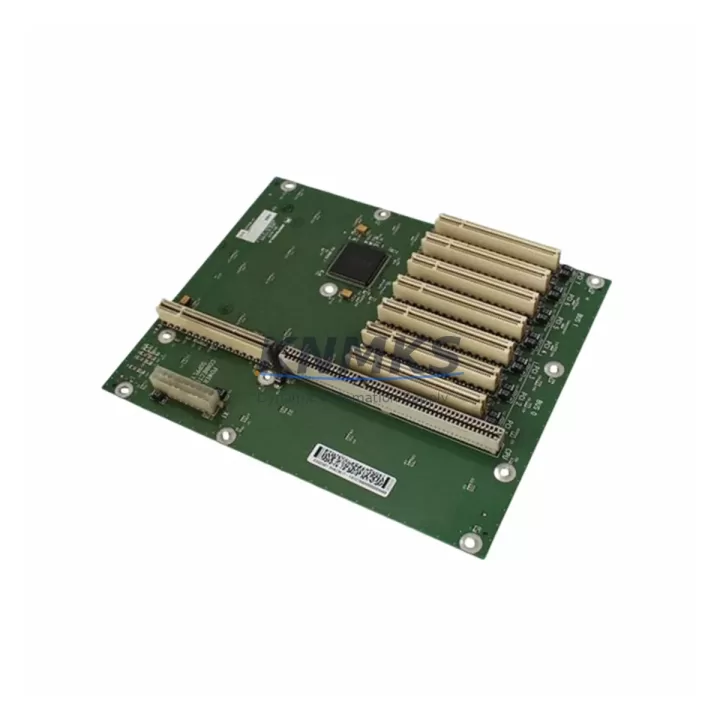
ABB DSQC501 3HAC3617-1 Migration-Ready Backplane for Legacy Control Systems
The ABB DSQC501 (part number 3HAC3617-1) is a critical backplane board designed for ABB IRC5 robot controller cabinets. As ABB progressively phases out legacy IRC5 hardware in favour of the OmniCore platform, engineering teams managing installed IRC5 fleets face increasing pressure to source verified, drop-in replacement backplanes that maintain full compatibility with existing drive units, computer units, and I/O modules. The DSQC501 backplane serves as the central interconnect hub within the IRC5 controller cabinet, routing power distribution, communication signals, and module addressing across all installed boards. Sourcing a pre-tested, migration-ready unit with documented compatibility is essential to minimising unplanned downtime during both emergency replacements and scheduled maintenance windows.
This unit is supplied pre-tested, fully inspected, and backed by a support terms confirmed by quotation. Multi-region stock is maintained to support fast global dispatch for emergency replacements and planned outage windows. Each unit ships with full traceability documentation to support your site acceptance test (SAT) and commissioning records.
Migration Compatibility Table
| Parameter | Specification / Compatibility Detail |
|---|---|
| Part Number | DSQC501 / 3HAC3617-1 |
| Compatible Platform | ABB IRC5 Single Cabinet, Dual Cabinet, Paint Cabinet |
| Backplane Slot Interface | IRC5 internal backplane bus; compatible with DSQC639, DSQC643, DSQC662 computer units |
| Power Input | 24 VDC distributed via IRC5 power supply unit (DSQC661 / DSQC609) |
| Communication Compatibility | DeviceNet, Profibus-DP, EtherNet/IP via installed fieldbus adapter modules (DSQC651, DSQC652) |
| I/O Module Compatibility | Compatible with DSQC651 (Digital I/O), DSQC652 (Analog I/O), DSQC653 (Relay I/O) |
| Installation Form Factor | IRC5 standard cabinet backplane slot; no mechanical modification required |
| Firmware Requirement | RobotWare 5.x / 6.x; verify RobotWare version before replacement |
| Replacement Type | Direct drop-in; no re-programming of backplane required |
| Pre-Shipment Testing | Yes — functional test completed prior to dispatch |
| Support terms | 12 Months from date of shipment |
| Country of Origin | Sweden (SE) |
Retrofit Planning for Existing Automation Systems
When planning a backplane replacement within an IRC5 controller cabinet, the scope of work extends well beyond the DSQC501 board itself. A structured retrofit assessment should begin with a full audit of the cabinet’s installed modules and their current addressing. The DSQC639 main computer unit retains all robot program logic and system parameters — provided the CompactFlash card is intact, program data is preserved across a backplane swap. However, engineers must verify that the DSQC661 power supply unit is delivering stable 24 VDC to the backplane bus before installing the replacement board, as undervoltage conditions are a common root cause of backplane failures in ageing IRC5 cabinets.
The fieldbus communication chain also requires careful validation. If the system uses a DSQC651 digital I/O module or a DSQC652 analog I/O module connected via DeviceNet or EtherNet/IP, the module node addresses and I/O signal mappings must be documented before the backplane is removed. These addresses are stored in the RobotWare system configuration files, not on the backplane itself, so they are preserved — but physical re-seating of modules after backplane replacement can occasionally trigger address conflicts that require a configuration reload via RobotStudio or the FlexPendant teach pendant.
For cabinets that include a DSQC679 FlexPendant interface or an external DSQC608 safety board, the wiring harness connectors on the backplane must be inspected for pin corrosion or mechanical fatigue before the new board is seated. In older IRC5 installations — particularly those operating in high-humidity or high-vibration environments — connector degradation is a frequent secondary failure mode that can cause intermittent faults even after a successful backplane replacement. Documenting the torque values and connector locking states as part of the commissioning checklist is strongly recommended.
Where the retrofit is part of a broader migration from IRC5 to OmniCore, the DSQC501 backplane replacement can serve as an interim stabilisation step, extending the operational life of the existing IRC5 cabinet while the OmniCore migration is planned and budgeted. This approach is particularly effective in multi-robot cells where a phased migration — replacing one controller at a time — is preferred over a full production line shutdown.
Downtime Control During System Migration
Minimising downtime during a backplane replacement in an IRC5 controller requires a disciplined pre-outage preparation process. Before the maintenance window opens, the full system backup should be exported from the DSQC639 computer unit via RobotStudio, capturing all RAPID program modules, system parameters, I/O configurations, and safety settings. This backup is the single most important risk mitigation step — it ensures that even in the event of an unexpected complication during the backplane swap, the robot system can be fully restored to its pre-maintenance state.
During the physical replacement, the IRC5 cabinet should be de-energised following the site’s lockout/tagout (LOTO) procedure. The backplane connector harnesses should be photographed before disconnection to provide a reference for re-assembly. The DSQC501 replacement board should be seated and all connectors re-engaged before power is restored. On first power-up, the system should be allowed to complete its full boot sequence before any motion commands are issued — the FlexPendant will display system status messages that confirm whether all installed modules have been recognised correctly.
If any module recognition errors appear on the FlexPendant after the backplane replacement, the first diagnostic step is to check the DeviceNet or EtherNet/IP node address assignments in the I/O configuration. In most cases, a configuration reload from the pre-maintenance backup resolves these errors without requiring manual re-programming. For sites with strict production continuity requirements, maintaining a spare DSQC501 backplane in local stock — alongside a current system backup — reduces the mean time to repair (MTTR) for IRC5 backplane failures to under two hours in most cases.
Retrofit Support FAQ
Q1: Is the DSQC501 (3HAC3617-1) a direct replacement for the original ABB backplane in all IRC5 cabinet variants?
A: Yes. The DSQC501 is compatible with IRC5 Single Cabinet, Dual Cabinet, and Paint Cabinet configurations. No mechanical modification or re-programming of the backplane is required. Verify that your RobotWare version is 5.x or 6.x before installation.
Q2: Will my RAPID programs and I/O configurations be preserved after the backplane replacement?
A: Program logic and I/O configurations are stored on the DSQC639 computer unit’s CompactFlash card, not on the backplane. They are preserved across a backplane swap. As a precaution, always export a full system backup via RobotStudio before beginning the replacement procedure.
Q3: What pre-shipment testing is performed on the DSQC501 before dispatch?
A: Each unit undergoes a functional test covering power distribution integrity, backplane bus signal continuity, and connector pin inspection. A test report is available upon request. All units are dispatched with a support terms confirmed by quotation from the date of shipment.
Q4: What is the typical lead time, and do you maintain stock for emergency orders?
A: Multi-region stock is maintained to support both emergency replacements and scheduled maintenance orders. Standard dispatch is within 1–3 business days. Express shipping options are available for critical downtime situations. Contact admin@knmks.com or +86 18359268345 for urgent stock confirmation.
© 2026 KNMKS. All rights reserved.
Original Source: https://knmks.com
Contact: admin@knmks.com | +86 18359268345
Product Identification
- Brand / Ecosystem
-
ABB
ABB - Model / Series
-
DSQC501-3HAC3617-1
IRC5 Series - Product Family
- PLCs & Controllers
- Availability Status
- Available on request after model and quantity confirmation
- Inquiry Type
- B2B RFQ, replacement inquiry and project spare-part request
- Pre-Quote Check
- Exact SKU, brand, series, quantity, nameplate photos and destination country are checked before quotation
System Path
Where this product fits in the KNMKS automation structure.
Specification & Inquiry Focus
- Control platform
- PLC, PAC and modular controllers
- Common needs
- CPU, rack, power and I/O expansion
- Project support
- Replacement, cabinet build and maintenance
Buyer Confirmation
Information KNMKS checks before replying.
- Exact model
- DSQC501-3HAC3617-1
- Brand / ecosystem
- ABB
- Product family
- PLCs & Controllers
- Application note
- Replacement, maintenance, project build or spare-part list
- Useful photos
- Nameplate, installed unit, cabinet layout or connector side
- Delivery details
- Quantity, destination country and target schedule
Document Support
Files and notes can be confirmed during quotation.
- Product photos or nameplate confirmation when available
- Packing and delivery notes before quotation confirmation
- Support scope and delivery terms confirmed per inquiry
- Export document coordination for qualified B2B requests
Inquiry Support
- Model cross-checking before quotation
- CPU, power, rack and expansion module matching
- Support for replacement and project inquiry
What to Send Us
- Brand and exact model number: ABB DSQC501-3HAC3617-1
- Quantity and required delivery time
- Application, replacement requirement or nameplate photo
- Destination country and shipping preference
RFQ Preparation
This is a product inquiry page built for RFQ communication.
Fast Model Check
Send this model to KNMKS for confirmation.
Include quantity, destination country and photos if this is a maintenance replacement. The inquiry will be saved with a reference number after submission.
Brand & Compatibility Note
KNMKS displays automation product information for well-known industrial brand ecosystems and compatible replacement references. Brand names are used for product identification and compatibility reference only; final availability and commercial terms are confirmed per quotation.
 Manufacturing
 Machine Tools
 Packaging
 Energy & Power



 HMI & Displays
 Servo Systems
 Variable Frequency Drives
 Sensors