
Overview
ABB DSQC500 3HAC3616-1 Migration-Ready Monitor CPU for Legacy S4C Control Systems
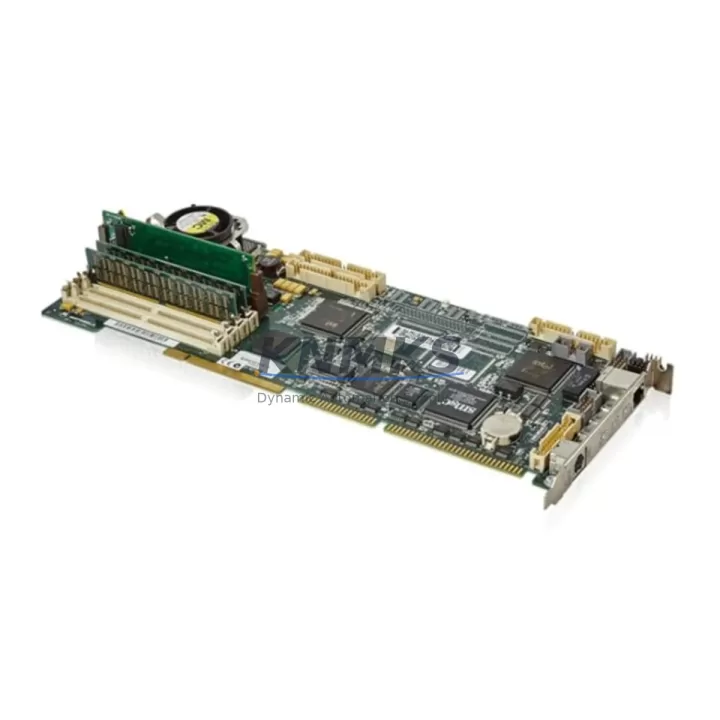
The ABB DSQC500 (part number 3HAC3616-1) is the monitor CPU board at the heart of ABB S4C robot controller cabinets, originally deployed across a wide range of IRB 1400, IRB 2400, IRB 4400, and IRB 6400 industrial robot installations. As ABB has progressively phased out S4C-generation hardware in favour of the IRC5 platform, end-users operating legacy lines face an urgent need for verified, drop-in replacement units that preserve existing program logic, fieldbus wiring, and HMI screen layouts without forcing a full controller migration. The DSQC500 3HAC3616-1 stocked by KNMKS is sourced from controlled inventories, subjected to pre-shipment functional testing, and backed by a support terms confirmed by quotation — making it the preferred choice for maintenance engineers who need to restore production with minimum downtime.
Before committing to a replacement, engineers should confirm several critical parameters. Power supply capacity inside the S4C cabinet must be verified against the DSQC500’s 24 VDC logic rail draw; the existing DSQC505 power distribution board typically provides adequate headroom, but aging capacitors in the PSU section can cause marginal voltage conditions that trigger false CPU faults on a new board. Terminal wiring on the X1 and X2 connectors must be documented and photographed before removal, as pin assignments for emergency-stop chains, teach-pendant enable, and external axis signals are board-specific and easy to transpose during a rushed swap. The backplane interface — a proprietary VME-derived bus used across S4C and S4C+ cabinets — must be inspected for bent pins and oxidation before seating the replacement module.
Module addressing is set via DIP switches on the DSQC500 board itself; the switch configuration from the failed unit must be replicated exactly, or the robot controller will fail to enumerate the axis computer boards (DSQC540 or DSQC560) and motion control will not initialise. Program compatibility is generally maintained because the RAPID task memory resides on the DSQC378 or DSQC386 memory board rather than on the monitor CPU, but engineers should perform a full backup to a USB or floppy image before powering down. HMI screen layouts on the FlexPendant or legacy teach pendant are unaffected by a monitor CPU swap, provided the firmware revision on the replacement DSQC500 matches or exceeds the version previously installed — a mismatch can cause communication errors on the serial link between the pendant and the controller main computer.
Migration Compatibility Table
| Parameter | Legacy Unit (Failed DSQC500) | Replacement DSQC500 3HAC3616-1 | Action Required |
|---|---|---|---|
| Backplane Interface | VME-derived S4C/S4C+ bus | VME-derived S4C/S4C+ bus | Inspect for bent pins; clean with IPA before seating |
| Power Input | 24 VDC from DSQC505 PSU | 24 VDC from DSQC505 PSU | Verify PSU output voltage under load before swap |
| Module Address (DIP) | Customer-specific setting | Factory default — must be reconfigured | Photograph and replicate DIP switch positions |
| Firmware Version | RobotWare 4.x / 5.x | Compatible with RobotWare 4.x / 5.x | Confirm revision match; update via service tool if needed |
| Communication Protocol | DeviceNet / Interbus-S (via DSQC351/DSQC352) | Same — protocol handled by fieldbus board | No fieldbus reconfiguration required |
| Terminal Wiring (X1/X2) | E-stop, pendant enable, ext. axis signals | Identical pinout | Document wiring before removal; verify after installation |
| Installation Space | Standard S4C cabinet slot | Same form factor | No mechanical modification required |
| Support terms | — | 12 months from shipment date | Retain invoice and test report for support requests |
Retrofit Planning for Existing Automation Systems
A successful DSQC500 retrofit rarely involves the monitor CPU in isolation. In most S4C cabinet upgrades, the axis computer board — typically a DSQC540 for standard six-axis robots or a DSQC560 for extended-axis configurations — is evaluated at the same time, since both boards share the backplane and a fault on one can stress the other. If the cabinet has been running continuously for more than a decade, the DSQC505 power supply module should be treated as a consumable and replaced proactively rather than reactively; a failing PSU is the single most common root cause of intermittent DSQC500 faults that are misdiagnosed as CPU failures.
Fieldbus connectivity in S4C systems is managed by dedicated communication boards mounted in the upper section of the controller cabinet. DeviceNet master/slave communication is handled by the DSQC351, while Interbus-S installations rely on the DSQC352. Neither board is affected by a monitor CPU swap, but engineers performing a broader system modernisation often use the opportunity to migrate from legacy fieldbus to PROFINET or EtherNet/IP by introducing an IRC5 gateway adapter — a step that requires careful mapping of I/O addresses between the old and new communication stacks. Signal isolators installed between the robot controller and field devices should be verified for compatibility with the new I/O address map before the line is restarted.
For sites where the teach pendant or operator panel is also due for replacement, the DSQC233 operator panel board and the associated FlexPendant cable assembly should be sourced alongside the DSQC500 to avoid a second planned outage. Programming cables used for RobotStudio offline backup and restore — typically a standard Ethernet crossover or a legacy serial programming cable depending on the RobotWare version — should be prepared and tested before the maintenance window begins, ensuring that the RAPID program, system parameters, and I/O configuration can be restored within the planned downtime budget.
Downtime Control During System Migration
Minimising unplanned downtime during a DSQC500 replacement requires a structured pre-outage checklist. At least 48 hours before the maintenance window, a full system backup should be created using RobotStudio or the teach pendant backup function, capturing RAPID modules, system parameters, I/O configuration, and safety controller data. The backup should be stored on at least two independent media — a USB drive and a network share — and verified by performing a test restore on an offline controller or simulator if available.
During the swap, the original DSQC500 should be removed with the cabinet powered down and the 24 VDC logic supply isolated at the DSQC505 PSU. Static precautions are mandatory: the replacement board must be handled with wrist straps and placed on an ESD mat. After seating the new board and replicating the DIP switch configuration, the cabinet should be powered up in service mode before enabling robot motion, allowing the controller to enumerate all boards and report any address conflicts or firmware mismatches on the teach pendant display before the robot is released to automatic operation.
If the firmware version on the replacement DSQC500 does not match the installed RobotWare release, the update procedure should be performed using the ABB service tool before the robot is returned to production. Attempting to run a mismatched firmware combination can cause intermittent communication errors between the monitor CPU and the axis computers, resulting in fault codes that are difficult to distinguish from hardware failures and can extend the outage significantly. Once the robot has completed a full warm-up cycle and passed the calibration check, a production test run of at least 30 minutes should be completed before the line is handed back to operations.
Retrofit Support FAQ
Q1: Is the DSQC500 3HAC3616-1 a direct drop-in replacement for all S4C and S4C+ controller variants?
A: Yes. The DSQC500 3HAC3616-1 is the standard monitor CPU for ABB S4C and S4C+ cabinets across all IRB robot models supported by that controller generation. The board uses the same VME-derived backplane connector, identical terminal pinout, and the same DIP-switch addressing scheme. No mechanical modification to the cabinet is required. Engineers should confirm the DIP switch positions from the failed unit before installation.
Q2: What pre-shipment testing is performed on DSQC500 units supplied by KNMKS?
A: Each unit undergoes power-on functional testing, backplane interface verification, and communication link checks before shipment. A test report is included with the delivery documentation. Units are shipped in ESD-protective packaging with foam cushioning to prevent transit damage. The support terms confirmed by quotation cover manufacturing defects and functional failures under normal operating conditions.
Q3: Can the existing RAPID program and I/O configuration be retained after replacing the DSQC500?
A: Yes, provided a full system backup is created before the swap. Program memory in S4C systems resides on the memory board (DSQC378 or DSQC386), not on the monitor CPU, so the RAPID tasks, system parameters, and I/O configuration are preserved independently of the DSQC500. After installing the replacement board and confirming the firmware version, the backup can be restored via the teach pendant or RobotStudio without reprogramming.
Q4: What is the typical lead time and stock availability for the DSQC500 3HAC3616-1?
A: KNMKS maintains ready stock of the DSQC500 3HAC3616-1 to support urgent maintenance requirements. Standard orders are dispatched within 1–3 business days. For large-quantity orders or scheduled maintenance programmes requiring multiple units, contact admin@knmks.com to confirm availability and arrange priority allocation. All units are covered by a support terms confirmed by quotation from the shipment date.
© 2026 KNMKS. All rights reserved.
Original Source: https://knmks.com
Contact: admin@knmks.com | +86 18359268345
Product Identification
- Brand / Ecosystem
-
ABB
ABB - Model / Series
-
DSQC500 3HAC3616-1
IRC5 Series - Product Family
- PLCs & Controllers
- Availability Status
- Available on request after model and quantity confirmation
- Inquiry Type
- B2B RFQ, replacement inquiry and project spare-part request
- Pre-Quote Check
- Exact SKU, brand, series, quantity, nameplate photos and destination country are checked before quotation
System Path
Where this product fits in the KNMKS automation structure.
Specification & Inquiry Focus
- Control platform
- PLC, PAC and modular controllers
- Common needs
- CPU, rack, power and I/O expansion
- Project support
- Replacement, cabinet build and maintenance
Buyer Confirmation
Information KNMKS checks before replying.
- Exact model
- DSQC500 3HAC3616-1
- Brand / ecosystem
- ABB
- Product family
- PLCs & Controllers
- Application note
- Replacement, maintenance, project build or spare-part list
- Useful photos
- Nameplate, installed unit, cabinet layout or connector side
- Delivery details
- Quantity, destination country and target schedule
Document Support
Files and notes can be confirmed during quotation.
- Product photos or nameplate confirmation when available
- Packing and delivery notes before quotation confirmation
- Support scope and delivery terms confirmed per inquiry
- Export document coordination for qualified B2B requests
Inquiry Support
- Model cross-checking before quotation
- CPU, power, rack and expansion module matching
- Support for replacement and project inquiry
What to Send Us
- Brand and exact model number: ABB DSQC500 3HAC3616-1
- Quantity and required delivery time
- Application, replacement requirement or nameplate photo
- Destination country and shipping preference
RFQ Preparation
This is a product inquiry page built for RFQ communication.
Fast Model Check
Send this model to KNMKS for confirmation.
Include quantity, destination country and photos if this is a maintenance replacement. The inquiry will be saved with a reference number after submission.
Brand & Compatibility Note
KNMKS displays automation product information for well-known industrial brand ecosystems and compatible replacement references. Brand names are used for product identification and compatibility reference only; final availability and commercial terms are confirmed per quotation.
 Manufacturing
 Machine Tools
 Packaging
 Energy & Power



 HMI & Displays
 Servo Systems
 Variable Frequency Drives
 Sensors