
Overview
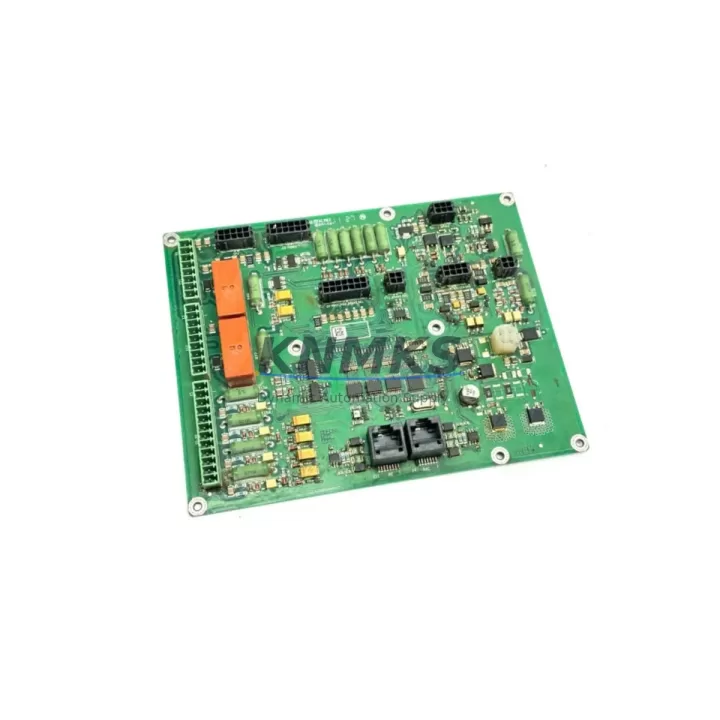
ABB DSQC400-3HAC030162-001 Maintenance-Proven Spare Part for Factory Uptime
The ABB DSQC400-3HAC030162-001 is an original axis computer board designed for the ABB IRC5 robot controller platform. As a core motion control component, this board manages axis interpolation, servo drive communication, and real-time trajectory execution across all robot axes. For maintenance engineers managing ABB IRC5 installations in automotive, electronics, food & beverage, and general manufacturing environments, maintaining a verified spare of the DSQC400-3HAC030162-001 is a fundamental element of any proactive uptime strategy.
Unplanned downtime caused by axis computer board failure is among the most disruptive events in a robotic production cell. The DSQC400-3HAC030162-001 interfaces directly with the IRC5 drive system and the main computer unit, meaning a fault in this board can halt all axis motion and trigger system-level alarms. Having a tested, ready-to-install spare on the shelf eliminates the lead time risk associated with OEM procurement channels, which can extend to 8–16 weeks for legacy IRC5 components.
Each DSQC400-3HAC030162-001 unit supplied by KNMKS is sourced from verified industrial channels, functionally tested prior to shipment, and covered by a support terms confirmed by quotation. Units are packaged in anti-static ESD-safe materials and shipped with full traceability documentation to support your maintenance records and audit requirements.
Spare Maintenance Table
| Part Number | DSQC400-3HAC030162-001 |
| Brand | ABB |
| Series / Platform | IRC5 Robot Controller |
| Component Type | Axis Computer Board |
| Origin | Germany (DE) |
| Compatible Controllers | ABB IRC5 Single Cabinet, IRC5 Compact, IRC5 Panel Mounted Controller |
| Compatible Robot Models | IRB 1600, IRB 2400, IRB 4600, IRB 6640, IRB 6650S (IRC5 generation) |
| Primary Function | Axis interpolation, servo drive communication, real-time motion control |
| Interface | Internal IRC5 backplane bus; connects to DSQC662 drive unit and DSQC639 main computer |
| Operating Voltage | 24 VDC (supplied via IRC5 internal power distribution) |
| Operating Temperature | 0°C to +55°C (controller cabinet ambient) |
| Weight | Approx. 800 g |
| Condition | Original spare — functionally tested before shipment |
| Support terms | 12 Months from date of shipment |
| Packaging | ESD-safe anti-static bag, foam-padded carton |
| Lead Time | In-stock units: 1–3 business days; subject to availability |
| Documentation | Shipment traceability record included |
Maintenance Planning for Continuous Operation
When replacing the DSQC400-3HAC030162-001 axis computer board in an IRC5 controller, a disciplined maintenance engineer will treat the replacement as an opportunity to inspect the entire motion control chain — not just the failed component. The IRC5 cabinet integrates multiple interdependent modules, and a board-level failure often indicates stress on adjacent components.
Begin by verifying the condition of the DSQC662 drive unit, which works in direct coordination with the DSQC400 to deliver servo power to each robot axis. A degraded DSQC662 can cause recurring axis computer faults even after a board replacement. Similarly, inspect the DSQC639 main computer unit — the primary controller that communicates with the DSQC400 over the internal backplane. Firmware version mismatches between the main computer and the replacement axis board are a common source of post-replacement commissioning errors.
Check the DSQC608 I/O board for any signal integrity issues, particularly if the robot cell uses digital I/O for safety interlocks or process triggers. A faulty I/O board can generate spurious signals that mask the true root cause of an axis fault. While the cabinet is open, inspect the DSQC611 power supply unit — the 24 VDC rail that feeds the axis computer board. Voltage ripple or intermittent dropout on this rail is a known cause of axis computer board degradation over time.
For IRC5 systems with fieldbus communication, verify the DSQC688 DeviceNet or DSQC658 PROFIBUS communication board is seated correctly and free of connector corrosion. Communication board faults can cause the axis computer to report motion errors that are actually network-layer issues. Additionally, inspect all terminal blocks and internal wiring harnesses within the cabinet for signs of heat damage, loose crimps, or insulation wear — particularly on the servo feedback cables routed near the drive section.
For sites running legacy IRC5 installations beyond their original design life, consider maintaining a cabinet-level spare kit that includes the DSQC400-3HAC030162-001 alongside the DSQC639 main computer and DSQC662 drive unit. This three-board kit covers the majority of IRC5 motion control failure modes and enables full system restoration within a single maintenance shift.
Site Replacement Workflow
Step 1 — Pre-replacement verification: Before powering down the IRC5 controller, record the current robot system software version (RobotWare) and axis calibration data from the FlexPendant. This data is stored on the DSQC639 main computer, but confirming it is accessible before the replacement prevents calibration loss risk.
Step 2 — Safe power isolation: Follow ABB IRC5 lockout/tagout procedures. Isolate mains power at the cabinet disconnect. Verify 0 VDC on the internal 24 VDC bus using a calibrated multimeter before touching any internal boards.
Step 3 — ESD precautions: Ground yourself with an ESD wrist strap before handling the DSQC400-3HAC030162-001. The axis computer board contains sensitive CMOS components that can be damaged by electrostatic discharge even when the cabinet is de-energized.
Step 4 — Board removal and inspection: Disconnect all internal connectors from the existing DSQC400 board. Photograph connector positions before removal. Inspect the backplane connector for bent pins or oxidation. Clean the backplane slot with dry compressed air before installing the replacement board.
Step 5 — Replacement installation: Seat the new DSQC400-3HAC030162-001 firmly into the backplane slot. Reconnect all internal cables in the documented sequence. Verify all locking clips are engaged.
Step 6 — Power-up and commissioning: Restore mains power. Monitor the IRC5 startup sequence on the FlexPendant. Confirm that all axes are recognized and that no axis computer fault codes (e.g., 20001, 20002 series) are present. Perform a slow-speed axis jog test on all axes before returning the robot to production speed.
Step 7 — Calibration verification: Confirm axis calibration values match pre-replacement records. If calibration data was lost, perform a full axis calibration procedure per ABB IRC5 calibration documentation before resuming production.
Spare Parts Support FAQ
Q1: Is the DSQC400-3HAC030162-001 compatible with all IRC5 controller variants?
The DSQC400-3HAC030162-001 is designed for the ABB IRC5 platform and is compatible with IRC5 Single Cabinet, IRC5 Compact, and IRC5 Panel Mounted Controller variants. Compatibility depends on the RobotWare version installed on the DSQC639 main computer. We recommend confirming your controller’s hardware revision and software version before ordering. Our technical team can assist with compatibility verification based on your controller serial number.
Q2: How is the DSQC400-3HAC030162-001 tested before shipment?
Every unit undergoes functional testing prior to dispatch. Testing covers board power-up, internal bus communication verification, and connector integrity checks. Units that do not pass functional testing are not shipped. A shipment traceability record is included with each order, and all units are covered by a support terms confirmed by quotation from the date of shipment.
Q3: What is the recommended inventory strategy for IRC5 axis computer boards?
For production facilities operating 3 or more IRC5 controllers, maintaining at least one DSQC400-3HAC030162-001 spare on-site is strongly recommended. Given that OEM lead times for this component can exceed 8–16 weeks, a local spare eliminates the risk of extended downtime during a board failure event. For high-criticality lines, a two-unit buffer is advisable to cover simultaneous failures or to support a swap-and-test diagnostic approach.
Q4: Can KNMKS support long-term supply of the DSQC400-3HAC030162-001?
Yes. KNMKS maintains ongoing sourcing relationships for ABB IRC5 spare parts, including the DSQC400-3HAC030162-001. We support both single-unit emergency orders and scheduled bulk procurement for annual maintenance budgets. Contact our team at admin@knmks.com or +86 18359268345 to discuss volume pricing, lead time commitments, and long-term supply agreements tailored to your maintenance program.
© 2026 KNMKS. All rights reserved.
Original Source: https://knmks.com
Contact: admin@knmks.com | +86 18359268345
Product Identification
- Brand / Ecosystem
-
ABB
ABB - Model / Series
-
DSQC400-3HAC030162-001
IRC5 Series - Product Family
- Other Components
- Availability Status
- Available on request after model and quantity confirmation
- Inquiry Type
- B2B RFQ, replacement inquiry and project spare-part request
- Pre-Quote Check
- Exact SKU, brand, series, quantity, nameplate photos and destination country are checked before quotation
System Path
Where this product fits in the KNMKS automation structure.
Specification & Inquiry Focus
- Component range
- Breakers, terminals and cabinet accessories
- Common needs
- Model, photo and installation requirement
- Project support
- Maintenance and mixed spare-part inquiry
Buyer Confirmation
Information KNMKS checks before replying.
- Exact model
- DSQC400-3HAC030162-001
- Brand / ecosystem
- ABB
- Product family
- Other Components
- Application note
- Replacement, maintenance, project build or spare-part list
- Useful photos
- Nameplate, installed unit, cabinet layout or connector side
- Delivery details
- Quantity, destination country and target schedule
Document Support
Files and notes can be confirmed during quotation.
- Product photos or nameplate confirmation when available
- Packing and delivery notes before quotation confirmation
- Support scope and delivery terms confirmed per inquiry
- Export document coordination for qualified B2B requests
Inquiry Support
- Mixed automation spare parts inquiry
- Cabinet component and accessory support
- Model identification from photos or labels
What to Send Us
- Brand and exact model number: ABB DSQC400-3HAC030162-001
- Quantity and required delivery time
- Application, replacement requirement or nameplate photo
- Destination country and shipping preference
RFQ Preparation
This is a product inquiry page built for RFQ communication.
Fast Model Check
Send this model to KNMKS for confirmation.
Include quantity, destination country and photos if this is a maintenance replacement. The inquiry will be saved with a reference number after submission.
Brand & Compatibility Note
KNMKS displays automation product information for well-known industrial brand ecosystems and compatible replacement references. Brand names are used for product identification and compatibility reference only; final availability and commercial terms are confirmed per quotation.
 Manufacturing
 Machine Tools
 Packaging
 Energy & Power

 PLCs & Controllers
 HMI & Displays
 Servo Systems
 Variable Frequency Drives