
Overview
ABB DSQC373 Maintenance-Proven Spare Part for Factory Uptime
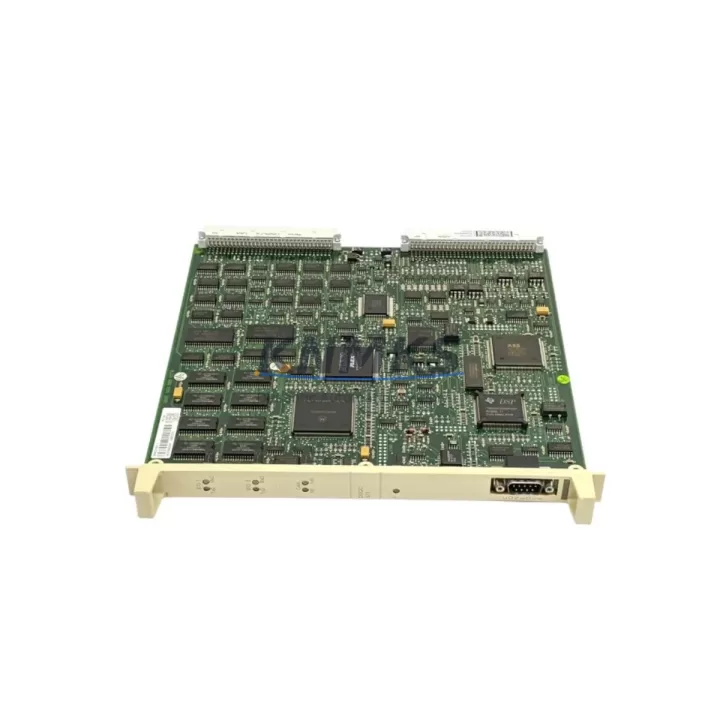
The ABB DSQC373 is an original axis computer board designed for ABB IRC5 and S4C+ robot controller systems. As a critical processing component within the robot controller cabinet, the DSQC373 governs axis motion coordination, interpolation, and real-time servo communication. When this board fails or degrades, the entire robot cell is at risk of unplanned downtime — making a verified, tested spare unit an essential item in any preventive maintenance inventory.
For maintenance engineers managing multi-robot production lines, the DSQC373 is a high-priority spare. Its role in axis trajectory calculation means that even intermittent faults — such as sporadic axis errors, communication timeouts, or erratic motion behavior — can often be traced back to this board. Stocking a tested replacement unit allows your team to execute a rapid swap during a scheduled maintenance window or emergency shutdown, restoring production within hours rather than days.
Procurement engineers sourcing DSQC373 replacements should verify the full part number and hardware revision against the installed unit. ABB IRC5 controller cabinets may contain multiple generations of axis computer hardware, and compatibility confirmation prior to shipment is essential to avoid costly re-ordering cycles. Our units are inspected, function-tested, and shipped with documentation to support incoming inspection at your facility.
Spare Maintenance Table
| SKU / Part Number | DSQC373 |
| Brand | ABB |
| Series | IRC5 / S4C+ Robot Controller |
| Product Type | Axis Computer Board |
| Function | Axis motion coordination, servo interpolation, real-time axis communication |
| Compatible Systems | ABB IRC5 Single Cabinet, IRC5 Dual Cabinet, S4C+ Controller |
| Mounting | Backplane-mounted inside IRC5 / S4C+ controller cabinet |
| Operating Environment | Industrial control cabinet, 0–55°C, protected enclosure |
| Origin | Germany |
| Weight | 600 g |
| Condition | Original, tested before shipment |
| Support terms | 12 months from date of shipment |
| Delivery | global delivery details confirmed by RFQ; DHL / FedEx / TNT available |
Maintenance Planning for Continuous Operation
When replacing the DSQC373 axis computer board during a scheduled or emergency maintenance event, a thorough inspection of the surrounding controller cabinet components is strongly recommended. The IRC5 controller is an integrated system — a fault in one board can stress adjacent modules, and a complete cabinet audit during the same maintenance window maximizes uptime recovery value.
Begin by inspecting the DSQC374 drive unit and DSQC375 I/O board, which work in close coordination with the DSQC373 during axis operation. Check the DSQC662 fieldbus communication adapter for any communication faults logged prior to the failure event, as axis errors are sometimes triggered by upstream fieldbus instability rather than the axis board itself. The DSQC508 panel unit and FlexPendant teach pendant cable should also be inspected for physical damage or connector wear, as these interface directly with the controller during commissioning and fault recovery.
On the power side, verify the DSQC609 power supply unit output voltages are within specification before installing the replacement DSQC373. An out-of-tolerance power supply is a common root cause of repeated axis computer failures and should be treated as a co-replacement candidate in aging IRC5 cabinets. Additionally, inspect the backplane connector and cabinet wiring harness for oxidation, loose pins, or heat damage — particularly in high-cycle or high-ambient-temperature installations.
For facilities operating legacy S4C+ systems, the DSQC373 is also a key spare for the older controller generation. Maintaining a cross-compatible spare inventory that covers both IRC5 and S4C+ platforms reduces the total number of unique SKUs required while maximizing coverage across your installed robot fleet.
Site Replacement Workflow
1. Pre-replacement verification: Confirm the installed DSQC373 part number and hardware revision via the controller cabinet label or ABB RobotStudio backup file. Cross-reference with the replacement unit prior to shipment acceptance.
2. Controller shutdown and lockout: Follow your site LOTO (Lockout/Tagout) procedure. Power down the IRC5 cabinet fully and allow capacitors to discharge before opening the cabinet door.
3. Board removal: Document the existing board position, connector orientation, and any jumper or DIP switch settings using photographs before removal. Retain the original board for failure analysis if required.
4. Replacement installation: Seat the DSQC373 firmly onto the backplane connector. Verify all cable and connector attachments match the original configuration.
5. Power-up and system check: Restore power and monitor the controller boot sequence. Confirm no axis error codes are present. Perform a slow-speed test cycle on all axes before returning the robot to production speed.
6. Documentation: Record the replacement in your CMMS or maintenance log, including the new unit serial number, installation date, and technician sign-off. This supports support terms tracking and future fault analysis.
This workflow minimizes total downtime from fault detection to production restoration, typically achievable within a single shift when a pre-tested spare is available on-site.
Spare Parts Support FAQ
Q1: Is this DSQC373 unit tested before shipment?
Yes. Every unit undergoes functional testing prior to shipment. A test report or inspection certificate is available upon request to support your incoming inspection process.
Q2: What support terms is provided, and what does it cover?
All DSQC373 units are covered by a support terms confirmed by quotation from the date of shipment. The support terms covers functional failure under normal operating conditions. Units damaged by incorrect installation, overvoltage, or physical impact are excluded. Our team provides technical support throughout the confirmed support period.
Q3: How do I confirm compatibility with my specific IRC5 or S4C+ cabinet?
Provide your controller serial number, robot model, and the existing board part number (found on the board label or in your ABB system documentation). Our technical team will confirm compatibility before order confirmation, eliminating the risk of receiving an incompatible unit.
Q4: Can you support long-term or repeat supply for fleet maintenance programs?
Yes. We support OEM and MRO procurement programs requiring scheduled or blanket orders for DSQC373 and related IRC5 spare parts. Contact our sales team to discuss volume pricing, lead time commitments, and consignment stock arrangements for high-volume maintenance operations.
© 2026 KNMKS. All rights reserved.
Original Source: https://knmks.com
Contact: admin@knmks.com | +86 18359268345
Product Identification
- Brand / Ecosystem
-
ABB
ABB - Model / Series
-
DSQC373
IRC5 Series - Product Family
- PLCs & Controllers
- Availability Status
- Available on request after model and quantity confirmation
- Inquiry Type
- B2B RFQ, replacement inquiry and project spare-part request
- Pre-Quote Check
- Exact SKU, brand, series, quantity, nameplate photos and destination country are checked before quotation
System Path
Where this product fits in the KNMKS automation structure.
Specification & Inquiry Focus
- Control platform
- PLC, PAC and modular controllers
- Common needs
- CPU, rack, power and I/O expansion
- Project support
- Replacement, cabinet build and maintenance
Buyer Confirmation
Information KNMKS checks before replying.
- Exact model
- DSQC373
- Brand / ecosystem
- ABB
- Product family
- PLCs & Controllers
- Application note
- Replacement, maintenance, project build or spare-part list
- Useful photos
- Nameplate, installed unit, cabinet layout or connector side
- Delivery details
- Quantity, destination country and target schedule
Document Support
Files and notes can be confirmed during quotation.
- Product photos or nameplate confirmation when available
- Packing and delivery notes before quotation confirmation
- Support scope and delivery terms confirmed per inquiry
- Export document coordination for qualified B2B requests
Inquiry Support
- Model cross-checking before quotation
- CPU, power, rack and expansion module matching
- Support for replacement and project inquiry
What to Send Us
- Brand and exact model number: ABB DSQC373
- Quantity and required delivery time
- Application, replacement requirement or nameplate photo
- Destination country and shipping preference
RFQ Preparation
This is a product inquiry page built for RFQ communication.
Fast Model Check
Send this model to KNMKS for confirmation.
Include quantity, destination country and photos if this is a maintenance replacement. The inquiry will be saved with a reference number after submission.
Brand & Compatibility Note
KNMKS displays automation product information for well-known industrial brand ecosystems and compatible replacement references. Brand names are used for product identification and compatibility reference only; final availability and commercial terms are confirmed per quotation.
 Manufacturing
 Machine Tools
 Packaging
 Energy & Power



 HMI & Displays
 Servo Systems
 Variable Frequency Drives
 Sensors