
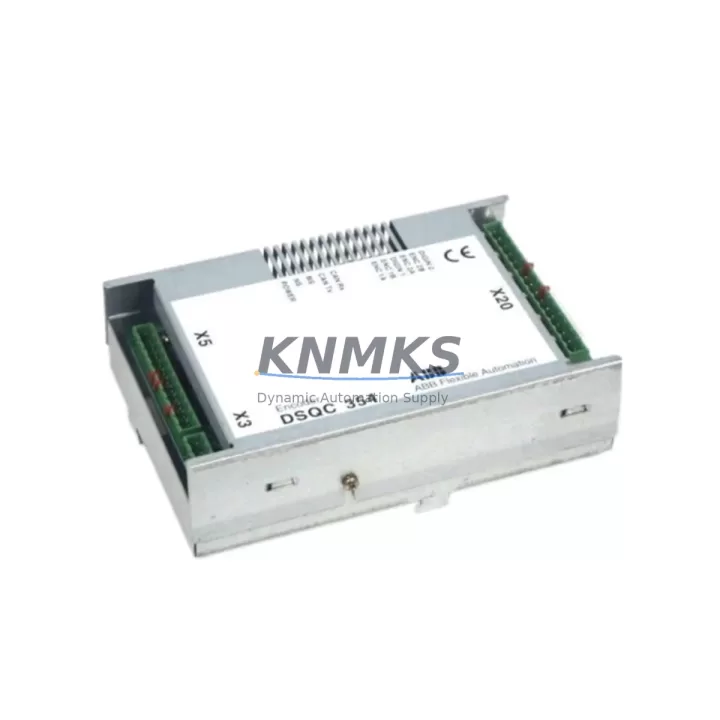
Overview
ABB DSQC354 Migration-Ready DeviceNet Interface for Legacy Control Systems
The ABB DSQC354 is a DeviceNet fieldbus interface module designed for ABB IRC5 and S4C+ robot controller platforms. As legacy automation lines face increasing pressure to modernize, the DSQC354 remains a critical component for facilities that must maintain DeviceNet communication continuity while managing phased migration strategies. Whether you are replacing a failed unit in an active production cell, extending the service life of an S4C+ cabinet, or bridging an IRC5 controller into an existing DeviceNet network, the DSQC354 provides the interface reliability that industrial retrofit projects demand.
Sourced from verified supply channels and subject to pre-shipment functional testing, each DSQC354 unit shipped by KNMKS is inspected for connector integrity, board-level condition, and firmware revision compatibility. Our inventory is maintained to support urgent replacement scenarios where production downtime must be minimized and lead times cannot accommodate new-build procurement cycles.
For engineers managing legacy ABB robot installations, the DSQC354 integrates directly into the IRC5 single-cabinet and dual-cabinet configurations as well as the earlier S4C+ architecture. Before installation, confirm the backplane slot assignment, verify that the DeviceNet node address does not conflict with existing network devices, and review the robot controller’s system parameters for fieldbus configuration. The module’s 5-pin open-style DeviceNet connector (CAN_H, CAN_L, V+, V−, Shield) must be wired to match the existing network topology — trunk line or drop line — and the termination resistor placement should be validated at both ends of the DeviceNet segment.
Migration Compatibility Table
| Parameter | DSQC354 Specification | Retrofit Notes |
|---|---|---|
| Compatible Controllers | ABB IRC5, S4C+ | Confirm cabinet generation before ordering |
| Fieldbus Protocol | DeviceNet (CAN-based) | Node address set via rotary switch or software parameter |
| Backplane Interface | IRC5 internal bus connector | Slot position must match system configuration file |
| Power Supply | Supplied via controller backplane | Verify DSQC609 or DSQC661 PSU capacity before adding modules |
| DeviceNet Connector | 5-pin open-style (CAN_H/L, V+/−, Shield) | Match existing trunk/drop wiring; check termination resistors |
| Firmware Compatibility | RobotWare 5.x / 6.x | Confirm RobotWare version; update system parameters post-install |
| Installation Space | Standard IRC5 module bay | No mechanical modification required for direct replacement |
| HMI / FlexPendant | Compatible with IRC5 FlexPendant | Update I/O configuration screens after module swap |
| Communication Link | DeviceNet Master or Slave | Verify master/slave role matches PLC or scanner configuration |
| Pre-Shipment Testing | Functional inspection performed | Board condition, connector integrity, firmware revision verified |
| Support terms | support terms confirmed by quotation | Covers manufacturing defects and functional failure under normal use |
Retrofit Planning for Existing Automation Systems
A successful DSQC354 retrofit begins well before the module arrives on site. For facilities running ABB IRC5 controllers in multi-robot cells, the DeviceNet network may simultaneously serve welding positioners, conveyor drives, safety PLCs, and vision system triggers — all of which depend on uninterrupted fieldbus communication. When planning the replacement, document the current DeviceNet node map and confirm that the DSQC354’s node address assignment will not create address conflicts after the swap.
Power budget verification is essential. The IRC5 cabinet’s internal power supply — commonly the DSQC609 or the later DSQC661 power distribution unit — must have sufficient headroom to support the DSQC354 alongside other installed option modules. If the cabinet is already populated with a DSQC652 digital I/O module, a DSQC377B conveyor tracking unit, or an DSQC688 Ethernet/IP interface, the cumulative load on the backplane bus should be reviewed against the PSU’s rated output before commissioning.
For S4C+ installations being migrated to IRC5 architecture, the transition from the older DSQC351 or DSQC352 DeviceNet boards requires a full re-mapping of I/O signals in the new controller’s configuration. The S4C+ system parameter files are not directly portable to IRC5 RobotWare, so the DeviceNet I/O table must be rebuilt and validated against the original robot program’s signal references. This is also the appropriate stage to audit the DSQC508 axis computer or motion control boards for firmware currency, as mixed firmware environments can introduce latency or communication faults on the fieldbus.
Where the retrofit involves upgrading a control cabinet that also houses a third-party PLC — such as a Siemens S7-300 or Allen-Bradley ControlLogix acting as the DeviceNet scanner — the DSQC354’s slave configuration must be aligned with the scanner’s EDS file and I/O size parameters. Mismatched I/O sizes are a common source of commissioning delays and should be resolved in the offline configuration phase before the production line is taken down for the physical swap.
Downtime Control During System Migration
Minimizing unplanned downtime during a DSQC354 replacement requires a structured pre-outage preparation protocol. Before the maintenance window opens, back up the full robot system — including the RAPID program, system parameters, I/O configuration, and safety configuration — using the IRC5 FlexPendant or RobotStudio. Store the backup on an external USB drive and verify the backup integrity before proceeding.
During the physical module swap, power down the IRC5 cabinet following the correct sequence: disable the main circuit breaker only after the controller has been shut down through the FlexPendant’s shutdown procedure. This protects the system parameters stored in the controller’s memory and prevents file system corruption that can occur with hard power cuts.
After installing the DSQC354, restore the system parameters and perform a controlled startup in manual mode. Verify that the DeviceNet fieldbus status indicator on the module shows active communication before switching to automatic mode. Walk through each I/O signal mapped to the DeviceNet network and confirm correct state reflection on the FlexPendant I/O panel. If the robot program references DeviceNet signals in safety-critical interlocks — such as cell door status or emergency stop chains — these must be individually validated before production restart.
For facilities where continuous production is required, a parallel commissioning approach — where the replacement module is pre-configured and tested on a spare controller or test bench before the live swap — can reduce the active maintenance window to under two hours in most IRC5 single-cabinet installations.
Retrofit Support FAQ
Q: Is the DSQC354 a direct drop-in replacement for a failed DeviceNet interface in my IRC5 cabinet?
A: Yes, for IRC5 single-cabinet and dual-cabinet configurations, the DSQC354 installs into the standard option module bay without mechanical modification. After installation, restore your system parameter backup and verify the DeviceNet node address and I/O configuration before restarting in automatic mode.
Q: Can the DSQC354 be used in an S4C+ controller?
A: The DSQC354 is compatible with S4C+ installations. However, if you are migrating from an S4C+ to an IRC5 platform, note that system parameters and I/O tables must be rebuilt for the new controller environment. The DeviceNet wiring and node addressing will need to be re-validated in the IRC5 configuration.
Q: What pre-shipment testing does KNMKS perform on the DSQC354?
A: Each unit undergoes a functional inspection covering board-level condition, connector integrity, and firmware revision verification. Units that do not meet our inspection criteria are not shipped. All DSQC354 modules are covered by a support terms confirmed by quotation against manufacturing defects and functional failure under normal operating conditions.
Q: How quickly can KNMKS ship a DSQC354 for an urgent production line repair?
A: KNMKS maintains inventory of the DSQC354 to support urgent replacement scenarios. Contact our sales team at admin@knmks.com or +86 18359268345 to confirm current stock availability and expedited shipping options for your location.
© 2026 KNMKS. All rights reserved.
Original Source: https://knmks.com
Contact: admin@knmks.com | +86 18359268345
Product Identification
- Brand / Ecosystem
-
ABB
ABB - Model / Series
-
DSQC354
IRC5 Series - Product Family
- PLCs & Controllers
- Availability Status
- Available on request after model and quantity confirmation
- Inquiry Type
- B2B RFQ, replacement inquiry and project spare-part request
- Pre-Quote Check
- Exact SKU, brand, series, quantity, nameplate photos and destination country are checked before quotation
System Path
Where this product fits in the KNMKS automation structure.
Specification & Inquiry Focus
- Control platform
- PLC, PAC and modular controllers
- Common needs
- CPU, rack, power and I/O expansion
- Project support
- Replacement, cabinet build and maintenance
Buyer Confirmation
Information KNMKS checks before replying.
- Exact model
- DSQC354
- Brand / ecosystem
- ABB
- Product family
- PLCs & Controllers
- Application note
- Replacement, maintenance, project build or spare-part list
- Useful photos
- Nameplate, installed unit, cabinet layout or connector side
- Delivery details
- Quantity, destination country and target schedule
Document Support
Files and notes can be confirmed during quotation.
- Product photos or nameplate confirmation when available
- Packing and delivery notes before quotation confirmation
- Support scope and delivery terms confirmed per inquiry
- Export document coordination for qualified B2B requests
Inquiry Support
- Model cross-checking before quotation
- CPU, power, rack and expansion module matching
- Support for replacement and project inquiry
What to Send Us
- Brand and exact model number: ABB DSQC354
- Quantity and required delivery time
- Application, replacement requirement or nameplate photo
- Destination country and shipping preference
RFQ Preparation
This is a product inquiry page built for RFQ communication.
Fast Model Check
Send this model to KNMKS for confirmation.
Include quantity, destination country and photos if this is a maintenance replacement. The inquiry will be saved with a reference number after submission.
Brand & Compatibility Note
KNMKS displays automation product information for well-known industrial brand ecosystems and compatible replacement references. Brand names are used for product identification and compatibility reference only; final availability and commercial terms are confirmed per quotation.
 Manufacturing
 Machine Tools
 Packaging
 Energy & Power



 HMI & Displays
 Servo Systems
 Variable Frequency Drives
 Sensors