
Overview
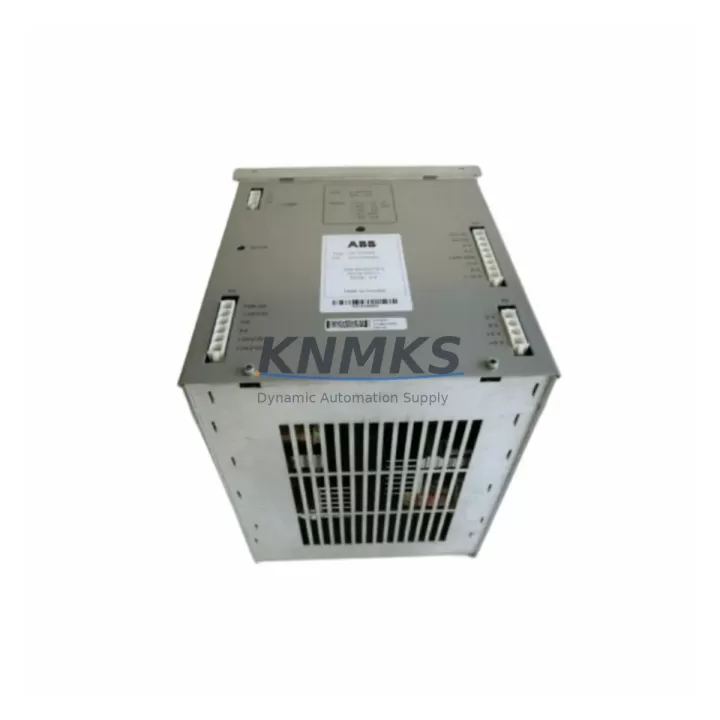
ABB DSQC334 3HAB5845-1 Migration-Ready Power Supply for Legacy Control Systems
The ABB DSQC334 (3HAB5845-1) is a proven power supply module engineered for ABB IRC5 robot controller cabinets. As legacy automation lines face end-of-life pressures and OEM discontinuation cycles, the DSQC334 remains a critical retrofit and replacement component for system integrators, maintenance engineers, and plant automation teams managing aging IRC5 installations. Whether you are executing a planned upgrade, recovering from an unplanned failure, or extending the operational life of an existing robot cell, the DSQC334 provides a verified drop-in solution that minimises engineering risk and downtime exposure.
This module supplies regulated DC power to the IRC5 controller’s internal backplane, supporting the drive system, I/O boards, and communication interfaces that keep the robot cell operational. Its compatibility with the IRC5 Single Cabinet and IRC5 Panel Mounted Controller variants makes it a versatile replacement across a wide range of ABB robot models including the IRB 1600, IRB 2400, IRB 4400, IRB 6600, and IRB 7600 series. Engineers migrating from older S4C+ or S4Cplus controller generations should note that the IRC5 platform represents a significant architectural shift, and the DSQC334 is specific to the IRC5 backplane architecture — not interchangeable with S4-series power supply modules such as the DSQC326 or DSQC345.
Every unit supplied by KNMKS undergoes pre-shipment functional testing, visual inspection, and output voltage verification before dispatch. Stock is maintained to support urgent replacement scenarios, with global shipping available to minimise production interruption for facilities operating on tight maintenance windows.
Migration Compatibility Table
| Parameter | Detail |
|---|---|
| Part Number | DSQC334 / 3HAB5845-1 |
| Compatible Controller | ABB IRC5 Single Cabinet, IRC5 Panel Mounted Controller |
| Backplane Interface | IRC5 internal backplane connector — not compatible with S4C/S4C+ backplane |
| Installation Requirement | Standard IRC5 cabinet rail mount; confirm cabinet revision before ordering |
| Communication Compatibility | Supports IRC5 DeviceNet, PROFIBUS, EtherNet/IP fieldbus options (fieldbus adapter dependent) |
| Replacement Recommendation | Direct replacement for failed or degraded DSQC334 units; verify firmware version on DSQC652 computer unit post-swap |
| Commissioning Focus | Output voltage check, backplane seating, system boot sequence, I/O board power confirmation |
| Support terms | support terms confirmed by quotation — all units pre-shipment tested |
Retrofit Planning for Existing Automation Systems
Successful integration of the DSQC334 into an existing IRC5 installation requires a structured pre-replacement assessment. Before removing the failed unit, engineers should document the current cabinet configuration, including the positions of the DSQC652 main computer unit, the DSQC662 I/O board, and any installed fieldbus adapter modules such as the DSQC688 DeviceNet adapter or DSQC679 PROFIBUS adapter. These modules draw regulated power from the backplane, and any interruption to their supply during the swap must be accounted for in the shutdown and restart sequence.
Terminal wiring on the AC input side of the DSQC334 should be photographed and labelled before disconnection. The IRC5 cabinet uses a structured wiring harness, and incorrect reconnection of the mains input or the 24V DC auxiliary circuits can result in downstream damage to the DSQC608 drive system or the teach pendant interface. Confirm that the replacement unit’s output voltage rails match the original specification before powering up — a multimeter check at the backplane test points is recommended before the first boot.
For facilities running RobotWare 5.x or RobotWare 6.x, the controller software and RAPID program logic are stored on the DSQC652 compact flash or USB backup, not on the power supply module itself. This means the DSQC334 swap does not require a software reload in most cases. However, if the failure event caused a corrupt system state, a full system restore from the most recent backup — including I/O configuration, motion parameters, and safety controller settings — should be performed before returning the cell to production. The FlexPendant (DSQC679 or equivalent) will guide the operator through the warm-start and calibration confirmation sequence.
Where the retrofit is part of a broader control cabinet upgrade — for example, migrating from an IRC5 to an IRC5 Compact or integrating a new DSQC1000 safety controller — the power budget of the new configuration must be recalculated. Additional I/O expansion modules, vision system interfaces, or conveyor tracking boards each add load to the backplane supply. Confirm that the DSQC334’s rated output capacity covers the full populated backplane load before finalising the upgrade bill of materials.
Downtime Control During System Migration
Unplanned power supply failure in a robot cell typically results in a full production stop. The primary strategy for minimising downtime is maintaining a verified spare DSQC334 on-site as part of the facility’s critical spare parts inventory. For high-utilisation cells running two or three shifts, a cold-standby spare reduces mean time to repair (MTTR) from days — the typical lead time for sourcing an obsolete module through OEM channels — to under two hours for a trained technician.
Before beginning the physical swap, back up the current RobotWare system using the FlexPendant backup function or RobotStudio. This preserves the RAPID program, I/O signal configuration, tool data, work object definitions, and safety parameters. A complete backup takes less than five minutes and eliminates the risk of losing production-tuned motion parameters accumulated over years of operation.
During the swap, the IRC5 controller should be fully de-energised and locked out per site LOTO procedures. The DSQC334 is secured to the cabinet backplane with standard fasteners; removal and reinstallation can typically be completed in under 30 minutes by a technician familiar with the IRC5 cabinet layout. After reinstallation, perform a controlled power-up sequence: confirm 24V DC auxiliary power first, then allow the DSQC652 to complete its boot cycle before enabling drive power. Monitor the FlexPendant for any system fault codes that may indicate incomplete backplane contact or downstream module issues.
For planned maintenance windows, coordinate the DSQC334 replacement with any scheduled RobotWare updates, safety controller recertification, or fieldbus configuration changes. Combining multiple maintenance tasks into a single planned outage reduces total annual downtime and allows the full system to be re-validated in a single commissioning session.
Retrofit Support FAQ
Q1: Is the DSQC334 a direct replacement for all IRC5 power supply variants?
The DSQC334 (3HAB5845-1) is the standard power supply for the IRC5 Single Cabinet and IRC5 Panel Mounted Controller. Some IRC5 Compact and IRC5 MultiMove configurations use different power supply assemblies. Confirm your cabinet type and existing part number before ordering. KNMKS technical support can assist with cross-referencing your cabinet serial number if required.
Q2: Will replacing the DSQC334 affect my existing RAPID programs or I/O configuration?
No. The DSQC334 is a power supply module only — it does not store program data, I/O configuration, or motion parameters. These are held on the DSQC652 main computer unit. However, as a precaution, always perform a full system backup before any hardware replacement.
Q3: What commissioning steps are required after installing a replacement DSQC334?
After installation, verify backplane connector seating, perform a controlled power-up, check for system fault codes on the FlexPendant, confirm 24V DC auxiliary output at the backplane test points, and run a dry-cycle of the robot program before returning to production. If the system was down for an extended period, also verify fieldbus communication status on any installed DSQC688 or DSQC679 adapter modules.
Q4: What support terms and testing does KNMKS provide with the DSQC334?
All DSQC334 units supplied by KNMKS carry a support terms confirmed by quotation from the date of shipment. Each unit undergoes pre-shipment functional testing including output voltage verification and visual inspection. In-stock units are available for immediate dispatch to support urgent replacement requirements. Contact admin@knmks.com or +86 18359268345 for availability confirmation and lead time.
© 2026 KNMKS. All rights reserved.
Original Source: https://knmks.com
Contact: admin@knmks.com | +86 18359268345
Product Identification
- Brand / Ecosystem
-
ABB
ABB - Model / Series
-
DSQC334 3HAB5845-1
IRC5 Series - Product Family
- Power Supplies
- Availability Status
- Available on request after model and quantity confirmation
- Inquiry Type
- B2B RFQ, replacement inquiry and project spare-part request
- Pre-Quote Check
- Exact SKU, brand, series, quantity, nameplate photos and destination country are checked before quotation
System Path
Where this product fits in the KNMKS automation structure.
Specification & Inquiry Focus
- Power range
- DIN rail and switching power supplies
- Common needs
- Voltage, current and mounting style
- Project support
- Control cabinet and panel-builder inquiries
Buyer Confirmation
Information KNMKS checks before replying.
- Exact model
- DSQC334 3HAB5845-1
- Brand / ecosystem
- ABB
- Product family
- Power Supplies
- Application note
- Replacement, maintenance, project build or spare-part list
- Useful photos
- Nameplate, installed unit, cabinet layout or connector side
- Delivery details
- Quantity, destination country and target schedule
Document Support
Files and notes can be confirmed during quotation.
- Product photos or nameplate confirmation when available
- Packing and delivery notes before quotation confirmation
- Support scope and delivery terms confirmed per inquiry
- Export document coordination for qualified B2B requests
Inquiry Support
- 24VDC and cabinet power selection support
- Stable power support for PLC and HMI systems
- Batch inquiry support for panel builders
What to Send Us
- Brand and exact model number: ABB DSQC334 3HAB5845-1
- Quantity and required delivery time
- Application, replacement requirement or nameplate photo
- Destination country and shipping preference
RFQ Preparation
This is a product inquiry page built for RFQ communication.
Fast Model Check
Send this model to KNMKS for confirmation.
Include quantity, destination country and photos if this is a maintenance replacement. The inquiry will be saved with a reference number after submission.
Brand & Compatibility Note
KNMKS displays automation product information for well-known industrial brand ecosystems and compatible replacement references. Brand names are used for product identification and compatibility reference only; final availability and commercial terms are confirmed per quotation.
 Manufacturing
 Machine Tools
 Packaging
 Energy & Power
 PLCs & Controllers
 HMI & Displays
 Servo Systems
 Variable Frequency Drives