
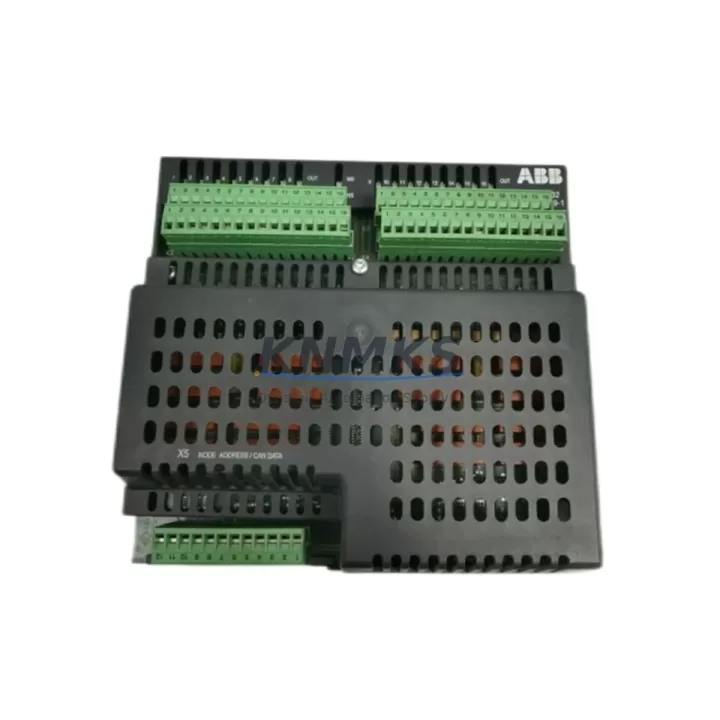
Overview
ABB DSQC332 Migration-Ready Digital I/O for Legacy IRC5 Systems
The ABB DSQC332 is a digital relay I/O module engineered for the IRC5 robot controller platform, widely deployed across automotive, metal fabrication, and general manufacturing automation lines. As legacy IRC5 installations approach end-of-support milestones and original DSQC332 units reach end-of-life, procurement and maintenance teams face increasing pressure to source verified replacement modules that preserve existing program logic, terminal wiring, and backplane addressing without triggering a full controller overhaul.
This listing supplies the DSQC332 as a migration-ready replacement unit — fully tested, functionally verified, and backed by a support terms confirmed by quotation. Each unit is inspected against ABB’s original hardware specification to confirm relay output integrity, digital input response, and backplane interface compatibility before dispatch. Whether you are restoring a production cell after an unplanned module failure or executing a planned retrofit of an aging IRC5 cabinet, the DSQC332 can be installed as a direct hardware substitute with no rack modification required.
Migration Compatibility Table
| Parameter | Detail |
|---|---|
| Compatible Controller | ABB IRC5 (Single Cabinet, Dual Cabinet, Panel Mounted) |
| Module Series | DSQC Series |
| Module Function | Digital Relay I/O (Inputs + Relay Outputs) |
| Backplane Interface | IRC5 internal I/O bus — direct slot replacement |
| Terminal Wiring | Compatible with existing IRC5 terminal block layout; verify connector type before installation |
| Communication Protocol | IRC5 internal DeviceNet / I/O bus (no external fieldbus adapter required) |
| Module Address | Configurable via RobotWare I/O configuration; retain original address to preserve program logic |
| Firmware Compatibility | Compatible with RobotWare 5.x and 6.x; verify RobotWare version before commissioning |
| Installation Space | Standard IRC5 I/O slot; no cabinet modification required for direct replacement |
| Replacement Recommendation | Direct drop-in for failed or end-of-life DSQC332 units in IRC5 cabinets |
| Commissioning Focus | I/O signal mapping verification, relay output load confirmation, RobotWare I/O restart |
| Support terms | support terms confirmed by quotation — functional defects covered from date of shipment |
Retrofit Planning for Existing Automation Systems
Successful DSQC332 replacement begins well before the module arrives on-site. Maintenance engineers should first audit the IRC5 cabinet’s power supply capacity — the DSQC328 or DSQC662 power distribution board feeding the I/O rack must have sufficient headroom to support the replacement module under full relay load. If the cabinet has been running near capacity, this is also an appropriate point to evaluate whether the DSQC609 computer unit or the DSQC639 axis computer require firmware updates that could affect I/O bus timing after the module swap.
Terminal wiring is the most time-sensitive step in any relay I/O replacement. The DSQC332 uses a defined connector layout for its digital inputs and relay outputs; technicians should photograph and label all field wiring before disconnecting the failed unit. Where the original wiring documentation is incomplete or missing — a common situation in installations that have been running for ten or more years — the terminal assignments must be reconstructed from the RobotWare I/O configuration file before any reconnection work begins.
Module addressing is equally critical. The DSQC332’s logical address within the IRC5 I/O system is defined in the RobotWare configuration, and any mismatch between the physical module slot and the configured address will cause the controller to fault on startup. Retain the original address assignment and verify it against the RAPID program’s I/O signal declarations before powering the cabinet back up. If the IRC5 is also connected to an external PROFIBUS or DeviceNet network via a DSQC688 fieldbus adapter, confirm that the network master’s I/O map still aligns with the updated module configuration after replacement.
For installations where the IRC5 cabinet also houses an operator panel or FlexPendant interface, verify that any HMI screen logic referencing digital I/O signals from the DSQC332 remains intact. Signal name changes or address shifts introduced during the replacement can cause HMI display errors that are separate from the robot program faults and must be resolved independently during commissioning.
Downtime Control During System Migration
Minimizing production downtime during a DSQC332 replacement requires a structured pre-swap preparation sequence. Before taking the IRC5 offline, back up the complete RobotWare system — including the I/O configuration, RAPID programs, and safety configuration — to a USB drive or network share. This backup is the single most important safeguard against configuration loss during the swap and should be verified as readable before the cabinet is powered down.
Physical replacement of the DSQC332 is straightforward once the cabinet is de-energized and locked out: the module slides out of its backplane slot and the replacement unit seats in the same position. However, the cabinet should remain powered down until all field wiring has been reconnected and verified against the terminal documentation. Rushing the reconnection step is the most common source of extended downtime in relay I/O replacements, as miswired relay outputs can damage connected field devices when power is restored.
After reconnection, restore the RobotWare system from the backup, confirm the I/O configuration loads without errors, and perform a controlled I/O test with the robot in manual mode before returning to automatic production. Where the production schedule permits, a 30-minute supervised run in manual mode — cycling each relay output and confirming each digital input — provides the highest confidence that the replacement module is performing correctly before full production resumes. This approach consistently delivers the shortest total downtime window compared to reactive troubleshooting after an unverified restart.
Retrofit Support FAQ
Q: Is the DSQC332 a direct replacement for the unit currently installed in my IRC5 cabinet?
A: Yes, provided your cabinet is an IRC5 variant (Single Cabinet, Dual Cabinet, or Panel Mounted). The DSQC332 occupies a standard IRC5 I/O slot and uses the same backplane interface as the original unit. No rack modification is required. Confirm the RobotWare version running on your DSQC609 computer unit is compatible (RobotWare 5.x or 6.x) before installation.
Q: Do I need to reconfigure my RAPID program after replacing the DSQC332?
A: Not if the replacement module is assigned the same logical I/O address as the original. Retain the existing address in the RobotWare I/O configuration and restore from a pre-swap system backup. If the address must change for any reason, all RAPID signal references and any associated HMI signal mappings must be updated accordingly.
Q: Has each unit been tested before shipment?
A: Yes. Every DSQC332 unit is functionally tested prior to dispatch — relay output switching, digital input response, and backplane interface integrity are all verified. Units are shipped with a support terms confirmed by quotation covering functional defects from the date of shipment. Contact admin@knmks.com if you require a test report or additional pre-shipment verification documentation.
Q: What is the typical lead time and do you maintain stock?
A: We maintain inventory of the DSQC332 to support urgent replacement requirements. Standard orders ship within 1–3 business days. For large-quantity orders or scheduled maintenance programs requiring multiple units, contact our team at admin@knmks.com or +86 18359268345 to confirm availability and arrange priority dispatch.
© 2026 KNMKS. All rights reserved.
Original Source: https://knmks.com
Contact: admin@knmks.com | +86 18359268345
Product Identification
- Brand / Ecosystem
-
ABB
ABB - Model / Series
-
DSQC332
IRC5 Series - Product Family
- PLCs & Controllers
- Availability Status
- Available on request after model and quantity confirmation
- Inquiry Type
- B2B RFQ, replacement inquiry and project spare-part request
- Pre-Quote Check
- Exact SKU, brand, series, quantity, nameplate photos and destination country are checked before quotation
System Path
Where this product fits in the KNMKS automation structure.
Specification & Inquiry Focus
- Control platform
- PLC, PAC and modular controllers
- Common needs
- CPU, rack, power and I/O expansion
- Project support
- Replacement, cabinet build and maintenance
Buyer Confirmation
Information KNMKS checks before replying.
- Exact model
- DSQC332
- Brand / ecosystem
- ABB
- Product family
- PLCs & Controllers
- Application note
- Replacement, maintenance, project build or spare-part list
- Useful photos
- Nameplate, installed unit, cabinet layout or connector side
- Delivery details
- Quantity, destination country and target schedule
Document Support
Files and notes can be confirmed during quotation.
- Product photos or nameplate confirmation when available
- Packing and delivery notes before quotation confirmation
- Support scope and delivery terms confirmed per inquiry
- Export document coordination for qualified B2B requests
Inquiry Support
- Model cross-checking before quotation
- CPU, power, rack and expansion module matching
- Support for replacement and project inquiry
What to Send Us
- Brand and exact model number: ABB DSQC332
- Quantity and required delivery time
- Application, replacement requirement or nameplate photo
- Destination country and shipping preference
RFQ Preparation
This is a product inquiry page built for RFQ communication.
Fast Model Check
Send this model to KNMKS for confirmation.
Include quantity, destination country and photos if this is a maintenance replacement. The inquiry will be saved with a reference number after submission.
Brand & Compatibility Note
KNMKS displays automation product information for well-known industrial brand ecosystems and compatible replacement references. Brand names are used for product identification and compatibility reference only; final availability and commercial terms are confirmed per quotation.
 Manufacturing
 Machine Tools
 Packaging
 Energy & Power



 HMI & Displays
 Servo Systems
 Variable Frequency Drives
 Sensors