
Overview
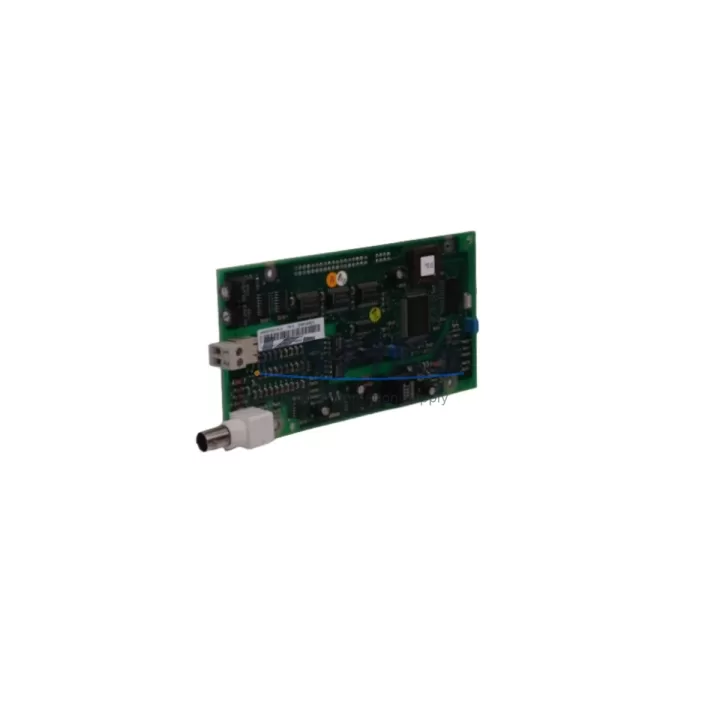
ABB DSQC327A 3HAC17971-1 Migration-Ready Digital I/O for IRC5 Legacy Control Systems
The ABB DSQC327A (part number 3HAC17971-1) is a Digital I/O Module engineered for the ABB IRC5 Robot Controller platform. As legacy automation lines face increasing pressure from discontinued spare parts and aging control architectures, the DSQC327A has become a critical component in retrofit and upgrade projects across automotive, electronics manufacturing, and general industrial assembly environments.
This module provides 16 digital inputs and 16 digital outputs, interfacing directly with the IRC5 controller backplane via the standard DSQC I/O bus. It is a proven drop-in replacement for the DSQC431 and is fully compatible with systems previously running 3HAC036260-001/04 firmware revisions. For maintenance engineers managing aging IRC5 cells, the DSQC327A eliminates the need for full controller replacement, preserving existing RAPID program logic, HMI screen configurations, and fieldbus communication links.
Before installation, engineers should verify the following: available 24 VDC power capacity on the IRC5 power distribution board, terminal block wiring compatibility (Phoenix Contact style, 0.5–2.5 mm²), backplane slot assignment and module address configuration in RobotStudio or the FlexPendant teach pendant, and whether the existing RAPID task references I/O signal names that must be remapped. In multi-robot cells, confirm that the DeviceNet or PROFIBUS DP communication chain remains uninterrupted during module swap.
Units are pre-shipment tested under simulated IRC5 backplane load conditions and ship with a support terms confirmed by quotation. Global stock is maintained to support urgent line-down scenarios with fast dispatch.
Migration Compatibility Table
| Parameter | DSQC327A (3HAC17971-1) | Notes / Retrofit Guidance |
|---|---|---|
| Compatible Controller | ABB IRC5 (Single / Dual Cabinet) | Verify cabinet variant before ordering |
| Replaces / Upgrades | DSQC431, 3HAC036260-001/04 | Direct backplane slot replacement |
| Digital Inputs | 16 x 24 VDC | Confirm field device voltage levels |
| Digital Outputs | 16 x 24 VDC, 0.5 A per channel | Check load current per output channel |
| Communication Interface | IRC5 Internal I/O Bus | No additional fieldbus adapter required |
| Module Address Setting | DIP switch / RobotStudio configuration | Match address to original module config |
| Backplane Connector | Standard IRC5 DSQC backplane | No mechanical modification required |
| Power Supply Requirement | 24 VDC from IRC5 PSU | Verify DSQC508 or DSQC661 PSU capacity |
| Firmware Compatibility | RobotWare 5.x / 6.x | Confirm RobotWare version before swap |
| Installation Space | Standard IRC5 I/O slot (1 slot) | No cabinet modification needed |
| Pre-Shipment Testing | Yes — functional I/O verification | Test report available on request |
| Support terms | 12 Months | Covers manufacturing defects |
Retrofit Planning for Existing Automation Systems
Successful integration of the DSQC327A into a running production environment requires a structured retrofit plan. Begin by auditing the existing IRC5 cabinet layout: identify which backplane slots are occupied by I/O modules, communication adapters, and the main computer unit. In a typical IRC5 single-cabinet configuration, the DSQC652 (Combi I/O module) or DSQC651 (Digital I/O) may occupy adjacent slots — confirm that the DSQC327A’s module address does not conflict with these units.
Power budget is a frequent oversight in retrofit projects. The IRC5 internal power supply — commonly the DSQC661 or its predecessor DSQC508 — must have sufficient 24 VDC headroom to support the additional I/O load. Calculate total current draw across all installed DSQC modules before proceeding. If the existing PSU is operating near capacity, a supplementary 24 VDC rail may be required.
For cells using DeviceNet or PROFIBUS DP fieldbus topologies, the DSQC327A operates on the IRC5 internal bus and does not require a separate fieldbus node address. However, if the legacy system used a DSQC378 DeviceNet adapter or DSQC352 PROFIBUS adapter to bridge external I/O, verify that signal routing in the RAPID program correctly references the new internal I/O unit rather than the external fieldbus node.
HMI screen updates are often overlooked during I/O module replacement. If the cell uses an ABB FlexPendant or an external SCADA/HMI panel linked to specific I/O signal names, confirm that signal aliases in the system parameters remain consistent after the module swap. In RobotStudio, use the I/O Signal Analyzer to validate all mapped signals before restarting the robot program. A DSQC679 teach pendant cable or a USB-to-serial programming cable may be needed for offline parameter backup prior to the swap.
Finally, confirm physical installation space. The DSQC327A occupies a single standard IRC5 I/O slot. If the cabinet has been retrofitted with third-party terminal blocks or DIN rail extensions, measure clearance carefully to avoid connector interference during insertion.
Downtime Control During System Migration
Minimizing unplanned downtime is the primary concern in any live production retrofit. For DSQC327A replacement projects, the recommended approach is a cold-swap procedure during a scheduled maintenance window. Before powering down the IRC5 cabinet, perform a full system backup using RobotStudio or the FlexPendant — this captures RAPID programs, system parameters, I/O configurations, and safety settings. Store the backup on an external USB drive and a network share simultaneously.
Label all field wiring connected to the existing I/O module terminal blocks before disconnection. Photograph the terminal layout as a secondary reference. The DSQC327A uses the same terminal block pitch as the DSQC431, so wiring can be transferred directly without re-crimping in most cases. Verify terminal torque specifications (typically 0.5–0.6 Nm for Phoenix Contact style terminals) to ensure reliable contact after reconnection.
After physical installation, restore the system backup and perform a controlled power-up sequence. Check the IRC5 event log for any I/O unit fault codes (Event ID 3xxxx range) before releasing the robot to automatic mode. Run a dry-cycle test with all outputs de-energized to confirm signal mapping integrity. For safety-critical applications, re-validate any safety I/O channels connected through the DSQC400 safety board or equivalent safety relay modules before resuming production.
With proper preparation, total downtime for a DSQC327A swap can be contained to under two hours in most IRC5 installations, preserving production continuity and reducing the risk of extended line-down events.
Retrofit Support FAQ
Q1: Is the DSQC327A a direct replacement for the DSQC431?
Yes. The DSQC327A (3HAC17971-1) is a direct backplane replacement for the DSQC431 in IRC5 controller configurations. No mechanical modification or wiring change is required in standard installations. Confirm module address settings match the original configuration in RobotStudio system parameters before power-up.
Q2: What RobotWare versions are compatible with the DSQC327A?
The DSQC327A is compatible with RobotWare 5.x and 6.x. If your IRC5 system is running an earlier RobotWare version, contact our technical team to confirm compatibility. Firmware version information can be retrieved from the FlexPendant under Control Panel > System Info.
Q3: How is the unit tested before shipment?
Each DSQC327A unit undergoes functional pre-shipment testing under simulated IRC5 backplane conditions, verifying all 16 digital input channels and 16 digital output channels. A test report is available on request. Units are shipped with a support terms confirmed by quotation covering manufacturing defects and functional failures under normal operating conditions.
Q4: What is the typical lead time and do you hold stock?
We maintain global stock of the DSQC327A to support urgent line-down and planned retrofit projects. Standard dispatch is within 1–3 business days. For large-quantity orders or long-term spare parts programs, contact admin@knmks.com to discuss inventory reservation and scheduled delivery arrangements.
© 2026 KNMKS. All rights reserved.
Original Source: https://knmks.com
Contact: admin@knmks.com | +86 18359268345
Product Identification
- Brand / Ecosystem
-
ABB
ABB - Model / Series
-
DSQC327ADSQC327A3HAC17971-1 DSQC431 3HAC036260-001/04
IRC5 Series - Product Family
- PLCs & Controllers
- Availability Status
- Available on request after model and quantity confirmation
- Inquiry Type
- B2B RFQ, replacement inquiry and project spare-part request
- Pre-Quote Check
- Exact SKU, brand, series, quantity, nameplate photos and destination country are checked before quotation
System Path
Where this product fits in the KNMKS automation structure.
Specification & Inquiry Focus
- Control platform
- PLC, PAC and modular controllers
- Common needs
- CPU, rack, power and I/O expansion
- Project support
- Replacement, cabinet build and maintenance
Buyer Confirmation
Information KNMKS checks before replying.
- Exact model
- DSQC327ADSQC327A3HAC17971-1 DSQC431 3HAC036260-001/04
- Brand / ecosystem
- ABB
- Product family
- PLCs & Controllers
- Application note
- Replacement, maintenance, project build or spare-part list
- Useful photos
- Nameplate, installed unit, cabinet layout or connector side
- Delivery details
- Quantity, destination country and target schedule
Document Support
Files and notes can be confirmed during quotation.
- Product photos or nameplate confirmation when available
- Packing and delivery notes before quotation confirmation
- Support scope and delivery terms confirmed per inquiry
- Export document coordination for qualified B2B requests
Inquiry Support
- Model cross-checking before quotation
- CPU, power, rack and expansion module matching
- Support for replacement and project inquiry
What to Send Us
- Brand and exact model number: ABB DSQC327ADSQC327A3HAC17971-1 DSQC431 3HAC036260-001/04
- Quantity and required delivery time
- Application, replacement requirement or nameplate photo
- Destination country and shipping preference
RFQ Preparation
This is a product inquiry page built for RFQ communication.
Fast Model Check
Send this model to KNMKS for confirmation.
Include quantity, destination country and photos if this is a maintenance replacement. The inquiry will be saved with a reference number after submission.
Brand & Compatibility Note
KNMKS displays automation product information for well-known industrial brand ecosystems and compatible replacement references. Brand names are used for product identification and compatibility reference only; final availability and commercial terms are confirmed per quotation.
 Manufacturing
 Machine Tools
 Packaging
 Energy & Power



 HMI & Displays
 Servo Systems
 Variable Frequency Drives
 Sensors