
Overview
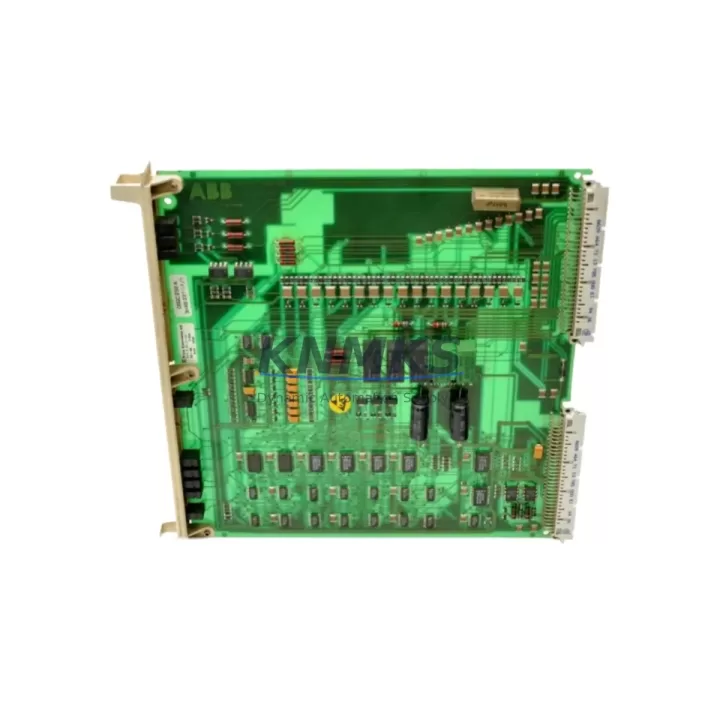
ABB DSQC256A 3HAB2211-1 Migration-Ready Digital Input for Legacy Control Systems
The ABB DSQC256A (3HAB2211-1) is a digital input module engineered for the ABB IRC5 robot controller platform, widely deployed across automotive assembly lines, arc welding cells, material handling systems, and precision manufacturing environments. As legacy IRC5 installations approach end-of-service milestones, the DSQC256A has become a critical spare part for maintenance engineers managing retrofit projects, unplanned downtime recovery, and phased system modernization programs.
This module provides 24 VDC digital input channels that interface directly with the IRC5 main computer and backplane architecture. Its compact form factor and standardized connector pinout make it a direct drop-in replacement for failed or degraded units without requiring modifications to existing cabinet wiring, PLC ladder logic, or RAPID program structures. For facilities operating mixed fleets of IRC5 and earlier S4C+ controllers, the DSQC256A serves as a reliable continuity component that bridges legacy I/O infrastructure with current control cabinet standards.
When planning a retrofit or spare-part replacement involving the DSQC256A, engineers must verify several critical parameters before installation: confirm the backplane slot assignment and module address configuration match the original unit, validate that the 24 VDC supply from the DSQC609 or equivalent power distribution module meets current draw specifications, and ensure the DeviceNet node address is correctly set to avoid communication conflicts on the fieldbus segment. Incorrect node addressing is one of the most common causes of post-replacement communication faults in IRC5 systems.
Migration Compatibility Table
| Parameter | Specification / Recommendation |
|---|---|
| Compatible Controller | ABB IRC5 (all variants incl. IRC5 Compact, IRC5 Panel Mounted) |
| Replaces / Supersedes | DSQC256A 3HAB2211-1 (direct replacement; verify hardware revision) |
| Communication Protocol | DeviceNet (CAN-based); node address configurable via rotary switch |
| Input Channels | Digital Input, 24 VDC nominal |
| Backplane Interface | IRC5 internal backplane connector; slot-specific addressing required |
| Power Supply Requirement | 24 VDC from IRC5 internal PSU (e.g., DSQC609); verify load capacity before swap |
| Installation Space | Standard IRC5 module bay; confirm slot availability in existing cabinet layout |
| Firmware Compatibility | Compatible with RobotWare 5.x and 6.x; verify system software version before commissioning |
| Terminal Wiring | Retain original field wiring; re-terminate per original I/O signal list |
| Commissioning Check | Verify I/O signal mapping in RobotStudio or FlexPendant I/O panel post-installation |
| Replacement Recommendation | Replace as complete module assembly; do not attempt board-level repair in field |
| Support terms | support terms confirmed by quotation included; covers manufacturing defects and functional failure |
Retrofit Planning for Existing Automation Systems
A successful DSQC256A replacement within an active production environment requires a structured pre-outage planning process. Begin by extracting the full I/O configuration from the IRC5 controller using RobotStudio’s offline backup function or the FlexPendant system backup utility. This preserves the RAPID module, system parameters, and I/O signal definitions that will be needed to validate the replacement module’s behavior after installation.
In cabinet-level retrofit scenarios — particularly where the IRC5 is being upgraded from an older S4C+ platform — engineers frequently need to address not only the digital input module but also adjacent components. The DSQC652 digital I/O module is commonly replaced alongside the DSQC256A when expanding I/O capacity or resolving intermittent signal faults caused by aging backplane connectors. Similarly, the DSQC508 axis computer and DSQC563 I/O module may require inspection if the retrofit scope includes drive system modernization or safety circuit reconfiguration.
For systems where the IRC5 communicates upstream to a Siemens S7-300 or Allen-Bradley ControlLogix PLC via PROFIBUS or EtherNet/IP, the DeviceNet segment carrying the DSQC256A must be isolated and re-commissioned after module swap to prevent cascading communication faults. Confirm that the DSQC688 DeviceNet master module (or equivalent fieldbus adapter) retains its configuration and that the node scan list is updated if the replacement module carries a different hardware revision identifier.
Where the retrofit involves HMI screen updates — particularly on legacy FlexPendant units or third-party SCADA panels — verify that I/O signal names referenced in operator screens match the restored signal list from the system backup. Mismatched signal names after a module replacement are a frequent source of post-commissioning alarms that extend planned downtime beyond the maintenance window.
For control cabinets with limited physical space, confirm that the DSQC256A module can be seated fully in the target backplane slot without interference from cable bundles or adjacent modules such as the DSQC626 power supply unit. Document the torque specification for backplane connector fasteners and apply it consistently to avoid intermittent contact faults during vibration-intensive production cycles.
Downtime Control During System Migration
Minimizing unplanned downtime during a DSQC256A replacement begins before the maintenance window opens. A pre-staged replacement module — tested for power-on self-test (POST) pass and DeviceNet enumeration — reduces in-cabinet swap time to under 30 minutes for experienced technicians. Confirm that the replacement unit has been bench-tested against a known-good IRC5 test rig or validated through the supplier’s outgoing inspection process prior to shipment.
During the swap, retain all original field wiring in its terminated state where possible. Use the original I/O signal list and terminal block labeling to guide re-termination if wiring must be disturbed. Photograph the existing wiring layout before disconnection as a reference for post-swap verification. After module installation, perform a controlled power-up sequence: restore 24 VDC to the cabinet, allow the IRC5 main computer to complete its boot cycle, and verify DeviceNet node enumeration before releasing the system to RAPID program execution.
If the IRC5 system is integrated into a production line with upstream and downstream equipment interlocked via safety relays or a safety PLC, coordinate the maintenance window with the line control team to ensure that safety circuit bypass procedures are followed and that the line is in a known-safe state before cabinet access. Restore all safety interlocks and perform a full safety function test before returning the robot cell to automatic mode.
For facilities managing multiple IRC5 units across a production floor, maintaining a minimum stock of one DSQC256A per robot cell — or a shared pool of two to three units per production line — provides adequate buffer against unplanned failures without excessive inventory carrying cost. The support terms confirmed by quotation on supplied units supports this stocking strategy by reducing the financial risk of holding spare modules.
Retrofit Support FAQ
Q1: Is the DSQC256A 3HAB2211-1 a direct drop-in replacement for a failed unit in an IRC5 cabinet?
Yes. The DSQC256A 3HAB2211-1 is a direct module replacement for the same part number in IRC5 controllers. No hardware modification to the cabinet or backplane is required. After installation, restore the system configuration from backup and verify I/O signal mapping via the FlexPendant or RobotStudio before returning to production.
Q2: What commissioning steps are required after replacing the DSQC256A?
After physical installation, power up the IRC5 and confirm that the DeviceNet node address on the replacement module matches the original configuration. Load the system backup to restore RAPID programs and I/O signal definitions. Navigate to the I/O panel on the FlexPendant and verify that all digital input signals associated with the DSQC256A are active and correctly mapped. Perform a dry-run cycle before resuming automatic production.
Q3: How do I verify wiring compatibility before installing the replacement module?
Refer to the original IRC5 cabinet wiring diagram and the DSQC256A terminal block pinout from the ABB product manual (3HAC026253-001 or equivalent). Confirm that field signal wiring polarity, cable gauge, and terminal torque specifications match the replacement module’s requirements. If the original wiring documentation is unavailable, use a multimeter to verify signal voltage levels at each terminal before energizing the module.
Q4: What support terms and supply assurance is provided with this unit?
Each DSQC256A 3HAB2211-1 supplied by KNMKS includes a support terms confirmed by quotation covering manufacturing defects and functional failure under normal operating conditions. Units are subject to outgoing functional inspection prior to shipment. In-stock availability supports same-week dispatch for urgent maintenance requirements. Contact admin@knmks.com or +86 18359268345 for lead time confirmation and volume pricing.
© 2026 KNMKS. All rights reserved.
Original Source: https://knmks.com
Contact: admin@knmks.com | +86 18359268345
Product Identification
- Brand / Ecosystem
-
ABB
ABB - Model / Series
-
DSQC256A 3HAB2211-1
IRC5 Series - Product Family
- PLCs & Controllers
- Availability Status
- Available on request after model and quantity confirmation
- Inquiry Type
- B2B RFQ, replacement inquiry and project spare-part request
- Pre-Quote Check
- Exact SKU, brand, series, quantity, nameplate photos and destination country are checked before quotation
System Path
Where this product fits in the KNMKS automation structure.
Specification & Inquiry Focus
- Control platform
- PLC, PAC and modular controllers
- Common needs
- CPU, rack, power and I/O expansion
- Project support
- Replacement, cabinet build and maintenance
Buyer Confirmation
Information KNMKS checks before replying.
- Exact model
- DSQC256A 3HAB2211-1
- Brand / ecosystem
- ABB
- Product family
- PLCs & Controllers
- Application note
- Replacement, maintenance, project build or spare-part list
- Useful photos
- Nameplate, installed unit, cabinet layout or connector side
- Delivery details
- Quantity, destination country and target schedule
Document Support
Files and notes can be confirmed during quotation.
- Product photos or nameplate confirmation when available
- Packing and delivery notes before quotation confirmation
- Support scope and delivery terms confirmed per inquiry
- Export document coordination for qualified B2B requests
Inquiry Support
- Model cross-checking before quotation
- CPU, power, rack and expansion module matching
- Support for replacement and project inquiry
What to Send Us
- Brand and exact model number: ABB DSQC256A 3HAB2211-1
- Quantity and required delivery time
- Application, replacement requirement or nameplate photo
- Destination country and shipping preference
RFQ Preparation
This is a product inquiry page built for RFQ communication.
Fast Model Check
Send this model to KNMKS for confirmation.
Include quantity, destination country and photos if this is a maintenance replacement. The inquiry will be saved with a reference number after submission.
Brand & Compatibility Note
KNMKS displays automation product information for well-known industrial brand ecosystems and compatible replacement references. Brand names are used for product identification and compatibility reference only; final availability and commercial terms are confirmed per quotation.
 Manufacturing
 Machine Tools
 Packaging
 Energy & Power



 HMI & Displays
 Servo Systems
 Variable Frequency Drives
 Sensors