
Overview
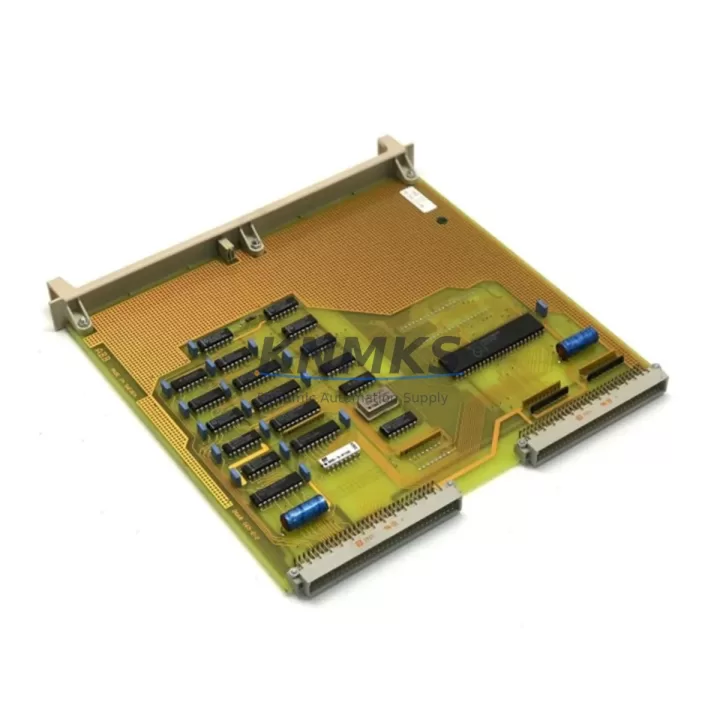
ABB DSQC227 Migration-Ready I/O Interface for Legacy IRC5 Control Systems
The ABB DSQC227 is a proven I/O Interface Board designed for IRC5 robot controllers, widely deployed across automotive, foundry, and general manufacturing automation lines. As legacy IRC5 systems approach end-of-service milestones, the DSQC227 remains one of the most requested retrofit and replacement components — bridging the gap between aging control architectures and modern production demands without requiring a full controller overhaul.
When planning a retrofit or spare-part replacement around the DSQC227, engineers must verify several critical parameters before installation. Power supply capacity at the IRC5 controller cabinet must support the board’s 24 VDC input requirements; confirm that the existing DSQC608 power distribution unit or equivalent can deliver stable voltage under full I/O load. Terminal wiring on the DSQC227 follows ABB’s standard 24-pin connector layout — any field wiring harness from a previous DSQC226 or DSQC228 installation should be cross-checked against the updated pinout to avoid signal inversion on digital outputs. Backplane slot assignment within the IRC5 drive module rack must be confirmed in RobotStudio or the FlexPendant teach pendant before powering up, as incorrect slot addressing will prevent the system from recognising the board during startup diagnostics.
Program compatibility is a key concern during DSQC227 migration. RAPID task modules referencing I/O signal names mapped to the previous board must be audited and updated in the system parameters (EIO.cfg). If the original installation used a DSQC332 DeviceNet master board to coordinate I/O across multiple stations, the DSQC227’s node address must be re-assigned to avoid bus conflicts. HMI screens built on ABB’s Panel Builder or third-party SCADA platforms that display I/O status from the IRC5 should be validated after the swap to confirm signal tag mappings remain intact.
Communication link integrity is equally important. The DSQC227 communicates over DeviceNet; verify that the network termination resistors are correctly placed at both ends of the bus and that the baud rate matches the existing network configuration — typically 500 kbps in high-speed IRC5 installations. If the retrofit involves migrating from an older S4C+ controller to IRC5, the DSQC227 can serve as a compatible I/O node provided the DeviceNet master — often a DSQC352 or third-party scanner — is reconfigured with the updated EDS file for the DSQC227.
Physical installation space within the IRC5 controller cabinet should be measured before ordering. The DSQC227 occupies a standard IRC5 I/O module slot; however, cabinets that have been field-modified or upgraded with additional DSQC651 digital I/O expansion boards may have limited rack space. Confirm slot availability and cable routing clearance before scheduling the maintenance window. Firmware version compatibility between the DSQC227 and the IRC5 main computer (typically running RobotWare 5.x or 6.x) should be verified against ABB’s compatibility matrix — mismatched firmware can cause intermittent I/O faults that are difficult to diagnose under production conditions.
On-site commissioning of the DSQC227 replacement typically follows a structured sequence: power-down the IRC5 cabinet, seat the board in the correct slot, restore power, confirm board recognition in the FlexPendant I/O configuration panel, run a full I/O signal test using the manual jogging mode, and execute a dry-run cycle of the robot program before returning the cell to automatic mode. This sequence minimises unplanned downtime and protects the integrity of the original RAPID program logic.
All DSQC227 units supplied by KNMKS are sourced from verified industrial channels, individually tested for I/O signal integrity and DeviceNet communication, and shipped with a support terms confirmed by quotation. Stock is maintained for immediate dispatch to support urgent production recovery scenarios.
Migration Compatibility Table
| Parameter | DSQC227 Specification | Retrofit / Migration Note |
|---|---|---|
| Compatible Controller | ABB IRC5 (single & multi-cabinet) | Verify RobotWare version 5.x / 6.x compatibility |
| Communication Protocol | DeviceNet | Match baud rate; update EDS file if migrating from S4C+ |
| Power Input | 24 VDC (via IRC5 backplane) | Confirm DSQC608 PSU capacity under full I/O load |
| Connector / Terminal | 24-pin ABB standard | Cross-check pinout vs. DSQC226 / DSQC228 harness |
| Slot / Rack Address | Configurable via EIO.cfg | Assign unique node address; avoid conflict with DSQC332 |
| Replacement Candidates | DSQC226, DSQC228 (legacy) | Functional drop-in with wiring and parameter verification |
| Installation Space | Standard IRC5 I/O module slot | Check rack availability if DSQC651 expansion boards installed |
| Commissioning Tool | FlexPendant / RobotStudio | Run I/O signal test before returning to AUTO mode |
| Support terms | 12 months from date of shipment — all units tested prior to dispatch | |
Retrofit Planning for Existing Automation Systems
A successful DSQC227 retrofit begins well before the maintenance window opens. During the planning phase, engineers should compile a full bill of materials for the IRC5 cabinet, including the DSQC608 power supply, any DSQC651 digital I/O expansion boards, the DSQC332 DeviceNet master (if present), and the DSQC352 fieldbus adapter if the cell communicates with a PLC or SCADA system over a secondary network. Identifying these components early allows the team to confirm that the replacement DSQC227 will integrate without requiring additional hardware changes.
Wiring documentation is critical. Before removing the existing board, photograph or diagram all terminal connections and label each wire with its signal name and destination. If the original installation used a DSQC226 — an earlier-generation I/O board with a similar form factor — the wiring harness may be reused after verifying the pinout differences. Signal isolators installed between the DSQC227 outputs and field devices (sensors, solenoids, or relay modules) should be tested for correct operating voltage range, as some legacy isolators rated for 12 VDC logic may not be compatible with the DSQC227’s 24 VDC output signals.
For cells that include an ABB FlexPendant or a third-party HMI panel connected to the IRC5, the I/O tag database should be exported before the swap and re-imported after commissioning to confirm that all signal references remain valid. Programming cables used to connect a laptop running RobotStudio to the IRC5 service port should be on-hand during commissioning to allow rapid parameter edits if the EIO.cfg requires adjustment after the board is seated.
Downtime Control During System Migration
Minimising unplanned downtime during a DSQC227 replacement requires a structured approach. Begin by scheduling the swap during a planned maintenance window and preparing a rollback plan — retain the original board until the replacement has completed a full production cycle without faults. Before powering down the IRC5, save a full system backup using RobotStudio or the FlexPendant backup function; this preserves the RAPID program, system parameters, and I/O configuration, allowing rapid restoration if the new board requires parameter adjustments.
During the swap, work methodically: power down the cabinet, discharge any residual voltage in the drive section, seat the DSQC227 in the correct slot, reconnect all terminal wiring, and restore power. Use the FlexPendant to navigate to the I/O configuration panel and confirm the board is recognised before attempting any motion. Run a manual jog test of all I/O signals — digital inputs, digital outputs, and any analogue channels — before switching the controller to automatic mode. This step-by-step approach protects the original program logic, maintains field control continuity, and reduces the risk of a secondary fault caused by an incorrectly wired or addressed replacement board.
For multi-robot cells where the IRC5 controls several manipulators over a shared DeviceNet network, coordinate the DSQC227 replacement with the cell PLC operator to ensure that upstream and downstream equipment is placed in a safe hold state before the controller is powered down. This prevents cascading faults on the production line and allows the commissioning team to work safely without time pressure.
Retrofit Support FAQ
Q: Is the DSQC227 a direct replacement for the DSQC226?
A: The DSQC227 is functionally compatible with IRC5 installations that previously used the DSQC226, but a pinout comparison is required before reusing the existing wiring harness. Terminal assignments differ on several signal channels, and the EIO.cfg system parameters must be updated to reflect the new board’s I/O mapping.
Q: What commissioning steps are required after installing the DSQC227?
A: After seating the board and restoring power, confirm recognition in the FlexPendant I/O panel, verify the DeviceNet node address in the system parameters, run a full I/O signal test in manual mode, and execute a dry-run robot cycle before returning to automatic production. A RobotStudio connection is recommended for parameter editing during commissioning.
Q: How do I confirm the DSQC227 is compatible with my IRC5 firmware version?
A: Check the RobotWare version installed on the IRC5 main computer (visible in the FlexPendant system info menu) and cross-reference with ABB’s hardware compatibility matrix. The DSQC227 is supported under RobotWare 5.x and 6.x; installations running earlier firmware may require a RobotWare update before the board is fully recognised.
Q: What support terms and testing does KNMKS provide with the DSQC227?
A: Every DSQC227 unit is individually tested for I/O signal integrity and DeviceNet communication before dispatch. A support terms confirmed by quotation is included from the date of shipment. In-stock units are available for same-day or next-business-day dispatch to support urgent production recovery requirements. Contact admin@knmks.com or +86 18359268345 for availability confirmation.
© 2026 KNMKS. All rights reserved. Original Source: https://knmks.com | Contact: admin@knmks.com | +86 18359268345
Product Identification
- Brand / Ecosystem
-
ABB
ABB - Model / Series
-
DSQC227
IRC5 Series - Product Family
- PLCs & Controllers
- Availability Status
- Available on request after model and quantity confirmation
- Inquiry Type
- B2B RFQ, replacement inquiry and project spare-part request
- Pre-Quote Check
- Exact SKU, brand, series, quantity, nameplate photos and destination country are checked before quotation
System Path
Where this product fits in the KNMKS automation structure.
Specification & Inquiry Focus
- Control platform
- PLC, PAC and modular controllers
- Common needs
- CPU, rack, power and I/O expansion
- Project support
- Replacement, cabinet build and maintenance
Buyer Confirmation
Information KNMKS checks before replying.
- Exact model
- DSQC227
- Brand / ecosystem
- ABB
- Product family
- PLCs & Controllers
- Application note
- Replacement, maintenance, project build or spare-part list
- Useful photos
- Nameplate, installed unit, cabinet layout or connector side
- Delivery details
- Quantity, destination country and target schedule
Document Support
Files and notes can be confirmed during quotation.
- Product photos or nameplate confirmation when available
- Packing and delivery notes before quotation confirmation
- Support scope and delivery terms confirmed per inquiry
- Export document coordination for qualified B2B requests
Inquiry Support
- Model cross-checking before quotation
- CPU, power, rack and expansion module matching
- Support for replacement and project inquiry
What to Send Us
- Brand and exact model number: ABB DSQC227
- Quantity and required delivery time
- Application, replacement requirement or nameplate photo
- Destination country and shipping preference
RFQ Preparation
This is a product inquiry page built for RFQ communication.
Fast Model Check
Send this model to KNMKS for confirmation.
Include quantity, destination country and photos if this is a maintenance replacement. The inquiry will be saved with a reference number after submission.
Brand & Compatibility Note
KNMKS displays automation product information for well-known industrial brand ecosystems and compatible replacement references. Brand names are used for product identification and compatibility reference only; final availability and commercial terms are confirmed per quotation.
 Manufacturing
 Machine Tools
 Packaging
 Energy & Power



 HMI & Displays
 Servo Systems
 Variable Frequency Drives
 Sensors