
Overview
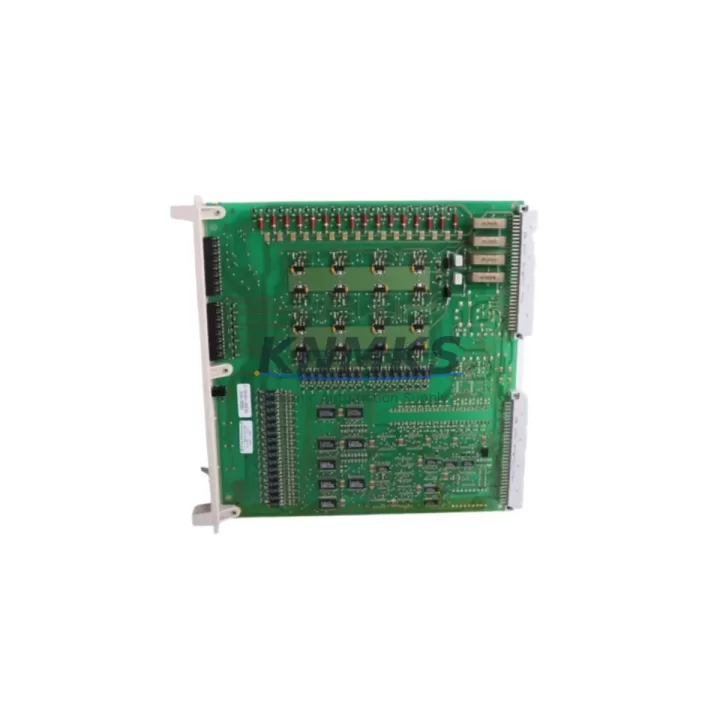
ABB DSQC223 YB560103-BD Maintenance-Proven Spare Part for Factory Uptime
The ABB DSQC223 (part number YB560103-BD) is an original digital I/O module engineered for ABB IRC5 and S4C+ robot controllers. Designed to handle discrete input and output signals in high-cycle industrial environments, this module is a critical component in robotic welding cells, automotive assembly lines, material handling systems, and general factory automation. Sourced directly from verified supply channels, each unit is inspected and tested before shipment to ensure drop-in compatibility and immediate operational readiness. With a support terms confirmed by quotation and long-term stock availability, the DSQC223 YB560103-BD is the preferred choice for maintenance engineers and MRO procurement teams managing ABB robot fleets.
Whether you are responding to an unplanned robot fault, executing a scheduled annual overhaul, or building a proactive spare parts buffer for a multi-robot production line, the DSQC223 delivers the signal integrity and system compatibility required to restore uptime with confidence. Its standardized form factor and plug-and-play installation reduce mean time to repair (MTTR) and eliminate the guesswork associated with aftermarket alternatives.
Spare Maintenance Table
| Part Number | DSQC223 / YB560103-BD |
| Brand | ABB |
| Module Type | Digital I/O Module |
| Compatible Controllers | ABB IRC5, S4C+ |
| Digital Inputs | 16 channels (24 VDC, sink/source) |
| Digital Outputs | 16 channels (24 VDC, 0.5 A per channel) |
| Supply Voltage | 24 VDC (±10%) |
| Communication Interface | Internal IRC5 backplane bus |
| Operating Temperature | 0°C to +55°C |
| Protection Rating | IP20 (cabinet-mounted) |
| Country of Origin | Sweden |
| Weight | Approx. 280 g |
| Installation | DIN rail / IRC5 controller backplane slot |
| Pre-Shipment Testing | Functional I/O verification, signal integrity check |
| Support terms | 12 Months |
| Condition | Original / Refurbished-to-OEM-spec (as stocked) |
Maintenance Planning for Continuous Operation
When replacing the DSQC223 YB560103-BD in an IRC5 controller cabinet, a disciplined maintenance engineer will treat the I/O module swap as an opportunity to audit the entire signal chain. Begin by verifying the 24 VDC power supply rail feeding the I/O section — the ABB DSQC609 power distribution board is a common companion component and should be inspected for capacitor aging, output voltage drift, and connector corrosion before the new DSQC223 is seated.
Next, inspect the IRC5 backplane (DSQC500 series) for bent connector pins, oxidation on the bus interface, and any signs of thermal stress. A degraded backplane can cause intermittent I/O faults that mimic module failure, leading to unnecessary part replacements. While the cabinet is open, check the DSQC651 DeviceNet communication module if your cell uses fieldbus I/O expansion — communication faults on this module can mask upstream digital I/O errors and complicate fault isolation.
Terminal blocks and field wiring connected to the DSQC223’s I/O terminals deserve equal attention. Loose or corroded terminals on the DSQC236 or DSQC240 I/O terminal units are a frequent source of intermittent signal loss that is often misdiagnosed as module failure. Torque all terminal screws to specification and verify continuity on critical input circuits before powering up the replacement module.
For cells with safety-rated I/O, confirm that the DSQC400 safety board or equivalent safety relay module is functioning correctly and that its diagnostic outputs are not masking a latent fault. Additionally, review the fuse protection on the 24 VDC I/O supply — blown or weakened fuses on the IRC5 power section can cause the new DSQC223 to appear faulty immediately after installation. Replacing fuses as a standard part of the I/O module maintenance kit eliminates this risk.
Finally, if the robot cell interfaces with an external HMI or SCADA system via the DSQC668 Ethernet/IP communication module, verify that the I/O mapping configuration in RobotStudio or the IRC5 FlexPendant is updated to reflect any address changes introduced during the module replacement. Documenting the I/O configuration before removal and restoring it after installation is a best practice that prevents production restart delays.
Site Replacement Workflow
Step 1 — Fault Isolation: Use the IRC5 FlexPendant event log to identify the specific I/O channel or module address generating the fault. Confirm that the fault is module-level and not caused by field wiring, power supply, or backplane issues before ordering the replacement DSQC223.
Step 2 — Safe Shutdown: Place the robot in manual mode, execute a controlled program stop, and isolate the IRC5 controller from mains power following your site LOTO (Lockout/Tagout) procedure. Allow the capacitor bank to discharge for a minimum of 5 minutes before opening the cabinet.
Step 3 — Module Removal: Photograph the existing wiring and I/O terminal connections for reference. Disconnect field wiring from the terminal unit, release the module retention latch, and slide the DSQC223 out of the backplane slot. Note the slot address for configuration restoration.
Step 4 — Replacement Installation: Seat the new DSQC223 YB560103-BD firmly into the same backplane slot. Reconnect field wiring to the terminal unit in the documented order. Verify that all terminal screws are torqued and that no wires are pinched by the cabinet door.
Step 5 — Power-Up and Verification: Restore mains power and boot the IRC5 controller. Confirm that the DSQC223 is recognized by the system (no module fault on the FlexPendant). Execute a dry-run I/O test using the I/O monitoring screen to verify all 16 input and 16 output channels respond correctly before resuming production.
Step 6 — Documentation: Record the replacement date, module serial number, and post-installation test results in your CMMS or maintenance log. Update the spare parts inventory to trigger a reorder if the DSQC223 buffer stock falls below your defined minimum level.
Spare Parts Support FAQ
Q1: Is the DSQC223 YB560103-BD compatible with both IRC5 and S4C+ controllers?
Yes. The DSQC223 is designed for use in ABB IRC5 single-cabinet and multi-cabinet configurations and is also backward-compatible with S4C+ systems. Always verify the backplane slot type and I/O configuration in your robot’s system parameters before installation to ensure address mapping is correct.
Q2: What pre-shipment testing is performed on each unit?
Every DSQC223 YB560103-BD unit undergoes functional I/O verification, 24 VDC supply input testing, and signal integrity checks on all 32 channels (16 in / 16 out) before dispatch. Units that do not meet OEM performance specifications are not shipped. A test report is available upon request for critical production applications.
Q3: What does the support terms confirmed by quotation cover?
The support terms confirmed by quotation cover manufacturing defects, premature component failure under normal operating conditions, and any fault attributable to the module itself rather than external wiring or power supply issues. Support requests are supported with replacement or documented resolution support, subject to fault verification. The confirmed support period begins from the date of shipment.
Q4: Can you support long-term or blanket order requirements for multi-site ABB robot fleets?
Yes. For customers managing large ABB robot populations across multiple facilities, we support blanket purchase orders, scheduled release shipments, and dedicated stock reservation to ensure supply continuity. Contact our team to discuss volume pricing, lead time commitments, and consignment stock arrangements tailored to your annual maintenance plan.
© 2026 KNMKS. All rights reserved.
Original Source: https://knmks.com
Contact: admin@knmks.com | +86 18359268345
Product Identification
- Brand / Ecosystem
-
ABB
ABB - Model / Series
-
DSQC223-YB560103-BD
IRC5 Series - Product Family
- PLCs & Controllers
- Availability Status
- Available on request after model and quantity confirmation
- Inquiry Type
- B2B RFQ, replacement inquiry and project spare-part request
- Pre-Quote Check
- Exact SKU, brand, series, quantity, nameplate photos and destination country are checked before quotation
System Path
Where this product fits in the KNMKS automation structure.
Specification & Inquiry Focus
- Control platform
- PLC, PAC and modular controllers
- Common needs
- CPU, rack, power and I/O expansion
- Project support
- Replacement, cabinet build and maintenance
Buyer Confirmation
Information KNMKS checks before replying.
- Exact model
- DSQC223-YB560103-BD
- Brand / ecosystem
- ABB
- Product family
- PLCs & Controllers
- Application note
- Replacement, maintenance, project build or spare-part list
- Useful photos
- Nameplate, installed unit, cabinet layout or connector side
- Delivery details
- Quantity, destination country and target schedule
Document Support
Files and notes can be confirmed during quotation.
- Product photos or nameplate confirmation when available
- Packing and delivery notes before quotation confirmation
- Support scope and delivery terms confirmed per inquiry
- Export document coordination for qualified B2B requests
Inquiry Support
- Model cross-checking before quotation
- CPU, power, rack and expansion module matching
- Support for replacement and project inquiry
What to Send Us
- Brand and exact model number: ABB DSQC223-YB560103-BD
- Quantity and required delivery time
- Application, replacement requirement or nameplate photo
- Destination country and shipping preference
RFQ Preparation
This is a product inquiry page built for RFQ communication.
Fast Model Check
Send this model to KNMKS for confirmation.
Include quantity, destination country and photos if this is a maintenance replacement. The inquiry will be saved with a reference number after submission.
Brand & Compatibility Note
KNMKS displays automation product information for well-known industrial brand ecosystems and compatible replacement references. Brand names are used for product identification and compatibility reference only; final availability and commercial terms are confirmed per quotation.
 Manufacturing
 Machine Tools
 Packaging
 Energy & Power



 HMI & Displays
 Servo Systems
 Variable Frequency Drives
 Sensors