
Overview
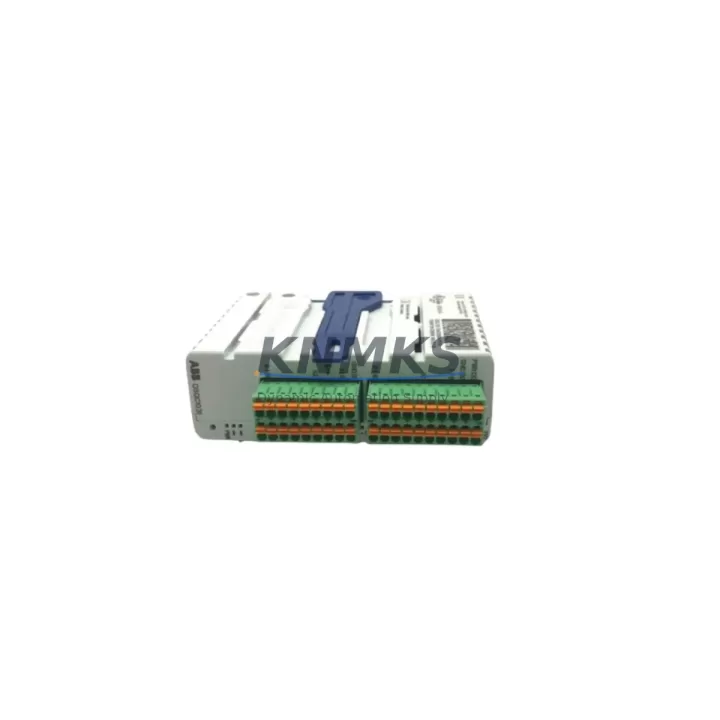
ABB DSQC1031 3HAC058664-001 Spare Part for Factory Uptime
The ABB DSQC1031 (part number 3HAC058664-001) is an original digital I/O module designed for the ABB IRC5 robot controller platform. As a maintenance-proven spare part, it supports continuous factory operation by enabling rapid replacement of failed or degraded I/O modules without extended downtime. Each unit supplied by KNMKS is sourced from verified channels, subjected to pre-shipment functional testing, and backed by a support terms confirmed by quotation — giving maintenance engineers and procurement teams the confidence to stock and deploy this module as part of a structured spare parts program.
The DSQC1031 module provides digital input and output channels for the IRC5 controller, interfacing directly with the robot’s internal backplane and external field devices such as safety interlocks, conveyor sensors, end-of-arm tooling signals, and PLC handshake lines. Its role in the control cabinet is critical: a failed I/O module can halt an entire robot cell, triggering cascading downtime across connected production lines. Stocking a verified replacement unit eliminates the lead-time risk associated with emergency procurement of discontinued or long-lead ABB components.
For maintenance engineers performing scheduled inspections or responding to fault codes on the IRC5 FlexPendant, the DSQC1031 is typically implicated in digital signal faults, I/O communication errors, or unexpected axis stops caused by lost sensor feedback. When replacing this module, a thorough inspection of the surrounding control cabinet components is strongly recommended to prevent repeat failures and ensure system integrity after restoration.
Spare Maintenance Table
| Parameter | Specification |
|---|---|
| Part Number | 3HAC058664-001 |
| Model | DSQC1031 |
| Brand | ABB |
| Series | DSQC (IRC5 Platform) |
| Module Type | Digital I/O Module |
| Compatible Controller | ABB IRC5 (Single Cabinet, Dual Cabinet, Panel Mounted) |
| Mounting | IRC5 Controller Backplane / Internal Rack |
| Origin | Germany (DE) |
| Weight | 900 g |
| Application Environment | Industrial robot cells, automotive assembly, material handling, arc welding, palletizing |
| Maintenance Role | Digital signal I/O, field device interfacing, PLC handshake, safety interlock feedback |
| Pre-Shipment Testing | Yes — functional verification before dispatch |
| Support terms | 12 Months |
| Supply Condition | Original spare, verified sourcing |
| Global Shipping | Yes — multi-region stock, fast dispatch |
Maintenance Planning for Continuous Operation
When replacing the DSQC1031 I/O module in an IRC5 controller, experienced maintenance engineers treat the replacement as an opportunity to audit the entire control cabinet for latent faults. The IRC5 backplane connects multiple DSQC-series modules in a shared communication bus, meaning a degraded I/O module can introduce noise or intermittent faults that affect adjacent modules before a hard failure occurs.
During the replacement procedure, inspect the DSQC1000 computer unit (the IRC5 main computer) for firmware version compatibility with the replacement DSQC1031, as mismatched firmware can cause I/O mapping errors after module swap. Check the DSQC609 power supply module for output voltage stability — an under-voltage condition on the 24 VDC rail is a common root cause of I/O module failures and will damage a replacement unit if not corrected first.
Inspect all field wiring terminal blocks connected to the I/O module’s input and output channels. Loose or corroded terminals on the 24 VDC signal lines are a frequent source of intermittent faults that are misdiagnosed as module failures. Verify the integrity of the DeviceNet or EtherNet/IP communication cables if the IRC5 system uses fieldbus-connected I/O expansion — a damaged communication cable can cause the controller to report I/O module faults even when the module itself is functional.
For robot cells with safety-rated I/O, verify the status of the DSQC643 safety I/O module or equivalent safety relay modules in the cabinet. Safety I/O faults are often triggered simultaneously with standard I/O faults during electrical disturbances, and both modules may require replacement or recertification after a power surge event. Additionally, check the IRC5 axis computer (DSQC668 or equivalent) for error logs that may indicate whether the I/O fault originated from the module itself or from a downstream field device.
Procurement engineers building a spare parts inventory for IRC5-based robot cells should consider stocking the DSQC1031 alongside the DSQC609 power supply and at least one set of terminal block connectors as a minimum viable spare kit. This combination covers the most common failure modes in the IRC5 I/O subsystem and enables same-shift restoration in most fault scenarios.
Site Replacement Workflow
Step 1 — Fault Isolation: Use the IRC5 FlexPendant to identify the specific I/O module address reporting the fault. Cross-reference the error code with the ABB IRC5 Troubleshooting Manual to confirm the DSQC1031 is the failed component before initiating replacement.
Step 2 — Safe Isolation: Follow your site’s lockout/tagout (LOTO) procedure. De-energize the IRC5 controller via the main disconnect. Verify zero energy state on the 24 VDC I/O supply rail before opening the cabinet.
Step 3 — Module Removal: Disconnect the I/O connector harness from the DSQC1031. Note the connector orientation and cable routing before removal. Release the module retention clips and slide the module out of the backplane slot.
Step 4 — Compatibility Verification: Confirm the replacement DSQC1031 (3HAC058664-001) matches the part number of the removed module. Verify the IRC5 system software version supports the replacement module revision. If upgrading from an older DSQC I/O module variant, consult the ABB release notes for any required configuration changes in RobotStudio.
Step 5 — Installation and Commissioning: Seat the replacement module firmly into the backplane slot until the retention clips engage. Reconnect the I/O connector harness. Restore power and perform a controlled restart of the IRC5 controller. Verify all I/O signals are correctly mapped and functional using the FlexPendant I/O diagnostic screen before returning the robot cell to production.
Step 6 — Post-Replacement Validation: Run a full I/O signal test cycle, including all digital inputs and outputs connected to the replaced module. Document the replacement in the maintenance log with the date, part number, and technician ID. Update the spare parts inventory to trigger reorder of a replacement DSQC1031 unit to maintain stock levels.
Spare Parts Support FAQ
Q: Is the DSQC1031 3HAC058664-001 compatible with all IRC5 controller variants?
A: The DSQC1031 is designed for the ABB IRC5 platform, including Single Cabinet, Dual Cabinet, and Panel Mounted Controller variants. Compatibility with specific IRC5 software versions should be verified against the ABB DSQC1031 product documentation or by contacting our technical team before ordering.
Q: What does the support terms confirmed by quotation cover?
A: The support terms confirmed by quotation cover functional defects in the DSQC1031 module under normal operating conditions. Each unit undergoes pre-shipment functional testing before dispatch. Support requests arising from installation errors, incorrect voltage supply, or physical damage are excluded. Contact admin@knmks.com for support terms support.
Q: How quickly can the DSQC1031 be shipped for emergency maintenance situations?
A: KNMKS maintains multi-region stock of high-demand IRC5 spare modules including the DSQC1031. Emergency orders are prioritized for same-day or next-business-day dispatch depending on destination. Contact +86 18359268345 for urgent availability confirmation.
Q: Can KNMKS support long-term supply of DSQC1031 for annual maintenance contracts?
A: Yes. KNMKS supports structured spare parts programs for industrial automation maintenance teams, including reserved stock agreements, annual supply contracts, and multi-unit pricing for the DSQC1031 and related IRC5 DSQC-series modules. Contact admin@knmks.com to discuss your maintenance inventory requirements.
© 2026 KNMKS. All rights reserved.
Original Source: https://knmks.com
Contact: admin@knmks.com | +86 18359268345
Product Identification
- Brand / Ecosystem
-
ABB
ABB - Model / Series
-
IO DSQC1031 3HAC058664-001
IRC5 Series - Product Family
- PLCs & Controllers
- Availability Status
- Available on request after model and quantity confirmation
- Inquiry Type
- B2B RFQ, replacement inquiry and project spare-part request
- Pre-Quote Check
- Exact SKU, brand, series, quantity, nameplate photos and destination country are checked before quotation
System Path
Where this product fits in the KNMKS automation structure.
Specification & Inquiry Focus
- Control platform
- PLC, PAC and modular controllers
- Common needs
- CPU, rack, power and I/O expansion
- Project support
- Replacement, cabinet build and maintenance
Buyer Confirmation
Information KNMKS checks before replying.
- Exact model
- IO DSQC1031 3HAC058664-001
- Brand / ecosystem
- ABB
- Product family
- PLCs & Controllers
- Application note
- Replacement, maintenance, project build or spare-part list
- Useful photos
- Nameplate, installed unit, cabinet layout or connector side
- Delivery details
- Quantity, destination country and target schedule
Document Support
Files and notes can be confirmed during quotation.
- Product photos or nameplate confirmation when available
- Packing and delivery notes before quotation confirmation
- Support scope and delivery terms confirmed per inquiry
- Export document coordination for qualified B2B requests
Inquiry Support
- Model cross-checking before quotation
- CPU, power, rack and expansion module matching
- Support for replacement and project inquiry
What to Send Us
- Brand and exact model number: ABB IO DSQC1031 3HAC058664-001
- Quantity and required delivery time
- Application, replacement requirement or nameplate photo
- Destination country and shipping preference
RFQ Preparation
This is a product inquiry page built for RFQ communication.
Fast Model Check
Send this model to KNMKS for confirmation.
Include quantity, destination country and photos if this is a maintenance replacement. The inquiry will be saved with a reference number after submission.
Brand & Compatibility Note
KNMKS displays automation product information for well-known industrial brand ecosystems and compatible replacement references. Brand names are used for product identification and compatibility reference only; final availability and commercial terms are confirmed per quotation.
 Manufacturing
 Machine Tools
 Packaging
 Energy & Power



 HMI & Displays
 Servo Systems
 Variable Frequency Drives
 Sensors