
Overview
ABB DSQC1006 Migration-Ready Profibus DP Board for IRC5 Legacy Control Systems
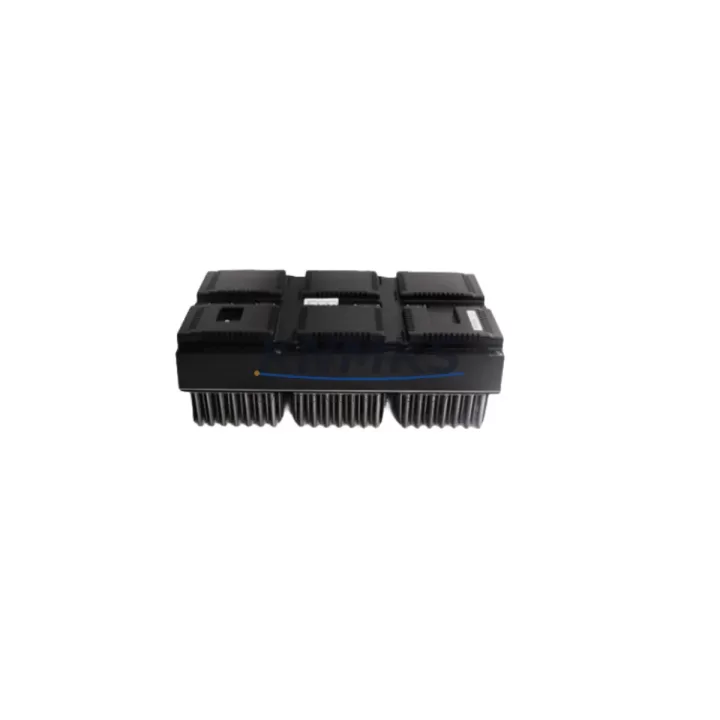
The ABB DSQC1006 (part number 3HAC043383-001/02) is a Profibus DP fieldbus communication board designed for ABB IRC5 robot controllers. As industrial facilities accelerate the retirement of legacy automation platforms, the DSQC1006 has become a critical component in retrofit projects where Profibus DP communication must be preserved across control cabinet upgrades, production line modernization, and robot system migrations. Whether you are replacing a failed unit, extending the service life of an existing IRC5 installation, or bridging a legacy Profibus network into a modernized control architecture, the DSQC1006 provides a verified, drop-in compatible solution with minimal disruption to existing program logic and field wiring.
Migration Compatibility Table
| Parameter | Specification / Requirement |
|---|---|
| Compatible Controller | ABB IRC5 (single cabinet, dual cabinet, paint cabinet) |
| Communication Protocol | Profibus DP (Master / Slave configurable) |
| Part Number | DSQC1006 / 3HAC043383-001/02 |
| Installation Interface | IRC5 main computer backplane slot (DSQC1000 / DSQC1018 platform) |
| Replaces / Upgrades | DSQC532, DSQC667 (Profibus DP adapter boards, earlier IRC5 revisions) |
| Firmware Compatibility | RobotWare 5.x / 6.x — verify active RobotWare version before installation |
| Terminal / Connector | DB9 Profibus DP connector; confirm cable shielding and termination resistor status |
| Module Address | Configured via RobotStudio or teach pendant; re-map I/O signals post-installation |
| Pre-Shipment Testing | Function-tested prior to dispatch |
| Support terms | support terms confirmed by quotation |
| Typical Lead Time | In-stock units ship within 1–3 business days |
| Retrofit Recommendation | Confirm IRC5 cabinet revision, backplane slot availability, and RobotWare license before ordering |
Retrofit Planning for Existing Automation Systems
Successful integration of the DSQC1006 into an existing IRC5 installation requires a structured pre-retrofit assessment. Before removing the legacy communication board, engineers should document the current Profibus DP network topology, including the number of slave devices, baud rate settings, GSD file versions, and the physical cable routing within the control cabinet. In many retrofit scenarios, the IRC5 main computer — typically built around the DSQC1000 or DSQC1018 compute platform — will retain its existing backplane configuration, and the DSQC1006 slots directly into the designated fieldbus expansion position without requiring mechanical modification to the cabinet frame.
Power budget verification is an essential step that is frequently overlooked during rapid replacement projects. The IRC5 internal power supply, often the DSQC661 or DSQC662 unit depending on cabinet generation, must be confirmed to have sufficient headroom to support the DSQC1006 alongside other installed option boards. If the cabinet is already populated with additional I/O expansion modules such as the DSQC652 digital I/O board or the DSQC651 analog I/O board, a full power audit should be completed before commissioning the replacement board.
For facilities running mixed Profibus and DeviceNet networks, the DSQC1006 operates independently of any DeviceNet adapter (such as the DSQC1004) that may be installed in a parallel slot. Both boards can coexist within the same IRC5 cabinet, which is a common configuration in automotive body shop and press line applications where multiple fieldbus protocols serve different zones of the production cell. Engineers should confirm that the RobotWare fieldbus option license (Profibus DP/Master or Profibus DP/Slave) is active on the controller before attempting to configure the DSQC1006 through RobotStudio or the FlexPendant interface.
HMI screen updates are another consideration in retrofit projects involving the DSQC1006. If the production cell uses a third-party SCADA or HMI system communicating over Profibus DP, the GSD file for the IRC5 Profibus interface may need to be re-imported into the HMI engineering tool after the board replacement to ensure that all process data objects and diagnostic signals are correctly mapped. This step is particularly important in legacy installations where the original GSD file version may differ from the version associated with the DSQC1006 firmware revision.
Downtime Control During System Migration
Minimizing unplanned downtime is the primary operational concern when replacing a Profibus DP communication board in a live production environment. A structured hot-swap preparation protocol significantly reduces the risk of extended outages. Before initiating the physical board replacement, the existing IRC5 program — including all RAPID module files, I/O configuration data, system parameters, and safety zone definitions — should be backed up to a USB storage device or a network-accessible RobotStudio backup location. This backup preserves the complete system state and allows rapid restoration if the commissioning process encounters unexpected compatibility issues.
During the physical installation of the DSQC1006, the IRC5 controller must be powered down and locked out in accordance with site LOTO (Lockout/Tagout) procedures. The Profibus DP cable should be disconnected from the existing board before removal, and the DB9 connector and cable termination should be inspected for corrosion or mechanical damage before being reconnected to the DSQC1006. After installation, the controller should be powered up in manual mode, and the Profibus DP network should be verified at the bus level using a Profibus diagnostic tool before returning the robot to automatic production mode.
For facilities where continuous production cannot be interrupted, a parallel commissioning approach is recommended: configure and test the DSQC1006 in an offline IRC5 cabinet or a spare controller unit before scheduling the live cutover. This approach allows the engineering team to validate firmware compatibility, I/O signal mapping, and HMI communication links without exposing the production cell to extended downtime. The total cutover window for a well-prepared DSQC1006 replacement in a standard IRC5 single-cabinet installation is typically achievable within a two-to-four-hour planned maintenance window.
Retrofit Support FAQ
Q1: Is the DSQC1006 a direct replacement for the DSQC532 Profibus DP board in older IRC5 cabinets?
The DSQC1006 is the current-generation Profibus DP board for IRC5 and is compatible with IRC5 cabinets running RobotWare 5.x and 6.x. If your cabinet originally used the DSQC532, confirm the backplane slot type and RobotWare version before ordering. In most cases, a firmware update and I/O re-mapping in RobotStudio are required, but no mechanical cabinet modification is needed.
Q2: Does the DSQC1006 ship pre-tested, and what does the support terms confirmed by quotation cover?
Yes. Every DSQC1006 unit is function-tested prior to shipment to verify communication interface integrity and board-level operation. The support terms confirmed by quotation cover manufacturing defects and functional failures under normal operating conditions. Units are shipped with protective packaging to prevent ESD damage during transit.
Q3: What wiring changes are required when installing the DSQC1006 in an existing Profibus DP network?
In most retrofit scenarios, the existing Profibus DP cable and DB9 connector can be reused without modification, provided the cable is in good condition and the termination resistors at the network endpoints are correctly configured. Verify that the Profibus baud rate setting in the IRC5 system parameters matches the network master configuration before enabling the bus.
Q4: How quickly can the DSQC1006 be sourced for an emergency replacement?
In-stock units are available for dispatch within 1–3 business days. For urgent production recovery situations, contact our sales team directly to confirm current inventory status and expedited shipping options. Global shipping is supported, and export documentation can be prepared for international orders upon request.
© 2026 KNMKS. All rights reserved.
Original Source: https://knmks.com
Contact: admin@knmks.com | +86 18359268345
Product Identification
- Brand / Ecosystem
-
ABB
ABB - Model / Series
-
DSQC1006?3HAC043383-001/02
IRC5 Series - Product Family
- PLCs & Controllers
- Availability Status
- Available on request after model and quantity confirmation
- Inquiry Type
- B2B RFQ, replacement inquiry and project spare-part request
- Pre-Quote Check
- Exact SKU, brand, series, quantity, nameplate photos and destination country are checked before quotation
System Path
Where this product fits in the KNMKS automation structure.
Specification & Inquiry Focus
- Control platform
- PLC, PAC and modular controllers
- Common needs
- CPU, rack, power and I/O expansion
- Project support
- Replacement, cabinet build and maintenance
Buyer Confirmation
Information KNMKS checks before replying.
- Exact model
- DSQC1006?3HAC043383-001/02
- Brand / ecosystem
- ABB
- Product family
- PLCs & Controllers
- Application note
- Replacement, maintenance, project build or spare-part list
- Useful photos
- Nameplate, installed unit, cabinet layout or connector side
- Delivery details
- Quantity, destination country and target schedule
Document Support
Files and notes can be confirmed during quotation.
- Product photos or nameplate confirmation when available
- Packing and delivery notes before quotation confirmation
- Support scope and delivery terms confirmed per inquiry
- Export document coordination for qualified B2B requests
Inquiry Support
- Model cross-checking before quotation
- CPU, power, rack and expansion module matching
- Support for replacement and project inquiry
What to Send Us
- Brand and exact model number: ABB DSQC1006?3HAC043383-001/02
- Quantity and required delivery time
- Application, replacement requirement or nameplate photo
- Destination country and shipping preference
RFQ Preparation
This is a product inquiry page built for RFQ communication.
Fast Model Check
Send this model to KNMKS for confirmation.
Include quantity, destination country and photos if this is a maintenance replacement. The inquiry will be saved with a reference number after submission.
Brand & Compatibility Note
KNMKS displays automation product information for well-known industrial brand ecosystems and compatible replacement references. Brand names are used for product identification and compatibility reference only; final availability and commercial terms are confirmed per quotation.
 Manufacturing
 Machine Tools
 Packaging
 Energy & Power



 HMI & Displays
 Servo Systems
 Variable Frequency Drives
 Sensors