
Overview
ABB DSQC1005 3HAC044872-001 Maintenance-Proven Spare Part for Factory Uptime
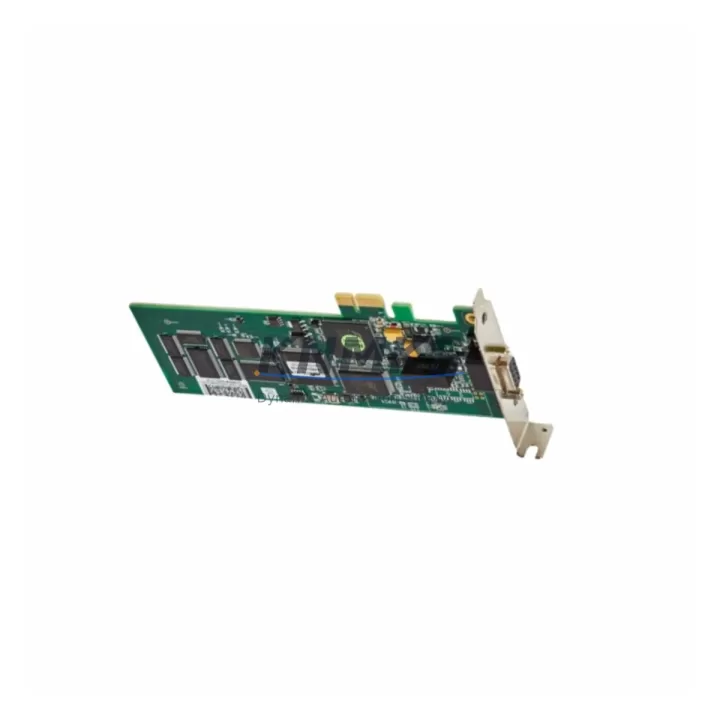
The ABB DSQC1005 (part number 3HAC044872-001) is the original PROFIBUS Master PCIe communication module designed for ABB IRC5 robot controllers. In maintenance-critical environments — automotive body shops, foundry lines, semiconductor fabs, and food processing plants — this module serves as the primary fieldbus interface between the IRC5 controller and PROFIBUS DP slave devices including drives, I/O stations, and distributed sensor networks. Sourced directly from ABB-authorized supply chains, every DSQC1005 unit shipped by KNMKS undergoes pre-shipment functional testing and is backed by a support terms confirmed by quotation, giving maintenance engineers and procurement teams the confidence to stock this part as a first-line replacement component.
When a PROFIBUS communication fault triggers an E-stop or causes a robot to drop into error state, the DSQC1005 is frequently the first module to be swapped during fault isolation. Its PCIe form factor seats directly into the IRC5 main computer (DSQC1000 or DSQC1024 platform), and replacement requires no firmware re-flashing when the RobotWare version is maintained. Maintenance teams running ABB IRC5 M2004 or IRC5 Compact variants should confirm PCIe slot compatibility and RobotWare 5.x or 6.x licensing before installation.
For procurement engineers managing multi-robot facilities, holding one or two DSQC1005 units in the spare parts cabinet eliminates the risk of extended downtime caused by fieldbus communication failures — a failure mode that can halt an entire production cell even when all mechanical components remain functional. KNMKS maintains long-term stock availability for this part and can support blanket purchase orders for facilities with 10 or more IRC5 controllers in service.
Spare Maintenance Table
| Parameter | Specification |
|---|---|
| Part Number | DSQC1005 / 3HAC044872-001 |
| Brand | ABB Robotics |
| Series / Platform | IRC5 Robot Controller (M2004 and later) |
| Module Type | PROFIBUS Master PCIe Communication Module |
| Interface | PROFIBUS DP Master, PCIe x1 slot |
| Compatible Controllers | IRC5 Single Cabinet, IRC5 Dual Cabinet, IRC5 Compact |
| Compatible Main Computers | DSQC1000, DSQC1024 |
| RobotWare Compatibility | RobotWare 5.x, RobotWare 6.x |
| Operating Voltage | 3.3 V / 12 V via PCIe slot (controller-supplied) |
| Operating Temperature | 0 °C to +55 °C |
| Country of Origin | Sweden |
| Weight | 560 g (with packaging) |
| Pre-Shipment Testing | Yes — functional communication test performed |
| Support terms | 12 Months from date of shipment |
| Condition | Original / New or Refurbished-to-OEM-spec |
| Lead Time | availability confirmed by RFQ — ships within 1–3 business days |
Maintenance Planning for Continuous Operation
A PROFIBUS communication failure in an IRC5 cell rarely occurs in isolation. When replacing the DSQC1005, a thorough maintenance engineer will also inspect the surrounding electrical environment to prevent repeat faults and confirm system integrity before returning the robot to production.
Start with the IRC5 main computer board (DSQC1000 or DSQC1024) — verify the PCIe slot contacts are clean and undamaged before seating the new module. Check the 24 VDC system power supply (DSQC609 or equivalent) for output voltage stability; an under-voltage condition on the controller backplane can cause intermittent PCIe communication errors that mimic a failed PROFIBUS module. Inspect the PROFIBUS cable termination resistors at both ends of the fieldbus segment — missing or damaged termination is a leading cause of PROFIBUS DP communication instability and will cause the replacement DSQC1005 to report faults even when the module itself is healthy.
Review the I/O module rack (DSQC651 or DSQC652 distributed I/O) connected on the PROFIBUS segment for any slave address conflicts or GSD file mismatches that may have contributed to the original fault. If the IRC5 cabinet includes a DeviceNet or Ethernet/IP option board, confirm those modules are seated correctly, as a loose PCIe neighbor can cause bus errors across all slots. For cells using ABB SafeMove or external safety PLCs connected via the PROFIBUS segment, re-validate the safety function after module replacement per your site’s functional safety procedure.
Finally, check the cabinet cooling fans and air filter — thermal stress is a known accelerator of PCIe module degradation in IRC5 cabinets operating in high-ambient environments. Replacing the DSQC1005 without addressing a blocked filter or failed fan risks premature failure of the new module within months.
Site Replacement Workflow
Step 1 — Fault Confirmation: Retrieve the IRC5 event log via FlexPendant or RobotStudio. Confirm PROFIBUS Master fault codes (e.g., 20223, 20224) pointing to the DSQC1005 slot. Rule out cable and slave-device faults before condemning the module.
Step 2 — Safe Isolation: Place the IRC5 in Manual mode, engage the mechanical brake release if required, and isolate the cabinet from mains power following your site LOTO procedure. The DSQC1005 is a PCIe card — ESD precautions (wrist strap, anti-static mat) are mandatory.
Step 3 — Module Removal: Open the IRC5 main computer compartment. Release the PCIe retention bracket, carefully extract the DSQC1005, and inspect the slot and connector for contamination or physical damage.
Step 4 — Replacement Installation: Seat the new DSQC1005 firmly into the PCIe x1 slot. Secure the retention bracket. The module does not require jumper configuration — PROFIBUS node addressing is managed via RobotWare software parameters.
Step 5 — Power-Up and Verification: Restore mains power and boot the IRC5. Confirm the PROFIBUS Master status LED on the DSQC1005 shows active communication. In RobotStudio or the FlexPendant I/O configuration panel, verify all PROFIBUS slave devices are online and responding. Clear the event log and run a test cycle before returning the cell to automatic production.
Step 6 — Documentation: Record the replacement in your CMMS (part number, serial number if available, date, technician). Update your spare parts inventory and reorder a replacement DSQC1005 to restore your buffer stock.
Spare Parts Support FAQ
Q1: Is the DSQC1005 compatible with all IRC5 variants, including IRC5 Compact?
The DSQC1005 is compatible with IRC5 Single Cabinet, Dual Cabinet, and IRC5 Compact controllers that use the DSQC1000 or DSQC1024 main computer platform. Verify your main computer part number before ordering. IRC5 controllers using older DSQC652-based main computers use a different PROFIBUS interface architecture and are not compatible with the DSQC1005 PCIe form factor.
Q2: What pre-shipment testing does KNMKS perform on the DSQC1005?
Each unit undergoes a functional communication test to verify PCIe interface integrity and PROFIBUS DP master initialization before dispatch. Units that fail testing are not shipped. All shipped units are covered by a support terms confirmed by quotation from the date of shipment. If a unit fails within the confirmed support period, KNMKS will provide a replacement or documented resolution support.
Q3: Can KNMKS support long-term or blanket purchase orders for the DSQC1005?
Yes. KNMKS maintains dedicated stock for high-demand IRC5 spare parts including the DSQC1005. For facilities managing fleets of 5 or more IRC5 controllers, we recommend discussing a blanket order or consignment stock arrangement to guarantee availability and lock in pricing. Contact admin@knmks.com or call +86 18359268345 to discuss your requirements.
Q4: What is the recommended spare parts holding strategy for the DSQC1005?
For facilities with 1–4 IRC5 controllers: hold a minimum of 1 unit on-site. For facilities with 5–20 controllers: hold 2–3 units. For large-scale installations or lines where robot downtime directly stops production: consider holding 1 unit per 5 controllers plus 1 additional unit as a floating spare. The DSQC1005 has a shelf life exceeding 10 years when stored in a dry, ESD-safe environment, making it a low-risk inventory investment relative to the cost of unplanned downtime.
© 2026 KNMKS. All rights reserved.
Original Source: https://knmks.com
Contact: admin@knmks.com | +86 18359268345
Product Identification
- Brand / Ecosystem
-
ABB
ABB - Model / Series
-
DSQC1005-3HAC044872-001
IRC5 Series - Product Family
- PLCs & Controllers
- Availability Status
- Available on request after model and quantity confirmation
- Inquiry Type
- B2B RFQ, replacement inquiry and project spare-part request
- Pre-Quote Check
- Exact SKU, brand, series, quantity, nameplate photos and destination country are checked before quotation
System Path
Where this product fits in the KNMKS automation structure.
Specification & Inquiry Focus
- Control platform
- PLC, PAC and modular controllers
- Common needs
- CPU, rack, power and I/O expansion
- Project support
- Replacement, cabinet build and maintenance
Buyer Confirmation
Information KNMKS checks before replying.
- Exact model
- DSQC1005-3HAC044872-001
- Brand / ecosystem
- ABB
- Product family
- PLCs & Controllers
- Application note
- Replacement, maintenance, project build or spare-part list
- Useful photos
- Nameplate, installed unit, cabinet layout or connector side
- Delivery details
- Quantity, destination country and target schedule
Document Support
Files and notes can be confirmed during quotation.
- Product photos or nameplate confirmation when available
- Packing and delivery notes before quotation confirmation
- Support scope and delivery terms confirmed per inquiry
- Export document coordination for qualified B2B requests
Inquiry Support
- Model cross-checking before quotation
- CPU, power, rack and expansion module matching
- Support for replacement and project inquiry
What to Send Us
- Brand and exact model number: ABB DSQC1005-3HAC044872-001
- Quantity and required delivery time
- Application, replacement requirement or nameplate photo
- Destination country and shipping preference
RFQ Preparation
This is a product inquiry page built for RFQ communication.
Fast Model Check
Send this model to KNMKS for confirmation.
Include quantity, destination country and photos if this is a maintenance replacement. The inquiry will be saved with a reference number after submission.
Brand & Compatibility Note
KNMKS displays automation product information for well-known industrial brand ecosystems and compatible replacement references. Brand names are used for product identification and compatibility reference only; final availability and commercial terms are confirmed per quotation.
 Manufacturing
 Machine Tools
 Packaging
 Energy & Power



 HMI & Displays
 Servo Systems
 Variable Frequency Drives
 Sensors