
Overview
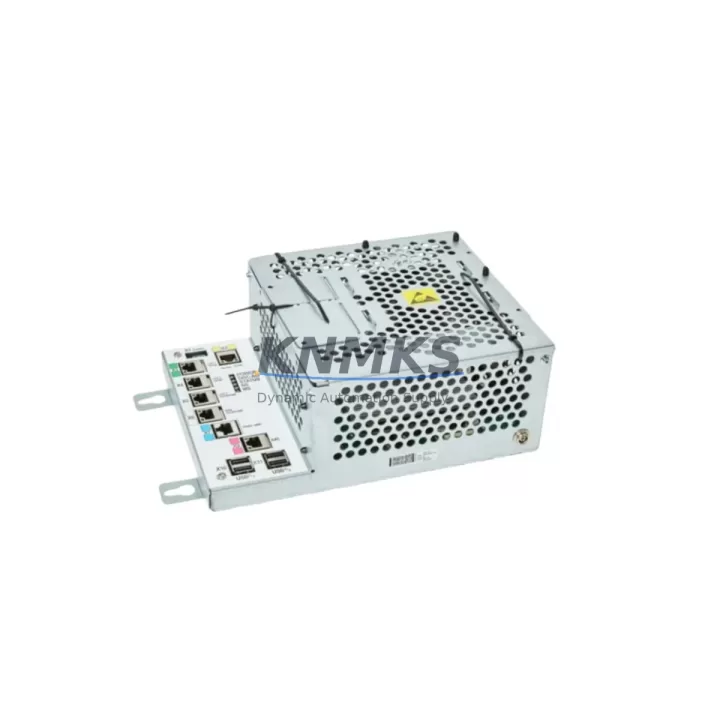
ABB DSQC1000 3HAC042766-001 Maintenance-Proven Spare Part for Factory Uptime
The ABB DSQC1000 (part number 3HAC042766-001) is the Main Computer Unit for ABB IRC5 robot controllers, serving as the central processing and coordination hub for all motion control, I/O management, and communication tasks within the IRC5 cabinet. In high-throughput manufacturing environments — automotive body shops, foundry lines, palletizing cells, and precision assembly stations — an unplanned failure of the DSQC1000 results in immediate production stoppage. Sourcing a verified, pre-tested replacement unit is the fastest path to restoring robot operation and protecting line uptime.
This listing supplies an original ABB DSQC1000 3HAC042766-001 unit, sourced from authorized channels, subjected to pre-shipment functional verification, and backed by a support terms confirmed by quotation. Each unit is inspected for firmware integrity, connector condition, and board-level health before dispatch. Maintenance engineers and spare parts procurement teams can order with confidence knowing the unit has been validated against ABB IRC5 compatibility requirements.
Spare Maintenance Table
| Parameter | Specification / Detail |
|---|---|
| Part Number | 3HAC042766-001 |
| SKU | DSQC1000 |
| Series | ABB IRC5 Robot Controller |
| Function | Main Computer Unit — motion control, I/O coordination, communication management |
| Compatible Controllers | IRC5 Single Cabinet, IRC5 Compact, IRC5 Panel Mounted Controller |
| Compatible Robot Families | IRB 120, IRB 1200, IRB 1600, IRB 2600, IRB 4600, IRB 6620, IRB 6640, IRB 6650S, IRB 7600 |
| Operating Voltage | 24 VDC (supplied by IRC5 internal PSU) |
| Communication Interfaces | Ethernet (service port + LAN), USB, internal backplane bus |
| Firmware | RobotWare 5.x / 6.x compatible (verify RobotWare version before replacement) |
| Origin | Germany (DE) |
| Installation Environment | IP54 cabinet interior; operating temp 0–45 °C |
| Mounting | DIN rail / cabinet backplate, IRC5 standard form factor |
| Pre-Shipment Testing | Functional verification performed on every unit |
| Support terms | 12 Months from date of shipment |
| Lead Time | availability confirmed by RFQ — ships within 1–3 business days |
Maintenance Planning for Continuous Operation
When a DSQC1000 failure is diagnosed or suspected, experienced maintenance engineers know that the Main Computer Unit rarely fails in isolation. A thorough cabinet inspection during the replacement window significantly reduces the risk of repeat downtime. Before returning the IRC5 controller to production, the following components and subsystems should be evaluated as part of a structured maintenance sweep:
Power Supply Unit (DSQC609 / 3HAC021905-001): The IRC5 internal PSU delivers regulated 24 VDC to the DSQC1000 and all connected boards. Voltage ripple, output stability, and connector integrity should be verified before installing a new Main Computer. A degraded PSU is a common root cause of repeated main computer faults and should be treated as a co-suspect in any DSQC1000 failure event.
I/O Module (DSQC652 / 3HAC025917-001): The digital I/O board handles all field-level signal exchange between the robot controller and external PLC, safety relays, and tooling. After a main computer replacement, I/O configuration must be verified and re-loaded from the system backup. Inspect the DSQC652 for connector wear, blown fuses on the I/O rail, and correct 24 VDC supply to the I/O bus.
Axis Computer (DSQC668 / 3HAC029157-001): The axis computer works in close coordination with the DSQC1000 to execute motion trajectories. If the main computer failure was accompanied by axis error codes or unexpected motion faults, the DSQC668 should be inspected for firmware compatibility and connector seating. Mismatched RobotWare versions between the main computer and axis computer are a known source of post-replacement communication errors.
Safety Board (DSQC400 / 3HAC024488-001): The IRC5 safety board manages emergency stop circuits, safeguard inputs, and enabling device logic. During any main computer replacement, the safety chain must be re-validated end-to-end. Verify that all ES and GS inputs are correctly wired, that the safety board firmware is compatible with the replacement DSQC1000, and that the safety configuration file is restored from backup.
Teach Pendant Cable and FlexPendant (3HAC028357-001): The FlexPendant connects to the DSQC1000 via a dedicated port. After replacement, confirm that the pendant cable is undamaged, that the connector is fully seated, and that the FlexPendant boots correctly and displays the expected RobotWare version. A faulty pendant cable can generate misleading main computer communication errors.
Backplane and Internal Cabling: The IRC5 backplane distributes power and data between all controller boards. During the DSQC1000 swap, inspect the backplane connectors for bent pins, oxidation, or heat damage. Internal ribbon cables and harnesses should be re-seated and checked for chafing. Backplane integrity is critical for stable multi-board communication after the new main computer is installed.
Site Replacement Workflow
Step 1 — System Backup: Before any hardware intervention, create a full system backup from the FlexPendant (Control Panel → Backup and Restore → Backup System). Store the backup on a USB drive and a network share. This backup contains the RAPID programs, system parameters, I/O configuration, and safety settings required to restore the robot to its pre-failure state.
Step 2 — Cabinet Power-Down and Lockout: Switch the IRC5 main disconnect to OFF and apply LOTO (Lockout/Tagout) per site safety procedures. Wait a minimum of 5 minutes for capacitors to discharge before opening the cabinet door.
Step 3 — DSQC1000 Removal: Photograph all cable connections before disconnection. Label each connector if not already marked. Release the board retention clips, disconnect the backplane connector, Ethernet cables, USB connections, and the FlexPendant cable. Slide the DSQC1000 out of its mounting position.
Step 4 — Replacement Unit Installation: Insert the new DSQC1000 3HAC042766-001 into the mounting position. Reconnect all cables in reverse order of removal, referencing the photographs taken in Step 3. Ensure the backplane connector is fully engaged and all retention clips are secured.
Step 5 — Power-Up and System Restore: Remove LOTO, close the cabinet, and power up the IRC5. The controller will boot into the RobotWare startup sequence. If the replacement unit requires a RobotWare license transfer, follow the ABB license migration procedure. Restore the system backup via the FlexPendant. Verify that all I/O signals, safety inputs, and communication links are operational before releasing the robot for production.
Step 6 — Functional Verification: Run the robot through a slow-speed test cycle in manual mode, monitoring for axis errors, communication faults, and safety chain status. Confirm that all RAPID programs execute correctly and that production tooling responds as expected before switching to automatic mode.
Spare Parts Support FAQ
Q1: Is this DSQC1000 unit compatible with all IRC5 controller variants?
The DSQC1000 3HAC042766-001 is designed for the ABB IRC5 platform, including the Single Cabinet, Compact, and Panel Mounted Controller variants. Compatibility with specific robot models depends on the installed RobotWare version and system configuration. Always verify the RobotWare version on your existing controller before ordering, and confirm that the replacement unit’s firmware is compatible. Our technical team can assist with compatibility verification prior to shipment.
Q2: What pre-shipment testing is performed on each unit?
Every DSQC1000 unit undergoes functional verification before dispatch, including power-on testing, communication interface checks, and board-level inspection. Units that do not pass verification are not shipped. A test report is available upon request. This process ensures that the unit you receive is operationally ready and reduces the risk of installation failure at the site.
Q3: What does the support terms confirmed by quotation cover, and how is a claim handled?
The support terms confirmed by quotation cover manufacturing defects and functional failures under normal operating conditions from the date of shipment. It does not cover damage caused by incorrect installation, overvoltage events, or physical mishandling. To initiate a support terms claim, contact admin@knmks.com with the order number, a description of the fault, and any available error logs. Replacement or repair will be arranged promptly to minimize your downtime.
Q4: Can you support long-term spare parts supply for our maintenance program?
Yes. KNMKS maintains stock of DSQC1000 and related IRC5 spare parts to support planned maintenance programs, annual shutdowns, and emergency replacement needs. For customers managing fleets of IRC5 robots, we offer reserved stock arrangements and priority dispatch agreements. Contact us at admin@knmks.com or +86 18359268345 to discuss a long-term supply agreement tailored to your maintenance schedule and inventory strategy.
© 2026 KNMKS. All rights reserved.
Original Source: https://knmks.com
Contact: admin@knmks.com | +86 18359268345
Product Identification
- Brand / Ecosystem
-
ABB
ABB - Model / Series
-
DSQC1000-3HAC042766-001
IRC5 Series - Product Family
- PLCs & Controllers
- Availability Status
- Available on request after model and quantity confirmation
- Inquiry Type
- B2B RFQ, replacement inquiry and project spare-part request
- Pre-Quote Check
- Exact SKU, brand, series, quantity, nameplate photos and destination country are checked before quotation
System Path
Where this product fits in the KNMKS automation structure.
Specification & Inquiry Focus
- Control platform
- PLC, PAC and modular controllers
- Common needs
- CPU, rack, power and I/O expansion
- Project support
- Replacement, cabinet build and maintenance
Buyer Confirmation
Information KNMKS checks before replying.
- Exact model
- DSQC1000-3HAC042766-001
- Brand / ecosystem
- ABB
- Product family
- PLCs & Controllers
- Application note
- Replacement, maintenance, project build or spare-part list
- Useful photos
- Nameplate, installed unit, cabinet layout or connector side
- Delivery details
- Quantity, destination country and target schedule
Document Support
Files and notes can be confirmed during quotation.
- Product photos or nameplate confirmation when available
- Packing and delivery notes before quotation confirmation
- Support scope and delivery terms confirmed per inquiry
- Export document coordination for qualified B2B requests
Inquiry Support
- Model cross-checking before quotation
- CPU, power, rack and expansion module matching
- Support for replacement and project inquiry
What to Send Us
- Brand and exact model number: ABB DSQC1000-3HAC042766-001
- Quantity and required delivery time
- Application, replacement requirement or nameplate photo
- Destination country and shipping preference
RFQ Preparation
This is a product inquiry page built for RFQ communication.
Fast Model Check
Send this model to KNMKS for confirmation.
Include quantity, destination country and photos if this is a maintenance replacement. The inquiry will be saved with a reference number after submission.
Brand & Compatibility Note
KNMKS displays automation product information for well-known industrial brand ecosystems and compatible replacement references. Brand names are used for product identification and compatibility reference only; final availability and commercial terms are confirmed per quotation.
 Manufacturing
 Machine Tools
 Packaging
 Energy & Power



 HMI & Displays
 Servo Systems
 Variable Frequency Drives
 Sensors