
Overview
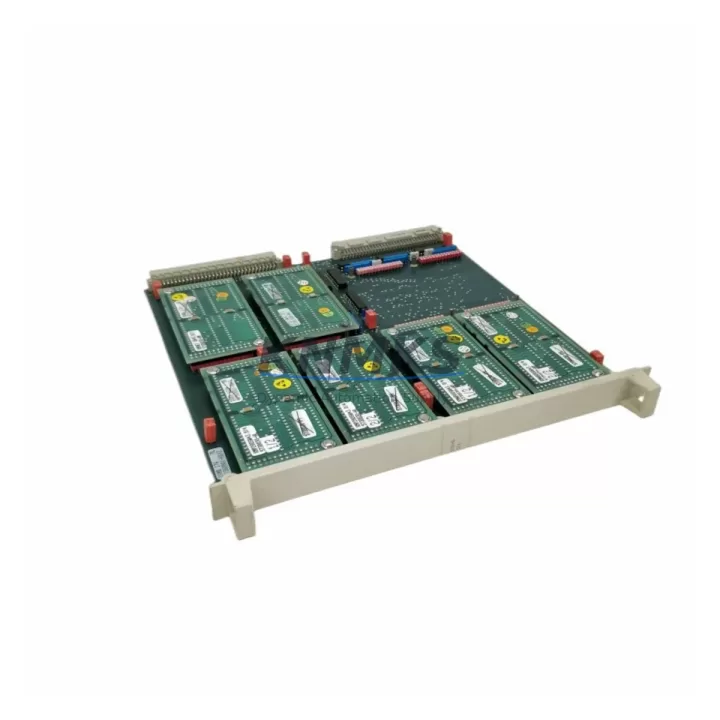
ABB DSMB170 Maintenance-Proven Spare Part for Factory Uptime
The ABB DSMB170 is an original servo memory board designed for ABB DSQC-series robot controllers, including the S3, S4, and IRC5 platforms. As a critical component in the robot’s motion control architecture, the DSMB170 stores servo parameter data, axis configuration, and calibration records essential for precise robotic movement. When this board fails or becomes corrupted, the entire robot cell halts — making rapid, verified replacement a top priority for maintenance and production engineering teams.
KNMKS stocks the DSMB170 as a ready-to-ship industrial spare, pre-tested against ABB factory specifications, with full support terms confirmed by quotation coverage. Whether you are managing a scheduled annual overhaul, responding to an unplanned fault alarm, or building a strategic spare parts buffer for a multi-robot line, the DSMB170 is a high-priority item that should be on every ABB robotics maintenance BOM.
Spare Maintenance Table
| Parameter | Specification / Detail |
|---|---|
| Part Number | DSMB170 |
| Manufacturer | ABB (Sweden) |
| Product Type | Servo Memory Board |
| Compatible Series | DSQC — ABB S3, S4, IRC5 Robot Controllers |
| Function | Stores servo axis parameters, calibration data, and motion configuration |
| Installation | Direct board-level replacement; backplane-mounted inside controller cabinet |
| Origin | Sweden (Original ABB manufacture) |
| Condition | Original spare — tested prior to dispatch |
| Application Environment | Industrial robot cells, automotive assembly, welding lines, material handling |
| Maintenance Recommendation | Inspect during annual overhaul; replace immediately on memory fault or axis calibration loss |
| Support terms | 12 Months from date of shipment |
| Lead Time | Fast dispatch — typically ships within 1–3 business days |
Maintenance Planning for Continuous Operation
Replacing the DSMB170 is rarely an isolated task. In ABB DSQC-series controller cabinets, the servo memory board operates in close coordination with several other components that should be inspected or staged as concurrent spares during any corrective or preventive maintenance event.
Begin with the DSQC508 or DSQC510 axis computer board, which communicates directly with the DSMB170 to execute motion commands. A degraded axis computer can cause repeated memory board faults even after a fresh DSMB170 is installed. Simultaneously, verify the condition of the DSQC604 power supply unit — voltage instability is a leading cause of servo memory corruption, and an aging PSU will shorten the service life of any replacement board.
Inspect the backplane connector and cabinet bus for oxidation, bent pins, or loose seating. A poor backplane connection can generate intermittent read/write errors that mimic a failed DSMB170. While the cabinet is open, check the DSQC352 or DSQC374 I/O module for alarm history — I/O faults that coincide with servo memory errors often indicate a shared power rail issue rather than an isolated board failure.
For robot cells with fieldbus communication, review the DSQC378 DeviceNet or DSQC409 Profibus communication module status. Communication timeouts during a servo memory fault can leave the network in an undefined state, requiring a controlled re-initialization after the DSMB170 is replaced. Finally, confirm that the SMB (Serial Measurement Board) cable connecting the robot arm to the controller is undamaged — a faulty SMB cable is frequently misdiagnosed as a servo memory board failure and should be ruled out before committing to a board replacement.
Maintaining a cabinet-level spare kit that includes the DSMB170 alongside these associated components reduces mean time to repair (MTTR) and eliminates the risk of a secondary fault extending an already costly production stoppage.
Site Replacement Workflow
1. Fault Confirmation: Log the active fault code from the FlexPendant or IRC5 teach pendant. DSMB170-related faults typically appear as servo memory read errors, axis calibration loss, or boot sequence failures. Document the fault log before powering down.
2. Safe Isolation: Follow ABB lockout/tagout (LOTO) procedure. Isolate mains power to the controller cabinet and discharge the capacitor bank in the DSQC604 power supply before opening the cabinet door.
3. Board Removal: Locate the DSMB170 on the backplane. Release the retention latch, extract the board with even pressure, and place it in an ESD-safe bag for return or failure analysis.
4. Replacement Installation: Insert the new DSMB170 firmly into the backplane slot until the latch engages. Verify connector seating visually before closing the cabinet.
5. Parameter Restore: Power up the controller and restore axis calibration data from your backup (RobotStudio backup file or teach pendant backup). If no backup exists, perform a full axis calibration sequence per ABB service manual.
6. Functional Verification: Run the robot through its full working envelope at reduced speed. Confirm all axes respond correctly, no fault codes are active, and servo memory data is retained after a full power cycle.
7. Documentation: Record the replacement date, new board serial number, and post-replacement test results in your maintenance management system (CMMS). Update your spare parts inventory accordingly.
This workflow applies equally to S3, S4, and IRC5 controller variants. For legacy S3 installations, confirm backplane compatibility before ordering — KNMKS technical support can assist with cross-reference verification prior to purchase.
Spare Parts Support FAQ
Q1: Is the DSMB170 compatible with both S4 and IRC5 controllers?
The DSMB170 is primarily associated with the ABB DSQC S3 and S4 controller families. IRC5 compatibility depends on the specific cabinet revision and backplane configuration. Contact KNMKS with your controller serial number and cabinet revision for a confirmed compatibility check before ordering.
Q2: What does the support terms confirmed by quotation cover?
All DSMB170 units shipped by KNMKS carry a support terms confirmed by quotation from the date of shipment, covering manufacturing defects and functional failure under normal operating conditions. Each unit is tested prior to dispatch. Support requests are supported by our technical team with replacement or refund options.
Q3: How should I manage DSMB170 inventory for a multi-robot facility?
For facilities operating five or more ABB robots on DSQC-series controllers, we recommend maintaining at least one DSMB170 as a live spare. For larger fleets or critical production lines with zero-tolerance for downtime, a two-unit buffer is advisable. KNMKS can support blanket order arrangements and reserved stock agreements for high-volume customers.
Q4: Can KNMKS supply the DSMB170 long-term for legacy S3/S4 systems?
Yes. KNMKS specializes in long-cycle industrial spare parts for legacy automation platforms. We maintain sourcing channels for discontinued and hard-to-find ABB DSQC components to support customers extending the operational life of older robot systems. Inquire about long-term supply agreements at admin@knmks.com.
© 2026 KNMKS. All rights reserved.
Original Source: https://knmks.com
Contact: admin@knmks.com | +86 18359268345
Product Identification
- Brand / Ecosystem
-
ABB
ABB - Model / Series
-
DSMB170
IRC5 Series - Product Family
- PLCs & Controllers
- Availability Status
- Available on request after model and quantity confirmation
- Inquiry Type
- B2B RFQ, replacement inquiry and project spare-part request
- Pre-Quote Check
- Exact SKU, brand, series, quantity, nameplate photos and destination country are checked before quotation
System Path
Where this product fits in the KNMKS automation structure.
Specification & Inquiry Focus
- Control platform
- PLC, PAC and modular controllers
- Common needs
- CPU, rack, power and I/O expansion
- Project support
- Replacement, cabinet build and maintenance
Buyer Confirmation
Information KNMKS checks before replying.
- Exact model
- DSMB170
- Brand / ecosystem
- ABB
- Product family
- PLCs & Controllers
- Application note
- Replacement, maintenance, project build or spare-part list
- Useful photos
- Nameplate, installed unit, cabinet layout or connector side
- Delivery details
- Quantity, destination country and target schedule
Document Support
Files and notes can be confirmed during quotation.
- Product photos or nameplate confirmation when available
- Packing and delivery notes before quotation confirmation
- Support scope and delivery terms confirmed per inquiry
- Export document coordination for qualified B2B requests
Inquiry Support
- Model cross-checking before quotation
- CPU, power, rack and expansion module matching
- Support for replacement and project inquiry
What to Send Us
- Brand and exact model number: ABB DSMB170
- Quantity and required delivery time
- Application, replacement requirement or nameplate photo
- Destination country and shipping preference
RFQ Preparation
This is a product inquiry page built for RFQ communication.
Fast Model Check
Send this model to KNMKS for confirmation.
Include quantity, destination country and photos if this is a maintenance replacement. The inquiry will be saved with a reference number after submission.
Brand & Compatibility Note
KNMKS displays automation product information for well-known industrial brand ecosystems and compatible replacement references. Brand names are used for product identification and compatibility reference only; final availability and commercial terms are confirmed per quotation.
 Manufacturing
 Machine Tools
 Packaging
 Energy & Power



 HMI & Displays
 Servo Systems
 Variable Frequency Drives
 Sensors