
Overview
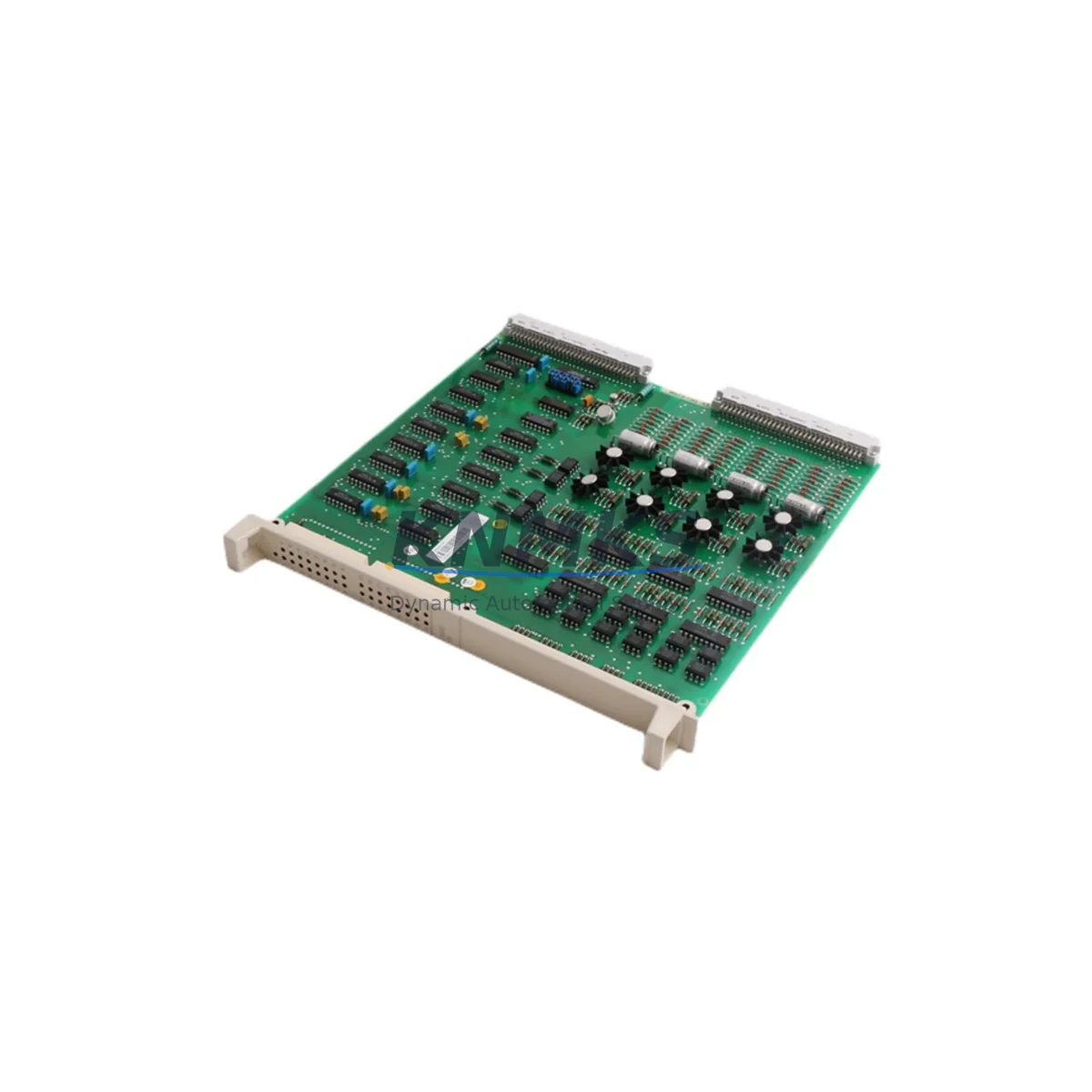
ABB DSDO110 57160001-K Migration-Ready Digital Output Module: Legacy System Retrofit & Compatibility Upgrade
The ABB DSDO110 57160001-K is a digital output module engineered for the PROCONTIC CS31 distributed control platform — one of ABB’s most widely deployed legacy automation architectures across process industries, utilities, and discrete manufacturing. As original CS31 hardware reaches end-of-life and spare part availability tightens, the DSDO110 57160001-K has become a critical component in retrofit projects, emergency replacements, and planned system modernization programs.
This module provides reliable digital output capability within the CS31 I/O bus architecture, supporting field device control including solenoid valves, motor contactors, signal lamps, and relay-driven actuators. Its direct compatibility with existing CS31 backplane wiring and module addressing makes it the preferred drop-in replacement for sites managing aging control cabinets without the budget or downtime window for a full PLC platform migration.
Whether you are extending the operational life of a CS31-based control system, recovering from an unplanned module failure, or executing a phased modernization of a legacy production line, the DSDO110 57160001-K delivers verified compatibility, predictable installation, and a support terms confirmed by quotation backed by pre-shipment functional testing.
Migration Compatibility Table
| Parameter | Specification / Retrofit Note |
|---|---|
| SKU / Part Number | DSDO110 57160001-K |
| Brand / Manufacturer | ABB |
| Platform Compatibility | ABB PROCONTIC CS31 distributed I/O system |
| Module Function | Digital Output (DO) |
| Backplane Interface | CS31 I/O bus — direct slot replacement, no adapter required |
| Installation Type | DIN rail / CS31 rack-mount; confirm available slot width before ordering |
| Wiring Compatibility | Existing CS31 terminal wiring retained; verify output channel count and load ratings |
| Module Addressing | Address switches must match original module configuration; document before removal |
| Communication Protocol | CS31 proprietary bus; no protocol conversion required for like-for-like replacement |
| Program Compatibility | Existing PLC program logic and I/O mapping remain valid for direct replacement |
| Firmware | Confirm firmware revision compatibility with host CPU (e.g., ABB 07KT98 or 07KT97) before installation |
| Power Supply Requirement | Verify CS31 rack power budget; add ABB DSNG110 or equivalent power supply module if capacity is marginal |
| Country of Origin | Germany |
| Weight | 340 g |
| Support terms | 12 months from shipment date; pre-shipment functional test included |
| Availability | availability confirmed by RFQ — contact admin@knmks.com for lead time confirmation |
Retrofit Planning for Existing Automation Systems
Successful integration of the DSDO110 57160001-K into an operating CS31 system requires systematic pre-installation planning. The following workflow reflects best practices for legacy control system retrofits where minimizing unplanned downtime and protecting existing program logic are the primary constraints.
Power Budget Verification: Before inserting any replacement module, audit the total power draw of the CS31 rack. The DSDO110 57160001-K draws supply current from the CS31 backplane. If the existing power supply module — such as an ABB DSNG110 or DSNG120 — is already operating near capacity due to accumulated I/O expansion over the system’s service life, adding or replacing a digital output module may trigger undervoltage conditions. Measure actual rail voltage under load before proceeding.
Terminal Wiring and I/O Channel Mapping: The CS31 terminal block wiring for the original DSDO110 installation should be photographed and documented before removal. Output channel assignments, load types (inductive vs. resistive), and common terminal configurations must be verified against the replacement module’s pinout. Where field wiring has been modified over the years without documentation updates, physical tracing is essential before energizing outputs.
Backplane Slot and Module Address Configuration: The DSDO110 57160001-K uses rotary or DIP address switches to define its logical position on the CS31 bus. These settings must exactly replicate the original module’s address to ensure the host CPU — typically an ABB 07KT98 or 07KT97 controller — recognizes the replacement without requiring program modifications. Photograph the switch positions on the failed module before disposal.
HMI Screen and SCADA Tag Validation: In systems where CS31 I/O points are mapped to HMI faceplates or SCADA historian tags, confirm that output point addresses remain consistent after module replacement. Systems using ABB Panel Builder or third-party SCADA platforms connected via ABB DSCS110 communication modules should be validated in simulation mode before live commissioning.
Communication Link Integrity: The CS31 bus relies on a daisy-chained communication topology. During module removal and reinsertion, verify that the bus termination resistors and cable connectors at adjacent modules — including any DSDI110 digital input modules or DSAI110 analog input modules sharing the same rack — remain properly seated. A loose connector at any node can cause bus faults that appear as unrelated I/O errors.
Installation Space and Mechanical Fit: Confirm the physical slot dimensions in the CS31 rack before ordering. In older installations, rack slots may have been modified, obstructed by cable management additions, or partially occupied by non-standard mounting hardware. The DSDO110 57160001-K ships in standard CS31 module form factor; verify clearance for front-panel connector access and LED status indicators.
Firmware Revision Compatibility: ABB released multiple firmware revisions for the CS31 platform over its production life. In rare cases, a replacement module with a later hardware revision may exhibit minor behavioral differences with older CPU firmware. Request the hardware revision label from your supplier and cross-reference against the host CPU’s compatibility matrix before installation in safety-critical applications.
Downtime Control During System Migration
For production environments where the CS31 system controls active processes, the replacement of a DSDO110 57160001-K must be executed within a defined maintenance window with a clear rollback plan. The following approach is recommended for sites where stopping the line carries significant cost.
Pre-Staging and Bench Testing: Configure the replacement module’s address switches on the bench before entering the control cabinet. Verify the module powers up correctly using a bench CS31 rack or a spare CPU if available. This eliminates configuration errors as a source of delay during the live replacement window.
Program Logic Backup: Export a full backup of the CS31 CPU program — including I/O configuration, function block assignments, and communication parameters — using the ABB programming tool before touching any hardware. Store the backup on an isolated device. If the host CPU is an ABB 07KT98, use the appropriate programming cable and software version to ensure backup integrity.
Output State Documentation: Before powering down the affected rack section, record the current output states of all channels on the DSDO110 module. In processes with interlock logic, unexpected output state changes during module swap can trigger downstream equipment responses. Coordinate with the process operator to place the system in a safe hold state before proceeding.
Hot-Swap Considerations: The CS31 platform does not universally support hot-swap of I/O modules. Plan for a controlled power-down of the affected rack segment. Confirm with the site’s electrical safety procedures whether the full cabinet must be de-energized or whether localized rack isolation is permissible.
Post-Installation Verification: After reinsertion, power up the rack and confirm the CPU recognizes the DSDO110 57160001-K at the correct bus address. Force each output channel individually from the programming tool to verify field device response before returning the system to automatic control. Document the commissioning test results for the site maintenance record.
By following this structured approach, most DSDO110 57160001-K replacements can be completed within a two-hour maintenance window, including pre-staging, physical swap, and output verification — significantly reducing the operational risk associated with legacy CS31 spare part management.
Retrofit Support FAQ
Q1: Is the DSDO110 57160001-K a direct replacement for the original DSDO110 module in my CS31 rack?
Yes. The DSDO110 57160001-K is a direct form-fit-function replacement for the original DSDO110 digital output module in ABB PROCONTIC CS31 systems. No wiring changes, program modifications, or bus reconfiguration are required for a like-for-like swap, provided the module address switches are set to match the original configuration. Each unit supplied by KNMKS undergoes pre-shipment functional testing to confirm output channel operation before dispatch.
Q2: How do I verify wiring compatibility before installation?
Compare the terminal block pinout of the DSDO110 57160001-K against your existing field wiring documentation. Pay particular attention to the common terminal configuration, output channel count, and maximum load current per channel. If your site wiring records are incomplete, physically trace each terminal before energizing. For sites with inductive loads (solenoids, contactors), confirm that the module’s built-in output protection is appropriate for the load type, or add external suppression as required.
Q3: What is included in the support terms confirmed by quotation and pre-shipment test?
Every DSDO110 57160001-K shipped by KNMKS is functionally tested prior to dispatch. The support terms confirmed by quotation cover manufacturing defects and verified functional failures under normal operating conditions. It does not cover damage resulting from incorrect installation, overvoltage, reverse polarity, or unauthorized modification. Support requests are processed via admin@knmks.com with a fault description and photographic evidence of the installation condition.
Q4: Can KNMKS supply other CS31 modules needed for a broader retrofit project?
Yes. KNMKS maintains stock of a range of ABB PROCONTIC CS31 components to support complete retrofit and emergency recovery projects. Commonly requested items alongside the DSDO110 57160001-K include the DSDI110 digital input module, DSAI110 analog input module, DSAO110 analog output module, and CS31 power supply modules. Contact admin@knmks.com with your full bill of materials for availability confirmation and lead time.
© 2026 KNMKS. All rights reserved.
Original Source: https://knmks.com
Contact: admin@knmks.com | +86 18359268345
Product Identification
- Brand / Ecosystem
-
ABB
ABB - Model / Series
- DSDO110 57160001-K
- Product Family
- PLCs & Controllers
- Availability Status
- Available on request after model and quantity confirmation
- Inquiry Type
- B2B RFQ, replacement inquiry and project spare-part request
- Pre-Quote Check
- Exact SKU, brand, series, quantity, nameplate photos and destination country are checked before quotation
System Path
Where this product fits in the KNMKS automation structure.
Specification & Inquiry Focus
- Control platform
- PLC, PAC and modular controllers
- Common needs
- CPU, rack, power and I/O expansion
- Project support
- Replacement, cabinet build and maintenance
Buyer Confirmation
Information KNMKS checks before replying.
- Exact model
- DSDO110 57160001-K
- Brand / ecosystem
- ABB
- Product family
- PLCs & Controllers
- Application note
- Replacement, maintenance, project build or spare-part list
- Useful photos
- Nameplate, installed unit, cabinet layout or connector side
- Delivery details
- Quantity, destination country and target schedule
Document Support
Files and notes can be confirmed during quotation.
- Product photos or nameplate confirmation when available
- Packing and delivery notes before quotation confirmation
- Support scope and delivery terms confirmed per inquiry
- Export document coordination for qualified B2B requests
Inquiry Support
- Model cross-checking before quotation
- CPU, power, rack and expansion module matching
- Support for replacement and project inquiry
What to Send Us
- Brand and exact model number: ABB DSDO110 57160001-K
- Quantity and required delivery time
- Application, replacement requirement or nameplate photo
- Destination country and shipping preference
RFQ Preparation
This is a product inquiry page built for RFQ communication.
Fast Model Check
Send this model to KNMKS for confirmation.
Include quantity, destination country and photos if this is a maintenance replacement. The inquiry will be saved with a reference number after submission.
Brand & Compatibility Note
KNMKS displays automation product information for well-known industrial brand ecosystems and compatible replacement references. Brand names are used for product identification and compatibility reference only; final availability and commercial terms are confirmed per quotation.
 Manufacturing
 Machine Tools
 Packaging
 Energy & Power



 HMI & Displays
 Servo Systems
 Variable Frequency Drives
 Sensors