
Overview
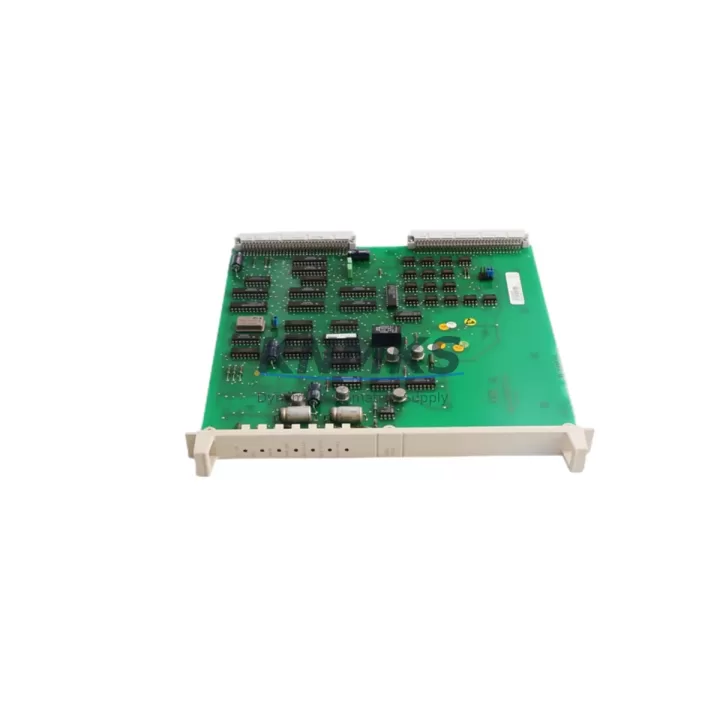
ABB DSBC173 Migration-Ready Bus Extender for Legacy S100 Control Systems
The ABB DSBC173 is a bus extender module engineered for the ABB S100 distributed I/O platform, widely deployed across legacy process automation, discrete manufacturing, and utility control systems. As industrial facilities face increasing pressure to modernize aging DCS and PLC infrastructure, the DSBC173 plays a critical role in extending the operational life of existing S100 I/O racks while providing a validated migration path toward contemporary control architectures.
For maintenance engineers and system integrators managing retrofit projects, the DSBC173 offers a drop-in compatible solution that preserves existing field wiring, terminal assignments, and rack addressing — dramatically reducing the engineering effort and downtime risk associated with full system replacement. Whether you are replacing a failed unit in an active production line or executing a phased control system upgrade, the DSBC173 delivers the reliability and compatibility required for mission-critical industrial environments.
Each unit is sourced from verified supply channels, subjected to pre-shipment functional testing, and backed by a support terms confirmed by quotation covering manufacturing defects and operational failures under normal industrial service conditions.
Migration Compatibility Table
| Parameter | DSBC173 Specification | Retrofit Notes |
|---|---|---|
| Platform Compatibility | ABB S100 I/O System | Direct replacement for existing S100 bus extender positions |
| Installation Type | DIN Rail / Rack Mount | Confirm rail spacing and rack slot clearance before installation |
| Bus Interface | S100 Parallel I/O Bus | Verify backplane connector alignment with host rack revision |
| Communication Protocol | S100 Proprietary Bus | No protocol conversion required for same-generation S100 systems |
| Power Supply Requirement | 24 VDC (from rack PSU) | Confirm rack power budget before adding extended I/O segments |
| Module Addressing | Hardware DIP switch / Rack position | Match original module address to avoid PLC scan table conflicts |
| Terminal Wiring | Screw terminal, field-side passthrough | Retain original field wiring; verify terminal torque spec |
| Firmware Compatibility | Compatible with S100 CPU firmware baseline | Check CPU firmware version against ABB compatibility matrix |
| HMI Integration | Transparent to SCADA/HMI layer | No HMI screen modification required for direct replacement |
| Support terms | 12 Months | Covers manufacturing defects under normal operating conditions |
Retrofit Planning for Existing Automation Systems
Successful integration of the DSBC173 into a legacy control system requires a structured pre-installation assessment. Begin by auditing the existing S100 rack configuration, documenting the position of each installed module including I/O modules such as the DSDI110A digital input module and DSDO110A digital output module, which share the same backplane bus and must remain undisturbed during bus extender replacement.
Power capacity is a primary concern in any S100 retrofit. The rack power supply module — typically an ABB DSPU110 or equivalent — must have sufficient headroom to support the extended I/O segment introduced by the DSBC173. Calculate the total current draw of all downstream modules before commissioning. If the existing power supply is operating near capacity, a parallel power supply or replacement with a higher-rated unit should be planned as part of the upgrade scope.
For systems where the DSBC173 is being used to expand I/O capacity rather than replace a failed unit, confirm that the host PLC or DCS controller — such as an ABB AC450 or AC410 — has available I/O addresses in its configuration table. Expanding beyond the original I/O map requires a program modification and a controlled download to the controller, which should be scheduled during a planned maintenance window.
Communication link integrity is equally important. In multi-rack S100 configurations, the DSBC173 extends the bus between racks. Inspect the bus cable connectors and termination resistors at both ends of the extended segment. A faulty termination is a common source of intermittent I/O faults that can be misdiagnosed as module failure. If the system includes a DSSB110 bus supervision module, verify that it recognizes the extended segment after installation.
For projects involving migration from S100 to a newer ABB control platform such as the System 800xA or AC500 series, the DSBC173 can serve as a transitional component, maintaining S100 I/O operation while the new controller infrastructure is staged in parallel. This phased approach allows engineering teams to validate new PLC logic, HMI graphics, and communication links before cutting over field I/O, minimizing production risk and enabling a controlled, reversible migration sequence.
Installation space confirmation is a frequently overlooked step. Measure the available cabinet depth and width before ordering, particularly in older control cabinets where space is constrained by conduit runs and existing cable management. The DSBC173’s physical footprint must be verified against the available slot in the target rack.
Downtime Control During System Migration
Minimizing unplanned downtime is the primary operational constraint in any legacy control system retrofit. When replacing the DSBC173 in an active system, the recommended procedure is to perform a controlled shutdown of the affected I/O segment rather than a full system stop. This requires coordination with the process control team to place the affected control loops in manual mode and confirm that all field devices are in a safe state before de-energizing the rack segment.
Before removing the existing bus extender, document the current module address settings using the DIP switch configuration or rack position record. Photograph the terminal wiring and label all field cables if they are not already tagged. This documentation step is critical for restoring the system to its original state in the event of an unexpected complication during installation.
After installing the DSBC173, perform a power-on test with the rack isolated from the live bus before reconnecting to the host controller. Verify that the module’s status indicators confirm normal operation. Reconnect the bus and observe the controller’s I/O diagnostic display to confirm that all downstream modules are recognized and reporting correctly. For systems using ABB’s Control Builder or equivalent engineering tool, run an online comparison between the current controller configuration and the expected I/O map to detect any addressing discrepancies before returning the system to automatic control.
Pre-shipment testing performed on each DSBC173 unit ensures that the module arrives in verified operational condition, reducing the risk of a failed installation during a time-critical maintenance window. Units are tested against S100 bus communication parameters and I/O signal integrity specifications before dispatch.
Retrofit Support FAQ
Q: Is the DSBC173 a direct replacement for the original ABB S100 bus extender?
A: Yes. The DSBC173 is designed as a direct form-fit-function replacement for the original S100 bus extender position. No wiring changes or rack modifications are required for a like-for-like replacement. Verify the rack revision and backplane connector type before installation to confirm compatibility with your specific rack generation.
Q: What pre-commissioning checks are required before installing the DSBC173?
A: Confirm rack power supply capacity, module address DIP switch settings, bus cable termination integrity, and controller I/O table configuration. For extended I/O applications, verify that the host controller has available address space and that the program scan time accommodates the additional I/O segment.
Q: Can the DSBC173 be used in a mixed S100 rack with modules from different production batches?
A: In most cases, yes. The S100 bus architecture is designed for backward compatibility across module generations. However, if your system includes early-generation S100 modules with non-standard firmware, consult the ABB S100 compatibility documentation or contact our technical support team for confirmation before installation.
Q: What support terms and supply terms apply to this unit?
A: Each DSBC173 is covered by a support terms confirmed by quotation from the date of shipment, covering manufacturing defects and operational failures under normal industrial service conditions. Units are availability confirmed by RFQ and available for immediate dispatch. Global shipping is supported with standard lead times of 3–7 business days depending on destination.
© 2026 KNMKS. All rights reserved.
Original Source: https://knmks.com
Contact: admin@knmks.com | +86 18359268345
Product Identification
- Brand / Ecosystem
-
ABB
ABB - Model / Series
-
DSBC173
Assorted Series - Product Family
- PLCs & Controllers
- Availability Status
- Available on request after model and quantity confirmation
- Inquiry Type
- B2B RFQ, replacement inquiry and project spare-part request
- Pre-Quote Check
- Exact SKU, brand, series, quantity, nameplate photos and destination country are checked before quotation
System Path
Where this product fits in the KNMKS automation structure.
Specification & Inquiry Focus
- Control platform
- PLC, PAC and modular controllers
- Common needs
- CPU, rack, power and I/O expansion
- Project support
- Replacement, cabinet build and maintenance
Buyer Confirmation
Information KNMKS checks before replying.
- Exact model
- DSBC173
- Brand / ecosystem
- ABB
- Product family
- PLCs & Controllers
- Application note
- Replacement, maintenance, project build or spare-part list
- Useful photos
- Nameplate, installed unit, cabinet layout or connector side
- Delivery details
- Quantity, destination country and target schedule
Document Support
Files and notes can be confirmed during quotation.
- Product photos or nameplate confirmation when available
- Packing and delivery notes before quotation confirmation
- Support scope and delivery terms confirmed per inquiry
- Export document coordination for qualified B2B requests
Inquiry Support
- Model cross-checking before quotation
- CPU, power, rack and expansion module matching
- Support for replacement and project inquiry
What to Send Us
- Brand and exact model number: ABB DSBC173
- Quantity and required delivery time
- Application, replacement requirement or nameplate photo
- Destination country and shipping preference
RFQ Preparation
This is a product inquiry page built for RFQ communication.
Fast Model Check
Send this model to KNMKS for confirmation.
Include quantity, destination country and photos if this is a maintenance replacement. The inquiry will be saved with a reference number after submission.
Brand & Compatibility Note
KNMKS displays automation product information for well-known industrial brand ecosystems and compatible replacement references. Brand names are used for product identification and compatibility reference only; final availability and commercial terms are confirmed per quotation.
 Manufacturing
 Machine Tools
 Packaging
 Energy & Power



 HMI & Displays
 Servo Systems
 Variable Frequency Drives
 Sensors