
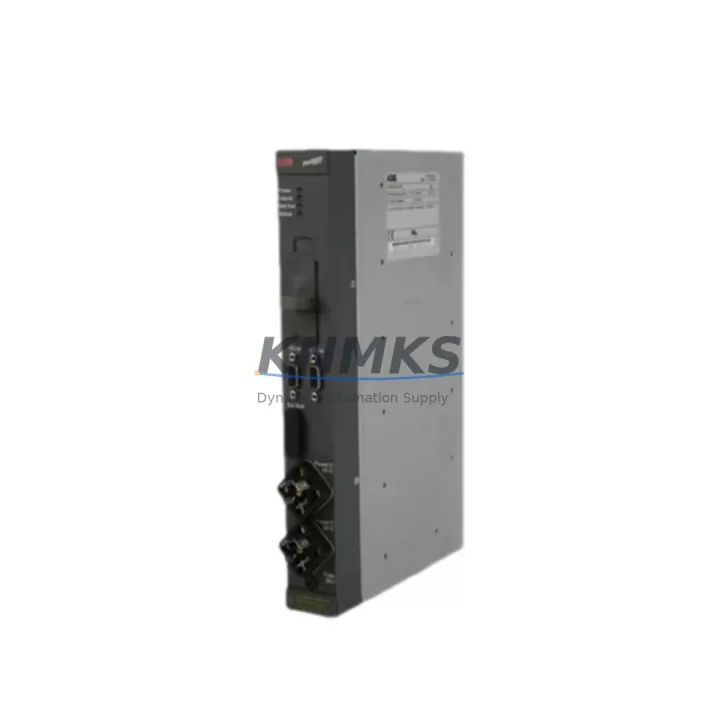
Overview
ABB DLM02 Migration-Ready Link Module for Legacy Control Systems
The ABB DLM02 is a communication link module designed for the AC500 PLC platform, widely deployed in industrial automation environments across manufacturing, energy, and process control sectors. As legacy control architectures age and original equipment manufacturers discontinue older communication modules, the DLM02 serves as a critical migration-ready replacement that preserves existing program logic, field wiring, and communication topology without requiring a full system overhaul.
For engineers managing aging control cabinets originally built around the ABB AC500 series, the DLM02 provides a direct-fit solution that maintains compatibility with existing backplane interfaces and rack configurations. When replacing discontinued link modules in legacy systems, the first priority is confirming backplane slot compatibility and verifying that the module address assignment matches the original configuration stored in the PLC program. Incorrect slot addressing is one of the most common causes of communication faults during retrofit commissioning.
Power supply capacity is another critical checkpoint. The DLM02 draws its operating power from the AC500 backplane bus. Before installation, engineers should audit the existing PM5xx or PM5xx-ETH CPU module’s power budget alongside any co-installed I/O modules such as the DC532 digital input/output module or the AX522 analog I/O module to ensure the total backplane load remains within rated limits. Overloading the internal bus supply is a silent failure mode that can cause intermittent communication dropouts rather than hard faults, making it difficult to diagnose in the field.
Terminal wiring on the DLM02 follows the standard AC500 module form factor. When migrating from an older generation link module, technicians should photograph and document all field wiring before removal. The DLM02’s connector pinout should be cross-referenced against the original module’s wiring diagram to identify any signal reassignment requirements. In systems where the original module used a non-standard termination sequence, a wiring adapter or re-termination at the marshalling panel may be necessary.
Communication protocol migration is frequently the most complex aspect of a DLM02 retrofit. The module supports PROFIBUS DP and Ethernet-based communication, making it suitable for systems transitioning from older serial fieldbus architectures toward modern Industrial Ethernet topologies. When migrating a PROFIBUS segment, the DLM02’s station address must be configured to match the GSD file entry in the PROFIBUS master configuration. Any change in station address requires a corresponding update in the master PLC’s hardware configuration and a full download to the controller — a step that must be coordinated with the site’s change management process to avoid unplanned downtime.
For systems incorporating ABB CP600 or CP620 HMI panels, the communication link established through the DLM02 must be validated after module replacement. HMI screen tags mapped to PLC data addresses should be verified against the updated program to confirm that no address offsets were introduced during the migration. In multi-node networks where the DLM02 bridges communication between the AC500 CPU and remote I/O stations or third-party devices, each node’s communication parameters — baud rate, parity, timeout settings — must be re-confirmed after the module swap.
Installation space confirmation is essential in densely populated control cabinets. The DLM02 occupies a single slot on the AC500 backplane rack. In cabinets where the TB521 or TB541 terminal base units are used for I/O expansion, available rack slots should be inventoried before ordering to avoid discovering a slot conflict on the day of installation. If the target rack is fully populated, a rack expansion using an additional AC500 backplane segment may be required, which introduces additional planning for inter-rack communication cabling.
Firmware version compatibility is a non-trivial concern in long-running AC500 installations. The DLM02 firmware must be compatible with the CPU firmware version running on the installed PM5xx module. ABB periodically releases firmware updates that introduce new features or resolve known issues, but cross-version compatibility is not always guaranteed. Before deploying a replacement DLM02, the site’s current CPU firmware version should be documented and compared against the module’s supported firmware matrix. If a firmware update is required, it should be performed in a controlled maintenance window using the ABB Automation Builder programming environment.
Downtime during a DLM02 replacement can be minimized by pre-staging the replacement module with the correct configuration parameters before the maintenance window begins. This includes pre-loading the module address, communication protocol settings, and any module-specific parameters using Automation Builder offline. A pre-tested, pre-configured spare module can reduce on-site commissioning time from several hours to under thirty minutes in straightforward replacement scenarios.
All DLM02 units supplied by KNMKS are sourced from authorized distribution channels and undergo pre-shipment functional testing. Each unit is supplied with a support terms confirmed by quotation covering manufacturing defects and operational failures under normal industrial operating conditions. Stock availability is maintained to support urgent replacement requirements, with expedited shipping options available for critical production environments.
Migration Compatibility Table
| Parameter | Detail |
|---|---|
| Compatible Platform | ABB AC500 PLC Series |
| Backplane Interface | AC500 standard backplane slot (single slot) |
| Communication Protocols | PROFIBUS DP, Industrial Ethernet |
| Installation Requirement | Single rack slot; confirm available slot before ordering |
| Power Source | Backplane bus power from AC500 CPU/power module |
| Address Configuration | Must match original GSD/hardware configuration in master PLC |
| Firmware Compatibility | Verify against installed PM5xx CPU firmware version |
| Programming Environment | ABB Automation Builder |
| Replacement Scope | Direct replacement for legacy AC500 link modules |
| Commissioning Tool | Automation Builder + PROFIBUS configuration tool or Ethernet switch |
| Pre-shipment Testing | Yes — functional test performed before dispatch |
| Support terms | 12 months from date of shipment |
Retrofit Planning for Existing Automation Systems
A successful DLM02 retrofit begins with a thorough audit of the existing control system architecture. In a typical AC500-based control cabinet, the DLM02 operates alongside the PM573-ETH or PM591 CPU module, sharing the backplane with I/O modules such as the DC532 digital I/O module and the AX522 analog input/output module. Before scheduling the replacement, the maintenance team should produce a rack layout diagram identifying each module’s slot position, address assignment, and wiring connection.
In systems where the DLM02 manages a PROFIBUS DP segment connecting remote I/O drops or variable frequency drives, the PROFIBUS master configuration in Automation Builder must be exported and archived before any hardware changes are made. This configuration file serves as the recovery baseline if commissioning issues arise after the module swap. The replacement DLM02 should be configured with an identical station address and identical GSD-based parameter set before it is inserted into the rack.
For control systems that include an ABB CP635 touch panel HMI communicating through the AC500 CPU, the HMI project should be backed up and the communication driver settings verified after the DLM02 replacement. In multi-rack configurations using TB541 terminal base units and inter-rack expansion cables, the communication link between rack segments must be re-validated after any module change in the primary rack.
Where the legacy system includes a CS31 remote I/O bus or older serial communication modules being migrated to Ethernet, the DLM02 can serve as the Ethernet gateway module in the updated architecture. This migration path typically requires a parallel run period where both the legacy and new communication paths are active simultaneously, allowing the control team to verify data integrity before cutting over fully to the new topology.
Signal isolation requirements should also be reviewed during retrofit planning. In environments with high electrical noise — common in motor control centers and variable speed drive cabinets — signal isolators may be required on analog I/O channels connected through the backplane. This is particularly relevant when the DLM02 is installed in a cabinet that also houses power conversion equipment.
Downtime Control During System Migration
Minimizing production downtime during a DLM02 replacement requires a structured pre-migration preparation process. The replacement module should be fully configured and bench-tested before the maintenance window begins. The existing PLC program should be uploaded and archived from the live system immediately before the module swap, providing a verified recovery image if the replacement encounters unexpected issues.
During the physical swap, the control system should be placed in a safe state with all field outputs de-energized and all interlocks confirmed. The DLM02 can be hot-swapped in some AC500 configurations, but this capability depends on the CPU firmware version and the system’s redundancy configuration. In non-redundant systems, a controlled CPU stop is the recommended approach to prevent spurious output activation during the module change.
After insertion, the replacement DLM02 should be powered up and its status LEDs observed before re-enabling communication. A solid green RUN LED with no fault indication confirms that the module has initialized correctly and established communication with the CPU. The PROFIBUS or Ethernet link status LEDs should then be verified to confirm that all downstream nodes have re-established communication. Only after all communication links are confirmed healthy should the CPU be returned to RUN mode and field outputs re-enabled.
Post-commissioning, the system should be monitored for a minimum of one full production cycle to confirm stable operation. Any intermittent communication faults observed in the first hours of operation should be investigated immediately, as they typically indicate a configuration mismatch rather than a hardware defect. KNMKS technical support is available to assist with remote commissioning guidance for customers who require on-call support during the migration window.
Retrofit Support FAQ
Q: Is the DLM02 a direct drop-in replacement for older ABB AC500 link modules?
A: In most AC500 installations, the DLM02 is a direct physical replacement occupying the same single backplane slot. However, firmware version compatibility between the DLM02 and the installed CPU module must be verified before installation. KNMKS can assist with compatibility confirmation based on your system’s current CPU part number and firmware version.
Q: What pre-shipment testing is performed on DLM02 units?
A: Each DLM02 unit supplied by KNMKS undergoes functional power-on testing and communication initialization verification before dispatch. Units that fail any test parameter are quarantined and not shipped. A test record is available upon request for quality-critical applications.
Q: Can the DLM02 be used in a system currently running an older PROFIBUS configuration without reconfiguring the master PLC?
A: If the replacement DLM02 is configured with the identical station address and GSD parameter set as the original module, no changes to the master PLC hardware configuration are required. The master will recognize the replacement module as the same device. Any deviation in station address or parameter set will require a hardware configuration update and program download to the master CPU.
Q: What does the support terms confirmed by quotation cover?
A: The support terms confirmed by quotation cover manufacturing defects and operational failures under normal industrial operating conditions from the date of shipment. It does not cover damage resulting from incorrect installation, overvoltage events, or operation outside the module’s rated environmental specifications. Support requests are processed through KNMKS with a target response time of two business days.
© 2026 KNMKS. All rights reserved.
Original Source: https://knmks.com
Contact: admin@knmks.com | +86 18359268345
Product Identification
- Brand / Ecosystem
-
ABB
ABB - Model / Series
-
DLM02
AC500 Series - Product Family
- PLCs & Controllers
- Availability Status
- Available on request after model and quantity confirmation
- Inquiry Type
- B2B RFQ, replacement inquiry and project spare-part request
- Pre-Quote Check
- Exact SKU, brand, series, quantity, nameplate photos and destination country are checked before quotation
System Path
Where this product fits in the KNMKS automation structure.
Specification & Inquiry Focus
- Control platform
- PLC, PAC and modular controllers
- Common needs
- CPU, rack, power and I/O expansion
- Project support
- Replacement, cabinet build and maintenance
Buyer Confirmation
Information KNMKS checks before replying.
- Exact model
- DLM02
- Brand / ecosystem
- ABB
- Product family
- PLCs & Controllers
- Application note
- Replacement, maintenance, project build or spare-part list
- Useful photos
- Nameplate, installed unit, cabinet layout or connector side
- Delivery details
- Quantity, destination country and target schedule
Document Support
Files and notes can be confirmed during quotation.
- Product photos or nameplate confirmation when available
- Packing and delivery notes before quotation confirmation
- Support scope and delivery terms confirmed per inquiry
- Export document coordination for qualified B2B requests
Inquiry Support
- Model cross-checking before quotation
- CPU, power, rack and expansion module matching
- Support for replacement and project inquiry
What to Send Us
- Brand and exact model number: ABB DLM02
- Quantity and required delivery time
- Application, replacement requirement or nameplate photo
- Destination country and shipping preference
RFQ Preparation
This is a product inquiry page built for RFQ communication.
Fast Model Check
Send this model to KNMKS for confirmation.
Include quantity, destination country and photos if this is a maintenance replacement. The inquiry will be saved with a reference number after submission.
Brand & Compatibility Note
KNMKS displays automation product information for well-known industrial brand ecosystems and compatible replacement references. Brand names are used for product identification and compatibility reference only; final availability and commercial terms are confirmed per quotation.
 Manufacturing
 Machine Tools
 Packaging
 Energy & Power



 HMI & Displays
 Servo Systems
 Variable Frequency Drives
 Sensors