
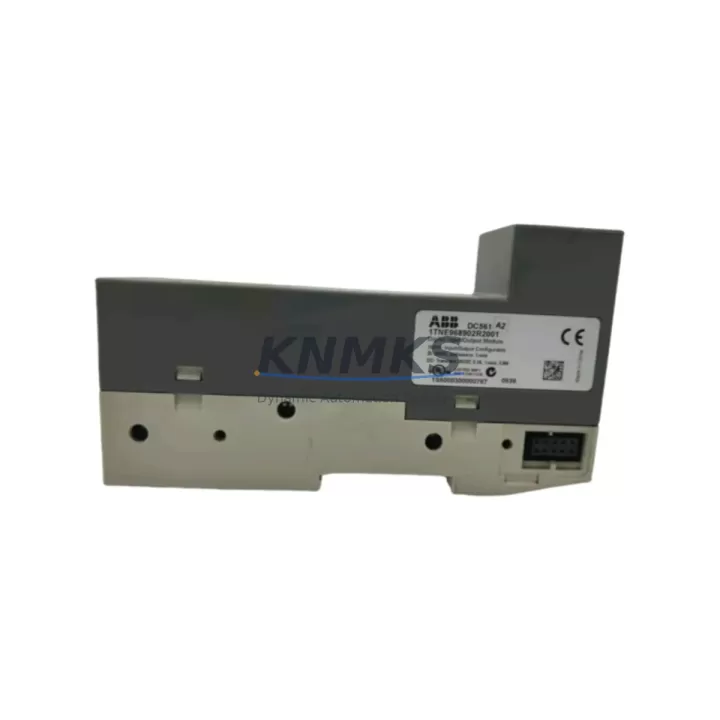
Overview
ABB DC561 B1 1TNE968902R2001 Migration-Ready Digital I/O for Legacy Control Systems
The ABB DC561 B1 (part number 1TNE968902R2001) is a compact, high-density digital I/O module engineered for the AC500 PLC platform. As legacy automation systems approach end-of-life and spare parts become increasingly scarce, the DC561 B1 has emerged as a critical component in retrofit projects, discontinued-model replacements, and control cabinet upgrades across manufacturing, process, and infrastructure industries. Whether you are migrating from an older AC500 CPU configuration or replacing a failed I/O module in a running production line, the DC561 B1 provides a reliable, wiring-compatible solution that minimizes engineering rework and reduces total downtime.
Designed to slot directly into the AC500 backplane, the DC561 B1 supports both digital input and digital output channels within a single module footprint. This dual-function architecture is particularly valuable in retrofit scenarios where panel space is constrained and the original control cabinet layout must be preserved. Engineers replacing older DC532 or DC551 series modules will find that the DC561 B1 maintains compatible terminal block assignments for most standard 24 VDC wiring configurations, significantly reducing the time required for field rewiring during a planned maintenance window or emergency replacement.
Migration Compatibility Table
| Parameter | DC561 B1 (1TNE968902R2001) | Retrofit Notes |
|---|---|---|
| Platform Compatibility | ABB AC500 (PM5xx / PM5xx-ETH series) | Verify CPU firmware ≥ V2.x for full I/O mapping support |
| Backplane Interface | AC500 standard I/O bus connector | Direct plug-in; no adapter required for standard AC500 racks |
| Digital Inputs | 16 DI, 24 VDC, IEC 61131-2 Type 1/3 | Confirm input filter timing in PS501 Control Builder Plus |
| Digital Outputs | 16 DO, 24 VDC, 0.5 A per channel | Verify load current per channel; replace fuse blocks if upgrading from higher-current legacy modules |
| Terminal Wiring | Removable screw terminal block, 2.5 mm² | Existing field wiring typically reusable; inspect insulation before reconnection |
| Power Supply Requirement | 24 VDC via backplane (no separate supply needed) | Confirm CP502 or CP503 power supply capacity covers total I/O load after module addition |
| Communication Protocol | AC500 internal I/O bus (not fieldbus) | No protocol migration required; module address set via DIP switch or software configuration |
| Module Address Configuration | Software-assigned in PS501 / Automation Builder | Re-assign module slot address in PLC program if rack position changes during retrofit |
| Installation Dimensions | Standard AC500 I/O module width (approx. 45 mm) | Measure available DIN rail space; confirm adjacent module clearance |
| Firmware Compatibility | Compatible with AC500 firmware V2.3 and above | Update CPU firmware before commissioning if running legacy firmware versions |
| Replacement for | DC532, DC551, and equivalent legacy AC500 digital I/O modules | Review I/O channel count differences; adjust PLC program variable mapping accordingly |
| Support terms | support terms confirmed by quotation | Covers manufacturing defects; includes pre-shipment functional test |
Retrofit Planning for Existing Automation Systems
A successful retrofit begins well before the module arrives on site. When planning a DC561 B1 installation into an existing AC500 control system, the first step is a thorough audit of the current rack configuration. Identify the CPU module — typically a PM554, PM564, or PM583 — and confirm the firmware version using ABB Automation Builder or PS501 Control Builder Plus. If the installed firmware predates V2.3, schedule a firmware update during the same maintenance window to avoid compatibility issues with the new I/O module’s diagnostic reporting.
Next, review the power budget of the existing CP502 or CP503 power supply module. Adding or replacing a digital I/O module changes the total current draw on the 24 VDC backplane bus. Calculate the combined load of all installed modules — including any CM589 communication modules, TU515 or TU516 terminal units, and the CPU itself — and confirm the power supply has sufficient headroom. A margin of at least 20% above calculated load is recommended for industrial environments with temperature variation.
For systems that include a TA526 or TA521 analog terminal unit alongside digital I/O, verify that the physical slot sequence in the rack matches the I/O variable declarations in the PLC program. The DC561 B1 uses software-based slot addressing in Automation Builder, so if the module is installed in a different rack position than the module it replaces, the corresponding PLC variable addresses must be updated before the program is downloaded to the CPU. Failure to update slot addressing is one of the most common causes of commissioning delays in retrofit projects.
If the existing system uses a CM589-PNIO or CM579-ETHCAT communication module for PROFINET or EtherCAT integration, the DC561 B1 operates on the internal AC500 I/O bus and does not require any changes to the fieldbus configuration. However, if the HMI — such as a CP635 or CP651 panel — displays I/O status via structured data blocks, verify that the data block variable mapping still aligns with the new module’s channel layout after the retrofit. HMI screen updates are often overlooked during module replacements and can cause operator confusion during the first post-retrofit production run.
Finally, prepare a pre-commissioning checklist that covers terminal block torque verification, channel-by-channel I/O forcing tests using the PLC’s online debug mode, and a review of the safety interlock logic that depends on the replaced module’s input channels. Document the as-built wiring changes and update the control cabinet schematic before returning the system to production.
Downtime Control During System Migration
Minimizing unplanned downtime is the primary concern for any maintenance engineer undertaking a module replacement on a live production system. For the DC561 B1 retrofit, the most effective strategy is to complete all preparatory work — firmware verification, power budget calculation, PLC program updates, and HMI variable review — before the physical module swap begins. This preparation phase can typically be completed during normal production hours without interrupting the running system.
When the maintenance window opens, the physical replacement of the DC561 B1 into the AC500 rack takes less than five minutes for an experienced technician. The removable terminal block design means that field wiring can be disconnected from the old module and reconnected to the new module as a single assembly, eliminating the need to re-terminate individual conductors under time pressure. Label all terminal blocks before removal to prevent wiring errors during reconnection.
After physical installation, download the updated PLC program to the CPU using Automation Builder’s online change function where possible, rather than a full program stop-and-download cycle. Online program changes preserve the current state of all non-affected outputs and timers, maintaining control continuity for the portions of the system not involved in the retrofit. Once the download is complete, force-test each input and output channel of the DC561 B1 individually before releasing the system to automatic mode. This structured commissioning approach typically allows a complete module replacement to be completed within a two-hour planned maintenance window, even in complex multi-rack AC500 configurations.
All DC561 B1 units supplied by KNMKS undergo a pre-shipment functional test that verifies channel-by-channel I/O operation, backplane communication integrity, and LED diagnostic indicator function. This factory-level verification reduces the risk of receiving a non-functional module and eliminates one potential source of extended downtime. Units are shipped with a support terms confirmed by quotation covering manufacturing defects, providing additional assurance for maintenance teams operating under strict uptime commitments.
Retrofit Support FAQ
Q1: Can the DC561 B1 directly replace a DC532 or DC551 module without PLC program changes?
In most cases, a direct replacement is possible if the DC561 B1 is installed in the same rack slot as the original module and the I/O channel count is compatible. However, you must verify the slot address assignment in Automation Builder and confirm that the variable declarations in the PLC program match the new module’s channel layout. If the channel count differs from the original module, program variable mapping adjustments will be required before the updated program is downloaded to the CPU.
Q2: What wiring changes are required when installing the DC561 B1 in an existing AC500 cabinet?
The DC561 B1 uses a removable screw terminal block compatible with 2.5 mm² conductors, which matches the wiring standard used in most AC500 installations. In the majority of retrofit scenarios, existing field wiring can be reconnected directly to the new terminal block without re-termination. Inspect conductor insulation condition before reconnection, and verify terminal torque to the manufacturer’s specification (typically 0.5–0.6 Nm) to ensure reliable contact in industrial environments.
Q3: Is the DC561 B1 compatible with both older and current AC500 CPU generations?
The DC561 B1 is compatible with AC500 CPUs running firmware V2.3 and above, covering the PM5xx and PM5xx-ETH series. For systems running older firmware, a firmware update is recommended prior to installation. KNMKS can provide firmware version guidance based on your specific CPU part number. All units are pre-tested before shipment to confirm backplane communication and I/O channel functionality.
Q4: What does the support terms confirmed by quotation cover, and what is the typical lead time for in-stock units?
The support terms confirmed by quotation cover manufacturing defects identified under normal operating conditions, including channel failure, backplane connector defects, and LED indicator malfunction. It does not cover damage resulting from incorrect installation, overvoltage, or environmental conditions outside the module’s rated specifications. In-stock DC561 B1 units are typically dispatched within 1–3 business days of order confirmation. Contact KNMKS sales for current stock availability and expedited shipping options for urgent retrofit requirements.
© 2026 KNMKS. All rights reserved.
Original Source: https://knmks.com
Contact: admin@knmks.com | +86 18359268345
Product Identification
- Brand / Ecosystem
-
ABB
ABB - Model / Series
-
DC561 B1 1TNE968902R2001
AC500 Series - Product Family
- PLCs & Controllers
- Availability Status
- Available on request after model and quantity confirmation
- Inquiry Type
- B2B RFQ, replacement inquiry and project spare-part request
- Pre-Quote Check
- Exact SKU, brand, series, quantity, nameplate photos and destination country are checked before quotation
System Path
Where this product fits in the KNMKS automation structure.
Specification & Inquiry Focus
- Control platform
- PLC, PAC and modular controllers
- Common needs
- CPU, rack, power and I/O expansion
- Project support
- Replacement, cabinet build and maintenance
Buyer Confirmation
Information KNMKS checks before replying.
- Exact model
- DC561 B1 1TNE968902R2001
- Brand / ecosystem
- ABB
- Product family
- PLCs & Controllers
- Application note
- Replacement, maintenance, project build or spare-part list
- Useful photos
- Nameplate, installed unit, cabinet layout or connector side
- Delivery details
- Quantity, destination country and target schedule
Document Support
Files and notes can be confirmed during quotation.
- Product photos or nameplate confirmation when available
- Packing and delivery notes before quotation confirmation
- Support scope and delivery terms confirmed per inquiry
- Export document coordination for qualified B2B requests
Inquiry Support
- Model cross-checking before quotation
- CPU, power, rack and expansion module matching
- Support for replacement and project inquiry
What to Send Us
- Brand and exact model number: ABB DC561 B1 1TNE968902R2001
- Quantity and required delivery time
- Application, replacement requirement or nameplate photo
- Destination country and shipping preference
RFQ Preparation
This is a product inquiry page built for RFQ communication.
Fast Model Check
Send this model to KNMKS for confirmation.
Include quantity, destination country and photos if this is a maintenance replacement. The inquiry will be saved with a reference number after submission.
Brand & Compatibility Note
KNMKS displays automation product information for well-known industrial brand ecosystems and compatible replacement references. Brand names are used for product identification and compatibility reference only; final availability and commercial terms are confirmed per quotation.
 Manufacturing
 Machine Tools
 Packaging
 Energy & Power



 HMI & Displays
 Servo Systems
 Variable Frequency Drives
 Sensors