
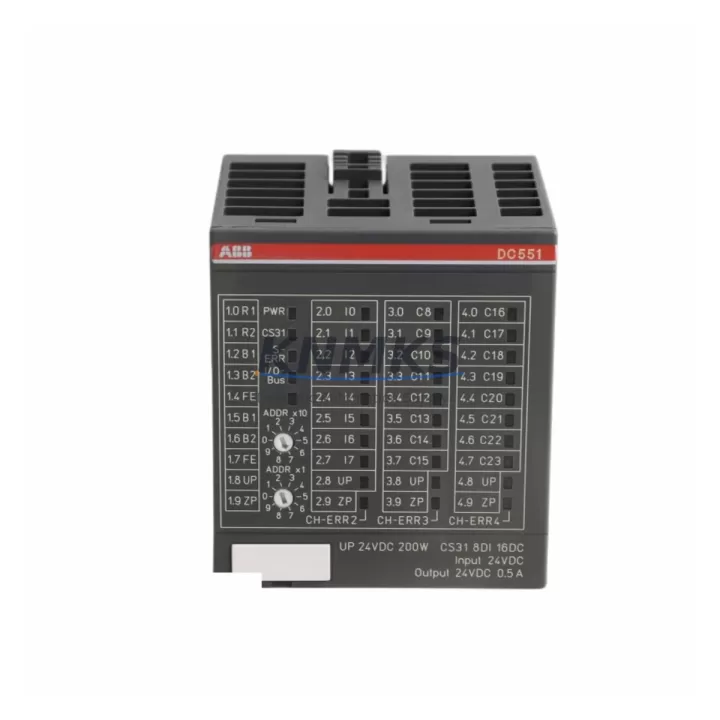
Overview
ABB DC551-CS31 Migration-Ready I/O Bus Module for Legacy CS31 Control Systems
The ABB DC551-CS31 (part number 1SAP220500R0001) is a CS31 digital I/O bus module engineered for direct integration into ABB’s AC31 and CS31 distributed control architectures. As legacy AC31 PLCs approach end-of-life and spare parts become increasingly scarce, the DC551-CS31 serves as a verified, migration-ready replacement that preserves existing wiring infrastructure, terminal layouts, and CS31 bus communication — dramatically reducing retrofit risk and unplanned downtime.
For engineers managing aging control cabinets built around the ABB Advant AC31 platform, sourcing a reliable DC551-CS31 is often the critical first step in a phased modernization strategy. Unlike a full system replacement, installing the DC551-CS31 allows the existing CS31 bus cable and field wiring to remain intact, while restoring full digital I/O capacity to the control loop. This module supports both digital input and output channels over the CS31 serial bus, making it directly compatible with AC31 CPUs such as the 07KT98 and 07KT97 series controllers that continue to operate in many process and manufacturing facilities worldwide.
Migration Compatibility Table
| Parameter | DC551-CS31 Specification | Retrofit / Migration Notes |
|---|---|---|
| Part Number | 1SAP220500R0001 | Verify label matches before installation |
| Bus Protocol | CS31 Serial Bus | Compatible with AC31 and CS31 CPU masters |
| Module Type | Digital I/O Bus Module | Replaces discontinued DC532 / DC551 variants |
| Supply Voltage | 24 V DC | Confirm panel PSU capacity before swap |
| Terminal Wiring | Screw-type terminals | Map existing field wiring before removal |
| Bus Address | Configurable via DIP switch | Match address of removed module exactly |
| Mounting | DIN rail / CS31 rack | Confirm rail spacing and cabinet depth |
| Firmware | Factory-loaded | No firmware update required for drop-in swap |
| Communication Link | CS31 bus (RS485-based) | Verify bus termination resistor status |
| HMI Compatibility | Transparent to HMI layer | No HMI screen changes required |
| Support terms | 12 Months | Covered from date of shipment by KNMKS |
Retrofit Planning for Existing Automation Systems
A successful DC551-CS31 retrofit begins well before the module arrives on site. Engineers should start by auditing the existing control cabinet to confirm available 24 V DC power budget from the panel power supply — typically an ABB CP-E 24/5.0 or equivalent unit — since adding or replacing I/O modules can shift the load balance. Next, document all field wiring connected to the outgoing module using terminal strip photographs and the original I/O list, as the DC551-CS31 preserves the same terminal assignment convention used across the CS31 family.
Bus address configuration is a common source of commissioning errors during CS31 retrofits. The DC551-CS31 uses onboard DIP switches to set its node address on the CS31 serial bus. Before powering down the old module, record its address setting — this must be replicated exactly on the replacement unit to avoid address conflicts with other nodes such as DA501 analog input modules or DC532 digital output modules sharing the same bus segment.
Where the retrofit involves expanding I/O capacity rather than a direct swap, engineers should also verify the maximum node count supported by the AC31 CPU master. In multi-rack configurations using a CS31 bus coupler or remote I/O station, confirm that the backplane slot assignments and rack addressing remain consistent with the existing PLC program. Program logic stored in the 07KT98 CPU does not require modification for a like-for-like DC551-CS31 replacement, but any I/O expansion will require a program update and re-download via the Automation Builder or legacy 907 PC 331 programming cable.
For sites migrating from older AC31 hardware to a more modern ABB AC500 platform in parallel, the DC551-CS31 can serve as a bridging component — maintaining CS31 bus continuity on legacy sections of the plant while the new AC500 CPU PM573 or PM583 takes over higher-level control. This phased approach avoids a full cutover shutdown and allows production to continue on unaffected lines during the transition.
Downtime Control During System Migration
Minimizing downtime during a CS31 I/O module replacement requires a structured pre-outage checklist. Before the planned maintenance window, verify that a complete backup of the PLC program is stored offline — including symbol tables, I/O configuration, and communication parameters. For AC31 systems, this backup should be held on both the programming PC and a removable storage medium independent of the control cabinet.
During the swap, the CS31 bus should be powered down in the correct sequence: field outputs first, then the bus master CPU, then the 24 V DC supply rail. This sequence protects output devices from spurious signals during module removal. The DC551-CS31 can typically be seated and wired within a standard 30-minute maintenance window, provided terminal documentation is complete and the DIP switch address is pre-configured before installation.
After installation, restore power in reverse order and monitor the CS31 bus status LEDs on the DC551-CS31 and the CPU master. A solid green bus LED confirms successful node recognition. If the CPU reports a bus fault, recheck the node address, bus termination at both ends of the CS31 cable, and cable continuity. Once bus communication is confirmed, perform a full I/O force test against the original I/O list before returning the system to automatic mode. This end-to-end verification step is essential for maintaining field control continuity and satisfying site safety requirements.
KNMKS ships all DC551-CS31 units with pre-shipment functional testing documentation. Each module is verified for bus communication, I/O channel integrity, and power consumption before dispatch, reducing the risk of a failed installation during a time-critical maintenance window.
Retrofit Support FAQ
Q1: Is the DC551-CS31 a direct drop-in replacement for discontinued CS31 I/O modules?
Yes. The DC551-CS31 (1SAP220500R0001) is designed as a compatible replacement for legacy CS31 digital I/O bus modules used in ABB AC31 and CS31 distributed control systems. Terminal pinout, bus protocol, and DIP switch addressing are consistent with the original CS31 module family, allowing direct substitution without PLC program changes in most applications.
Q2: What wiring and commissioning checks are required after installation?
After seating the module and reconnecting field wiring, confirm the DIP switch node address matches the original module, verify CS31 bus termination at both cable ends, and check the 24 V DC supply voltage at the module terminals. Power up the bus master and confirm the green bus status LED on the DC551-CS31 before enabling outputs. Perform a channel-by-channel I/O force test against the site I/O list before returning to automatic control.
Q3: Does KNMKS provide stock availability and lead time guarantees for the DC551-CS31?
KNMKS maintains inventory of the DC551-CS31 to support urgent retrofit and breakdown replacement requirements. Standard orders ship within 1–3 business days. For large-quantity or project-based procurement, contact admin@knmks.com or call +86 18359268345 to confirm stock levels and arrange priority dispatch.
Q4: What support terms coverage applies to the DC551-CS31 supplied by KNMKS?
All DC551-CS31 modules supplied by KNMKS are covered by a support terms confirmed by quotation from the date of shipment. Each unit undergoes pre-shipment functional testing. In the event of a verified module fault within the confirmed support period, KNMKS will arrange replacement or repair at no additional cost to the customer.
© 2026 KNMKS. All rights reserved.
Original Source: https://knmks.com
Contact: admin@knmks.com | +86 18359268345
Product Identification
- Brand / Ecosystem
-
ABB
ABB - Model / Series
-
DC551-CS31-1SAP220500R0001
AC500 Series - Product Family
- PLCs & Controllers
- Availability Status
- Available on request after model and quantity confirmation
- Inquiry Type
- B2B RFQ, replacement inquiry and project spare-part request
- Pre-Quote Check
- Exact SKU, brand, series, quantity, nameplate photos and destination country are checked before quotation
System Path
Where this product fits in the KNMKS automation structure.
Specification & Inquiry Focus
- Control platform
- PLC, PAC and modular controllers
- Common needs
- CPU, rack, power and I/O expansion
- Project support
- Replacement, cabinet build and maintenance
Buyer Confirmation
Information KNMKS checks before replying.
- Exact model
- DC551-CS31-1SAP220500R0001
- Brand / ecosystem
- ABB
- Product family
- PLCs & Controllers
- Application note
- Replacement, maintenance, project build or spare-part list
- Useful photos
- Nameplate, installed unit, cabinet layout or connector side
- Delivery details
- Quantity, destination country and target schedule
Document Support
Files and notes can be confirmed during quotation.
- Product photos or nameplate confirmation when available
- Packing and delivery notes before quotation confirmation
- Support scope and delivery terms confirmed per inquiry
- Export document coordination for qualified B2B requests
Inquiry Support
- Model cross-checking before quotation
- CPU, power, rack and expansion module matching
- Support for replacement and project inquiry
What to Send Us
- Brand and exact model number: ABB DC551-CS31-1SAP220500R0001
- Quantity and required delivery time
- Application, replacement requirement or nameplate photo
- Destination country and shipping preference
RFQ Preparation
This is a product inquiry page built for RFQ communication.
Fast Model Check
Send this model to KNMKS for confirmation.
Include quantity, destination country and photos if this is a maintenance replacement. The inquiry will be saved with a reference number after submission.
Brand & Compatibility Note
KNMKS displays automation product information for well-known industrial brand ecosystems and compatible replacement references. Brand names are used for product identification and compatibility reference only; final availability and commercial terms are confirmed per quotation.
 Manufacturing
 Machine Tools
 Packaging
 Energy & Power



 HMI & Displays
 Servo Systems
 Variable Frequency Drives
 Sensors